1.0.11 Release Note_July 14, 2026
Release Date: July 14, 2026
The Business AI Cloud 1.0.11 release introduces the following new or enhanced features.
Important
This document provides high-level information on the Business AI Cloud's latest release features and enhancements. For detailed procedures, configuration steps, and comprehensive guidance, please refer to the Business AI Cloud User Guide.
Release Highlights
New Features
Introducing: Process Intelligence - Automatically discovers and models how work actually happens by analyzing recorded agent interactions such as screen recordings, audio, and transcripts, surfacing friction and inefficiencies, and generating the SOPs and automation artifacts needed to act on them.
Schema Explorer - Automatically reads your data source documents and generates a structured schema that maps their layout and data types, making the content immediately queryable and ready for downstream processing.
Lineage - Delivers a visual, end-to-end map of structured data lineage so you can trace every transformation your data undergoes from source to destination.
Personally Identifiable Information (PII) group - Allows you to define and manage PII groups for table columns in your data source, giving your teams precise control over how personally identifiable information is classified and governed.
Dataflow Version - Introduces version management for dataflows, enabling you to create, review, test, and execute changes across multiple versions without disrupting existing configurations.
Instruction Audit - Introduces a full audit trail for instructions associated with Knowledge Bases and Knowledge Clusters, enabling you to review the complete history of prompt changes for governance and traceability.
Long-Term Memory for Agents - Agents can now remember user context and attributes across sessions, enabling more continuous, personalized experiences.
Agent Hooks - Pre-call and post-call hooks let you run custom actions before and after an agent executes, simplifying integration with external systems and workflows.
Access Management for Agentic Workflows - Restrict workflow visibility and execution to the right user groups and roles.
Agent Execution Schedules - Define when and how often your agents run, moving from manual, ad-hoc runs to repeatable, schedule-driven automation.
Enhancements
Data Engineering Agent - Adds the ability to cancel a pipeline execution at runtime and copy pipeline execution logs for faster troubleshooting and operational visibility.
Data Orchestrator Agent - Adds the ability to download dataflow logs and copy dataflow execution logs directly from the platform, streamlining pipeline monitoring and issue resolution.
Dataflow Decision Node - Extends the Decision node to support multiple outputs, enabling more flexible and conditional branching logic within dataflow pipelines.
Agent Monitoring - Richer agent monitoring with new metrics, date-based graphs, and performance benchmarking.
Agent Optimization - Improved prompt optimization, larger-scale distillation, and quality metrics for synthetic traces.
Agent Evaluation - A unified experiment experience across single-agent and workflow experiments, with richer skill evaluation and default metrics.
Agent Version Support in Evaluation - Pin experiments to a specific agent version for reproducible, auditable results.
Agent Evaluation Information Display - Clearer metric and configuration guidance through tooltips and inline help.
Compare Agent Versions - Review a structured difference between two agent versions before promoting or rolling back.
Clone Agent - Duplicate an existing agent to quickly create safe variants without rebuilding configuration.
Agent Builder - See version numbers, attached knowledge bases, and sub-agents directly in the builder.
Agent Management - Delete agents and custom apps directly from the UI, making it easier to manage and clean up unused artifacts.
Audit Trail for Login and Logout - User login and logout events are now captured in the audit trail, improving compliance and forensic visibility.
New Features
Process Intelligence
Business AI Cloud now introduces Process Intelligence, a discovery and analysis capability that automatically models how work actually happens by analyzing recorded agent interactions, including screen recordings, audio, and transcripts. It identifies recurring processes and the paths used to execute them, then surfaces where friction and automation opportunities exist.
In most organizations, process documentation is written once, based on how work is supposed to happen, and it goes stale the moment reality diverges from it. Teams are left guessing where time is actually lost. Process Intelligence solves this by deriving process models directly from recorded execution rather than manual mapping, ensuring that documentation and analysis reflect how work is actually being done. The result is an always-current view of operational performance, along with the artifacts needed to act on it.
Key Capabilities:
Automatically discovers processes and their variants from recorded interactions, with no manual process mapping required.
Quantifies operational drag with a 0–10 Friction Index, based on system switching, repeated loops, and silence, making inefficiency comparable across processes, agents, and time periods.
Surfaces AI-generated Root Cause Analysis and side-by-side variant comparisons to explain why a process is inefficient, not just where.
Generates editable Standard Operating Procedures (SOPs) directly from observed process data, exportable in PDF or Word format.
Produces ready-to-use automation artifacts (Skills, Tools, Entities, and Business Rules) for identified automation candidates, plugging directly into LLM-powered agents.
Supports both automatic ingestion via Google Cloud Storage or SFTP connectors and manual upload of recordings, transcripts, and audio, with configurable PII redaction on connector-based uploads.
Process Intelligence is available within Business AI Cloud's Data Layer.
To access, go to the Home page > Agents > Data Layer > Process Intelligence.
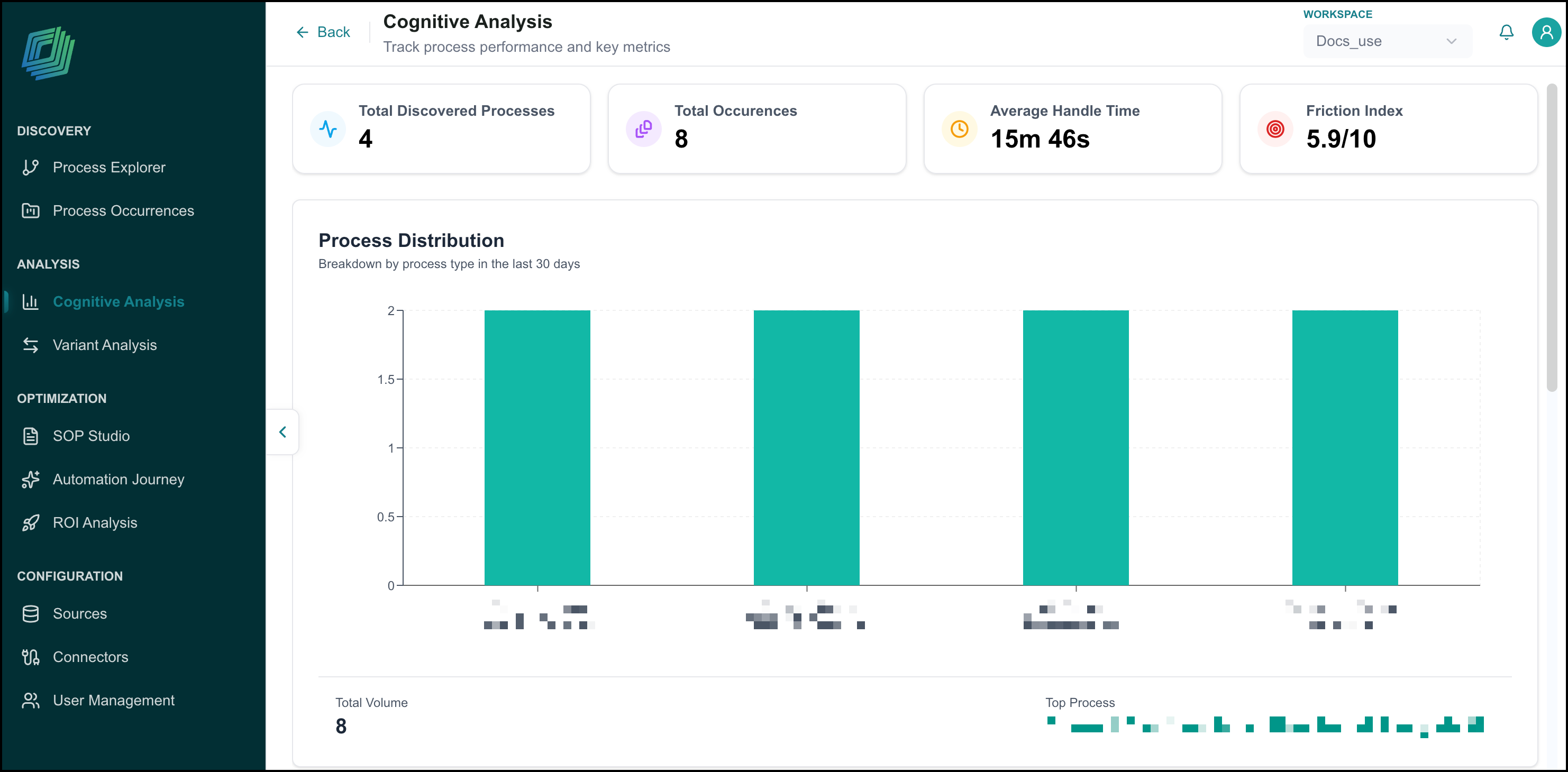
For more information, see Process Intelligence in the User Guide.
Schema Explorer
Business AI Cloud now automatically reads documents from your connected data source and generates a structured schema that defines the document layout and the types of data it contains. Once the schema is generated, you can review it and promote it as a template for use across your data ingestion workflows.
Key Capabilities:
Automatically reads source documents and generates a structured schema with no manual mapping required.
Defines document layout and data types to make content consistently queryable across ingestion and AI workflows.
Review the generated schema and promote it as a reusable template for use across your data ingestion workflows.
The Schema Explorer is available within Business AI Cloud's Data Layer.
To access, go to the Home page > Data Ingestion > Data Prep > Schema Explorer.
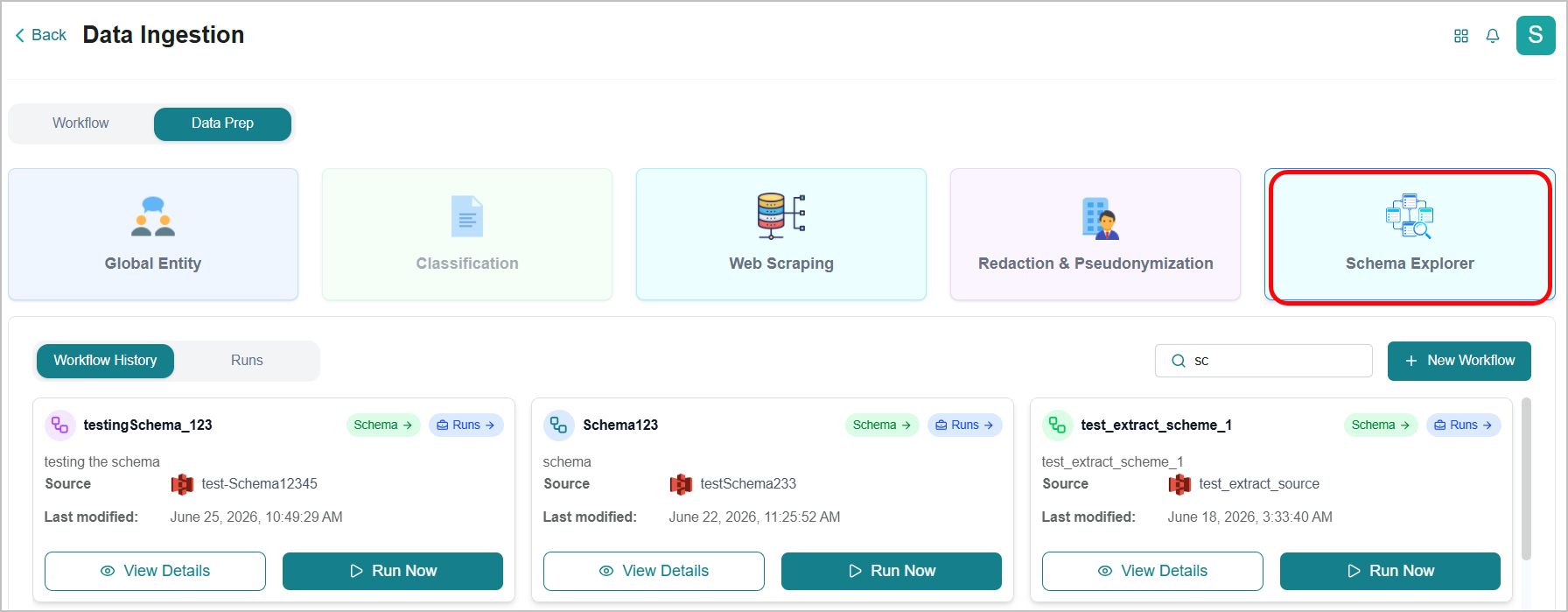
To know more, refer to Schema Explorer in the User Guide.
Lineage
Business AI Cloud now provides a visual, end-to-end view of structured data lineage. Lineage lets you trace the complete transformation journey of your data from its original source through every processing and pipeline stage to its final destination. This visibility helps understand how data is being transformed, identify where changes are introduced, and support governance and audit requirements with confidence.
Key Capabilities:
Displays the full lineage of structured data in a visual, easy-to-navigate diagram.
Traces each transformation step from source to destination, showing exactly how and where data changes occur.
View both forward lineage and backward lineage in one place, giving you complete visibility in a single interface.
Supports data governance and audit readiness by making the complete data journey transparent and reviewable.
Lineage nodes offer options to drill into that table's lineage, open its profile in the AI Catalog, or jump to the pipeline that generated it.
Lineage is available within Business AI Cloud's Data Layer.
To access, go to the Home page > Data > Data Ingestion > Relational DB RAG > View Metadata > Data Profile tab > Lineage tab.
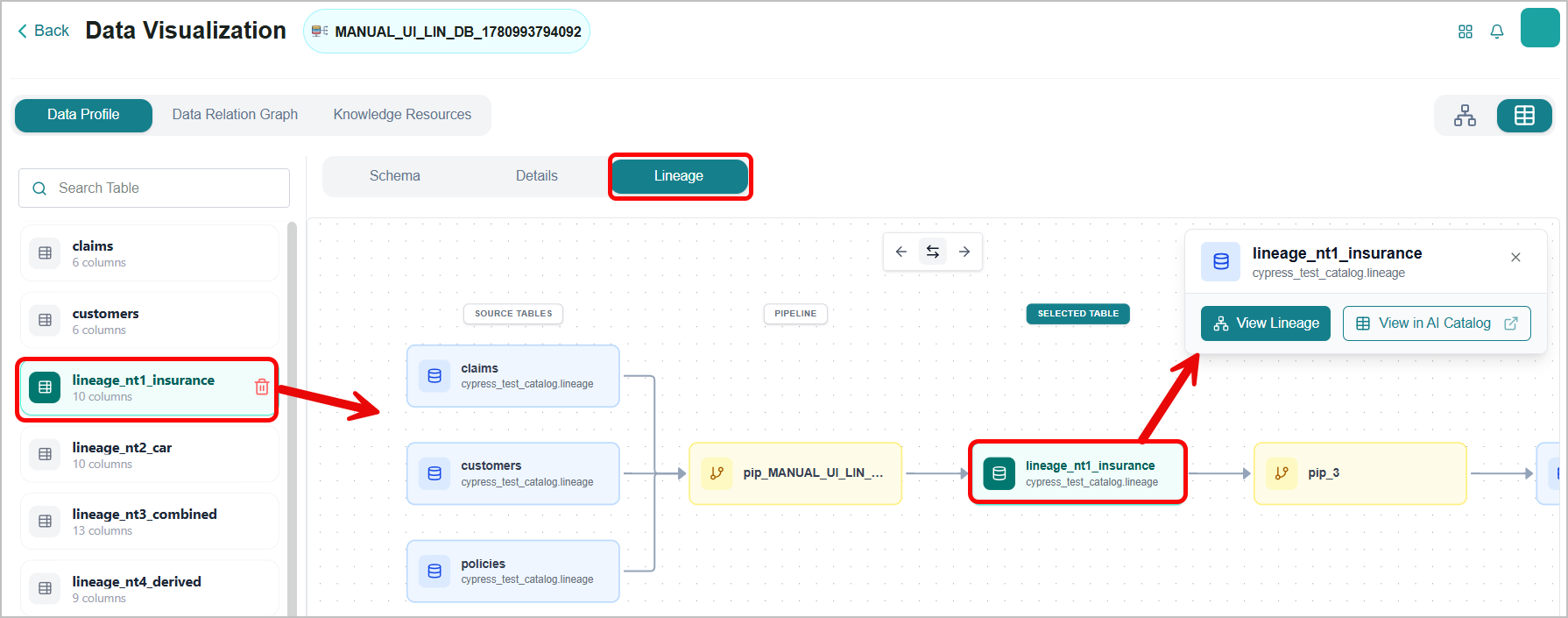
To know more, refer to Viewing Metadata in the User Guide.
PII Group
Business AI Cloud now lets you create and manage PII groups for table columns in your structured data source. By grouping columns that contain personally identifiable information, you can apply consistent classification and governance rules across their structured data, ensuring PII is handled correctly throughout ingestion, processing, and downstream workflows.
Key Capabilities:
Create named PII groups and assign specific table columns to each group for consistent classification.
Apply governance rules at the group level, reducing the need to configure individual columns separately.
Ensures PII handling remains consistent across ingestion pipelines, knowledge bases, and agent workflows.
PII Group is available within Business AI Cloud's Data Layer.
To access, go to the Home page > Data > Data Ingestion > Relational DB RAG > View Metadata > Data Profile tab > Details tab.
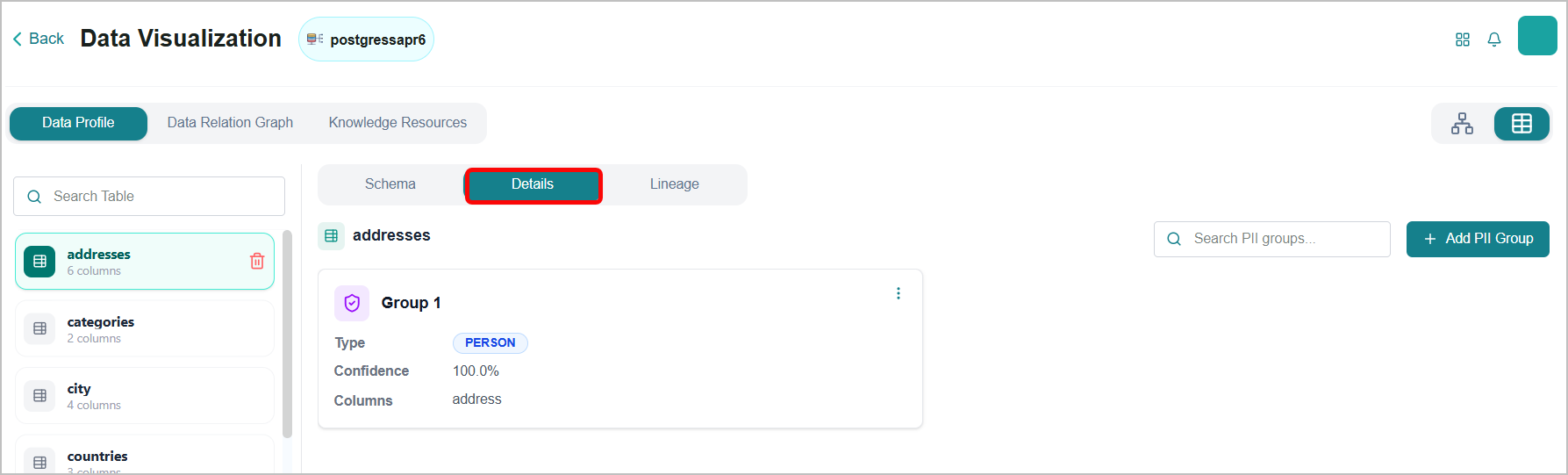
To know more, refer to Viewing Metadata in the User Guide.
Dataflow Version
Business AI Cloud now supports version management for dataflows. You can create and maintain multiple versions of a dataflow, making it straightforward to test changes, compare configurations, and roll back when needed, all without affecting the version currently running. This gives teams a safer, more controlled way to evolve the dataflow process over time.
Key Capabilities:
Create multiple versions of any dataflow and manage them from a single interface.
Test and validate changes on a new version before promoting it, keeping the active configuration stable.
Navigate and restore prior versions, with each version maintained as a distinct, reviewable snapshot.
Dataflow Versioning is available within Business AI Cloud's Data Layer.
To access, go to the Home page > Data > Data Agents > Data Orchestrator Agent > Dataflow project > Editor tab.
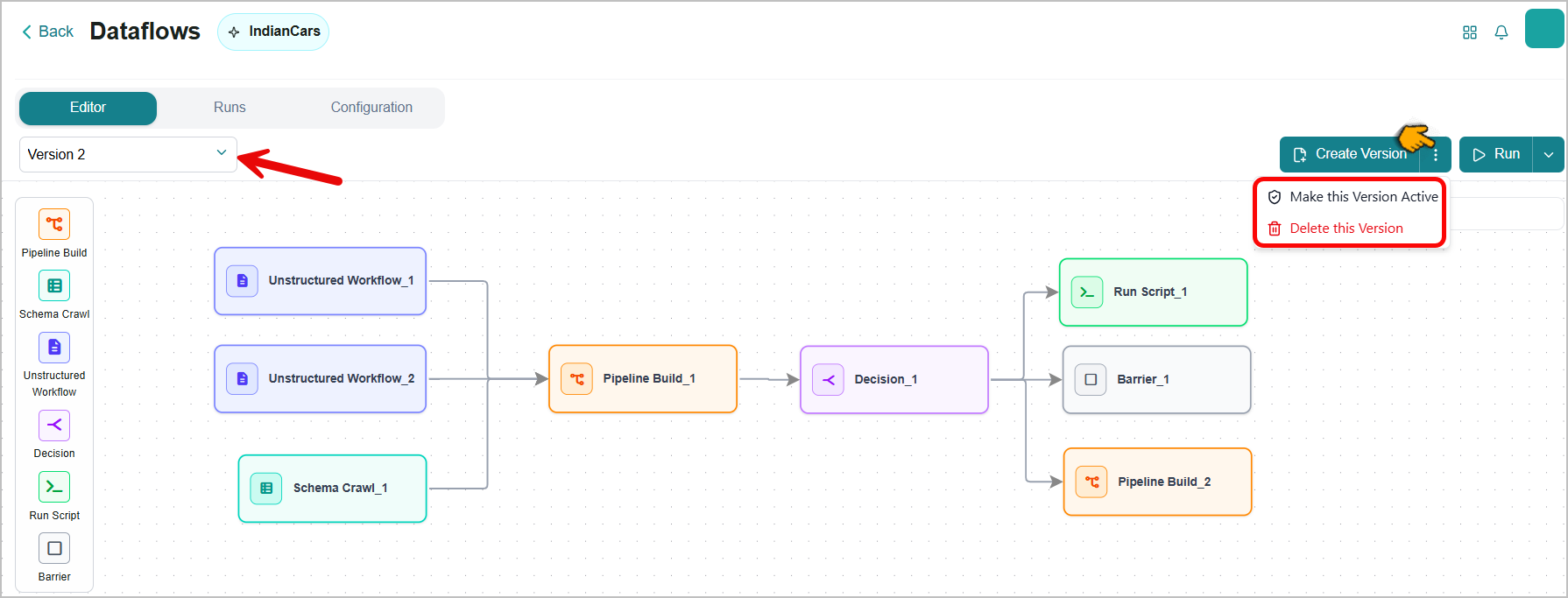
To know more, refer to Managing a Dataflow Version in the User Guide.
Instruction Audit
Business AI Cloud now adds an Audit option to the instructions associated with knowledge clusters and relational DB knowledge bases. The Audits view has two tabs: Version Audits, which show field-level changes made within a specific version (e.g., an update to Instructions or a change to the active flag), and Version Events, which show lifecycle events for the version itself (e.g., created or deleted). This supports governance requirements and makes it easier to investigate issues tied to instruction changes.
Key Capabilities:
Records every change to a Knowledge Base or Knowledge Cluster instruction as a timestamped audit entry.
Captures the full change history, making it easy to review what changed, when, and by whom.
Supports governance and compliance requirements by maintaining a traceable record of all prompt instruction updates.
Instruction Audit is available within Business AI Cloud's Data Layer.
To access KB Instruction Audit, go to the Home page > Data > Data Ingestion > Relational DB RAG > View Metadata > Knowledge Resource tab > Instructions tab > Audits.
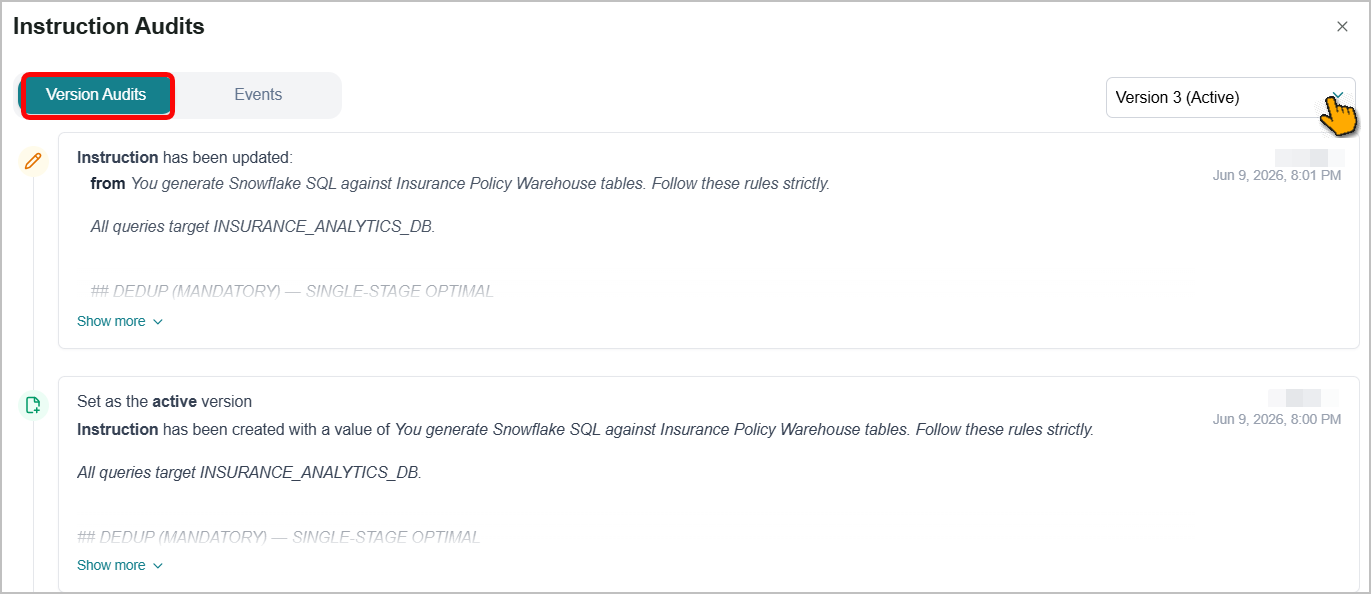
To know more, refer to Viewing a Knowledge Resource in the User Guide.
To access KC Instruction Audit, go to the Home page > Data > Data Agents > Data Discovery Agent > Knowledge Clusters tab > Instructions tab > Audit.
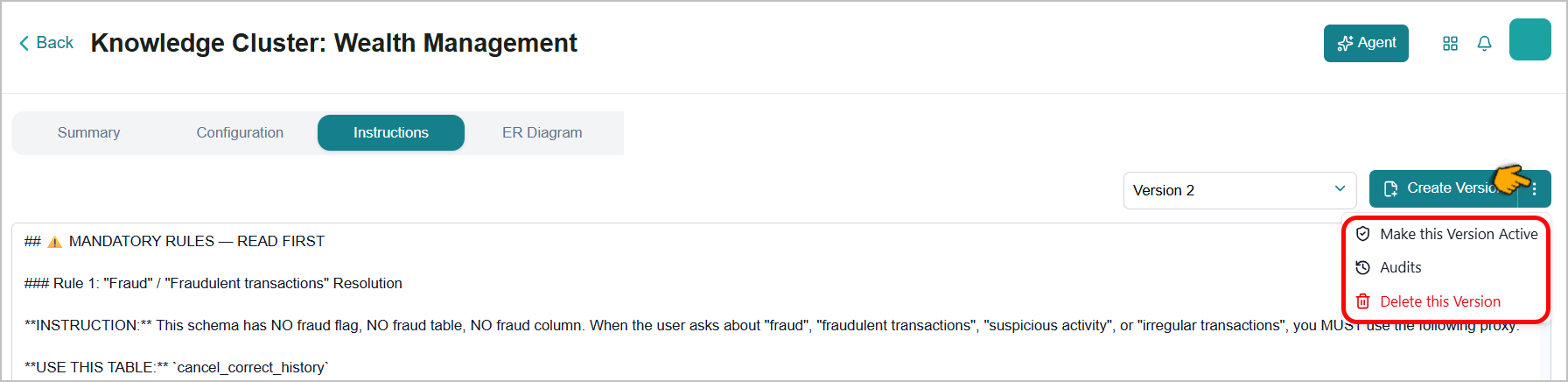
To know more, refer to Knowledge Clusters in the User Guide.
Long-Term Memory for Agents
Business AI Cloud introduces long-term memory for agents. Instead of treating every conversation as stateless, agents can now persist user attributes and contextual information, then reuse them in later interactions. Memory is scoped to individual users and shared across the platform, so agents can recall preferences and maintain continuity across sessions.
Key Capabilities:
Recall user preferences and profile details without being re-told.
Maintain continuity across multiple sessions, including follow-up on earlier tasks.
Personalize responses based on past interactions, not just the current input.
Enable or disable memory per agent, with memory scoped to individual users.
Long-term memory for agents is available within Business AI Cloud's Agent Layer. To access, go to the Home page > Agents > Agent SDK, and create or edit an agent.
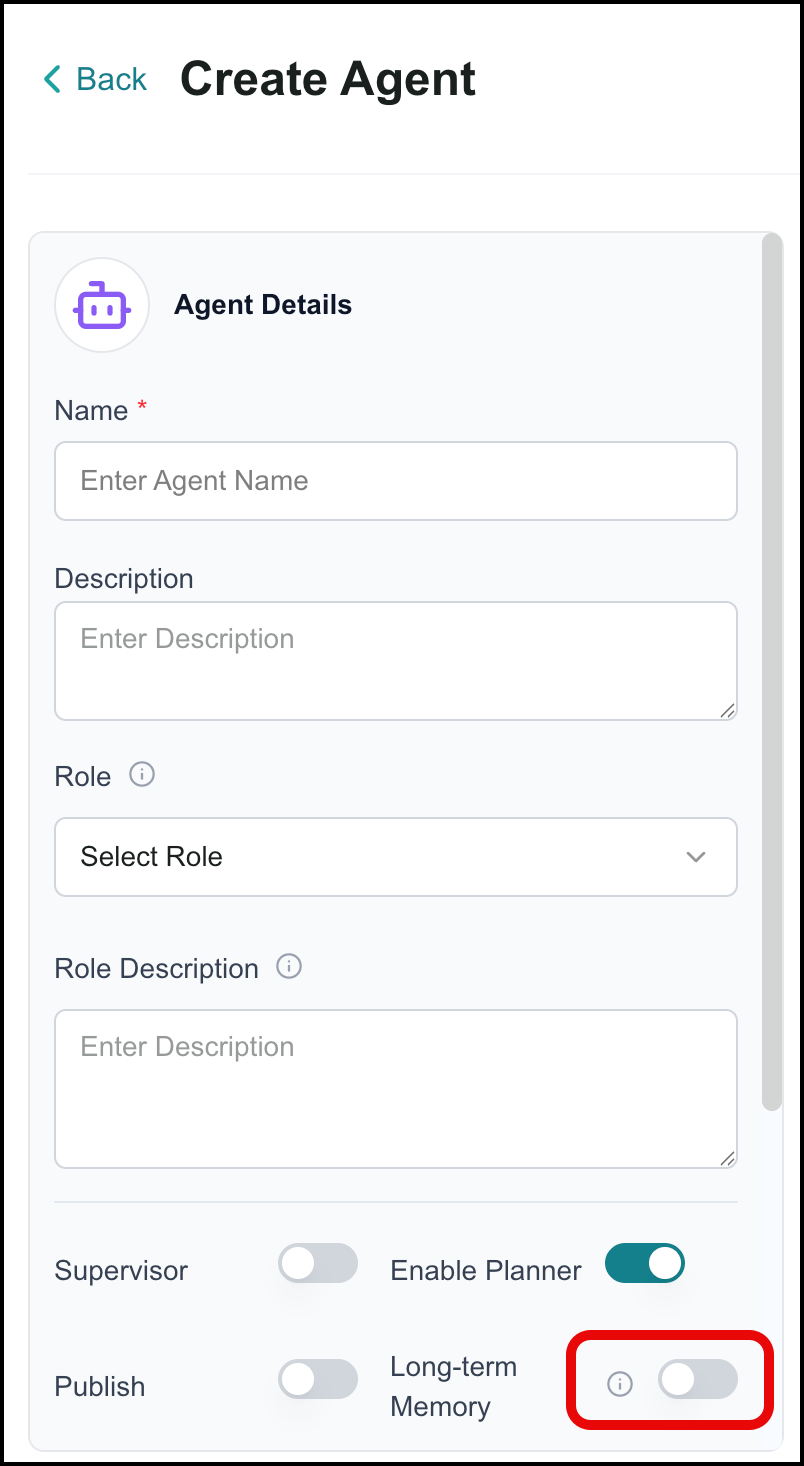 |
For more information, see Creating an Agent.
Agent Hooks
Business AI Cloud now supports pre-call and post-call hooks in the agent configuration. Hooks let you define custom actions that run immediately before an agent invocation, such as fetching fresh context or validating preconditions, and after a call completes, such as logging results or triggering follow-on workflows. Orchestration that previously required external glue code can now be configured as a first-class part of the agent.
Key Capabilities:
Pre-call hooks enrich agent inputs with data from external systems before execution.
Post-call hooks persist outputs or trigger side effects after the agent responds.
Agent Hooks are available within Business AI Cloud's Agent Layer. To access, go to the Home page > Agents > Agent SDK, and create or edit an agent.
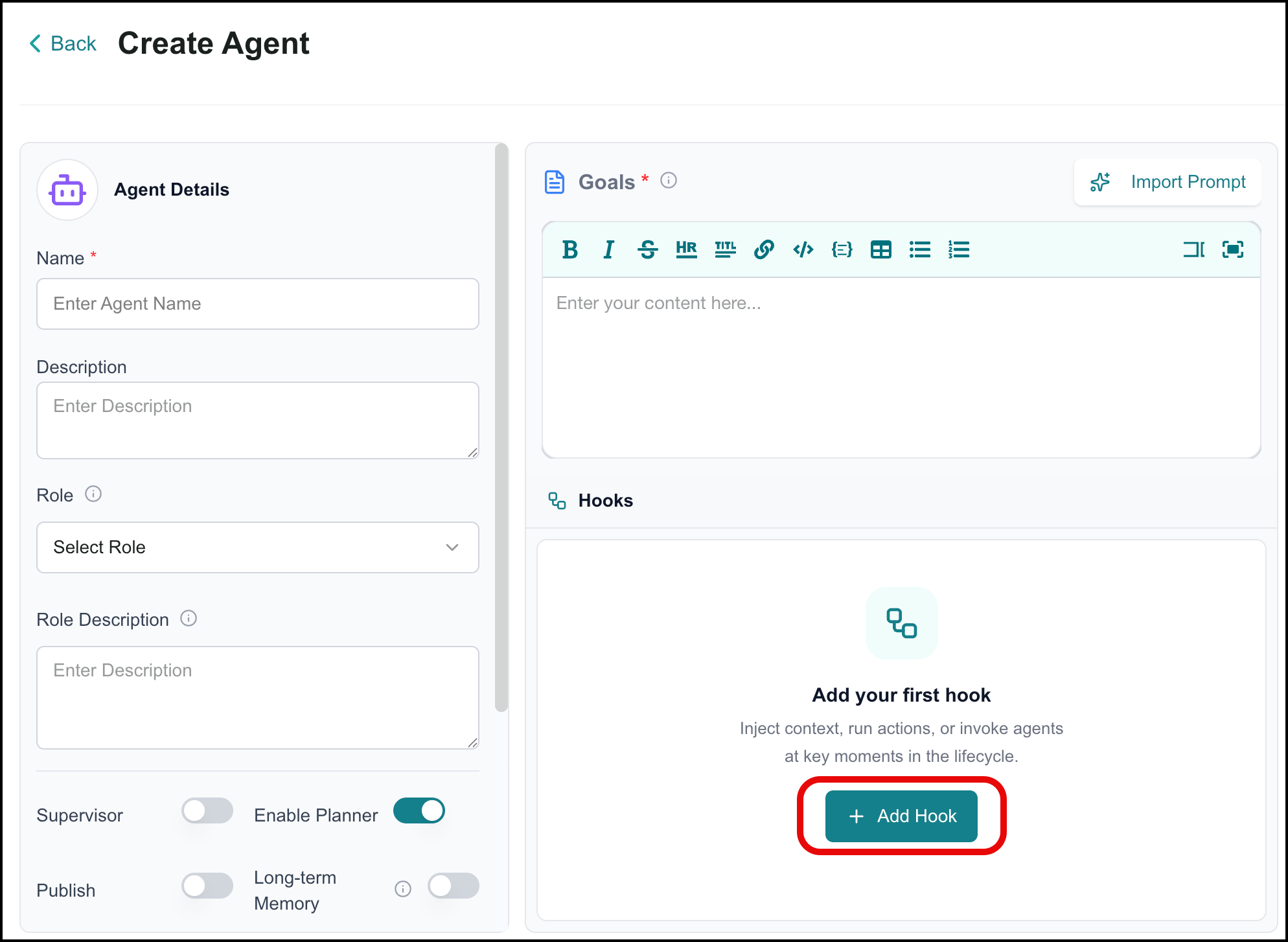
For more information, see Adding Hooks.
Access Management for Agentic Workflows
Business AI Cloud introduces access management for agentic workflows. Workflow owners and administrators can now control which user groups and roles can view or run each agentic workflow. Previously, all users could see and potentially run any agentic workflow, even when a workflow was designed for a specific team or contained sensitive logic. Access is managed from the access and permissions section on the workflow details page.
Key Capabilities:
Restrict workflow visibility and execution to specific user groups and roles.
Give workflow owners and administrators clear oversight of who can run each workflow.
Ensure teams see only the workflows relevant to them.
Access management for agentic workflows is available on the Business AI Cloud Admin page. To access, go to the Home page > Admin (in the left panel).
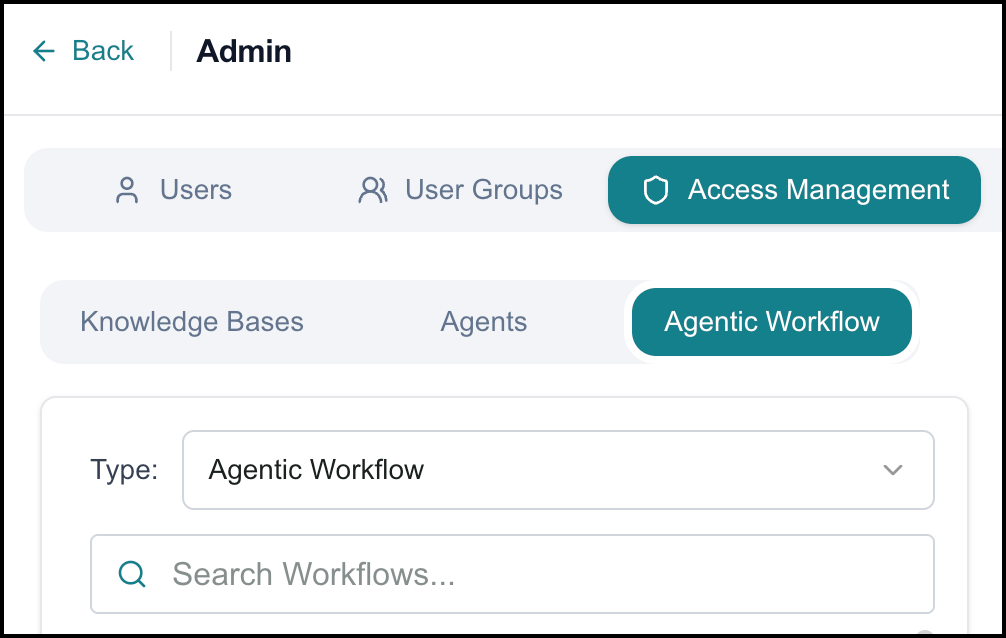 |
For more information, see Access Management.
Agent Execution Schedules
Business AI Cloud introduces Agent Execution Schedules, letting you define when and how often your agents run without manual triggering. Instead of starting each run by hand, you can set up recurring executions for tasks such as periodic summarization or scheduled data checks, moving from ad-hoc runs to a repeatable, schedule-driven automation model.
Key Capabilities:
Define schedules for agent execution, specifying frequency and timing.
Automate recurring tasks without manual triggering.
Review and manage your configured schedules from a single place on the Schedules page.
Agent execution schedules are available within Business AI Cloud's Agent Layer. To access, go to the Home page > Agents > Agent SDK and click the Ellipsis ( ) icon on an agent's card. Select Agent Schedule.
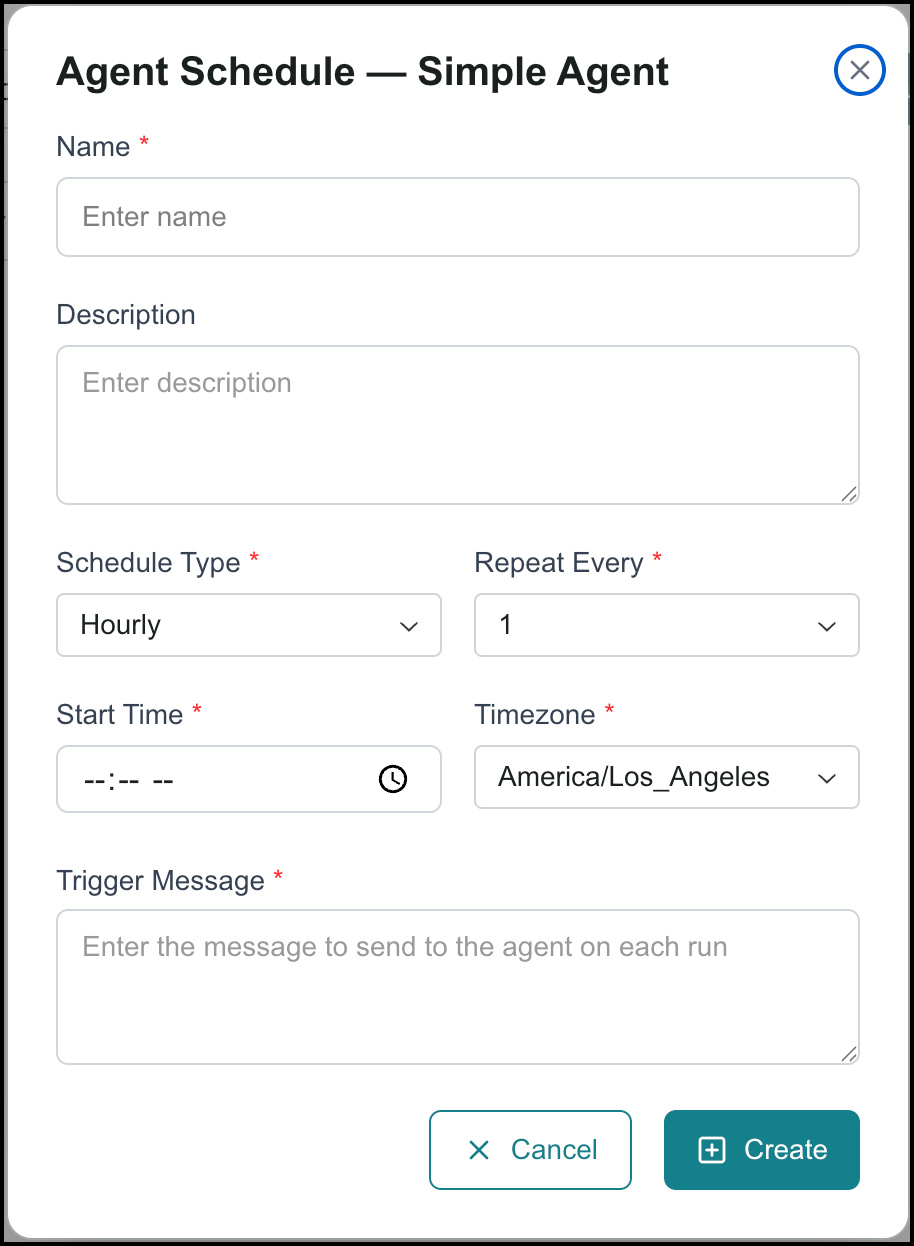 |
For more information, see Schedule an Agent to Run.
Enhancements
Data Engineering Agent
Business AI Cloud enhances the Data Engineering Agent with the ability to cancel a pipeline execution at runtime and copy pipeline execution logs directly from the platform. These additions give teams greater control during live pipeline runs and make it faster to capture and share log output when investigating issues or escalating for support.
Key Capabilities:
Cancel a running pipeline execution directly from the platform without requiring manual intervention at the infrastructure level.
Copy pipeline execution logs with a single action for faster troubleshooting, sharing, and incident documentation.
The Data Engineering Agent is available within Business AI Cloud's Data Layer. For more information, refer to Viewing Pipeline Runs in the User Guide.
Data Orchestrator Agent
Business AI Cloud enhances the Data Orchestrator Agent by enabling it to download dataflow logs and copy dataflow execution logs directly from the platform. You can now capture complete log output for any dataflow run without leaving the interface, making it easier to monitor pipeline health, investigate failures, and document issues for resolution.
Key Capabilities:
Download the full log for any dataflow run as a file for offline review, archiving, or escalation.
Copy dataflow execution logs directly from the platform for faster troubleshooting and sharing.
Search the logs to locate specific entries more efficiently.
The Data Orchestrator Agent is available within Business AI Cloud's Data Layer. For more information, refer to Viewing Dataflow Runs History in the User Guide.
Dataflow Decision Node
Business AI Cloud extends the Decision node in dataflow pipelines to support multiple outputs. Previously limited to a two-branch path, the Decision node can now route dataflow execution to more than two downstream paths based on configured conditions, enabling more expressive, flexible pipeline logic without requiring additional workarounds.
Note
Simple mode is still available if you only need basic success or failure routing and do not require conditional logic.
Key Capabilities:
Configure a Decision node to produce multiple outputs, each mapped to a different downstream path.
Define conditional branching logic that routes execution based on the outcome of the decision evaluation.
Conditional paths are executed in the order you specify. Only the first path with a true condition is used; all subsequent paths are ignored. Even if multiple conditions are true, the agent follows your defined order and does not apply its own priority system.
The Data Orchestrator Agent is available within Business AI Cloud's Data Layer.
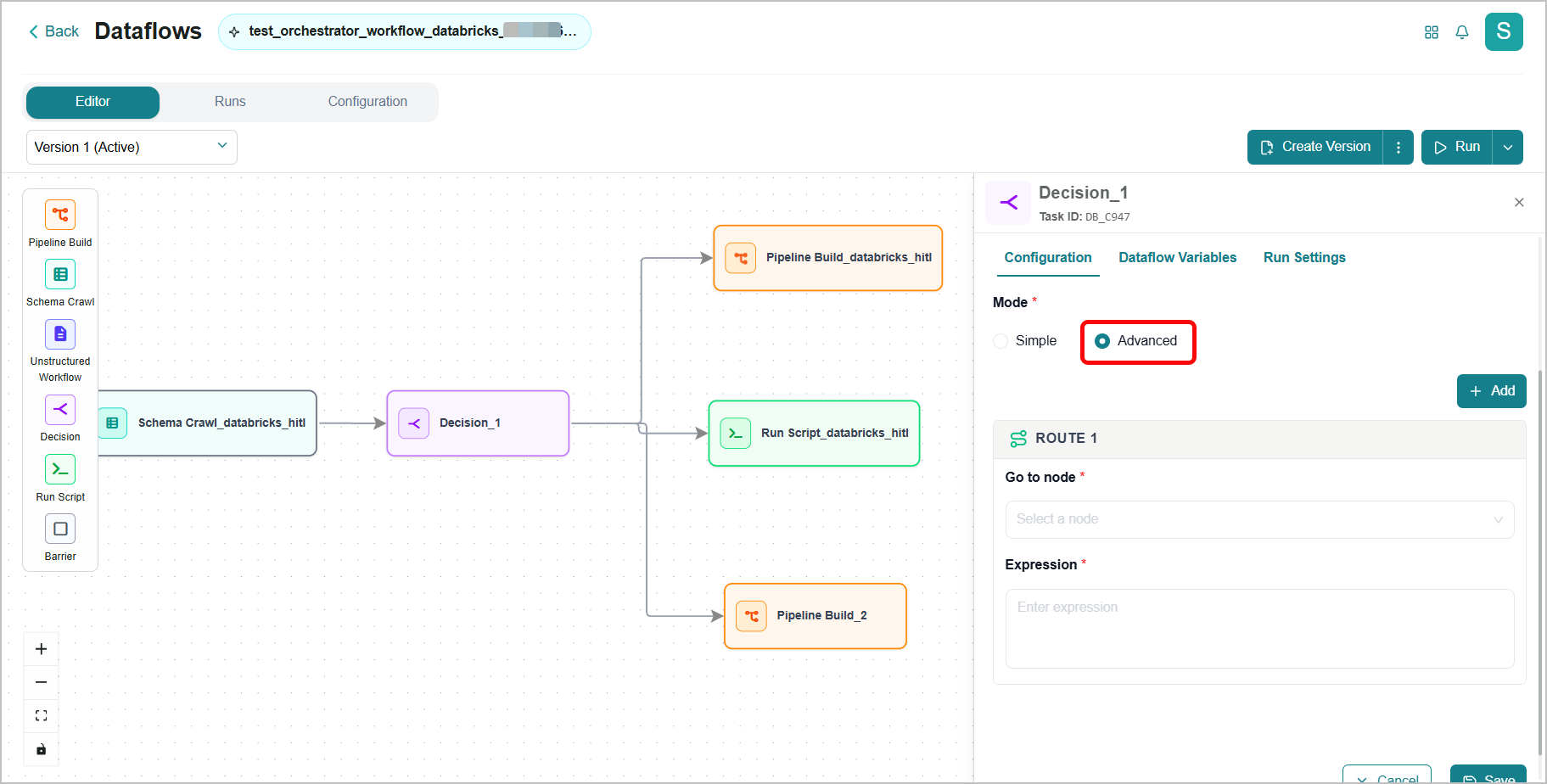
For more information, refer to Task Nodes Configuration in the User Guide.
Agent Monitoring
Business AI Cloud upgrades the agent monitoring experience with additional metrics, date-based graphs, and performance benchmarking. The latest enhancement adds metrics such as cost, retries, and token consumption, supports date-keyed values for time-based graphing, and provides the foundation for comparing agent configurations. The changes are additive, so existing dashboards continue to work while richer, time-aware views become available.
Key Capabilities:
New metrics, including cost, retries, and token consumption.
Date-based graphs that show agent activity and performance over time.
Performance benchmarking to compare agent configurations and optimization strategies.
The agent monitoring enhancements are available within Business AI Cloud's Agent Layer. For more information, see Agent Analytics.
Agent Optimization
Business AI Cloud continues to strengthen the agent optimization workflow with improvements across prompt optimization, distillation, and synthetic trace quality. These changes make the platform's optimization tools more effective and better suited to larger, production-scale workloads.
Key Capabilities:
An improved prompt-optimization algorithm produces more effective prompts with fewer manual tuning cycles.
Agent distillation now scales to more than 100 traces per run while maintaining or improving quality.
New quality metrics for synthetic traces help teams assess whether generated data is representative and trustworthy.
The agent optimization enhancements are available within Business AI Cloud's Agent Layer. For more information, see Optimizing Agents.
Agent Evaluation
Business AI Cloud improves the agent evaluation workflow with a more unified experiment experience and richer skill evaluation. Instead of configuring single-agent and workflow experiments through separate paths, teams can now work through one consistent interface, and skill evaluation produces more consistent, informative results.
Key Capabilities:
A unified experiment interface supports both single-agent and workflow experiments.
Skill evaluation now provides more context to the evaluator and applies a set of default metrics for consistent scoring across skills.
Clearer feedback on which skills perform well and which need refinement.
The agent evaluation enhancements are available within Business AI Cloud's Agent Layer. For more information, see Agent Evaluation.
Agent Version Support in Evaluation
When configuring an evaluation, you can now select a specific agent version to run against. Previously, evaluation runs implicitly used the latest agent implementation, making it hard to reproduce results or compare the impact of specific changes. The chosen version is pinned in the experiment configuration and shown in run details and history.
Key Capabilities:
Select a specific agent version when configuring an evaluation.
Pin the chosen version in the experiment configuration for reproducible runs.
See the pinned version in run details and history for auditable, version-to-version comparisons.
The agent evaluation version support is available within Business AI Cloud's Agent Layer. For more information, see Agent Evaluation.
Agent Evaluation Information Display
Agent evaluation screens now offer richer tooltips and inline help for metrics, thresholds, datasets, agent versions, and guardrail options, so evaluation runs are easier to set up and interpret.
Key Capabilities:
Richer tooltips and inline help for metrics, thresholds, datasets, agent versions, and guardrail options.
Makes it easier for more users to confidently configure and interpret evaluation runs.
The agent evaluation information display improvements are available within Business AI Cloud's Agent Layer. For more information, see Agent Evaluation.
Compare Agent Versions
Business AI Cloud now provides a Compare Versions view that shows a structured difference between any two versions of an agent, highlighting changes in prompts, knowledge bases, skills, tools, and other key configuration areas.
Key Capabilities:
View a structured difference between any two versions of an agent.
See changes across prompts, knowledge bases, skills, tools, and other configurations.
Review and approve configuration changes, troubleshoot regressions, and collaborate across stakeholders more easily.
The improved agent version comparison is available within Business AI Cloud's Agent Layer. For more information, see Managing Agents.
Clone Agent
Business AI Cloud now lets you clone any existing agent. Cloning creates a new agent that copies the prompts, tools, knowledge bases, hooks, schedules, and settings from the selected version, while starting with a fresh identity and history. Previously, creating similar agents for different customers or experiments required rebuilding the configuration from scratch, which increased setup time and the risk of errors.
Key Capabilities:
Duplicate an existing agent, copying prompts, tools, knowledge bases, hooks, schedules, and settings.
Start the cloned agent with a fresh identity and history, leaving the original untouched.
Spin up safe variants for A/B tests, per-region deployments, or customer-specific adaptations.
Cloning agents are available within Business AI Cloud's Agent Layer. For more information, see Cloning an Agent.
Agent Builder
The Create and Edit Agent experience now surfaces more of an agent's structure and dependencies at creation time. Builders can view the agent's version number, the KB attached in the Copilot builder, and sub-agents for Supervisor agents.
Key Capabilities:
Display the agent's version number in the builder.
List attached knowledge bases in the Copilot builder.
Show sub-agents for Supervisor agents.
Agent Builder is available within Business AI Cloud's Agent Layer. For more information, see Creating an Agent.
Agent Management
Business AI Cloud now lets you delete agents and custom apps directly from the UI. Previously, removing an unwanted agent or app required support intervention, leading to cluttered lists and confusion about which agents were active. You can now curate your own inventory and remove obsolete or experimental agents once they are no longer needed.
Key Capabilities:
Delete agents and custom apps directly from the UI, without support intervention.
Keep the agent inventory clean to reduce confusion between active and obsolete agents.
Manage your own artifacts throughout the day-to-day agent-building workflow.
Agent management is available within Business AI Cloud's Agent layer. For more information, see Managing Agents.
Audit Trail for Login and Logout
Business AI Cloud now captures user login and logout events in the audit trail. This complements existing audit logging for resource changes, providing administrators with a clearer record of who accessed the system and when, for compliance and forensic purposes.
Key Capabilities:
Login and logout events are recorded in the audit trail.
Complements existing audit logging for resource changes.
Supports compliance and forensic review.
Audit trail information is available within Business AI Cloud's Admin page. For more information, see Audit Logs.
Constraints and Limitations
The following constraints and limitations exist for this release:
Item | Description |
|---|---|
Data Lineage | This is the first phase of Data Lineage tracking for SQL pipelines, focusing on tracking tables used within these pipelines in the current scope. |
PII Group | Currently, only column-level tagging and metadata storage are supported. Table-level tagging, downstream enforcement (e.g., restricting query results or propagating tags to external systems such as Snowflake), and integration with user access or role management have not yet been implemented. |
Dataflow Version | An audit trail for Dataflow versioning (similar to what is currently available for Knowledge Resources) is not included in this release and is planned for an upcoming release. |
Instruction Audit | The change author is currently shown as a user ID rather than a username. Displaying the username is planned for a future release. |
Data Pipeline Cancellation | Cancellation happens in the background. If a job finishes before it gets the cancel request, it will finish as usual and will not be canceled. |
Long-term Memory | The initial release supports user-scoped memory shared across the platform. Agent-scoped or Workflow-scoped memory is not part of this release. |
Bug Fixes
The following bugs are fixed in this release:
Item | Description |
|---|---|
Agent Monitoring Pagination | Fixed an issue where pagination for agent execution traces could skip or drop results. A page could indicate that more results were available and then return no rows on the next page, hiding valid executions from the monitoring view. Monitoring pages now reflect all executions within the selected time window and filters. |
JSON Output Generation | Restored reliable JSON output generation for agents. Some agents configured to emit JSON responses intermittently returned errors or empty payloads, breaking integrations that consume machine-readable results. Agents configured for JSON output now produce valid, parseable JSON on every successful interaction. |