1.0.12 Release Note_August 07, 2026
Release Date: August 07, 2026
Business AI Cloud introduces the following new or enhanced features.
Important
This document provides high-level information on the latest release features and enhancements for the Business AI Cloud. For detailed procedures, configuration steps, and comprehensive guidance, please refer to the Business AI Cloud User Guide.
Release Highlights
New Features
Store Structured Metadata to Vector DB – Routes structured metadata to a vector database of your choice, Astra or Milvus, instead of a single default destination for all sources.
Data Orchestrator Agent - Automates end-to-end dataflow creation, management, and execution using agentic flows, letting you describe requirements in plain English while the system generates, runs, and monitors the dataflow.
Agent-to-Agent (A2A) - Connect your Business AI Cloud agents to external AI agents using the A2A protocol, letting them discover, authenticate with, and delegate tasks to remote agents.
Create Evaluation with AI - Adds an agent-assisted path for building agent evaluations. Describe what you want to test in plain English, and the agent creates (or reuses) the experiment and dataset, runs the evaluation, and reports results with no manual setup required.
Mock Tools - Lets you simulate tool responses when evaluating agents, so you can test agent behavior without calling live tool APIs.
Automation Journey for Process Intelligence - Assesses the automation potential of your discovered processes, scores each process for readiness, identifies governance considerations, and generates structured automation artifacts, including workflow steps, tools, and skills.
ROI Analysis for Process Intelligence - Quantifies the financial value of process optimization and automation efforts across your discovered processes, projecting time savings, cost savings, and capacity gains based on configurable cost and performance parameters.
SOP Agent for Process Intelligence - Lets you use an agent chat experience to edit Standard Operating Procedures (SOPs).
Enhancements
New Vector DB - Adds Weaviate as a supported vector database configuration for the platform.
Optimized Workflow (Location Info) – Captures the page number and bounding box position for each value extracted during PDF-to-JSON conversion.
View Structured Data
Audits - Tracks detailed audit history at both the source and individual-table levels.
Attributes - Lets you designate PII columns, natural keys, and watermark columns directly on a table.
Table Descriptions - Updates descriptions across multiple tables at once through a bulk glossary upload.
Instructions - Compares instruction versions side by side and renders instruction text in Markdown for easier reading.
Knowledge Cluster
Audits - Tracks detailed audit information for Knowledge Clusters, providing teams with visibility into cluster-level changes over time.
Instruction – Lets you compare different versions of a Knowledge Cluster instruction side by side and view the instruction text rendered in Markdown for easier readability.
Data Engineering Agent
Automated Table Mapping - Maps source and target tables automatically and lets you review and adjust the mapping manually before proceeding.
Pipeline Configuration - Updates pipeline configuration automatically based on agent chat input, and lets you review, edit, and approve the configuration before the final pipeline is created.
Pipeline Version Export/Import - Exports a pipeline version and imports it into another pipeline, making it easy to reuse configurations across projects.
Pipeline Audit - Tracks detailed audit information for each pipeline, providing teams with visibility into pipeline-level changes over time.
Pipeline Version Comparison - Compares two pipeline versions side by side, making it easy to spot differences before restoring or reusing a version.
Pipeline Run Log Download - Lets you download pipeline run logs for offline review, troubleshooting, or compliance records.
Data Analyst Agent - Lets you cancel an SQL run after it starts, giving you control to stop queries that are no longer needed.
Data Orchestrator Agent - Tracks detailed audit information for each dataflow, giving teams visibility into changes made at the dataflow level over time.
SLM for Knowledge Base – Redesigns the interface to make SLM pairing and management easier.
Copilot Agent Builder - Adds the ability to test an agent directly from the builder, switch between the Supervisor and its Sub-Agents while building, and run agent evaluations through Copilot's guided prompts.
Agent Skills - Adds active/inactive flagging for skill versions, with filtering support on the Agent Skills page.
Agent Distillation - Adds support for mixing in previously approved training datasets and knowledge base datasets, and expands the list of available base models.
Agent Evaluation - Adds two new metrics in workflow evaluation analytics: non-agentic end-to-end latency and a detailed latency breakdown for non-agentic workflow components.
Agents Page - Replaces traditional pagination with endless scrolling for agent listings.
New Features
Store Structured Metadata to Vector DB
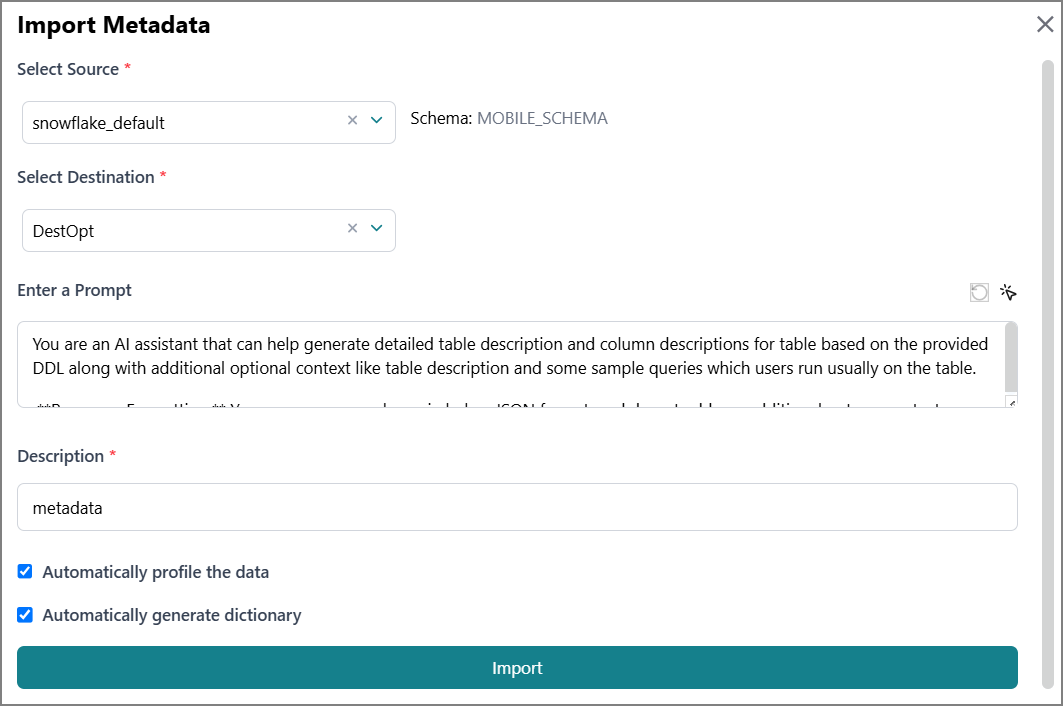
Business AI Cloud now lets you choose the vector database destination for structured metadata on a per-source basis. Previously, all sources were routed to one static default vector DB. Now, you have the flexibility to select from multiple supported vector database destinations, giving you finer control over how metadata from different sources is stored and queried.
Key Capabilities:
Route structured metadata to a vector database destination selected per source, rather than a single shared default.
Choose from multiple supported vector database destinations to match each source's requirements.
Gain finer control over how metadata from different sources is stored and queried across the platform.
The structured metadata Vector DB connection is available within the Data Ingestion in Business AI Cloud's Data Layer.
To access, go to the Home page > Data > Data Ingestion > Relational DB > Import Metadata.
 |
For more information, refer to Creating a Connection in the User Guide.
Data Orchestrator Agent
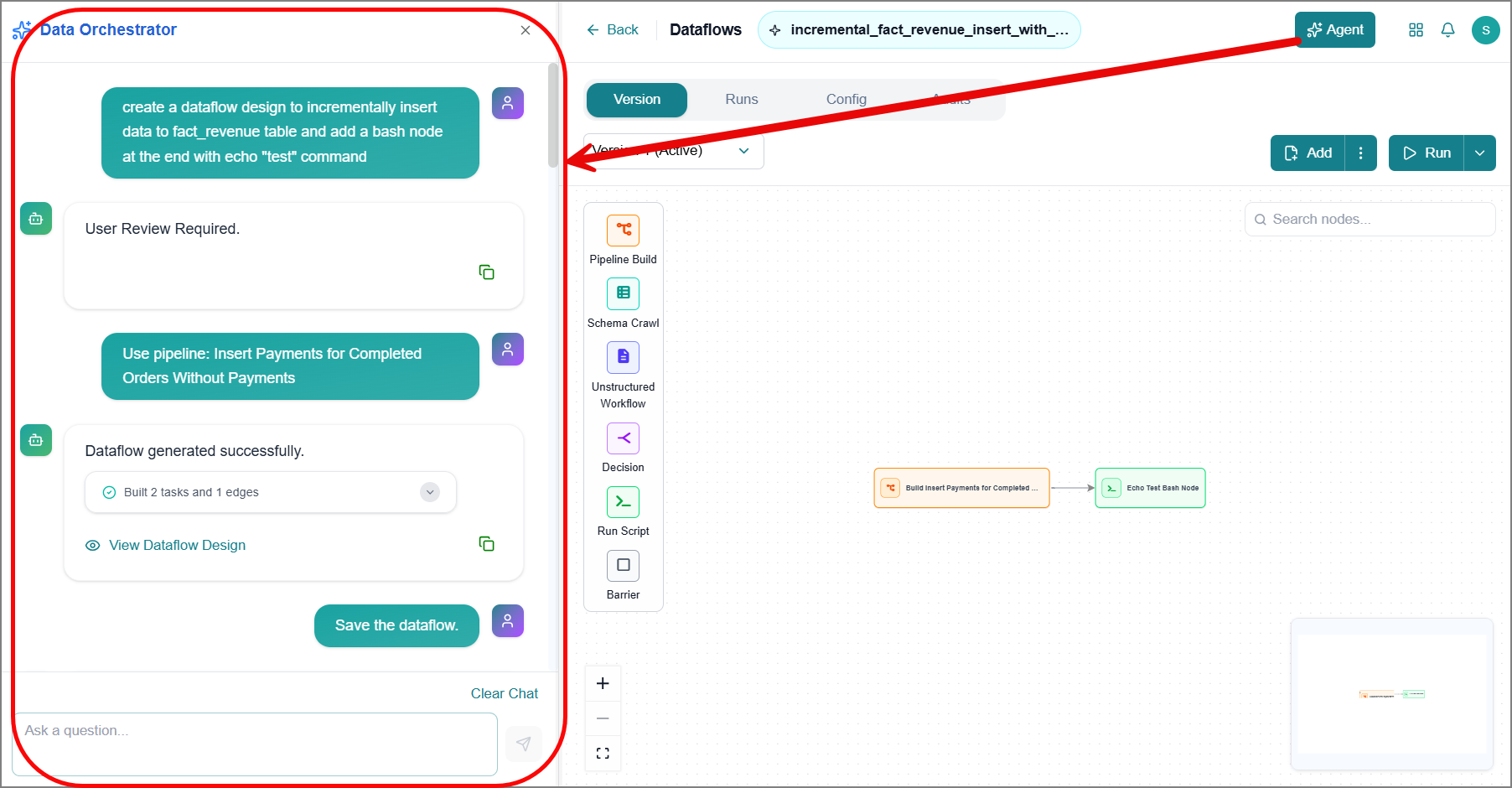
Business AI Cloud now introduces an agent-assisted experience for creating dataflows. You describe your requirements in plain English, and the agent generates, runs, and monitors the dataflow automatically, end to end. A manual dataflow creation path also remains available for teams who want to build and manage their own dataflows directly.
Key Capabilities:
Automates end-to-end dataflow creation, management, and execution using agentic flows.
Generates dataflows directly from plain-English requirements, without manual configuration.
Runs and monitors the dataflow automatically once created, reducing the need for manual oversight.
The Data Orchestrator Agent is available within Business AI Cloud's Data Layer.
To access, go to the Home page > Data > Data Agents > Data Orchestrator Agent.
For more information, refer to Creating a Dataflow with an Agent in the User Guide.
Agent-to-Agent (A2A)
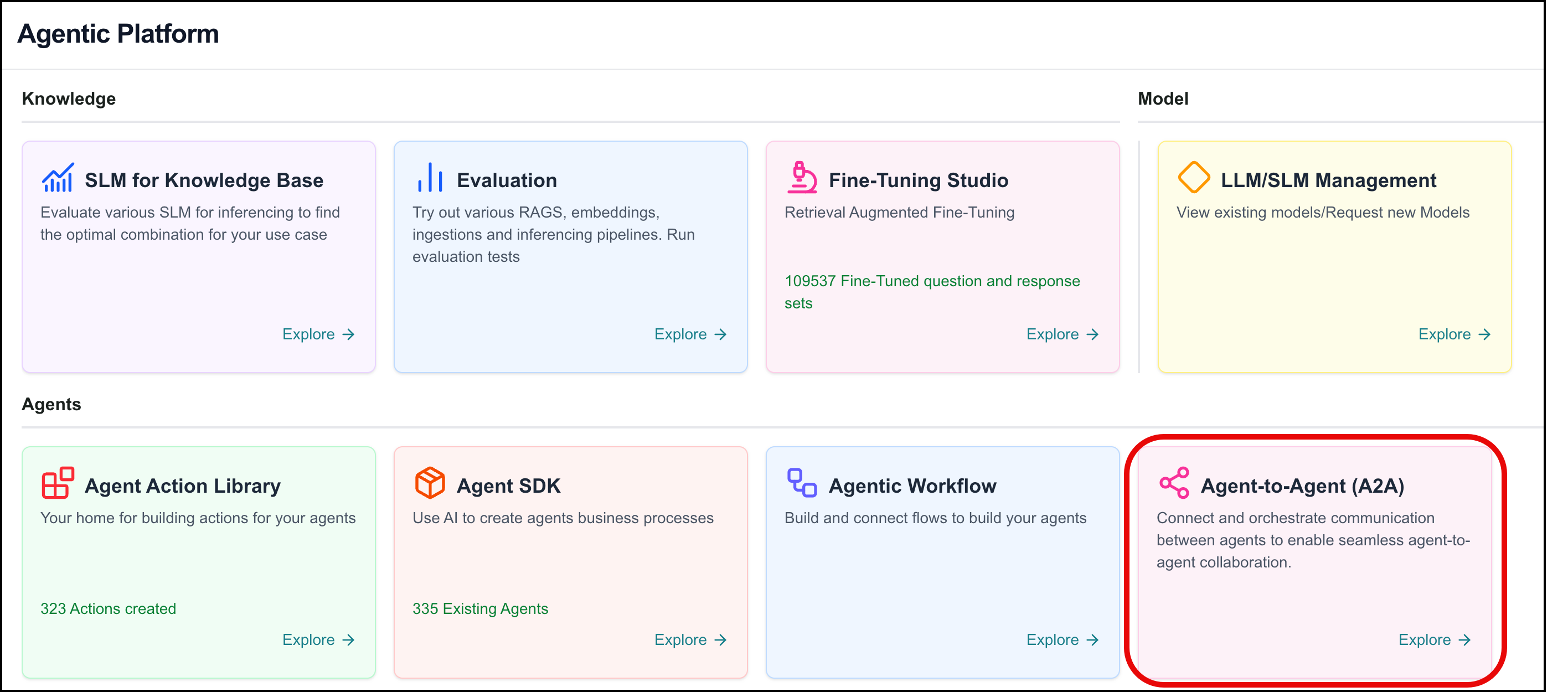
Business AI Cloud now supports the A2A (Agent-to-Agent) protocol, letting you connect your agents to external, remote AI agents. You register a remote agent by providing its Agent Card URL, verifying its capabilities and authentication requirements, and then mapping it to one of your agents in Agent SDK so it can delegate tasks to the remote agent as part of its workflow.
Key Capabilities:
Connects Business AI Cloud agents to external agents using the open A2A protocol.
Automatically discovers a remote agent's identity, capabilities, and skills from its Agent Card.
Supports API Key, OAuth 2.0 Authorization Code, and Open Access authentication, depending on the remote agent’s requirements.
Lets you map a connected external agent to one of your agents in Agent SDK so it can be invoked as part of that agent's workflow.
Agent-to-Agent (A2A) is available within Business AI Cloud's Agents layer.
To access, go to the Home page > Agents > Agent-to-Agent (A2A).
For more information, refer to Agent-to-Agent in the User Guide.
Create Evaluation with AI
Business AI Cloud now introduces an agent-assisted experience for creating agent evaluations. You describe what you want to evaluate in plain English, and the agent determines what's needed. The agent will reuse an existing experiment and dataset where one already fits, or create a new dataset and experiment, including relevant custom metrics, when needed, and then run the evaluation and report the results. A manual evaluation creation path also remains available for teams who want to build and manage experiments and datasets directly.
Key Capabilities:
Automates end-to-end evaluation creation and execution using agentic flows.
Generates experiments and datasets directly from plain-English requirements, without manual configuration.
Reuses existing experiments and datasets where appropriate to avoid duplication.
Reports headline scores, custom metric scores, tool/skill usage, and root-cause recommendations once the evaluation completes.
Supports further iteration through chat, including re-running evaluations after configuration changes.
The AI evaluation creation flow is available within the Agent SDK, next to Agent Evaluation.
To access, go to the Home page > Agents > Agent SDK, then click the AI icon next to Agent Evaluation.

For more information, refer to Creating an Evaluation with AI in the User Guide.
Mock Tools
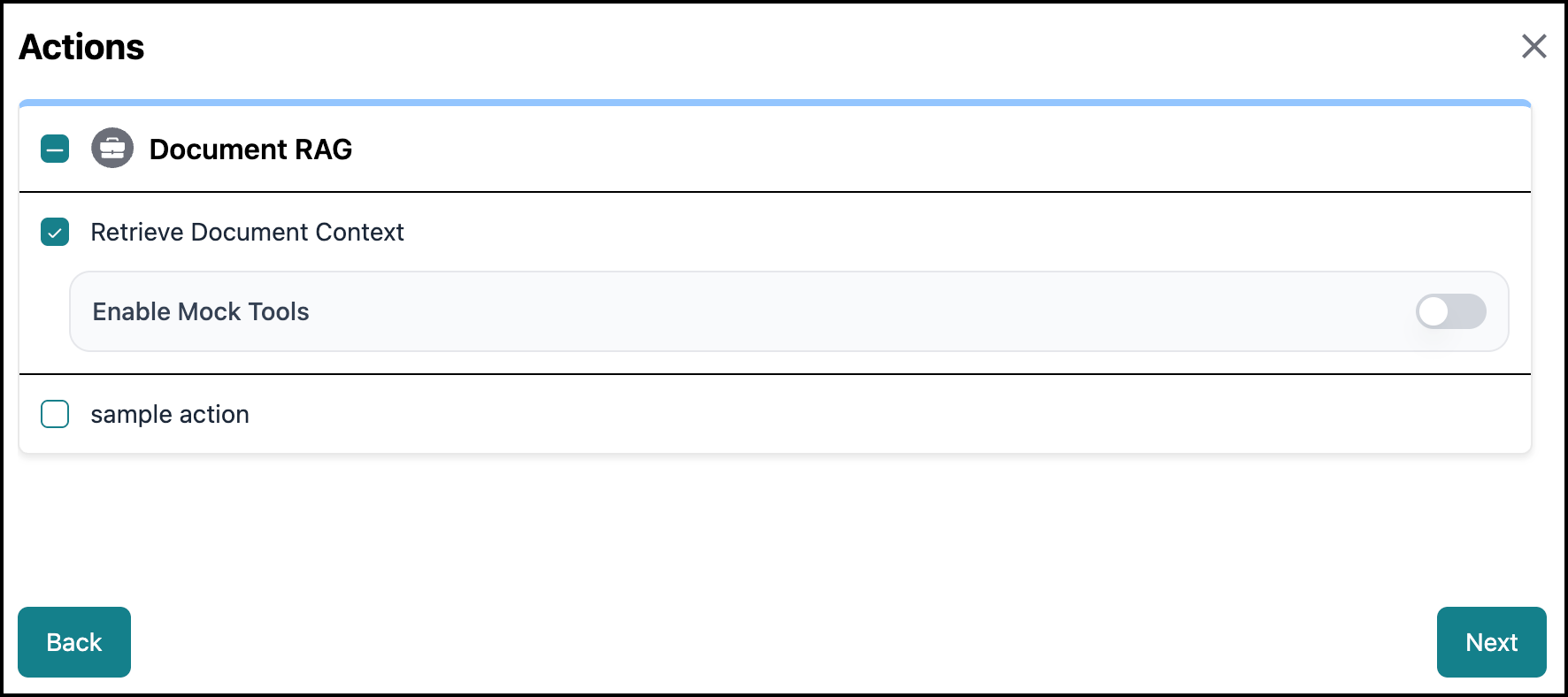
Business AI Cloud now lets you configure simulated responses for the tools attached to an agent, so those tools return mock data instead of calling live APIs when you run experiments in Agent Evaluation. You can enable mocking for each tool individually, choose whether the response is static or generated dynamically by an LLM, and turn mock tools on or off per experiment run.
Key Capabilities:
Enable mock behavior individually for each tool attached to an agent, so only the tools you choose return simulated data.
Provide a fixed JSON response that's returned as-is, or let an LLM generate a dynamic, realistic response from a schema example.
Turn mock tools on or off per experiment run, so you can compare an agent's behavior with and without live tool calls.
Mock Tools is available within Business AI Cloud's Agents layer. To access, go to the Home page > Agents > Agent SDK, open an agent, and add a tool.
 |
For more information, refer to Mock Tools in the User Guide.
Automation Journey
Business AI Cloud now introduces Automation Journey, an AI-powered feasibility analysis tool that evaluates how automatable your discovered processes are. For each process, Automation Journey scores overall automation readiness, breaks down steps by automation potential, surfaces governance and compliance considerations such as PII, financial data, and blast radius, and generates structured artifacts (workflow steps, tools, and skills) that provide the building blocks needed to act on the analysis.
Key Capabilities:
Assess the automation readiness of discovered processes with a 0-100 Automation Score and readiness label.
Identify which steps in a process are highly automatable, partially automatable, or require manual handling.
Surface governance and compliance considerations across process steps, including data sensitivity, blast radius, and compliance framework tags.
Generate automation artifacts, including workflow steps with input/output detail, tool definitions, and skill definitions.
Download the full artifact package for use in automation development.
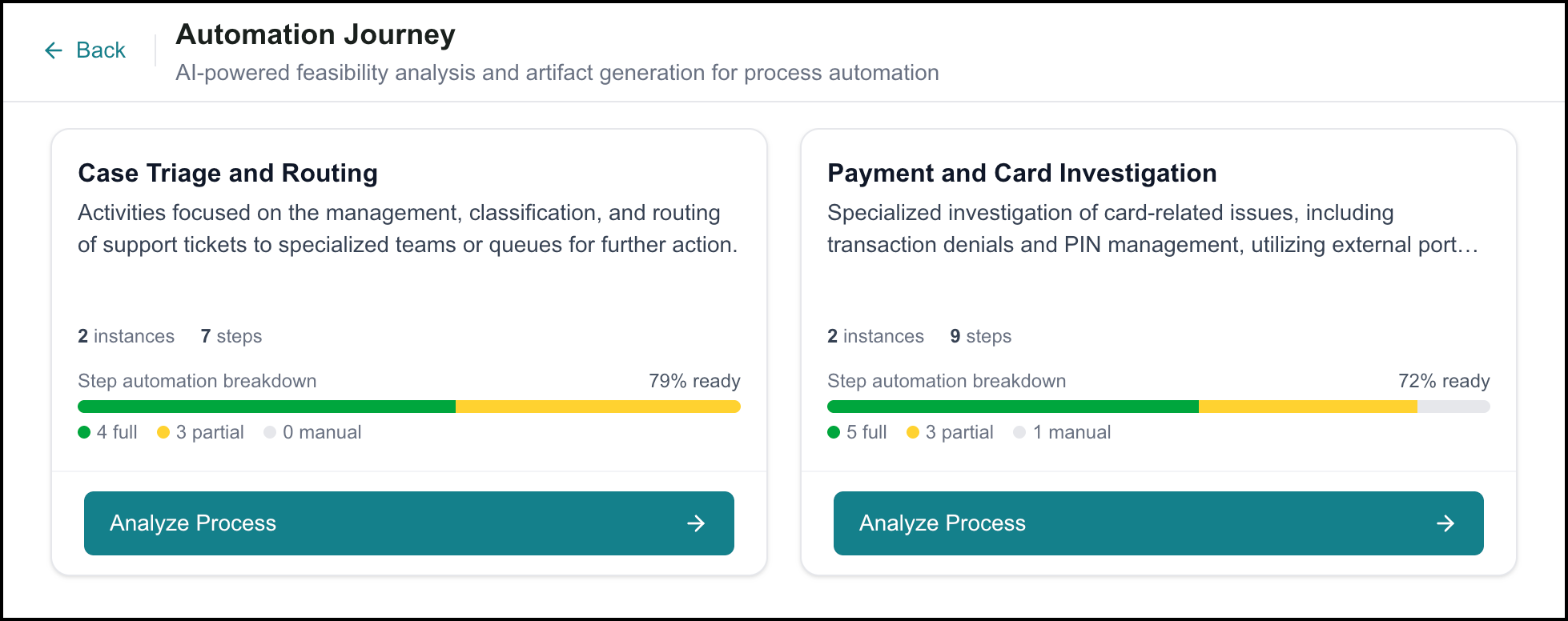 |
Automation Journey is available within Process Intelligence in Business AI Cloud.
To access, go to the Home page > Data Layer > Process Intelligence, and click Automation Journey under Optimization.
For more information, refer to Automation Journey in the User Guide.
ROI Analysis
Business AI Cloud now introduces ROI Analysis, a financial modeling tool that quantifies the value of process optimization and automation efforts across your discovered processes. Using configurable cost and performance parameters, ROI Analysis projects time savings, cost savings, and capacity gains for process optimization, and models the returns on automation investment, including payback period and net ROI, over a three-year horizon.
The page is organized into two tabs. The Process Optimization tab projects savings based on estimated handle time improvements, with a configurable cost per hour, working days per month, and target AHT improvement. The Automation tab models the return on automation investment using configurable implementation costs and timelines, and includes scenario saving and comparison tools to model and compare up to three different configurations side by side.
Key Capabilities:
Project monthly and annual savings across all discovered processes based on configurable cost and performance parameters.
Model automation investment returns, including Year 1 ROI, 3-Year Net ROI, and payback period.
Adjust Target AHT per process individually to model more realistic improvement targets.
Categorize processes by automation readiness and compare their savings potential and investment requirements.
Save and compare up to three named scenarios to present stakeholders with a range of projected outcomes.
Identify which cost parameters have the greatest influence on projected returns using the Sensitivity Analysis.
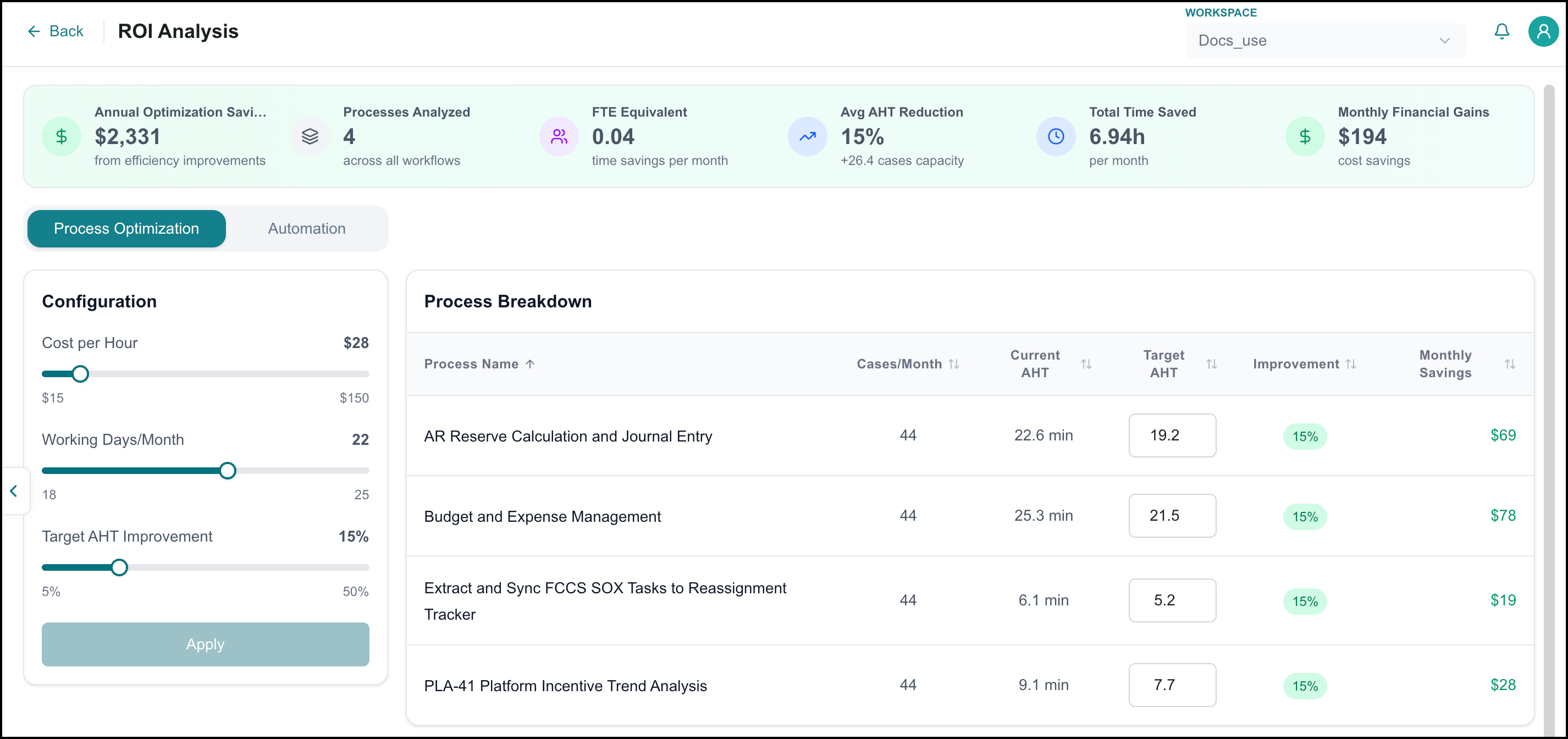
ROI Analysis is available within Process Intelligence in Business AI Cloud.
To access, go to the Home page > Data Layer > Process Intelligence and click ROI Analysis under Optimization.
For more information, refer to ROI Analysis in the User Guide.
SOP Agent
Business AI Cloud now provides an agentic approach for editing SOPs. Launch the agent, and it will guide you through editing an SOP.
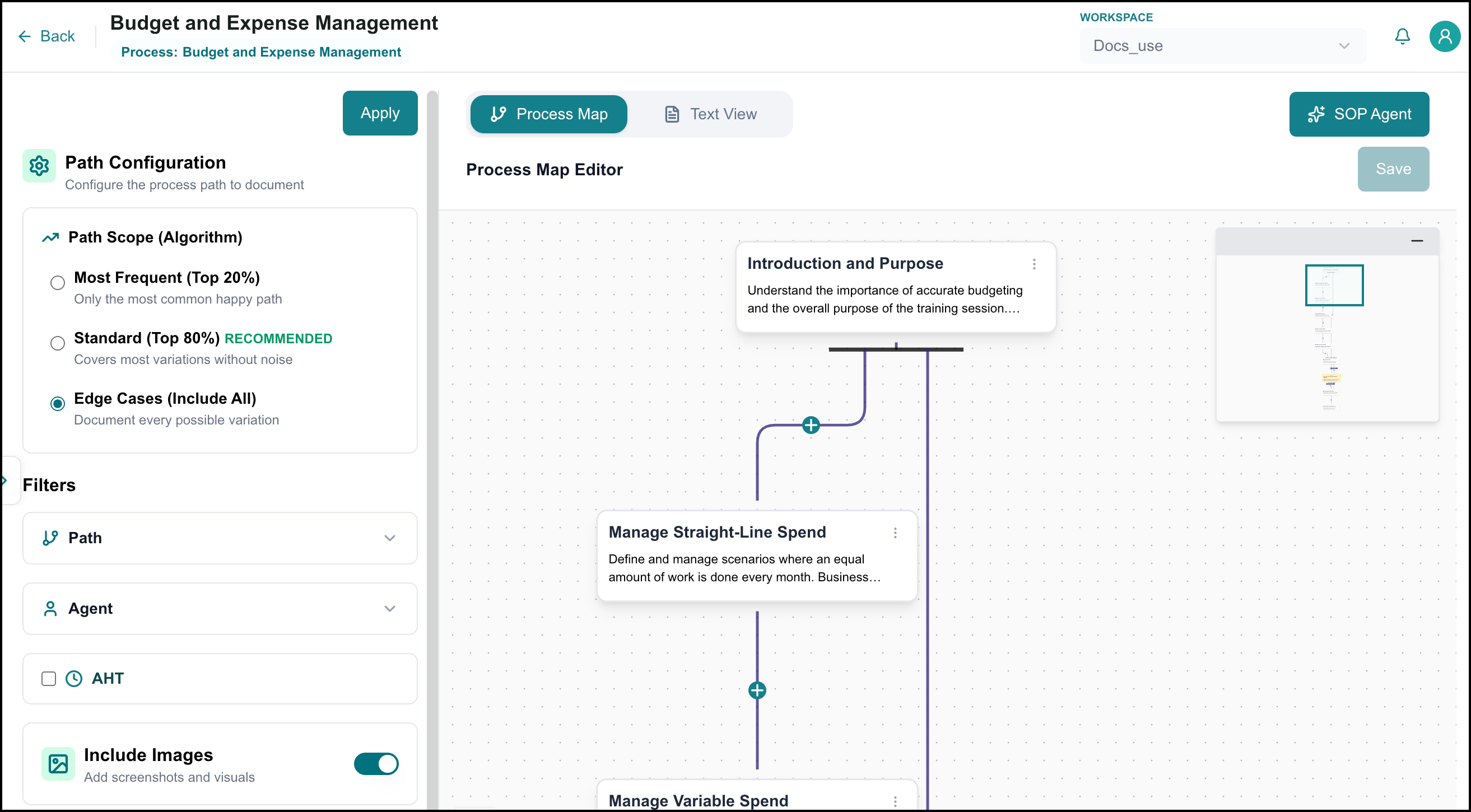
To access, go to the Home page > Data Layer > Process Intelligence and click SOP Studio under Optimization. Open an existing SOP and click SOP Agent to get started.
For more information, refer to SOP Studio in the User Guide.
Enhancements
Optimized Workflow
Business AI Cloud now lets you enable location info as an optional feature within the Optimized Workflow's PDF-to-JSON conversion process. You must enable it for the platform to capture the page number, the bounding box position of each extracted value, and the value itself. When left disabled, the workflow continues to extract values without this positional data. This provides a traceable link between the structured output and its exact source location in the original document.
Key Capabilities:
Improves traceability by linking each extracted value back to its exact position in the source document.
Gives you the option to enable source-location tracking only when needed, avoiding unnecessary output in simpler use cases.
Simplifies verification and audit workflows by allowing reviewers to quickly locate the source of any extracted value.
The location info enabler is available within the Data Ingestion workflow in Business AI Cloud's Data Layer. For more information, refer to in the User Guide.
View Structured Metadata
Business AI Cloud now captures detailed audit information for structured metadata, including source-level and individual table-level audit details, as well as instruction audit details. You can compare different versions of an instruction side by side and view the instruction text rendered in Markdown for easier readability. You can also update table attributes directly, such as marking columns as Personally Identifiable Information (PII), designating a natural key, or setting a watermark column. To simplify large-scale updates, you can also bulk-upload a glossary to update descriptions across multiple tables at once, rather than editing each table individually.
Key Capabilities:
Improves transparency and traceability across metadata, tables, and instructions.
Speeds up review by letting you compare instruction versions directly, rather than cross-referencing manually.
Gives you direct control over key table attributes, such as PII, natural key, and watermark column, without requiring a separate configuration step.
Reduces manual effort when updating table descriptions at scale, especially for you managing many tables.
Makes instruction content easier to read and review with markdown formatting.
The structured metadata is available within the Data Ingestion in Business AI Cloud's Data Layer. For more information, refer to Viewing Metadata in the User Guide.
Knowledge Cluster
Business AI Cloud now records detailed audit information in Knowledge Clusters. You can compare different versions of an instruction side by side to view exactly what has changed. The instruction text also supports Markdown rendering, making the formatted content easier to read.
Key Capabilities:
Improves transparency into changes made to the Knowledge Cluster over time.
Speeds up review by letting you compare instruction versions directly, rather than cross-referencing manually.
Makes instruction content easier to read and review with markdown formatting.
The Knowledge Cluster is available within Business AI Cloud's Data Layer. For more information, refer to Knowledge Clusters in the User Guide.
Data Engineering Agent
Business AI Cloud now extends the Data Engineering Agent with a set of pipeline management capabilities that provide teams with greater visibility, control, and reusability throughout the pipeline lifecycle. The agent automatically maps the source and target tables and updates the pipeline configuration in real time based on the agent's chat input, with a review and approval step before the final pipeline is created. Pipeline versions can now be exported and imported across pipelines for easy reuse, compared side by side to review changes between versions, and tracked through a detailed audit trail that records pipeline-level changes over time. Run logs can also be downloaded directly, supporting offline troubleshooting and compliance review.
Key Capabilities:
Automated table mapping and chat-driven configuration reduce manual setup time while keeping teams in control through review and approval steps.
Detailed audit tracking gives teams full visibility into who changed what and when at the pipeline level.
Side-by-side version comparison and export/import support make it simple to reuse configurations and roll back changes with confidence.
Downloadable run logs give teams direct access to execution details for offline review and quicker issue resolution.
The Data Engineering Agent is available within Business AI Cloud's Data Layer. For more information, refer to Data Engineering Agent in the User Guide.
Data Analyst Agent
Business AI Cloud now lets you cancel an SQL run after it starts. Once a query is submitted for execution, a cancel control becomes available in both the Agent Chat interface and the Saved SQL Queries tab, giving you the ability to stop long-running or unnecessary queries without waiting for them to complete. If the run is about to complete, cancellation may not take effect.
Key Capabilities:
Cancel an in-progress SQL run directly from the Agent Chat interface or the Saved SQL Queries tab.
Immediately stop query execution, freeing up compute resources tied up by unnecessary or long-running runs.
Cancellation may not succeed if the run is near completion when the request is made.
The Data Analyst Agent is available within Business AI Cloud's Data Layer. For more information, refer to Data Analyst Agent in the User Guide.
Copilot Agent Builder
Business AI Cloud extends Copilot Agent Builder with new capabilities to test and navigate agents during the build process. You can now test an agent directly from the builder, move between a Supervisor agent and its Sub-Agents without leaving the builder, and kick off an agent evaluation when Copilot prompts you to do so.
Key Capabilities:
Test an agent directly from the builder using the new Test button, once the agent has been created, or ask Copilot to test it.
Switch between a Supervisor agent and any of its Sub-Agents while building, without exiting the builder.
Run an agent evaluation from within Copilot Agent Builder when prompted, without navigating to a separate evaluation flow.
Copilot Agent Builder is available within Business AI Cloud's Agent Layer. For more information, refer to Copilot Agent Builder in the User Guide.
Agent Skills
Business AI Cloud now lets you flag individual skill versions as active or inactive from the Agent Skills page. This makes it easier to distinguish skills currently in use from those that are deprecated or under review, without removing them from the platform.
Key Capabilities:
Flag any version of a skill as active or inactive while viewing that skill.
Filter the Agent Skills page to show Active, Inactive, or All skills.
Agent Skills flagging is available within Business AI Cloud's Agent Layer. For more information, refer to Agent Skills in the User Guide.
Agent Distillation
Business AI Cloud enhances Agent Distillation with more flexibility over training data and base model selection. You can now mix in previously approved datasets and knowledge base datasets alongside newly generated traces, and choose from an expanded, dynamically updated list of base models.
Key Capabilities:
Mix in previously approved datasets using the Select datasets to mix in dropdown.
Mix in one or more knowledge base datasets using the Select knowledge base datasets to mix in dropdown, available for agents with at least one associated knowledge base that has datasets in FineTune Studio.
Choose from an expanded list of base models.
Agent Distillation is available within Business AI Cloud's Agent Layer. For more information, refer to Optimizing Agents in the User Guide.
Agent Evaluation
Business AI Cloud adds non-agentic latency visibility to workflow evaluation analytics. In addition to overall end-to-end latency, you can now see the summed latency of non-agentic workflow components (events, gateways, and deterministic tasks) making it easier to see how much of a workflow's runtime comes from agentic versus non-agentic steps.
Key Capabilities:
View non-agentic end-to-end latency alongside overall latency in workflow evaluation analytics.
See a detailed, summed latency figure for non-agentic workflow components (events, gateways, and deterministic tasks).
The workflow evaluation analytics enhancements are available within Business AI Cloud's Agent Layer.
To access, go to the Home page > Agents > Agent Evaluation > Results & Analytics > All Metrics > Performance and Efficiency. For more information, refer to Agent Evaluation in the User Guide.
Constraints and Limitations
The following constraints and limitations exist for this release:
Item | Description |
|---|---|
Structured Metadata | Currently, the platform supports two vector DB destinations: Astra and Milvus. |
Agent Builder | The Workflows tab in the Agent Builder does not show any available workflows. This feature will be enabled in a future release. |