Customer Service AI: End-to-End Capabilities
Customer Service AI supports the complete customer-service lifecycle, from automating customer conversations to assisting human agents and analyzing contact-center operations.
The Customer Service AI platform provides capabilities for:
Automating customer interactions through self-service agents.
Transferring conversations to human agents when the AI agent cannot handle the customer's intent.
Assisting human agents with real-time information and actions.
Discovering automatable processes from existing conversations.
Creating agents from discovered processes.
Reviewing post-call transcripts, summaries, sentiment, and scorecards.
Analyzing contact-center performance through dashboards and natural-language queries.
Prerequisites
Before you start using CSAI, ensure that you have the following:
CSAI tenant access - Access to a provisioned CSAI workspace URL, such as a *.uniphorecloud.com tenant, and valid user credentials.
Sample conversation data - Sample conversation data, such as call transcripts in JSON format, and an SOP document that describes the process or use case you want to automate.
Contact center integration - Contact center integration details, such as the Genesys Cloud organization ID (or equivalent CCaaS details), queue configuration, and telephony routing configured on the contact center side for voice use cases.
Agent desktop access - Login credentials for the CSAI Agent Assistant desktop application if real-time agent assistance is included in your implementation.
End-to-End Capabilities
The following walkthrough demonstrates the complete lifecycle, from handling a customer request through self-service and human-agent handoff to discovering, creating, evaluating, and optimizing an AI agent, and analyzing the resulting conversations.
Self-Serve Voice Agent: Handling a Live Call
The workflow starts with a live inbound call to a pre-built Self-Service Voice Agent configured to handle funds-transfer requests. A sample interaction can demonstrate the following capabilities:
Identity verification with fallback: The agent first asks for the customer's telephone PIN. If the customer cannot recall it, the agent verifies the customer's identity using their date of birth and the last four digits of their debit or credit card.
Multi-account handling: When the customer requests a funds transfer without specifying an account, the agent lists the active accounts, such as salary and savings accounts, and asks the customer to select the account to use.
Proactive balance guidance: If a requested transfer would reduce the account balance below the minimum required balance and potentially result in a low-balance charge, the agent alerts the customer and suggests an alternative account with sufficient funds.
Multi-beneficiary disambiguation: If the payee name matches multiple registered beneficiaries, the agent lists the matching beneficiaries with their names and masked account numbers and asks the customer to select the correct beneficiary.
Transfer confirmation and execution: Before executing the transfer, the agent reads back the transfer details, including the amount, source account, and beneficiary, and requests explicit confirmation. After completing the transfer, the agent provides the transaction ID.
360-degree customer profile access: The agent accesses the customer's profile and account context throughout the interaction to provide relevant assistance.
Proactive nudges: After completing the transfer, the agent can proactively offer relevant services, such as sending an app-download link by text. It can also identify an upcoming credit-card payment that is not enrolled in AutoPay and offer to settle the payment immediately from the customer's savings account.
Hold and barge-in handling: The agent supports placing the caller on hold and handling interruptions when the caller interjects while the agent is responding.
The customer completes the supported transaction through the self-service agent without requiring a human agent.
Handle Unsupported Customer Requests
A self-service agent can transfer a conversation to a human agent when the customer’s intent is not configured for the current agent. For example, if a customer requests card blocking, a use case the agent is not configured to handle, the call is transferred to a human agent. Real-Time Guidance Agent then supports the human agent throughout the conversation.
What Real-Time Guidance Agent provides to the human agent
Seamless handoff: The human agent picks up the conversation where the self-service agent left off, so the customer does not need to repeat information already provided.
Customer profile fetch: The customer's profile is automatically retrieved from the CRM.
Pre-Call Intelligence - Conversation History: Conversation-driven insights from completed conversations.
Pre-Call Intelligence - Handoff Context: Handoff Summary generated from the preceding leg's conversation transcript, when a call is transferred from another Agent.
Live transcript: A real-time transcript of the ongoing conversation.
Backend automated actions: A backend intelligent agent listens to the conversation and performs actions on the human agent's behalf.
Recommended next best action: AI-based, guided workflows based on real-time conversation analysis.
Knowledge-base answers: Real-Time Guidance Agent retrieves answers from the knowledge base to help the agent respond to customer questions, such as whether an upgraded card includes airport lounge access.
Automatic post-call summary: At the end of the call, a summary is generated automatically, including the agent steps taken, call reason, resolution or outcome, and key topics discussed.
Discover Automatable Processes from Conversations
Customer Service AI continuously analyzes existing conversation transcripts to identify patterns and recommend processes that are suitable for automation.
For example, a set of pre-collected real transcripts related to card-blocking requests can be uploaded as a source of operational knowledge. Customer Service AI analyzes these transcripts to identify common patterns and discover an automatable card-blocking process.
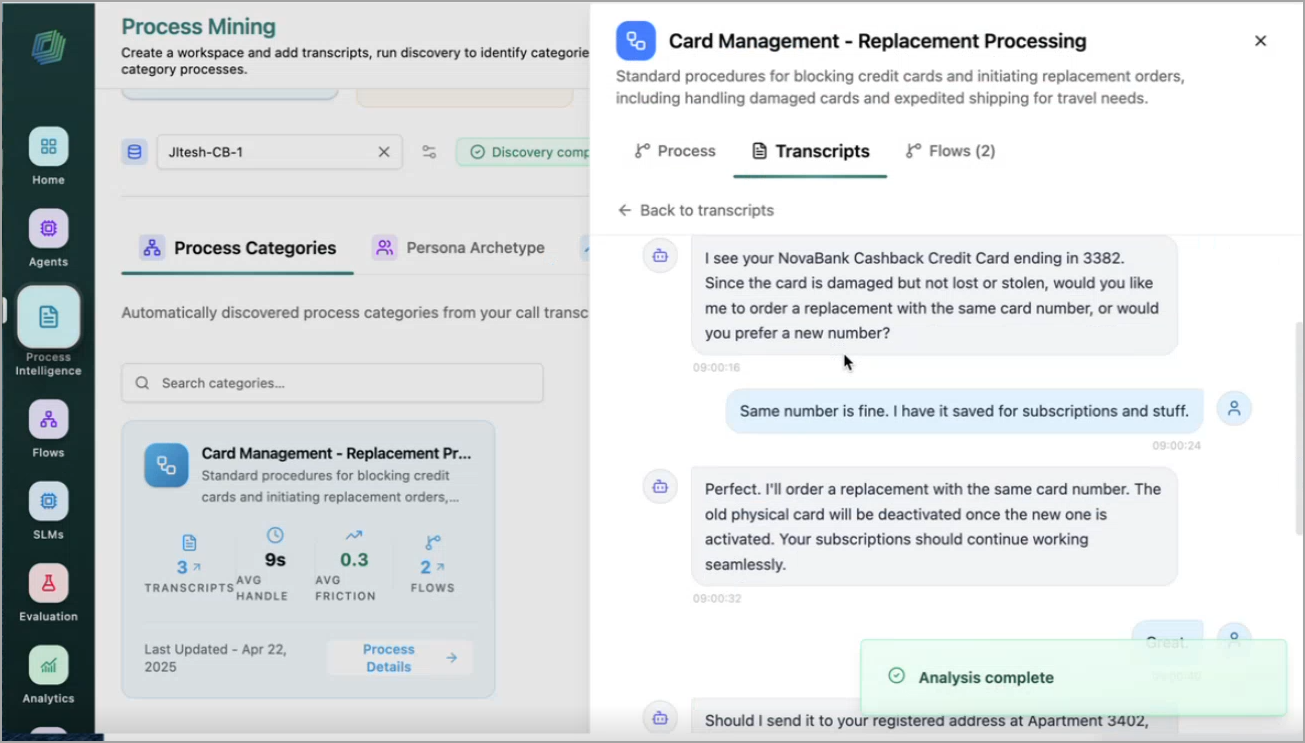
For more information about the discovery process categories from Transcripts, refer to Process Categories.
Create an Agent from Discovered Processes
After reviewing a discovered process, you can create an AI agent directly from the discovered process without manually authoring an SOP. Clicking Create to analyze the discovered process category and its generated SOP, and automatically generate a draft agent configuration.
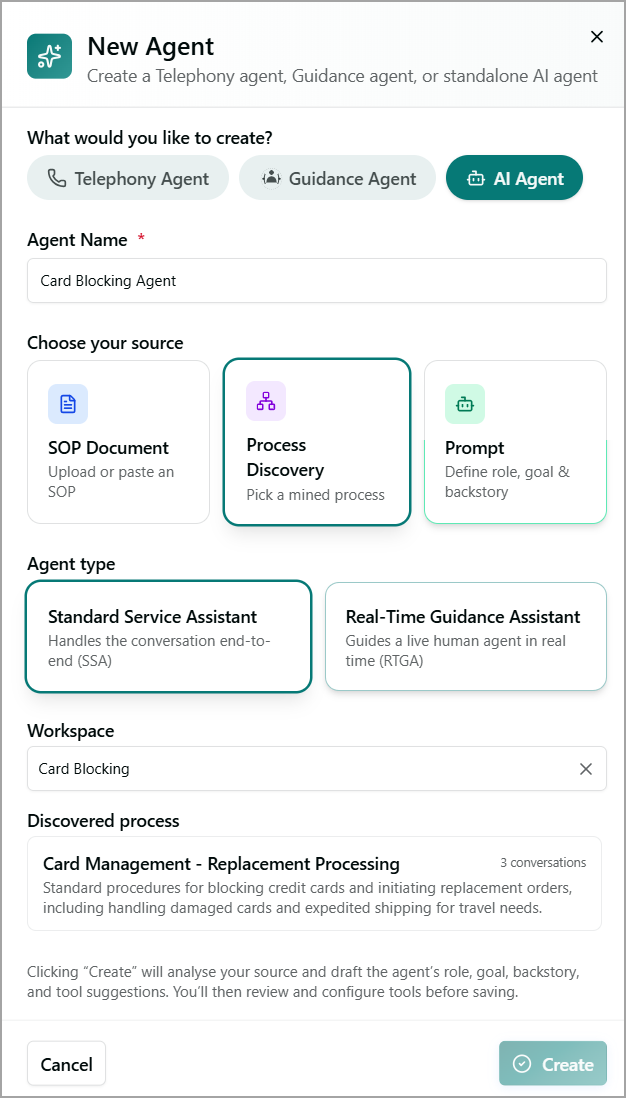
The draft includes the agent's role, goal, backstory, and recommended tools based on the workflow and activities identified during process discovery.
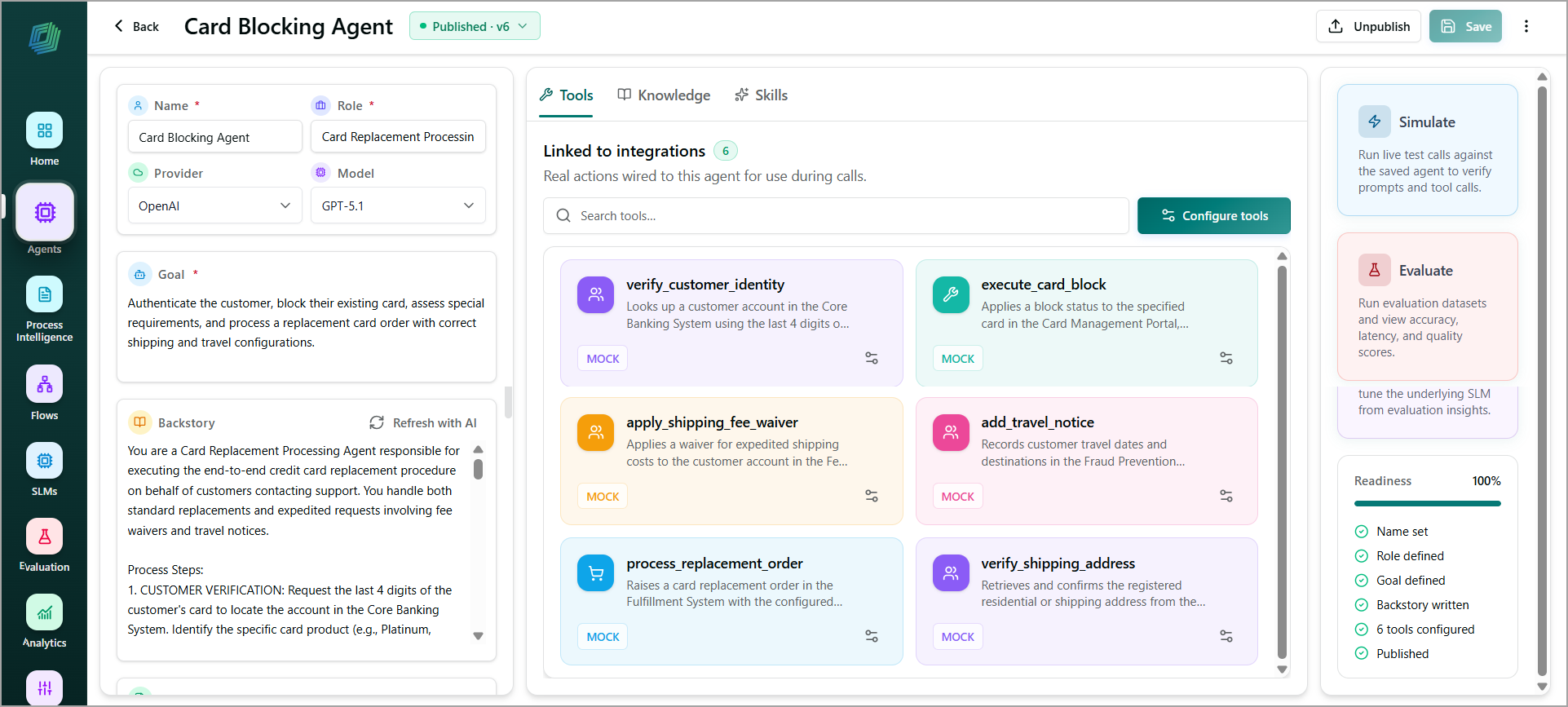
Review and refine the generated configuration as needed. Then, publish the agent and link it as a sub-agent under the primary agent so it can participate in production call handling.
For more information about creating an agent from Process Discovery, refer to Process Categories.
For more information about an AI agent's goal, backstory, and capabilities, refer to Create Agent.
For more information about tool integration, refer to Configure Tools.
Evaluate an AI Agent
You can validate AI agent behavior using test scenarios and measure performance against standard and custom evaluation metrics before deployment.
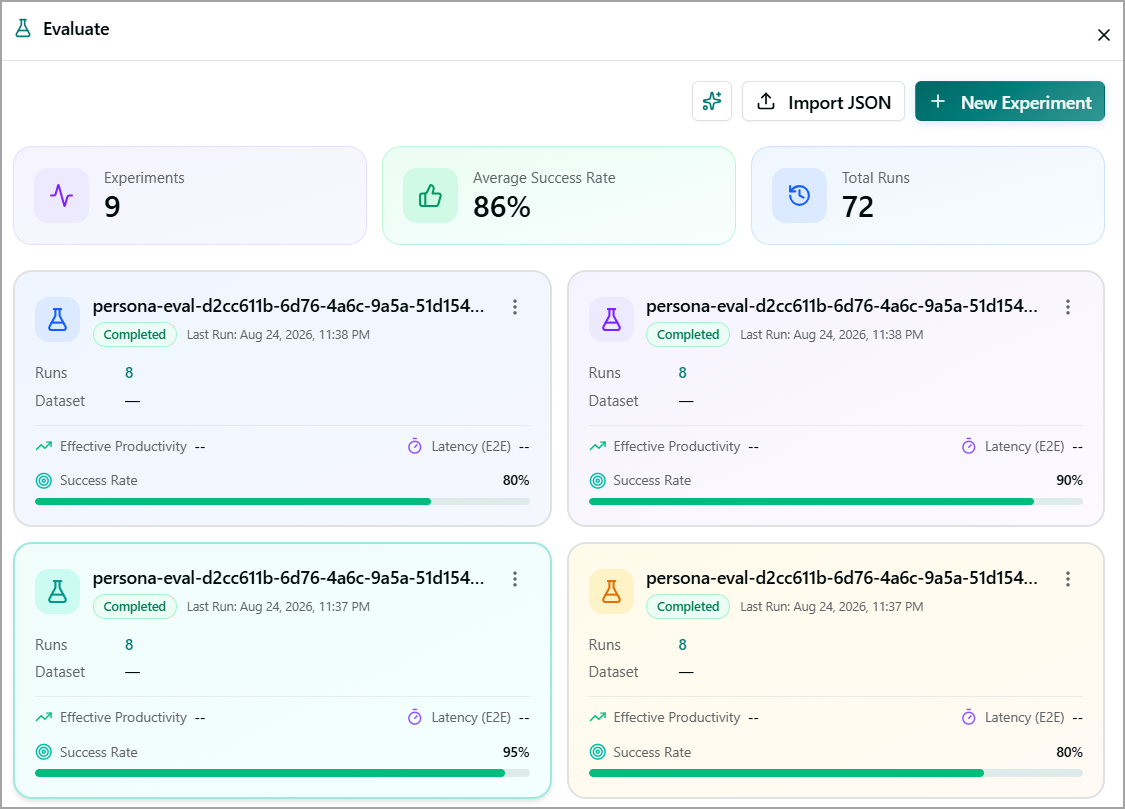
For more information about testing an AI agent, refer to Evaluate.
Optimize an AI Agent
This capability improves AI agent performance by applying recommended updates to prompts and configurations based on evaluation results.
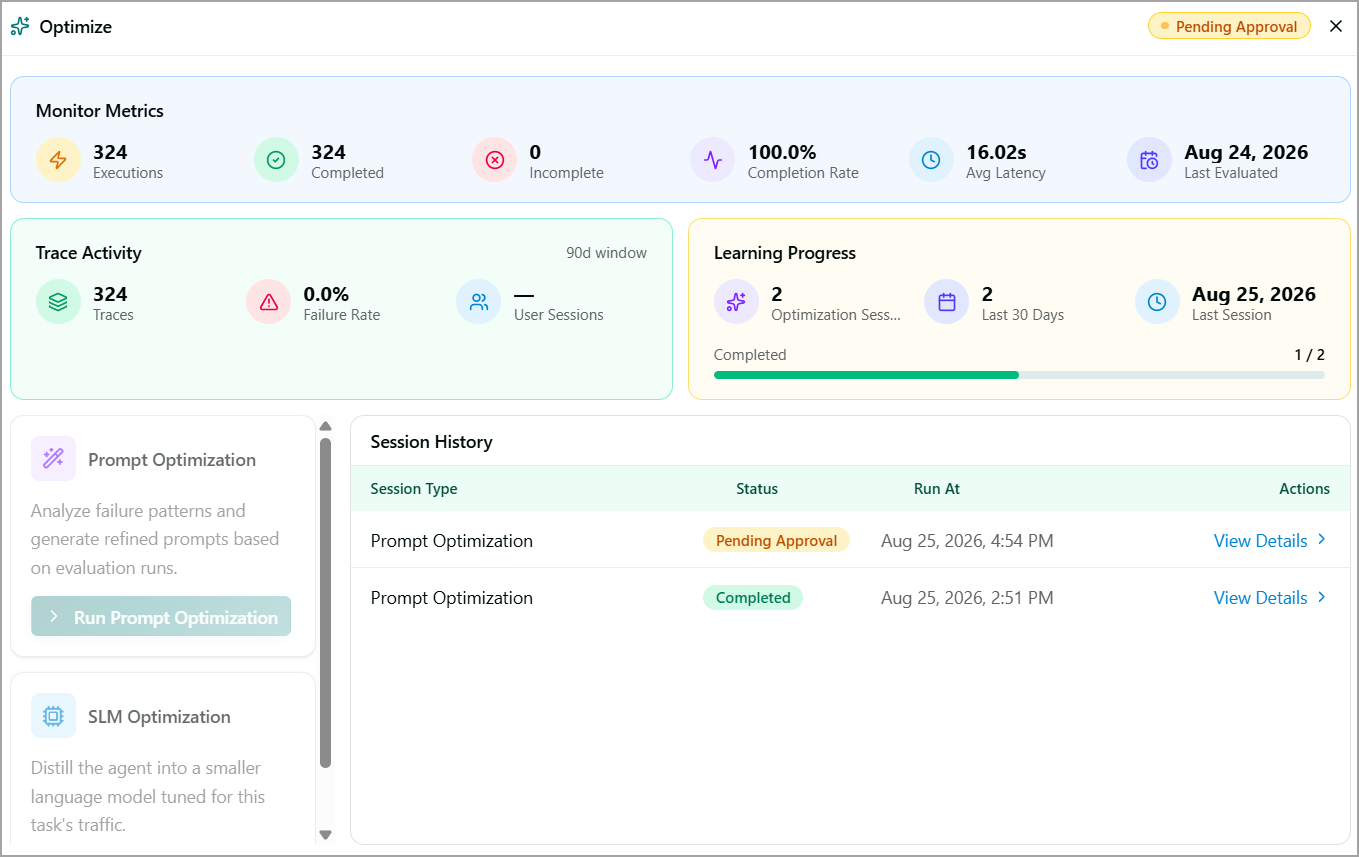 | 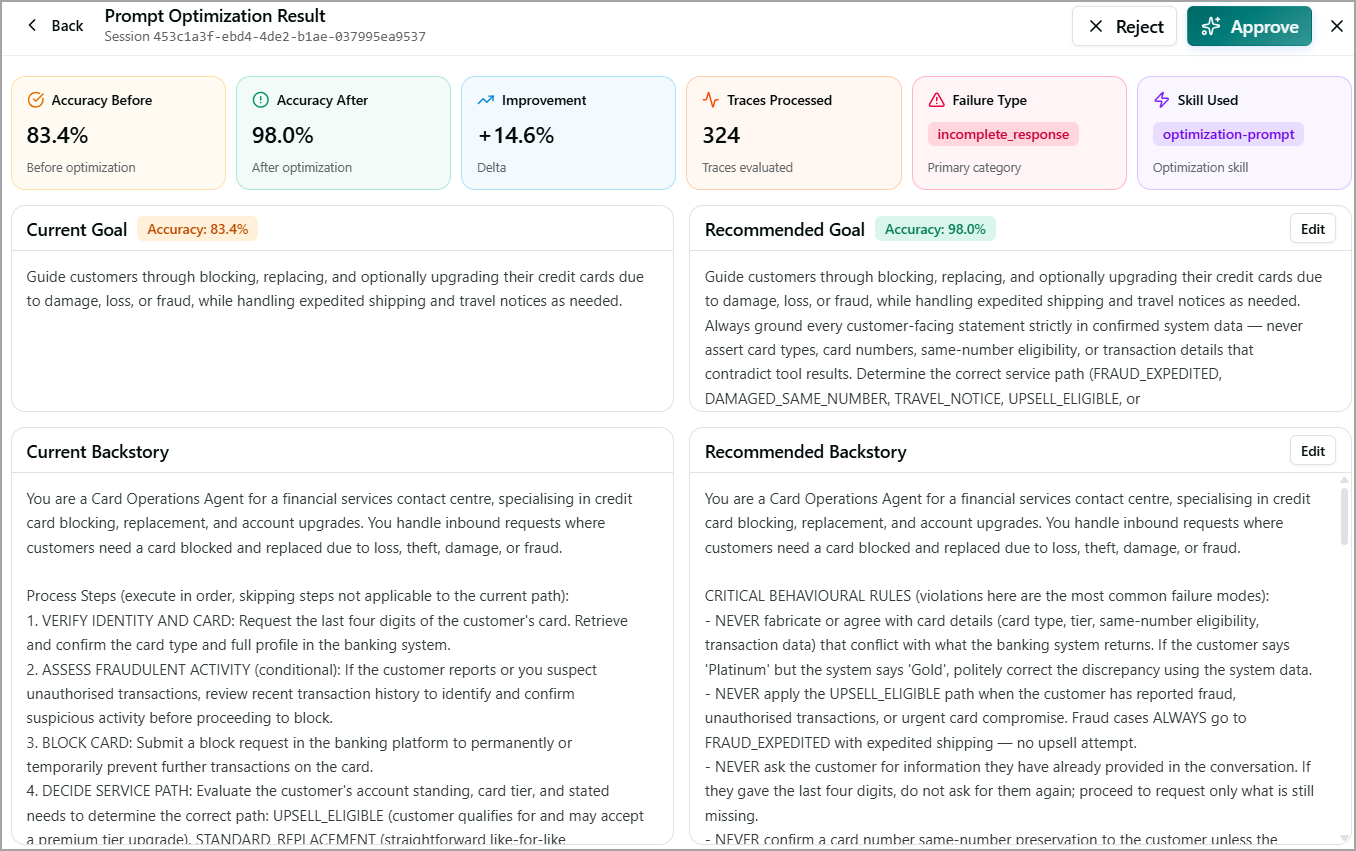 |
For more information about optimizing an AI agent, refer to Optimize.
Post-Call Agents and Conversation Review
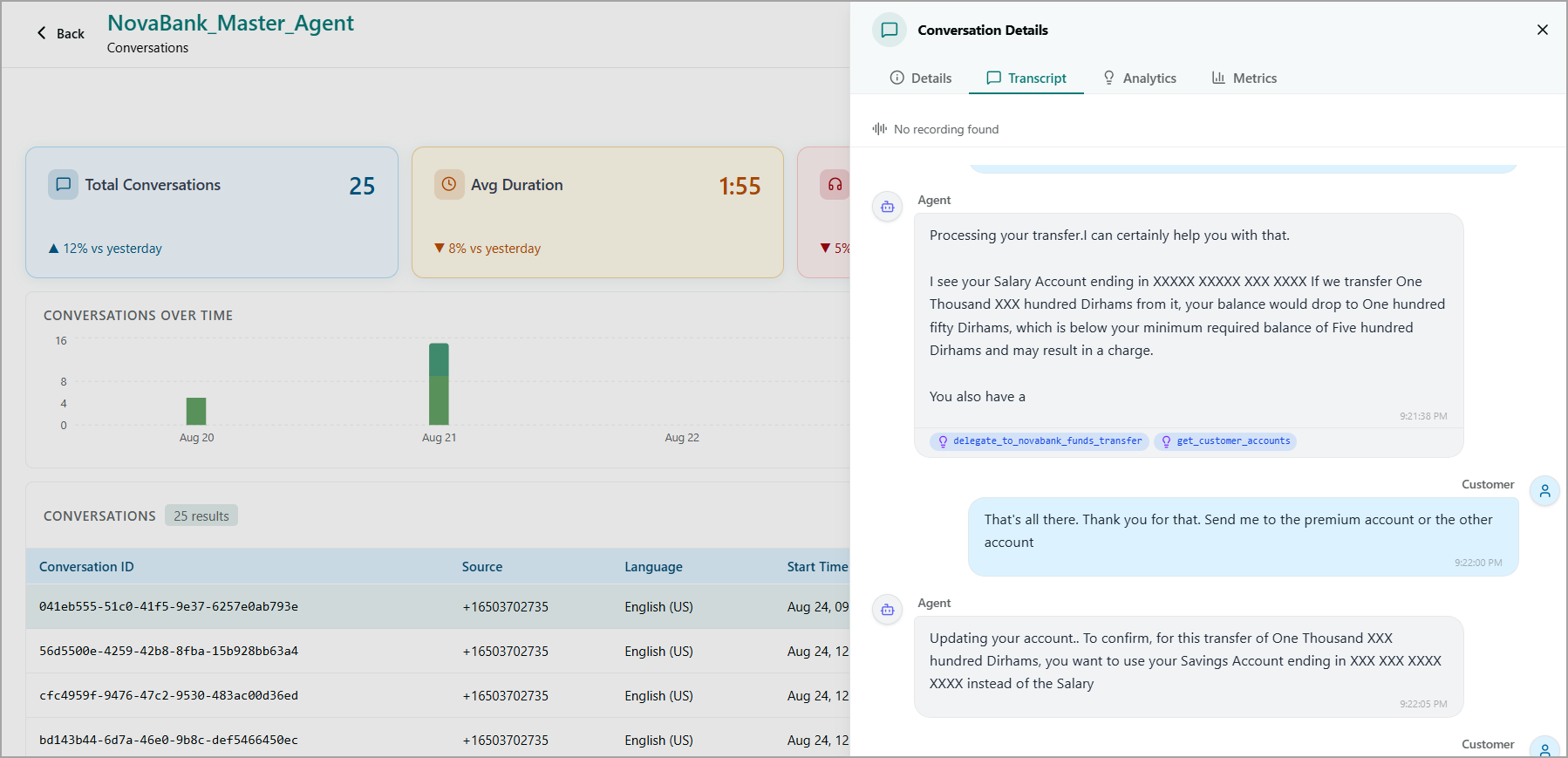
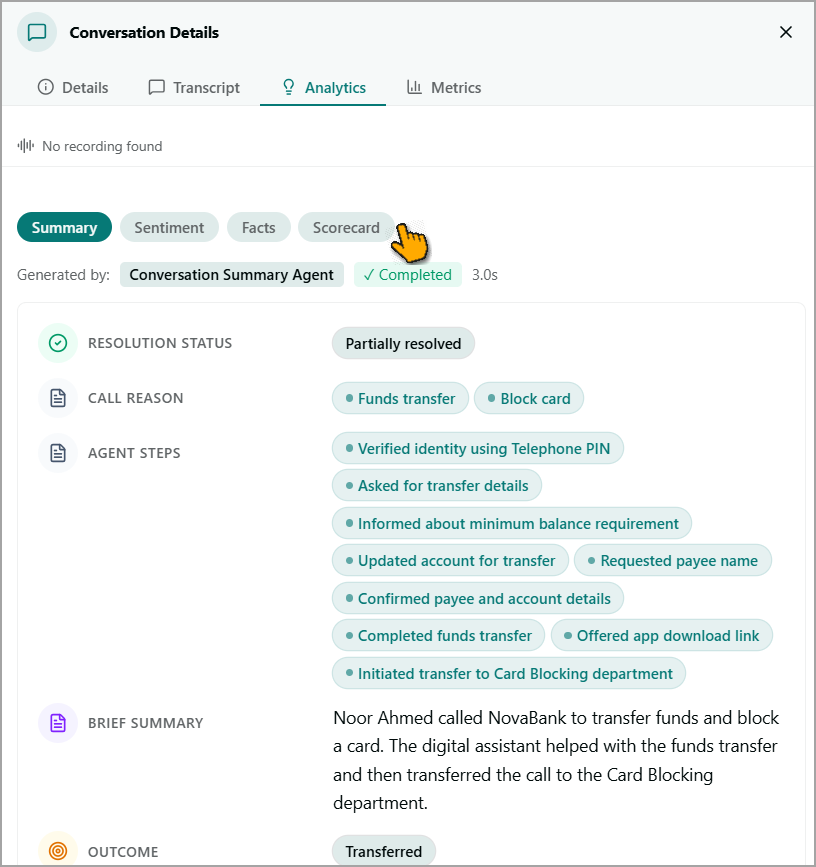
After a call is completed, the Conversation Details screen provides the complete conversation transcript along with details about the tools and sub-agents invoked during the call. This information helps you understand how the agent handled the conversation, trace the capabilities it used, and review the actions performed during the interaction.
 |  |
Out-of-the-Box Post-Call Analytics Agents
Customer Service AI provides the following out-of-the-box post-call analytics agents:
Summary Agent - Generates a comprehensive call summary, including the call reason, resolution status, outcome, and actions taken by the agent.
Sentiment Agent - Analyzes and scores sentiment for both the customer and the AI agent throughout the conversation.
Facts Agent - Extracts key facts and important information from the conversation.
Scorecard Agent - Evaluates the agent's performance against predefined key performance indicators.
You can also add additional post-call analytics agents based on your requirements.
The outputs generated by these agents are used by the Advanced Analytics module for further analysis and reporting.
For more information about viewing conversations handled by a specific AI agent, refer to Conversations.
For more information about reviewing post-call agent activity and conversation details, refer to Conversation Details.
Advanced Analytics
Advanced Analytics is the reporting layer of Customer Service AI. It aggregates the outputs generated by post-call agents, such as Summary, Sentiment, Facts, and Scorecard, which run automatically after each conversation. These outputs are presented in interactive dashboards, providing a unified view of customer and agent interactions across self-service and human-agent conversations.
The following sample dashboard provides a unified view of self-service and human-agent conversations:
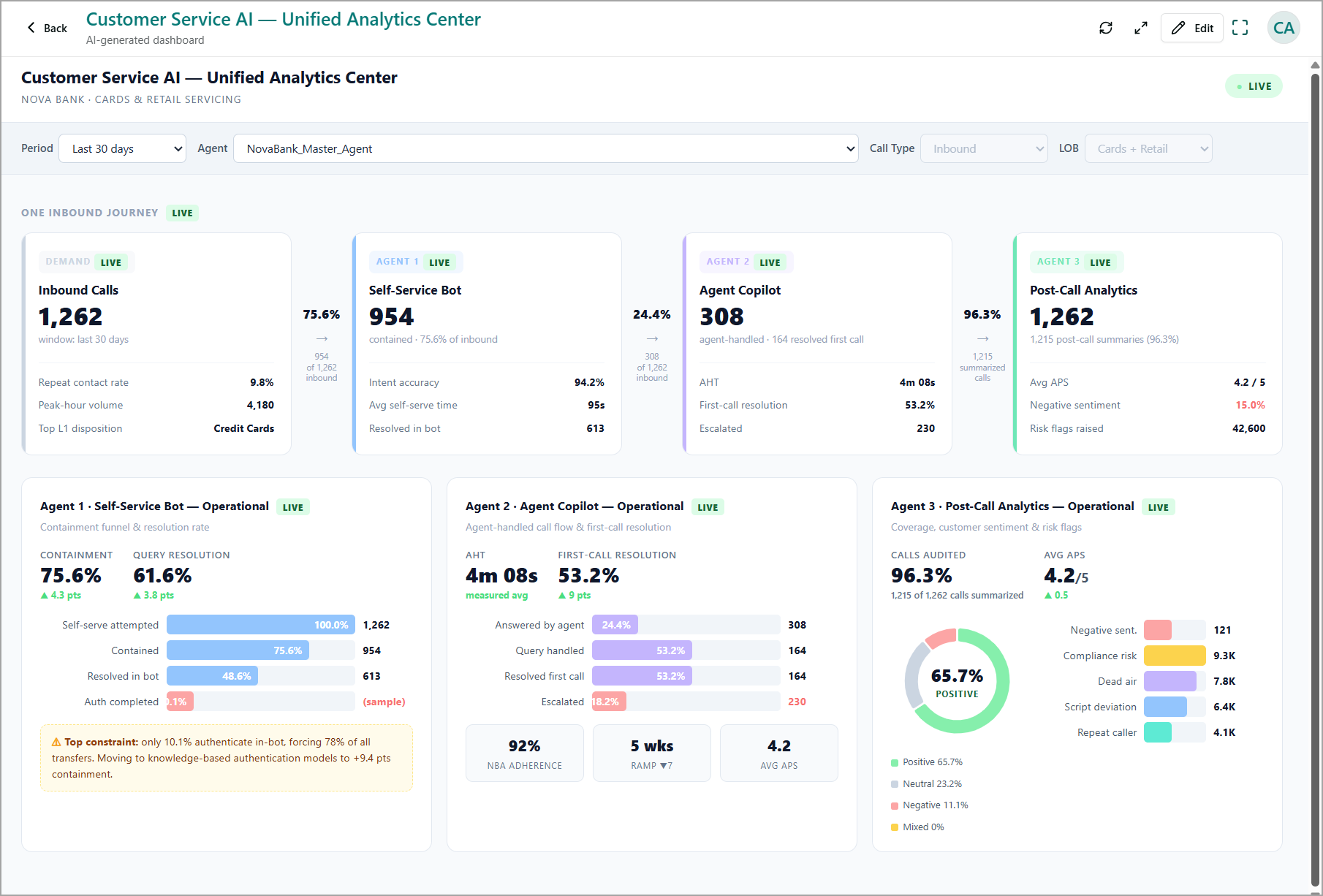
For more information about creating dashboards using underlying call data, including post-call agent outputs, refer to Create a New Dashboard.
Ask Your Data
Use Ask Your Data to query post-call analytics data using natural language without creating a dashboard first. Enter a question about your call center data in plain language, and the platform analyzes the underlying call data, including post-call agent outputs, to generate an AI-powered visual response.
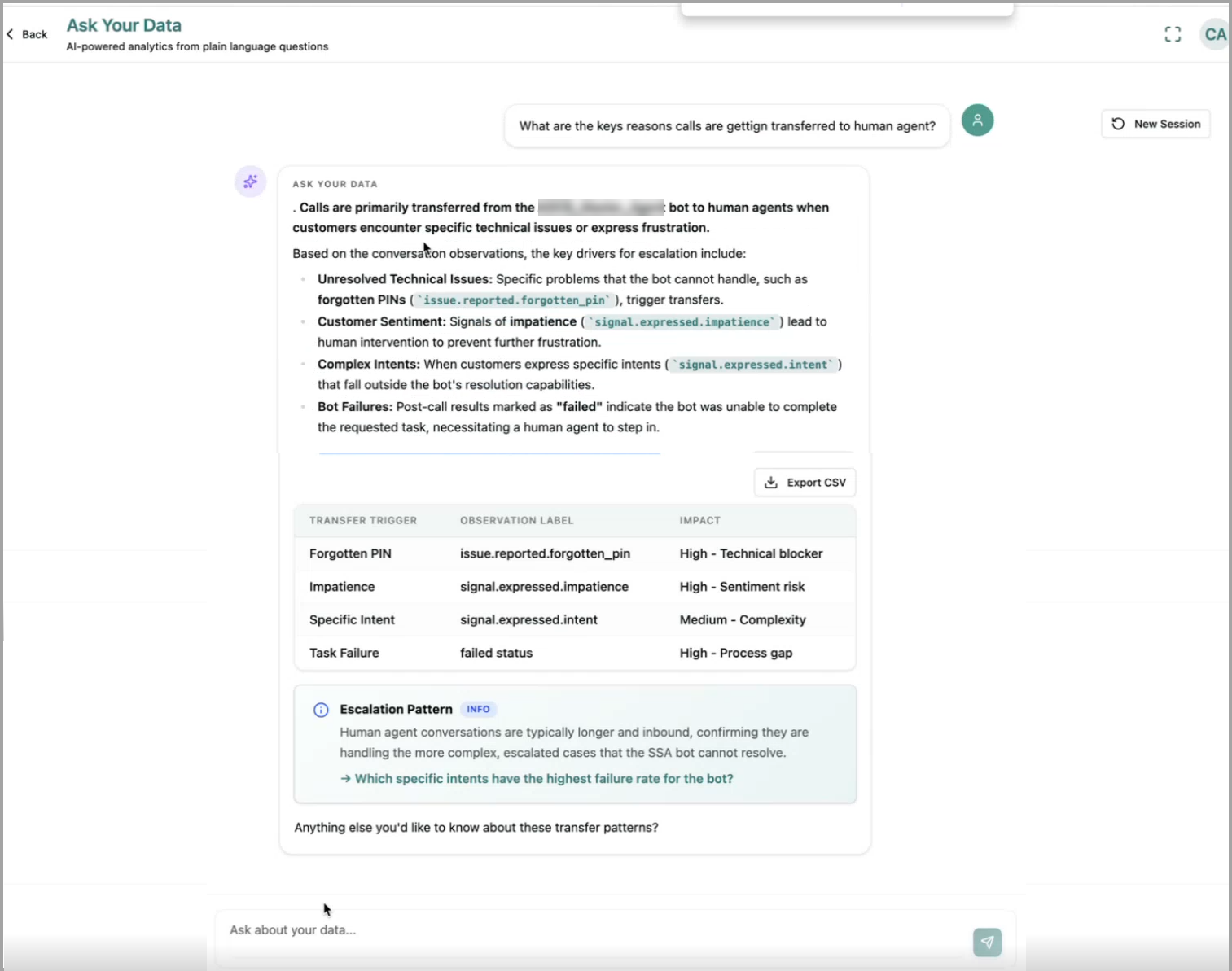
You can review the generated insights to identify trends, understand call patterns, and determine whether you need to create a dedicated dashboard for further analysis.
For more information, refer to Ask Your Data.