Home Page Tour
After successfully signing in, you are directed to the Customer Service AI Home page, which serves as the central workspace for exploring Customer Service AI's core capabilities, understanding customer-service automation opportunities, and evaluating the performance of AI-powered agents and Small Language Models (SLMs).
From the Home page, you can use predefined AI-powered workflows to analyze customer conversations, identify opportunities for automation, evaluate SLMs and AI agents, optimize inference performance, and create data pipelines from Standard Operating Procedure (SOP) documents.
The Home page provides quick access to Customer Service AI Copilot, an AI-powered conversational assistant that helps you perform common Customer Service AI activities without having to navigate through multiple modules or manually determine which capabilities to use. When you select an option, Customer Service AI opens the AI Assistant with a preconfigured request. The AI Assistant processes your request, performs the required analysis or actions, and displays its progress in the Agent Execution Steps panel.
Depending on the selected option, the AI Assistant can help you:
Analyze customer conversations to identify processes that can be automated.
Determine whether a customer interaction is better suited for a Self-Service Agent (SSA), a Human Agent, or a combination of both.
Review the fine-tuning status of SLMs used by AI agents.
Identify opportunities to reduce inference latency and cost.
Convert SOP information into data pipelines and AI-powered assistance for associates.
Evaluate the accuracy and effectiveness of AI agents operating in a contact center.
For more information about these predefined options, refer to the Get Started Section.
The Copilot is integrated into the Home page and complements Agent Studio by providing different approaches to creating and configuring AI-powered voice agents:
Customer Service AI Copilot provides a guided, conversational experience for rapidly creating production-ready voice agents with minimal configuration.
Agent Studio offers advanced configuration and customization options, allowing you to enhance agents with tools, knowledge bases, prompts, and business-specific workflows.
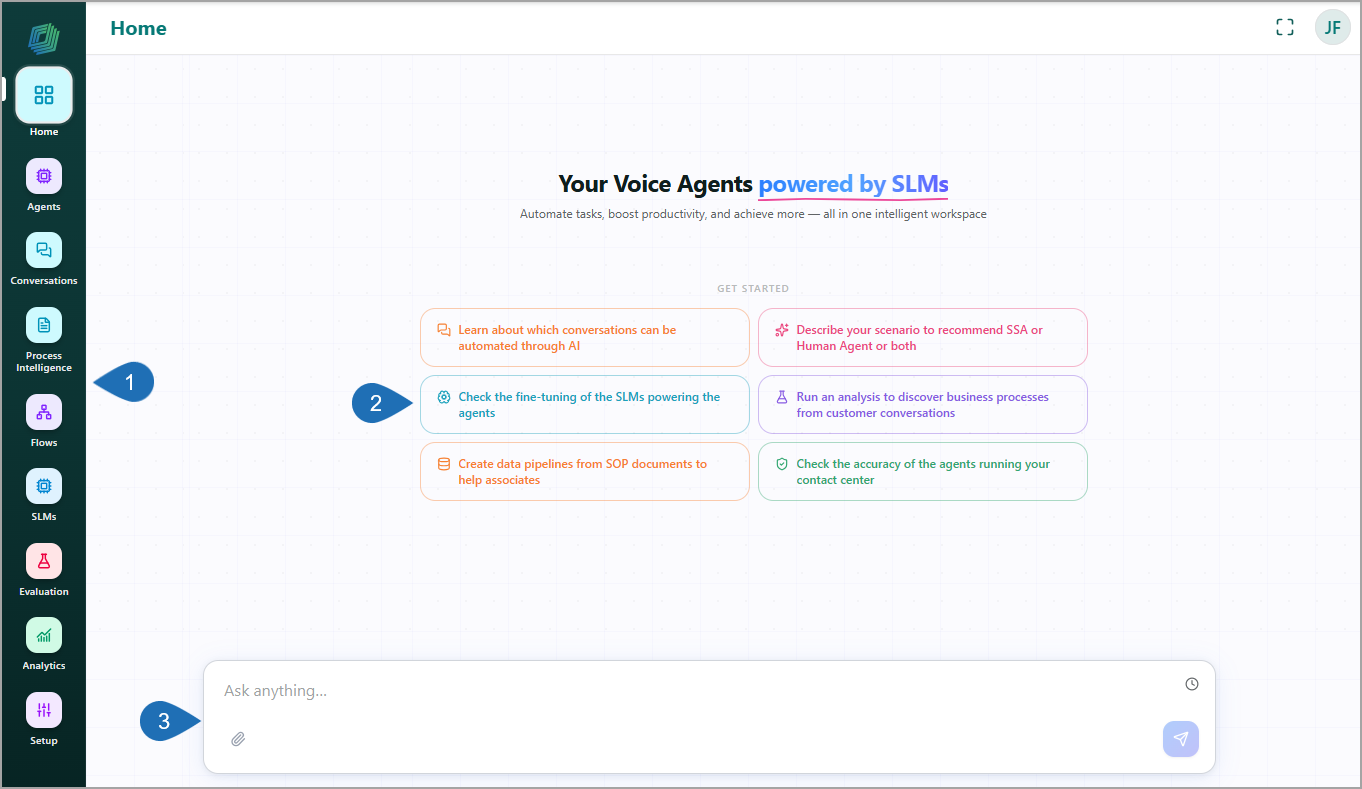
The primary objective of Customer Service AI is 'Your Voice Agents powered by SLMs'. By leveraging AI-powered voice agents and SLMs, you can automate customer-service interactions, improve operational efficiency, and deliver personalized customer experiences at scale.
The Home page consists of the following areas:
1 | Navigation Menu | Provides access to the core Customer Service AI modules. |
2 | Get Started Section | Provides guided entry points for common Customer Service AI activities. |
3 | AI Assistant Panel | Allows users to interact with Customer Service AI using natural language and receive AI-guided recommendations and actions. |
Naviagtion Menu
The sidebar gives you access to every core Customer Service AI module.
Menu | Description |
|---|---|
Home | Displays the Customer Service AI home page with quick-start actions, suggested use cases, and platform insights. Use this page as your starting point for accessing Customer Service AI capabilities. |
Agents | Create, configure, and manage AI-Powered Customer Service Agents. Use this module to define agent behavior, configure tools and knowledge sources, and manage agent deployments. |
Conversations | Provides a complete view of calls and chat sessions handled by a selected AI Agent. Use this page to monitor conversation activity, view summary cards for a quick overview of conversation volume, search and filter individual conversation records, and review conversations in detail. |
Process Intelligence | Analyze conversation transcripts to discover process categories, customer personas, workflow patterns, and automation opportunities. Use this module to understand customer interactions and identify areas for optimization. |
Flows | Create and manage workflow and conversation flows. Use flows to define process logic, automate tasks, and control how agents respond to customer interactions. |
SLMs | Manage the SLMs used by AI agents. View model performance, monitor fine-tuning status, and evaluate optimization opportunities related to accuracy, latency, and cost. |
Evaluation | Assess the quality and performance of AI agents through automated evaluations. Review pass rates, coverage metrics, regressions, and other quality indicators to validate agent behavior. |
Analytics | View aggregated metrics and operational insights across agents, processes, and models. Use analytics to monitor performance trends, adoption, productivity improvements, and business outcomes. |
Setup | Configure voice agent studio, ASR, TTS, phone integrations, orchestration logic, analytics, guardrails, and multi-language support for your AI voice platform. |


Get Started Section
The Get Started section provides six quick-action prompts for common Customer Service AI tasks and workflows.
Select a prompt to open the AI Assistant with the corresponding request pre-populated. The AI Assistant processes the request and displays the progress of each task in the Agent Execution Steps panel. After processing is complete, the AI Assistant provides contextual guidance, recommendations, and actionable next steps based on the selected workflow.
Learn about which conversations can be automated through AI - Helps you identify customer interactions that may be suitable for automation. The AI Assistant analyzes uploaded conversation transcripts to identify process categories, conversation patterns, and operational metrics, and recommends workflows that can be handled by AI-powered agents.
Describe your scenario to recommend SSA or Human Agent or both - Helps you determine the most appropriate customer-service model for a specific use case. By describing your business process, customer interaction, or call type, the AI assistant evaluates the scenario and recommends whether it should be handled by a Self-Service Agent (SSA), a Human Agent, or a combination of both.
Check the fine-tuning of the SLMs powering the agents - Provides visibility into the SLMs available in the platform and their fine-tuning configurations. Use this prompt to review which models have been fine-tuned for specific business domains and verify the configuration used by your AI agents.
Run experiments to reduce latency and cost of inferencing - Helps you identify opportunities to improve model response times and reduce inference costs. Use this option to explore experiments and configurations that can help optimize the performance and cost of AI-powered voice agents.
Create data pipelines from SOP documents to help associates - Helps you create an end-to-end data pipeline from your SOP documents. Use this prompt to analyze uploaded SOPs, identify business workflows, generate structured SOPs, and create a voice agent that associates can interact with in real time.
Check the accuracy of the agents running your contact center - Helps you evaluate how effectively AI agents handle customer interactions in the contact center. By reviewing key performance metrics, conversation outcomes, and response quality, you can identify areas for improvement and ensure your AI Agents deliver accurate, consistent customer experiences.
Viewing Agent Execution Steps
The Agent Execution Steps panel displays the real-time progress of tasks performed by the AI assistant while processing your request. It helps you understand the sequence of operations the agent performs and provides visibility into the current execution status.
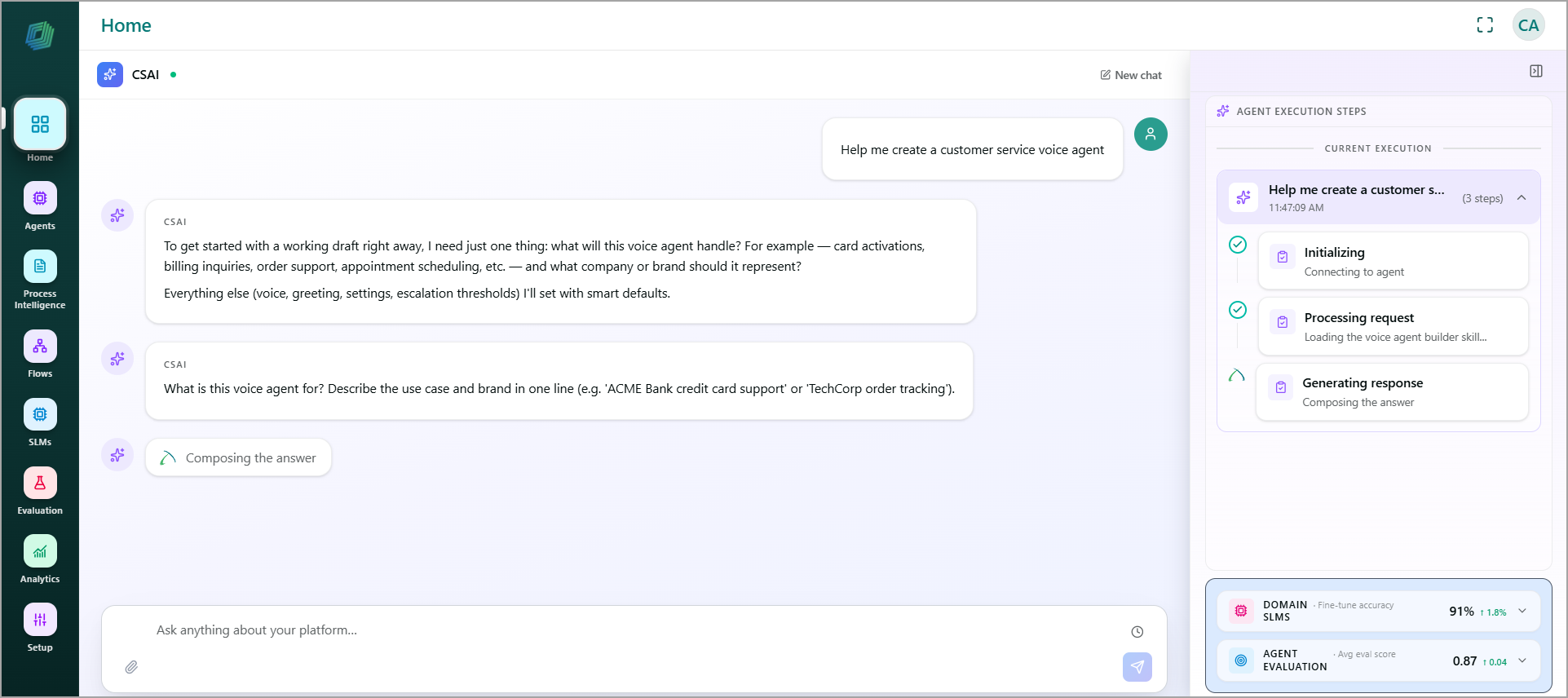
Each request is broken down into a series of execution steps. As processing progresses, completed steps are indicated by a green checkmark, while the current step is highlighted.
The execution steps vary depending on the task being performed. For example, when creating a voice agent, the Customer Service AI assistant displays the following execution steps:
Steps | Description |
|---|---|
Initializing | Confirms the connection to the Customer Service AI agent before any processing begins. |
Processing request | Analyzes your request and loads the relevant builder skill or knowledge required to handle it. |
Generating response | Composes the answer or the next set of options based on the processed request. |
Finalizing | Completes the execution and returns the generated response. |
Each request you send to Customer Service AI creates one execution entry. An entry shows:
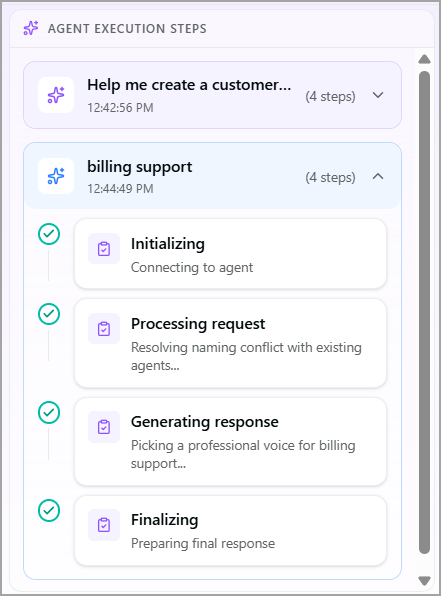
Request summary - A brief description of the submitted request.
Timestamp - The time the request was submitted (for example, 11:47:09 AM).
Step count - The total number of execution steps performed to process the request (for example, 4 steps).
Expand/Collapse - Click the down or up arrow on the right side of an entry to expand or collapse the list of individual steps.