1.0.9 Release Note_May 18, 2026
Release Date: May 18, 2026
The Business AI Cloud 1.0.9 Release will introduce the following new or enhanced features.
Important
This document provides high-level information on the Business AI Cloud's latest release features and enhancements. For detailed procedures, configuration steps, and comprehensive guidance, please refer to the Business AI Cloud User Guide.
Release Highlights
New Features
OIDC Login: End-to-end OIDC SSO support implementing the open-standard OIDC protocol, with Keycloak and Okta as validated identity provider integrations.
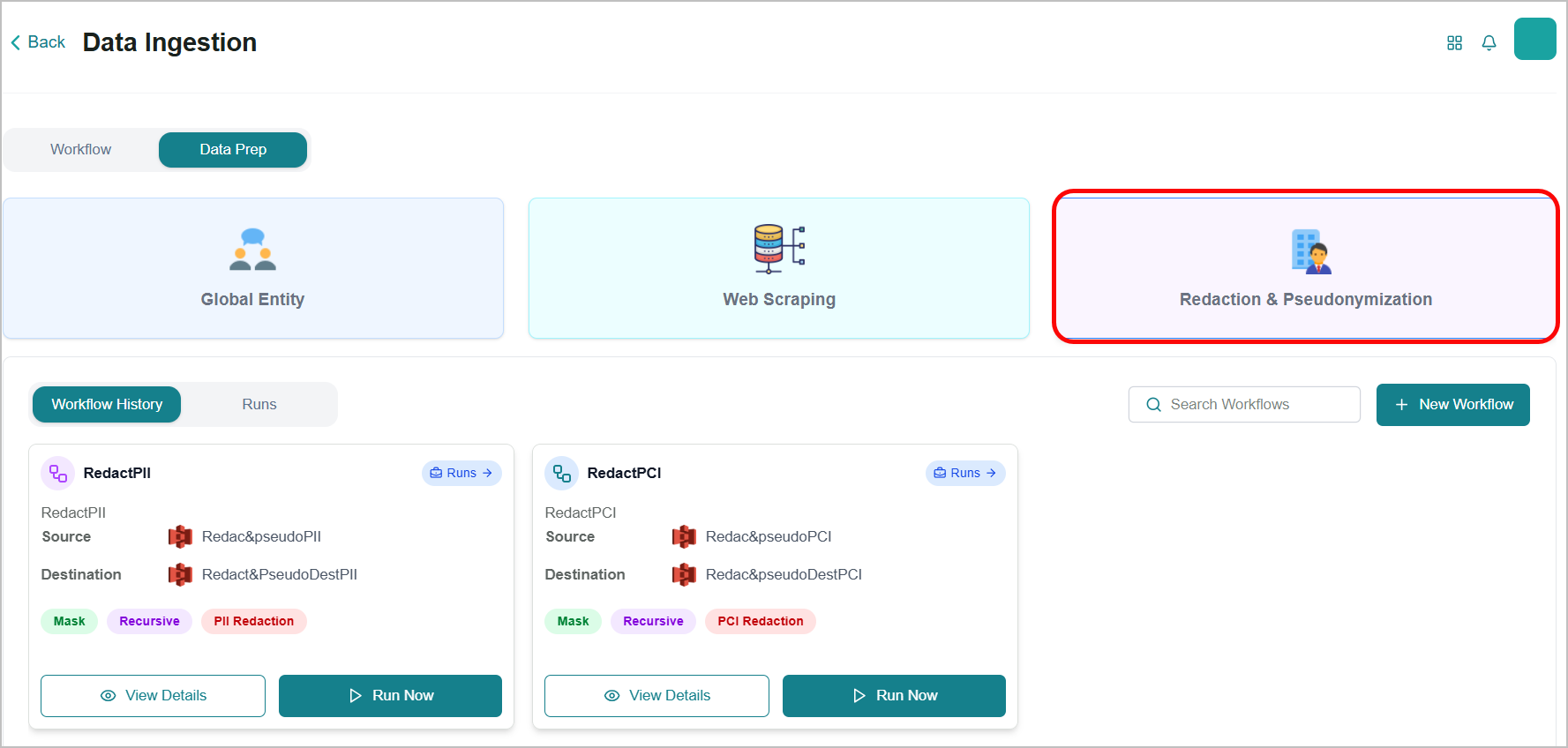
Data Redaction and Pseudonymization: Configurable workflows automatically redact or pseudonymize PII and PCI during ingestion, keeping sensitive data out of knowledge bases while preserving the structure needed for RAG, fine-tuning, and AI agents.
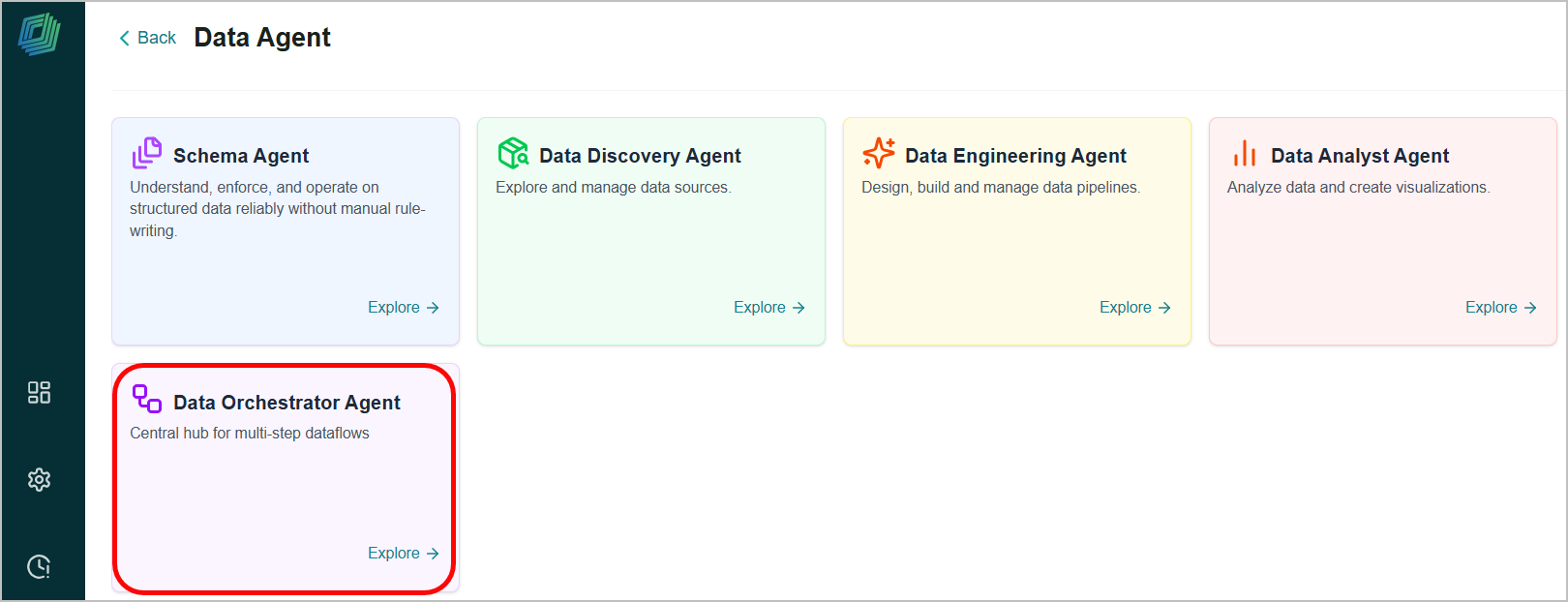
Data Orchestration Agent: Allows you to design, run, and monitor multi-step dataflow on the visual workspace.
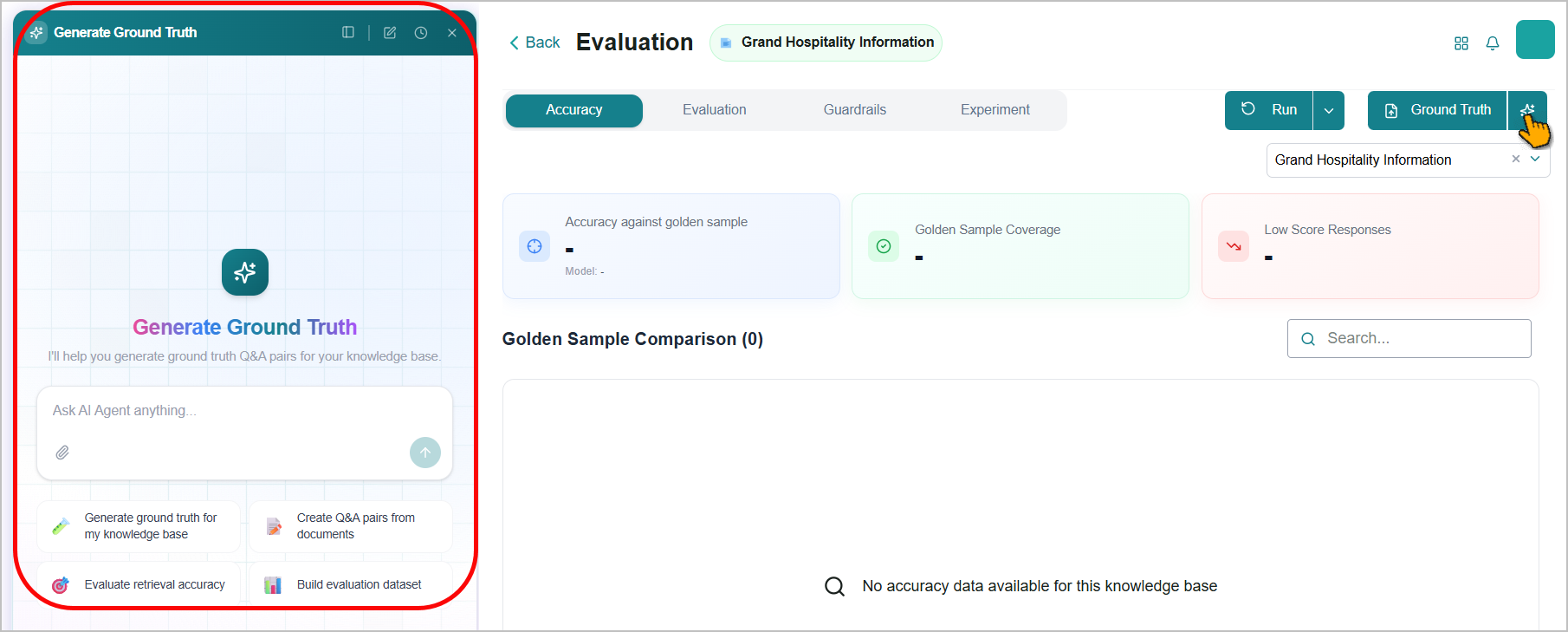
Automatic Ground Truth Data: Generate ground truth Q&A pairs automatically from your knowledge base through a conversational agent.
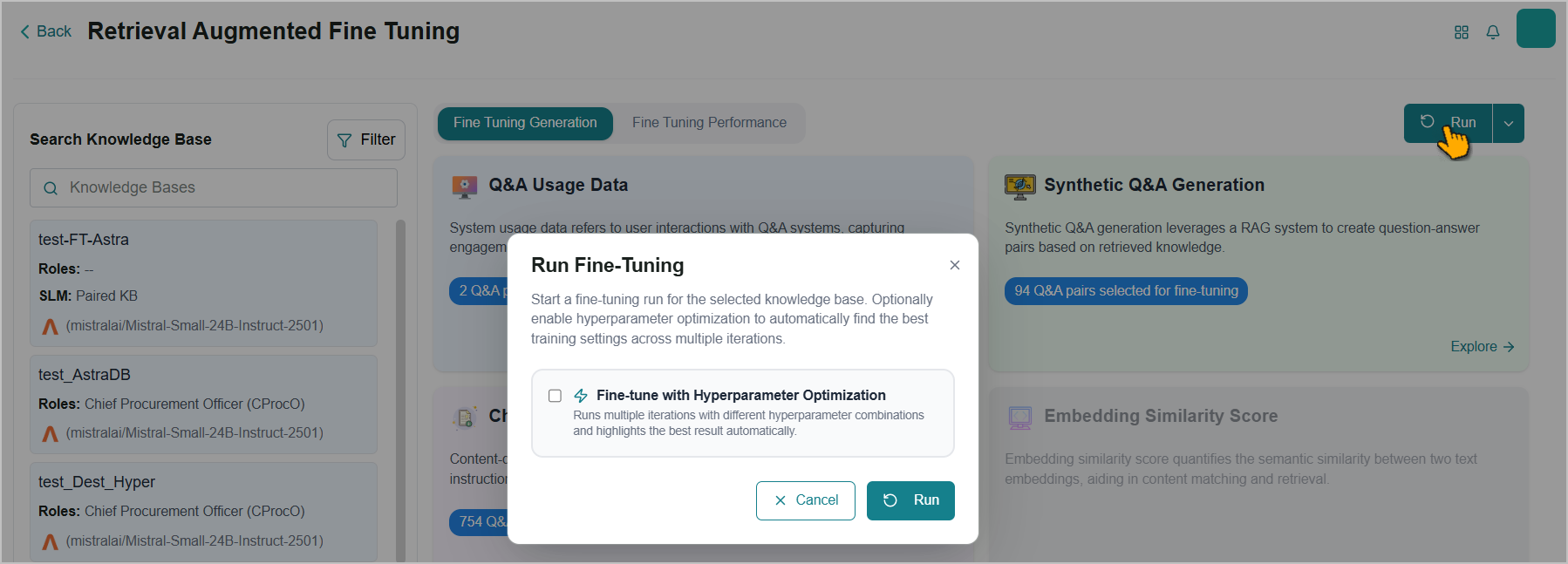
Agentic Hyperparameter Optimization: Fine-tuning runs can now automatically test multiple hyperparameter combinations across iterations and highlight the best result based on a target accuracy threshold.
Root Cause Analysis for Drift Scores: Every drift score now opens into an automated, question-by-question diagnostic showing which questions regressed, which improved, and why.
Workato Connectors Integration: Extends the Agent Action Library with a wider base of enterprise connectors (e.g., ServiceNow, Freshdesk, Salesforce, Jira) available on demand, with OAuth and API key authentication support.
Agent Skills Management & Versioning: Independently versioned skills with centralized management for creating, editing, and attaching skills to agents.
Agents Version Management: Immutable, auto-numbered version history for agent configurations with rollback and version-specific execution support.
AI Agent Health Dashboard: High-level system health dashboard with agent-level usage and performance metrics for monitoring AI agents.
Enhancements
Optimized Ingestion for Large Documents (~100 pages): The ingestion pipeline now handles large and complex documents reliably, converting tables, handwritten notes, signatures, and diagrams for downstream RAG retrieval and fine-tuning.
Filtering for Eval Runs: The RAG Evaluations screen now hides experimental eval runs by default, with a toggle to show runs generated by auto SLM pairing and other automated flows.
Filters in Fine Tuning Studio: Filter by knowledge base type (Document RAG / Relational DB RAG) and ground truth data state directly within Fine Tuning Studio.
Prompt Visibility for Fine-Tuning Jobs: The prompt used for each fine-tuning job is now visible directly, alongside the chunks used to generate the Q&A pairs.
SLM Fine-Tuning on Google Cloud: SLM fine-tuning is now available on Business AI Cloud deployments running on Google Cloud.
Copilot Agent Builder: Split-view Agent Builder with conversational chat on the left and a manual configuration panel on the right, plus session history for viewing and resuming past builder conversations.
Agent Evaluation – Results & Analytics: Workflow dropdown for filtering evaluation results by specific workflows, plus Agent Insights with session management and module-specific filtering.
OpenAPI Enhancements: OAuth 2.0 authorization flow for OpenAPI integrations and automatic retry mechanism for failed API executions.
OAuth Support for Smithery MCPs: Smithery MCP integrations that require OAuth now open an inline authorization flow with automatic connection status polling.
Latency Optimization and Context Compaction: Context compaction and summarization for lower latency in extended agent conversations.
Lightweight Agent Config Without Tasks: Support for lightweight agent configurations using only tools, without requiring task definitions.
New Features
OIDC Login
Business AI Cloud now supports end-to-end OpenID Connect (OIDC) login, enabling Single Sign-On (SSO) for the platform using the open-standard OpenID Connect protocol. Organizations using compliant identity providers can integrate their existing authentication infrastructure with the platform. Keycloak and Okta have been validated as identity provider integrations. Existing login methods remain unaffected.
Key Capabilities:
OIDC-based SSO login for the platform, supporting any compliant identity provider.
Keycloak and Okta validated as identity provider integrations.
Existing username/password and other login methods continue to work alongside OIDC.
OIDC Login is available in the platform's authentication settings and must be enabled by the Business AI Cloud support team. For more information, refer to Access Business AI Cloud in the User Guide.
Data Redaction & Pseudonymization
Sensitive data, such as Personally Identifiable Information (PII) and Payment Card Information (PCI), flowing into knowledge bases, agent responses, and training datasets creates compliance and privacy risks. Business AI Cloud now offers Data Protection Workflows that scan source content during data preparation and either redact or pseudonymize sensitive fields before they enter knowledge bases or model outputs, while preserving the structure needed for RAG retrieval, fine-tuning, and agents.
Key Capabilities:
Configure protection per data type, with PII and PCI each independently set to redaction or pseudonymization within a single workflow.
Mask new data on ingestion or unmask previously protected data, with optional recursive processing of files in subfolders.
Run workflows across AWS S3, Google Cloud Storage (GCS), and Azure Blob Storage sources, with support for CSV, PDF, DOCX, PPTX, ODT, and XLSX files, with real-time run history, file-level status, and error diagnostics.
Data Redaction & Pseudonymization are available in Data Prep within Business AI Cloud's Knowledge Layer.
To access, go to the Home page > Data > Data Ingestion > Data Prep > Redaction & Pseudonymization.
For more information, refer to Data Preparation in the User Guide.
Data Orchestration Agent
Business AI Cloud now provides the Data Orchestrator Agent, a visual workspace that lets you design, run, and monitor multi-step dataflows without writing code. Acting as the central control point for your data operations, the agent manages the full dataflow lifecycle, from build to production, by automatically handling sequencing, dependency checking, and task handoffs. Before any pipeline starts, it verifies that all required inputs and connections are available.
Key Capabilities:
Design dataflow on a graphical canvas by adding and connecting task nodes.
Run dataflow directly from the canvas without a command line or separate tool.
Verifies that all dependencies are met before a dataflow starts, preventing pipelines from failing mid-run due to missing inputs or unresolved connections.
Executes tasks seamlessly from start to finish, handling sequencing, triggers, and task handoffs automatically.
The Data Orchestrator Agent is available within Business AI Cloud's Data Layer.
To access, go to the Home page > Data > Data Agents > Data Orchestrator Agent.
For more information, refer to Data Orchestrator Agent in the User Guide.
Automatic Ground Truth Data
Building a ground truth Q&A dataset is one of the most manual steps in evaluating a knowledge base, and without one, retrieval accuracy can't be measured reliably. Business AI Cloud now generates synthetic Q&A pairs directly from your knowledge base through a conversational agent, producing evaluation datasets in minutes. The Generate Ground Truth agent accepts natural-language prompts like "Create Q&A pairs from documents" or "Build evaluation dataset" and returns a labeled dataset ready for retrieval evaluation.
Key Capabilities:
A conversational agent generates ground-truth Q&A pairs directly from knowledge base content, eliminating the need for manual labeling.
Built-in prompts for the common evaluation workflows, generating ground truth, and evaluating retrieval accuracy.
Generated datasets feed directly into retrieval evaluation, so teams can benchmark knowledge base quality and track it over time.
Document-grounded generation keeps synthetic questions and answers tied to source content for traceability.
Automatic Ground Truth Data generation is available within Business AI Cloud's Knowledge Layer.
To access, go to the Home page > Knowledge > RAG Evaluation.
For more information, refer to Running the RAG Evaluation in the User Guide.
Agentic Hyperparameter Optimization
Finding the right hyperparameters for fine-tuning takes ML expertise and many manual iterations. Business AI Cloud now runs that loop automatically: set a target accuracy and iteration cap (1-3), and the system tests multiple hyperparameter combinations and highlights the best result.
Key Capabilities:
Toggle Hyperparameter Optimization when starting a fine-tuning run to automatically test multiple combinations across iterations.
Configure the maximum number of iterations (1-3) and a target accuracy threshold; training stops early once the threshold is reached.
View key hyperparameter values directly on each LoRA adapter for quick reference (Learning Rate, Epochs, LoRA Rank).
One place to view the full set of hyperparameters used per iteration, including Learning Rate, Epochs, LoRA Rank, Batch Size, Warmup Steps, and Gradient Accumulation, with the best accuracy highlighted across runs.
Agentic Hyperparameter Optimization is available within Fine-tuning Studio in Business AI Cloud's Knowledge Layer.
To access, go to the Home page > Knowledge > Fine Tuning Studio.
For more information, refer to Fine Tuning Studio in the User Guide.
Root Cause Analysis for Drift Scores
Business AI Cloud now provides automated Root Cause Analysis (RCA) for every drift score, showing which questions regressed, which improved, and what caused the change. You can view RCA next to any drift score, a question-by-question diagnostic comparing the fine-tuned model to the base model.
Key Capabilities:
Three-tab breakdown of every drift score: Regressed (questions where the fine-tuned model performed worse), Improved (questions where it performed better), and Novel (questions unique to the fine-tuned evaluation).
Per question diagnostics showing previous and new accuracy, drift score, both answers side by side, and a plain language analysis of what changed (for example, "Retrieval changed: the adapter retrieved a different context).
Search for any question by keyword and export the full RCA dataset as a CSV file for offline review or compliance archiving.
The RCA is available within the Fine-tuning Performance in Business AI Cloud's Knowledge Layer.
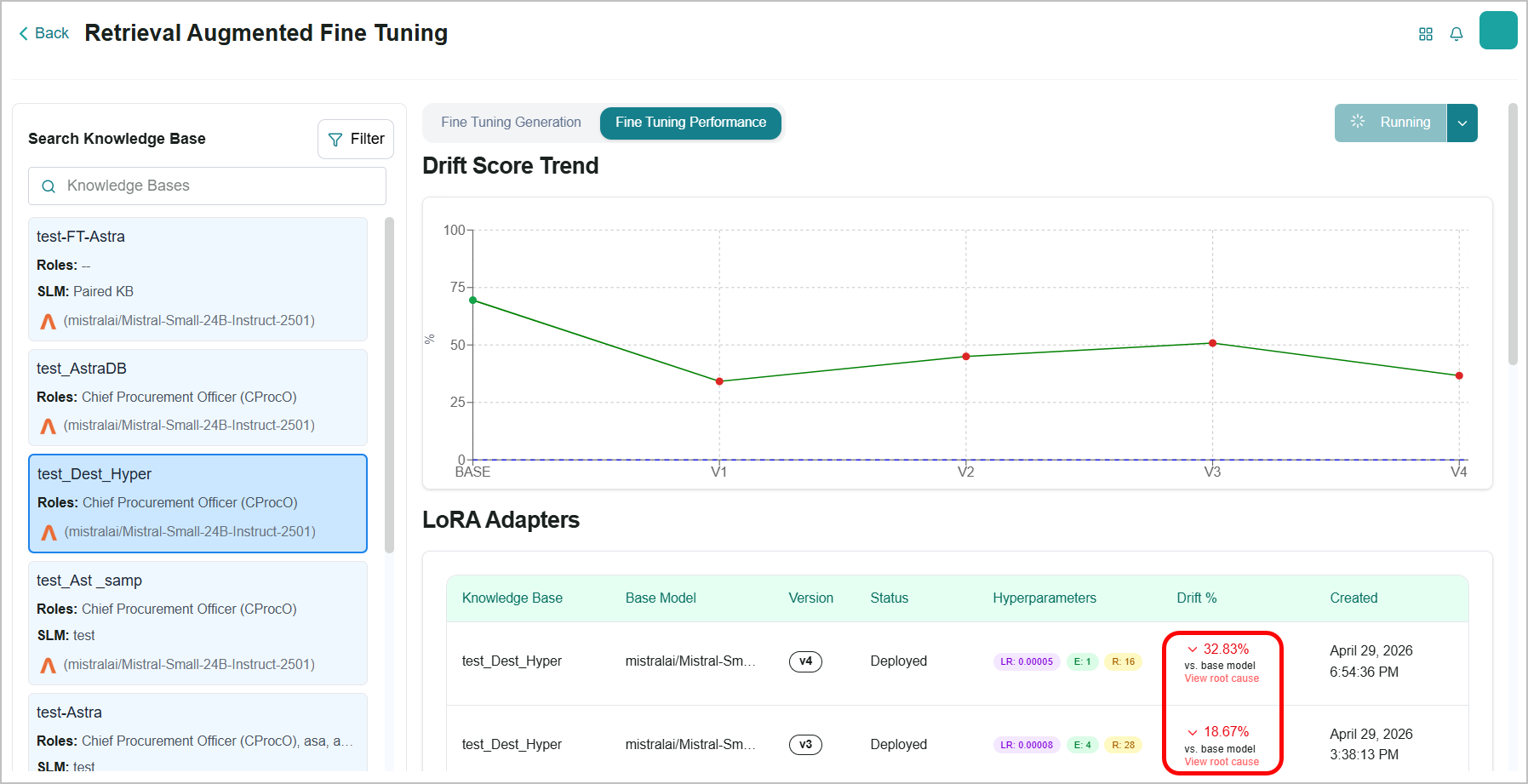
For more information, refer to Viewing Root Cause Analysis in the User Guide.
Workato Connectors Integration
Business AI Cloud extends the Agent Action Library with a wider base of enterprise application connectors, available on demand. Agents can connect to and execute actions across a wider range of third-party applications via a Workato integration.
Key Capabilities:
Connect agent workflows to a wide range of enterprise applications, including ServiceNow, Freshdesk, Salesforce, Jira, Slack, Gmail, and Outlook.
One-click app connection via OAuth or API key, with per-user authentication so each agent execution runs with the appropriate user's permissions.
Connectors are available on demand - contact your account team to enable specific integrations for your environment.
OpenAPI spec upload for registering custom API-based tools through the UI.
Enterprise connectors are available in the Agent Action Library within Business AI Cloud's Agent Layer. For more information, refer to Agent Action Library in the User Guide.
Agent Skills Management & Versioning
Business AI Cloud introduces a centralized Skills Management experience within the Agent SDK. A dedicated Skills tab provides a full catalog for creating, editing, deleting, viewing, filtering, and building skills independently from agents. Skills are now independently versioned, so updating a skill no longer requires updating the entire agent configuration. Skills can be created manually or generated with AI, then attached to agents from the catalog and executed during agent runtime.
Key Capabilities:
Create, edit, delete, view, and filter skills from a dedicated Skills catalog, independent of any specific agent configuration.
Skills carry their own version history, enabling updates without modifying the parent agent.
AI-assisted skill generation for faster authoring alongside the manual creation path.
Vulnerability scan for skills to identify potential security issues before attaching them to agents.
Download skill files from the Skills Management page for offline review or reuse.
Attach skills from the catalog to one or more agents and execute them during agent runtime.
Agent Skills Management is available within the Agent SDK in Business AI Cloud's Agent Layer.
To access, go to the Home page > Agents > Agent SDK > Agent Skills.
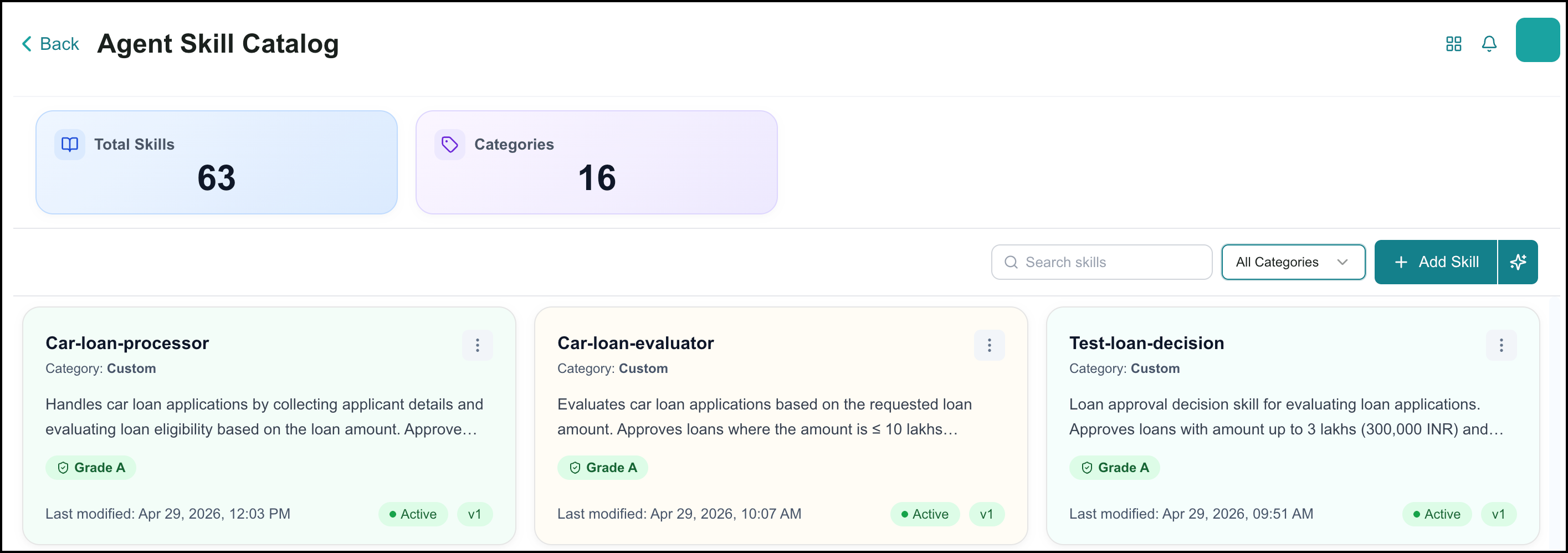
For more information, refer to Agent Skills Management in the User Guide.
Agents Version Management
Business AI Cloud now provides a full immutable version history for agent configurations. Every configuration change, create, update, or rollback, produces an auto-numbered snapshot starting at version 1. Existing agents were automatically backfilled to version 1 at deployment.
Key Capabilities:
List the complete version history for any agent, with paginated results.
Retrieve the full configuration snapshot for a specific version, compare it with another version, and restore an agent to a previous version, which appends a new rollback entry to the history.
Execution runs record the agent configuration version active at execution time, enabling version-segmented analysis.
Execute a specific version directly by including the version in the API request.
Optionally include a change summary when updating an agent configuration.
Agent Version Management is available within the Agent SDK in Business AI Cloud's Agent Layer.
To access, go to the Home page > Agents > Agent SDK > Edit agent.
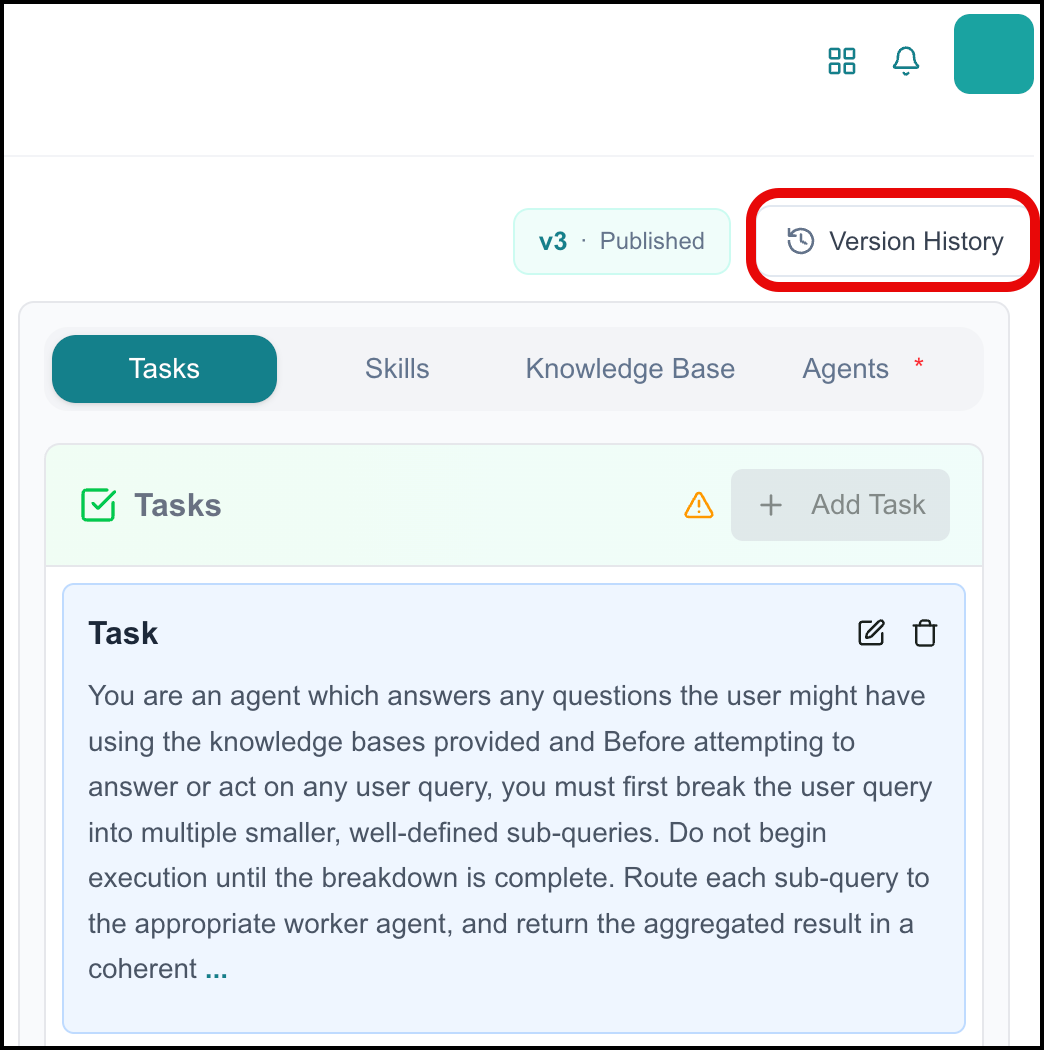 |
For more information, refer to Managing Agents in the User Guide.
AI Agent Health Dashboard
Business AI Cloud introduces the AI Agent Health Dashboard, providing high-level system health visibility with agent-level usage and performance metrics. The dashboard includes agent execution counts, mean latency metrics, and completion rates to monitor agent behavior in production.
Key Capabilities:
System health dashboard with agent-specific details and filtering.
Anomaly detection for proactive agent monitoring.
Agent-level drill-down for isolating performance issues to individual agents.
The AI Agent Health Dashboard is available within Agent Analytics in Business AI Cloud's Agent Layer.
To access, go to the Home page > Agents > Agent SDK > Agent Analytics > Agent Monitoring.
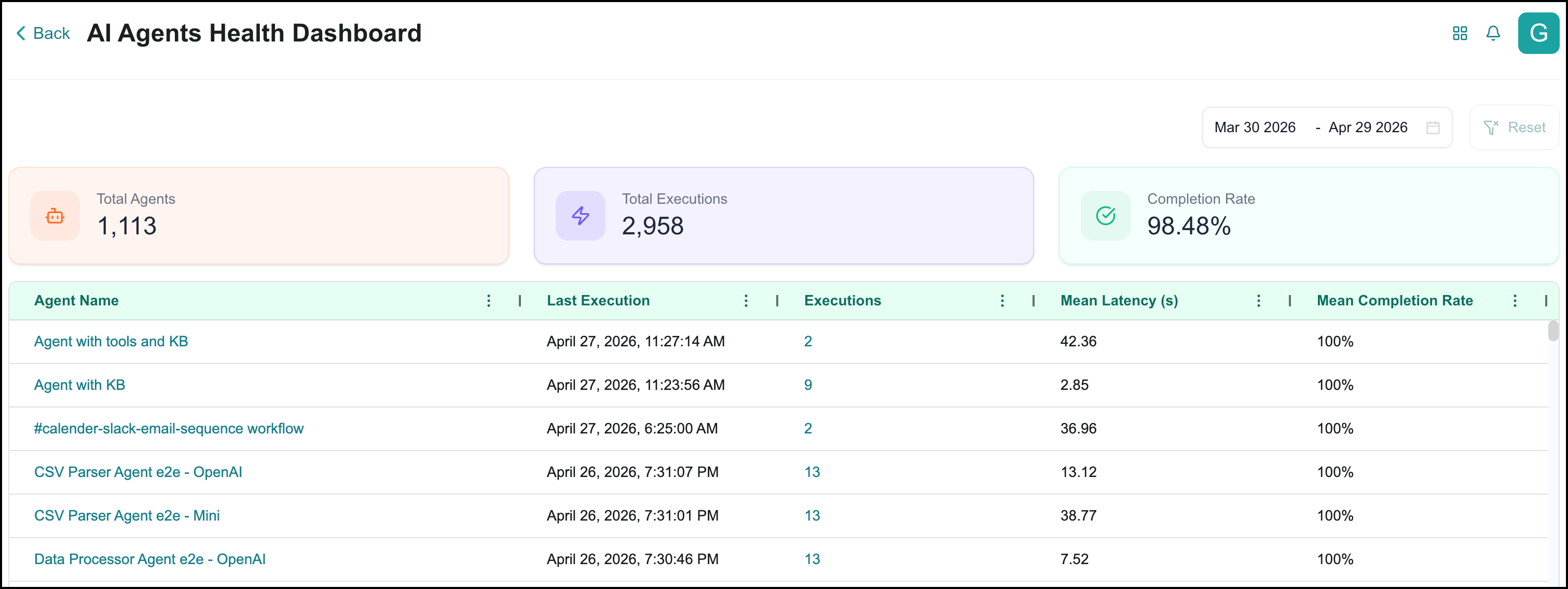
For more information, refer to Agent Analytics in the User Guide.
Enhancements
Ingestion for Large and Complex Documents
The ingestion pipeline now reliably handles large, complex documents, converting tables, handwritten notes, and diagrams into Markdown for downstream RAG retrieval and fine-tuning.
Key Capabilities:
Ingest PDFs of 100+ pages reliably, including documents of 500 pages or more.
Handle complex content in large files that conventional pipelines miss: tables with merged cells, handwritten notes, signatures, seals, and engineering diagrams.
This capability is available in Data Ingestion within Business AI Cloud's Data Layer. For more information, refer to Data Ingestion in the User Guide.
Filtering for Eval Runs
The RAG Evaluations screen now hides experimental eval runs by default, keeping the list focused on intentional evaluations. A toggle brings them back when needed.
Key Capabilities:
The default view shows only the main eval runs.
Toggle reveals experimental runs from auto SLM pairing and other automated flows.
Makes it easier to track and compare intentional evaluations as automated eval generation expands across the platform.
This capability is available in RAG Evaluation within Business AI Cloud's Knowledge Layer. For more information, refer to RAG Pipeline Evaluation in the User Guide.
Filters in Fine Tuning Studio
Fine Tuning Studio now supports additional filtering, making it easier to narrow views to a specific knowledge base type or ground truth data state.
Key Capabilities:
Filter by knowledge base type: Document RAG or Relational DB RAG.
Filter by ground truth data state to separate runs with fine-tuning data from those without.
The filters are available in the Fine Tuning Studio within Business AI Cloud's Knowledge Layer. For more information, refer to Fine Tuning Studio in the User Guide.
Fine-Tuning Prompt Visibility
The prompt used for each fine-tuning job is now visible in the user interface, giving teams full transparency into which prompt trained each adapter without digging through logs.
Key Capabilities:
View the final prompt used for each fine-tuning job.
View source chunks used during fine-tuning alongside the prompt for full content traceability.
Sample chunks and Q&A pairs from the Q&A Usage Data and Synthetic Q&A Generation pages to inspect the training inputs.
The Fine-Tuning Prompt is available in the Fine-Tuning Studio within Business AI Cloud's Knowledge Layer. For more information, refer to Fine Tuning Studio in the User Guide.
SLM Fine Tuning on Google Cloud
SLM fine-tuning is now available on Business AI Cloud deployments running on Google Cloud, with full feature parity to AWS. Customers running BAIC on GCP can fine-tune SLMs end-to-end without changing their cloud footprint.
Key Capabilities:
SLM fine-tuning is available on BAIC deployments hosted on Google Cloud.
Feature parity with AWS, including training data download, drift calculation, and adapter management, etc.
Copilot Agent Builder
Business AI Cloud enhances the Copilot Agent Builder with a split-view layout and session history. The new layout places conversational chat on the left and a manual configuration panel (Agent Information) on the right, enabling a hybrid building experience where users can build via natural language or direct UI editing. Session history allows users to view and resume past builder conversations.
Key Capabilities:
Split-view Agent Builder with conversational chat on the left and the Agent Information configuration panel on the right.
Session history for viewing and resuming past Copilot Agent Builder conversations.
Agent Information panel displays the current version number, attached Knowledge Bases, and connected Sub-Agents for supervisor agents.
The Copilot Agent Builder is available within the Agent SDK in Business AI Cloud's Agent Layer.
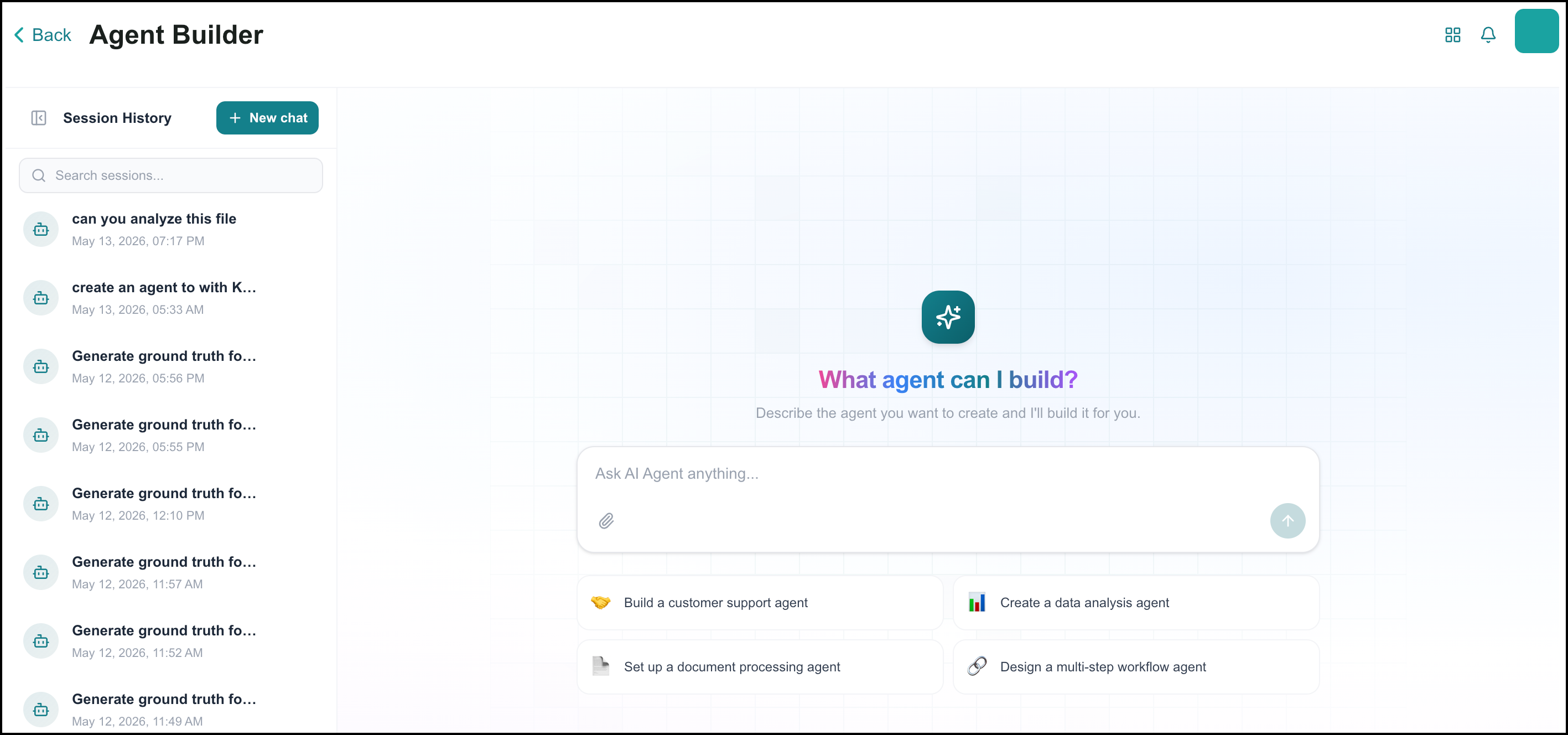
For more information, refer to Copilot Agent Builder in the User Guide.
Agent Evaluation – Results & Analytics
Business AI Cloud enhances the Results & Analytics page in Agent Evaluation with a workflow filter and improved Agent Insights. Users can now filter evaluation results by specific workflows and access Agent Insights with session management and module-specific filtering for more targeted performance analysis.
Key Capabilities:
Workflow dropdown on the Results & Analytics tab for filtering evaluation results by specific workflows.
Agent Insights with session management for tracking evaluation activity across sessions.
Module-specific filtering in Agent Insights for isolating metrics to individual agent components.
Agent Evaluation enhancements are available within the Agent SDK in Business AI Cloud's Agent Layer. For more information, refer to Agent Evaluation in the User Guide.
Open API Enhancements
Business AI Cloud adds OAuth 2.0 authorization support for OpenAPI spec integrations and a retry mechanism for failed API executions. When an integration uses the authorization_code grant type, a connect button appears in the UI, triggering the standard OAuth redirect flow.
Key Capabilities:
OAuth authorization flow for OpenAPI integrations, with an in-UI Connect button and redirect-based authorization.
The connection status display shows whether an integration is actively connected.
Automatic retry mechanism for failed OpenAPI API executions, improving reliability for integrations that depend on external services.
Open API enhancements are available within the Agent Action Library in Business AI Cloud's Agent Layer. For more information, refer to Agent Action Library in the User Guide.
OAuth Support for Smithery MCPs
Business AI Cloud now supports registering and using Smithery OAuth-based MCP servers in the MCP server registration flow. When a Smithery MCP server requires OAuth, the connection test returns a redirect URL, and the user is prompted to authorize the request. A polling mechanism automatically checks the authorization status with a 3-minute timeout.
Key Capabilities:
Inline OAuth authorization flow for Smithery MCP servers requiring authentication.
Automatic connection status polling with a three-minute timeout and a retry option on timeout.
UI handles all states: standard non-OAuth registration, OAuth redirect and waiting, authentication timeout with retry, and authentication completed.
OAuth Support for Smithery MCPs is available within the Agent Action Library in Business AI Cloud's Agent Layer. For more information, refer to MCP Server Registration in the User Guide.
Latency Optimization & Context Compaction
Business AI Cloud now provides context compaction and summarization for agents, reducing latency in extended multi-turn conversations. The platform uses message summarization to compact long conversation histories and strip tool messages after each turn, keeping context windows manageable without losing important conversational context.
Key Capabilities:
Automatic context compaction and summarization for long agent conversations.
Tool message stripping after each turn to reduce context size.
Context retention across conversation turns, preserving key information while reducing token usage.
Lightweight Agent Config without Tasks
Agent configuration APIs now support creating agents without task definitions. Agents can be configured with only tools, not tasks, enabling lightweight agent setups for simpler use cases. Agent execution APIs fully support running these simplified configurations.
Key Capabilities:
Create agents with tools only, without requiring task definitions.
Agent execution APIs support running task-free agent configurations.
Enables lightweight, tool-focused agent setups for straightforward automation scenarios.
Constraints and Limitations
The following constraints and limitations exist for this release:
Item | Description |
|---|---|
AI Agent Health Dashboard | The current release includes execution counts, mean latency, and completion rate. Comprehensive agent evaluation metrics are planned for an upcoming release within the dashboard. |
Workato Connectors | Enterprise connectors are available on demand and require coordination with the account team to enable. Self-service connector provisioning is not supported in this release. |