1.0.10 Release Note_June 28, 2026
Release Date: June 28, 2026
The Business AI Cloud 1.0.10 release introduces the following new or enhanced features.
Important
This document provides high-level information on the Business AI Cloud's latest release features and enhancements. For detailed procedures, configuration steps, and comprehensive guidance, please refer to the Business AI Cloud User Guide.
Release Highlights
New Features
SCIM Provisioning (Microsoft Entra ID) - Automated identity provisioning through Microsoft Entra ID synchronizes users, groups, and group memberships into the platform via SCIM, replacing manual user provisioning.
Prompt Instruction - Introduces a new prompt type for Data Agents that passes a fixed set of instructions to the model on every call that references the resource.
Knowledge Graph - Automatically builds a Knowledge Graph for a Knowledge Base on demand, enriching entity relationships to improve model retrieval accuracy.
Agentic Search - Introduces a new retrieval method that uses the Knowledge Graph to perform graph-traversal-based retrieval, delivering more contextually relevant results.
RAG Evaluation Insights - Introduces a built-in evaluation metrics insight that scores RAG performance across five industry-standard quality metrics, and automatically surfaces a root cause diagnosis with recommended actions to improve retrieval and answer quality.
Agent Prompt Optimization - A new capability under Agent Optimization that automatically refines the instructions an agent works from, using real execution traces to improve clarity and precision without changing the underlying model.
Agent Distillation to Fine-tune SLMs - A new capability under Agent Optimization that uses agent distillation to transfer the reasoning behavior of larger frontier models into a smaller, faster model tuned to the agent's tasks, reducing latency and cost while preserving output quality.
Enhancements
Data Discovery Agent - Upgraded to a LangGraph-based agentic framework with a redesigned search and chat experience, and an enterprise-grade data exploration experience.
Data Engineering Agent - Adds human-in-the-loop confirmation for pipeline creation, persistent session context, visual SQL pipeline representation, version history navigation, and undo/redo support in the SQL Editor.
Data Analyst Agent - Upgraded to a LangGraph-based multi-intent agentic framework with persistent sessions, intent-aware query handling, inline SQL review and editing controls, relevancy scoring, and Golden SQL promotion.
Data Orchestrator Agent - Adds scheduled dataflow execution, enabling the platform to automatically run dataflows at configured intervals without manual triggering.
Context Chunks (RAG Evaluation) - Displays the context chunks retrieved for each evaluation answer mapped against the ground truth, giving teams direct visibility into retrieval quality.
Global Entity Extraction - Extends the Global Entity Extraction data preparation process to Google Drive and SharePoint as supported sources.
TAG Fine-Tuning - Extends TAG Fine-Tuning support to Knowledge Bases served from Snowflake.
Credit Actuals Drill Down - Captures credit consumption at the individual data and agent level. It provides teams with granular visibility into usage.
Auto-Generated Agent Description and Icon - Agents created through the Copilot Agent Builder now automatically generate a description and icon, streamlining the agent-creation workflow.
Chat Input Improvements - The Copilot conversational builder and skill builder now support multi-line entry and structured replies. Shift + Enter inserts a new line, and the input field expands as you type.
New Features
SCIM Provisioning (Microsoft Entra ID)
Business AI Cloud now supports automated identity provisioning through Microsoft Entra ID using the SCIM protocol. Administrators can synchronize users, groups, and group memberships directly from their identity provider, eliminating the need to manually create and manage user accounts in the platform.
Key Capabilities:
Automated user lifecycle management: users are provisioned, updated, and deprovisioned from Entra ID, and these changes are automatically reflected in the platform.
Group and membership synchronization: group structures defined in Entra ID carry over to the platform, preserving organizational access patterns.
Default role assignment: SCIM-provisioned users receive a default role and group upon creation, enabling immediate access without manual configuration.
Prompt Instruction
Business AI Cloud now adds an Instructions tab to Knowledge Base and Knowledge Cluster resources. Instructions are distinct from unstructured document sources: unlike RAG-retrieved chunks, which are surfaced based on query relevance, instructions are always passed to the model on every call that references the resource. This makes the Instructions tab the right place to define mandatory query filters, table join logic, column-to-target mappings, business rules, and reference SQL examples that must be consistently available to the model. At the Knowledge Cluster level, instructions describe how the grouped Knowledge Bases work together within a specific business context.
Key Capabilities:
Instructions are always passed to the model on every call, ensuring consistent behavior regardless of query context.
Knowledge Cluster-level instructions describe how grouped Knowledge Bases operate together within a specific business context.
Instruction entries support versioning: multiple versions can be maintained per resource, with only one active at any time, and earlier versions remain accessible and restorable.
The Instruction feature is available in the Business AI Cloud's Data layer.
To access KB Instructions, go to the Home page > Data > Data Ingestion > Relational DB RAG > View Metadata > Knowledge Resource tab > Instructions tab.
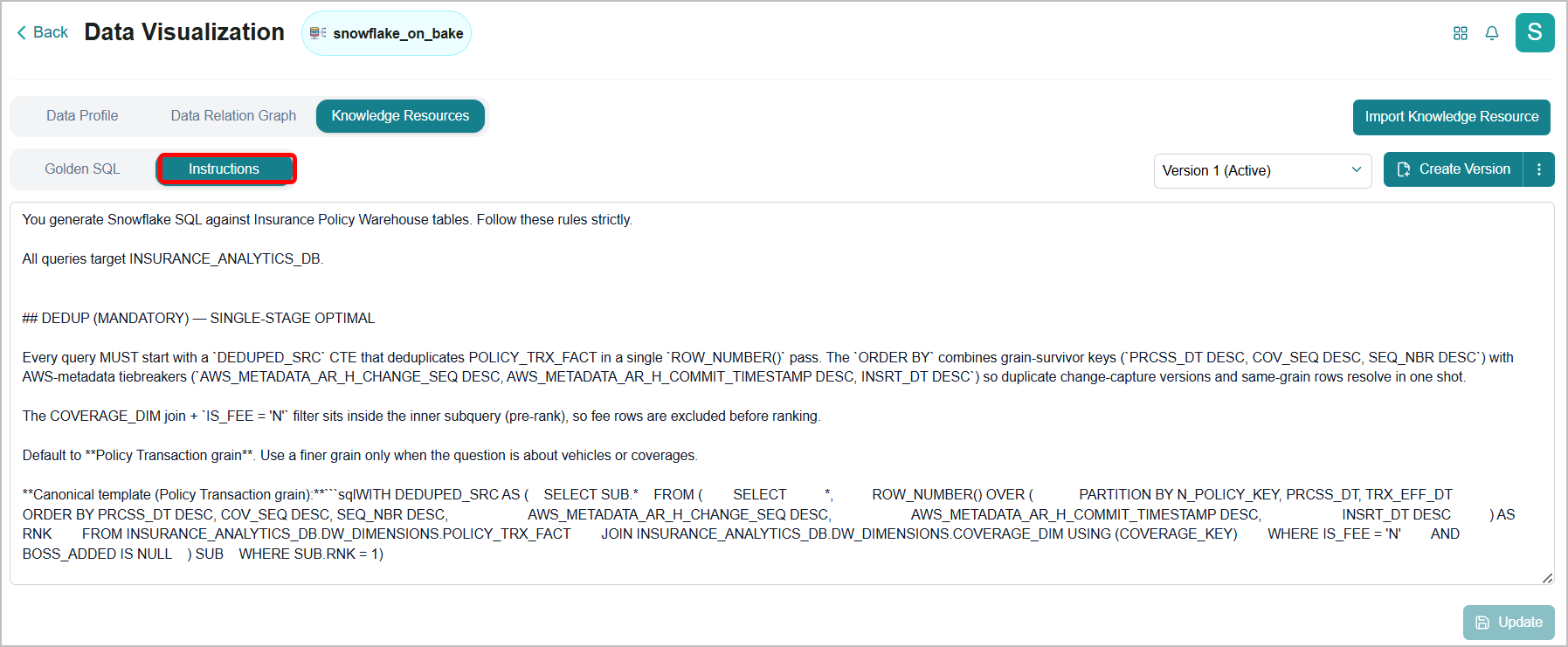
To know more, refer to Viewing a Knowledge Resource in the User Guide.
To access KC Instructions, go to the Home page > Data > Data Agents > Data Discovery Agent > Knowledge Clusters tab > Instructions tab.
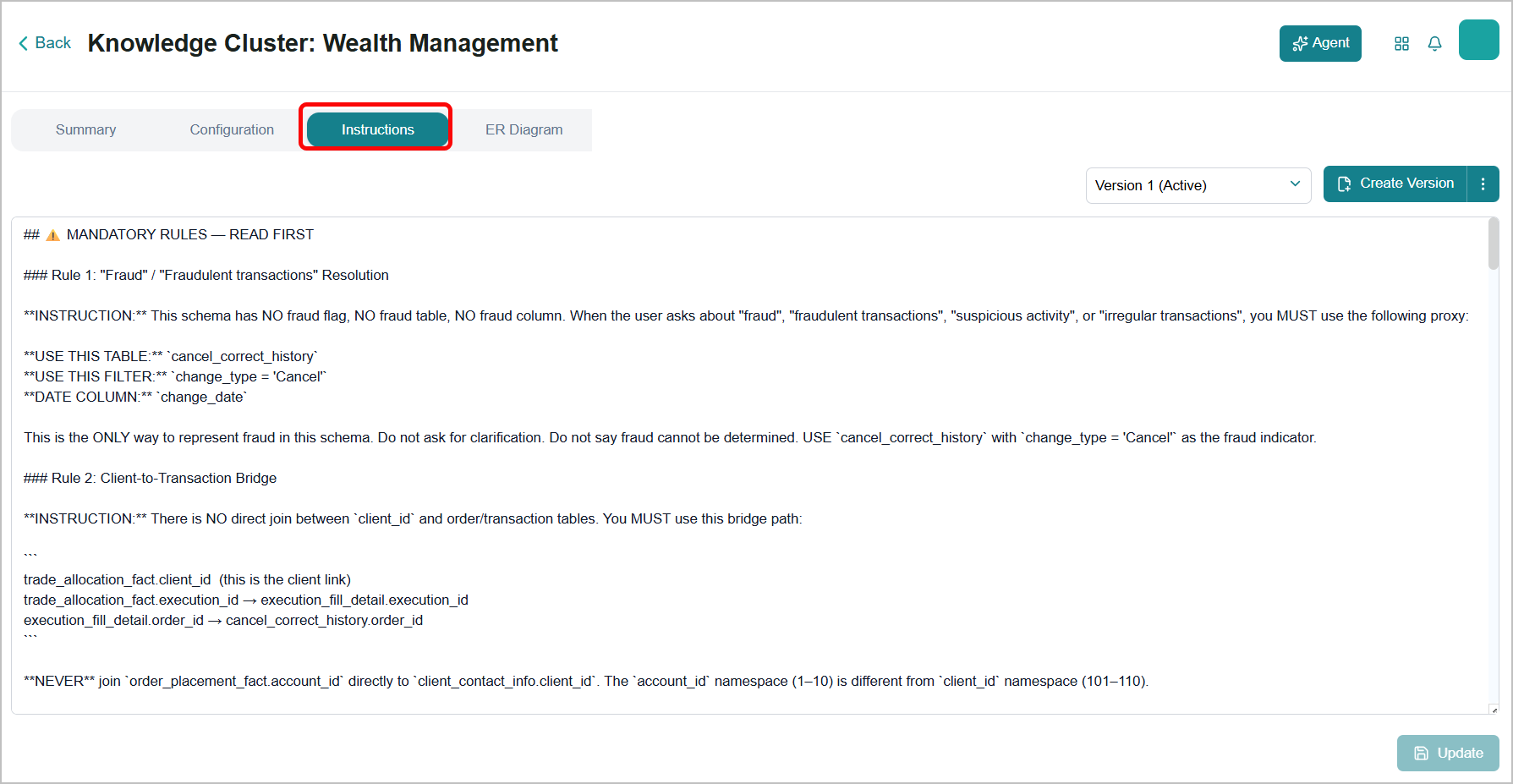
To know more, refer to Knowledge Clusters in the User Guide.
Knowledge Graph
Business AI Cloud now lets you automatically generate a Knowledge Graph for any Knowledge Base on demand. The Knowledge Graph maps entities and their relationships within the KB, enriching the retrieval context available to AI agents and models. Building a Knowledge Graph directly on a KB improves retrieval accuracy by grounding queries in structured entity relationships rather than relying solely on vector similarity.
Key Capabilities:
Generates a Knowledge Graph for a selected source on demand with no manual mapping required.
Enhances model retrieval by providing structured relational context alongside existing vector-based retrieval.
Serves as the foundation for Agentic Search, enabling graph-traversal-based retrieval across the KB.
The Knowledge Graph is available within Business AI Cloud's Data Layer.
To access, go to the Home page > Data > Data Ingestion > Workflow.
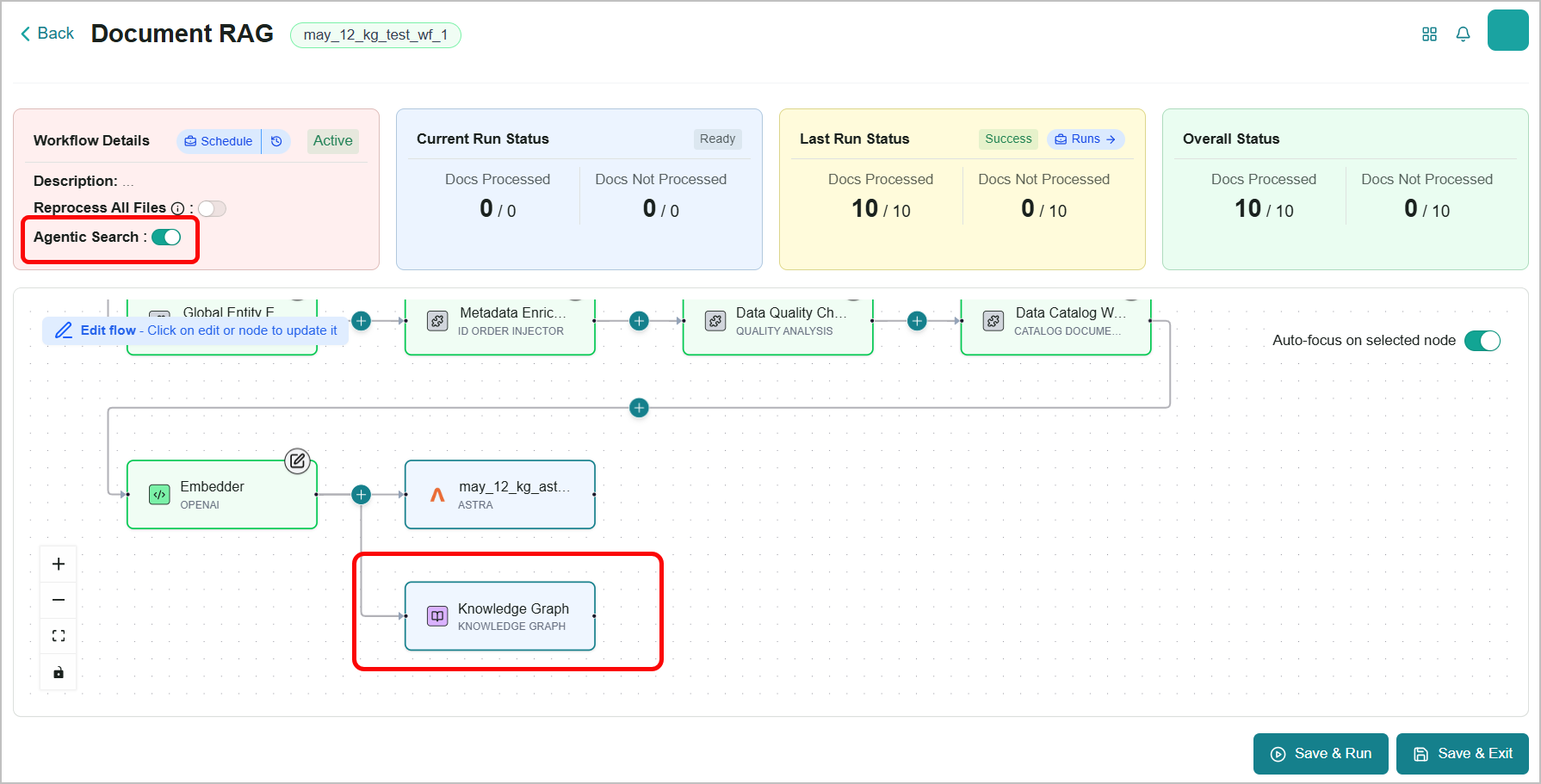
To know more, refer to Viewing Workflow Details in the User Guide.
Agentic Search
Business AI Cloud now introduces Agentic Search, which operates in two stages: first, it traverses the Knowledge Graph to find the documents that matter, including those reachable only through multi-hop relationships between entities; then an agent reads and searches within those documents to locate the precise answer.
Key Capabilities:
An agent actively reads and searches inside the retrieved documents to locate the answer, rather than passing raw chunks to the model.
Uses Knowledge Graph traversal to retrieve results across connected entities, supporting queries that span multiple documents.
Complements semantic search by adding graph-based retrieval as an alternative method within the same KB.
The Agentic Search is available within Business AI Cloud's Knowledge Layer.
To access, go to the Home page > Knowledge > Evaluation > Edit Knowledge Base.
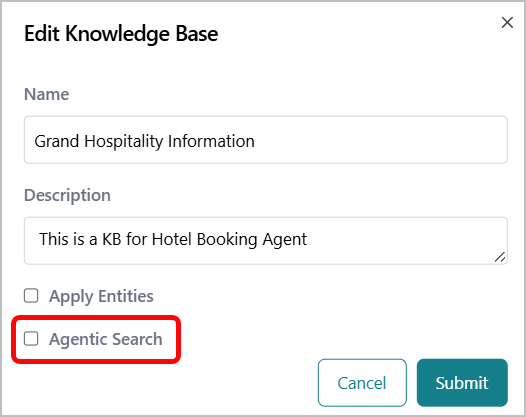 |
To know more, refer to Managing a Knowledge Base in the User Guide.
RAG Evaluation
Business AI Cloud now introduces RAG Evaluation, a built-in capability for assessing the quality of an RAG pipeline's answers against a Knowledge Base. Using a set of golden samples, it measures retrieval and generation quality across standard metrics, presents the results at both summary and per-question level, and provides an automated diagnosis of where quality is being lost and which changes are likely to improve it.
Key Capabilities:
Evaluates answer quality across Context Recall, Context Precision, Relevant to Topic, Answer Completeness, and Faithfulness, with each metric rated High, Acceptable, or Low to indicate whether issues originate in retrieval or generation.
Provides an Answer Quality Distribution chart and detailed metric scorecards for each evaluation category, with inline descriptions explaining how each score is calculated and what it means for KB performance.
Automatically analyzes results and surfaces a structured diagnosis covering the primary performance bottleneck, plain-language interpretation of scores, likely root causes, and specific recommended actions — so teams know exactly where to focus and what to fix.
The SLM Evaluation is available within Business AI Cloud's Knowledge Layer.
To access, go to the Home page > Knowledge > Evaluation > Evaluation tab.
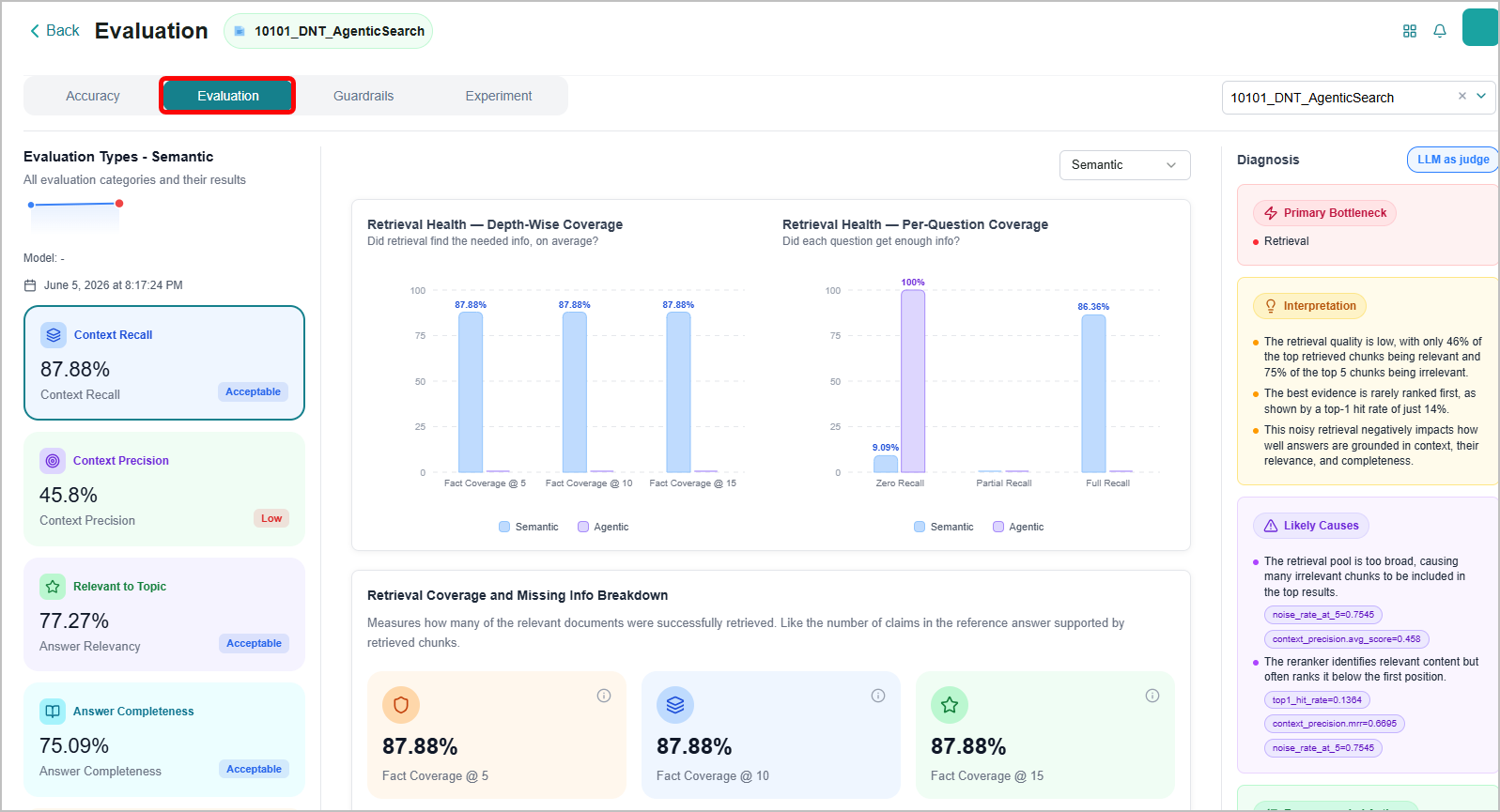
To know more, refer to Viewing the Evaluation in the User Guide.
Agent Prompt Optimization
Business AI Cloud introduces Agent Prompt Optimization, a new capability within the Agent Optimization suite. It analyzes an agent's real execution traces to identify where the agent's instructions fall short, then automatically generates a refined prompt that better aligns with user intent.
The optimization includes a human-in-the-loop approval gate: the system presents the proposed prompt change with a clear before-and-after comparison, and the optimized prompt is applied only after explicit approval.
Key Capabilities:
Trace-driven refinement: uses actual agent execution traces as training signal, not synthetic data.
Before-and-after prompt diff: review exactly what changed and why before applying.
Human-in-the-loop approval: proposed prompt updates require explicit approval or rejection.
Health overview: surfaces agent accuracy, failure rate, and version history at a glance.
Agent Prompt Optimization is available within the Agent SDK page in Business AI Cloud's Agent Layer. To access, go to the Home page > Agents > Agent SDK and select Optimize from any agent card.
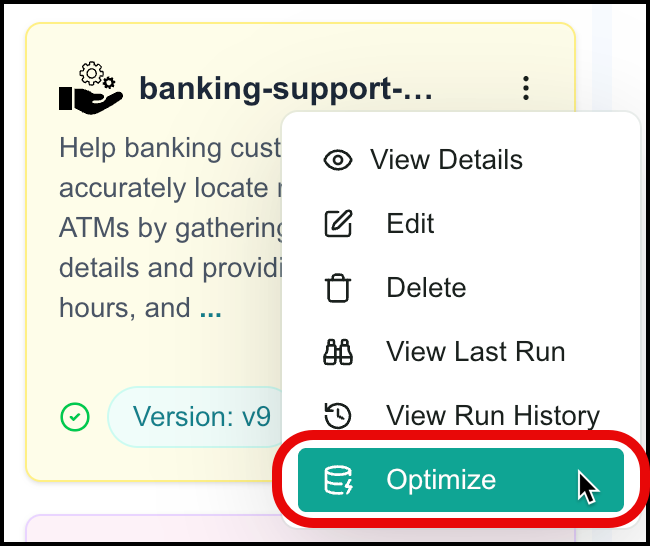 |
For more information, refer to Optimizing Agents in the User Guide.
Agent Distillation to Fine-tune SLMs
Business AI Cloud introduces Agent Distillation, a new capability within the Agent Optimization suite for fine-tuning SLMs. It takes the reasoning and problem-solving behavior captured in a frontier model's execution traces and uses that data to fine-tune a smaller language model (SLM) for the same tasks, delivering comparable output quality at lower latency and reduced inference cost.
Key Capabilities:
Execution-trace distillation: generates high-quality training data from real agent interactions with frontier models.
End-to-end workflow: from trace collection through model fine-tuning to post-distillation evaluation, managed within the platform.
Cost and latency reduction: replaces frontier model inference with a purpose-built SLM without sacrificing task accuracy.
Agent SLM Fine-Tuning is available within the Agent SDK page in Business AI Cloud's Agent Layer. To access, go to the Home page > Agents > Agent SDK and click SLM Optimization from an agent's Optimize page.
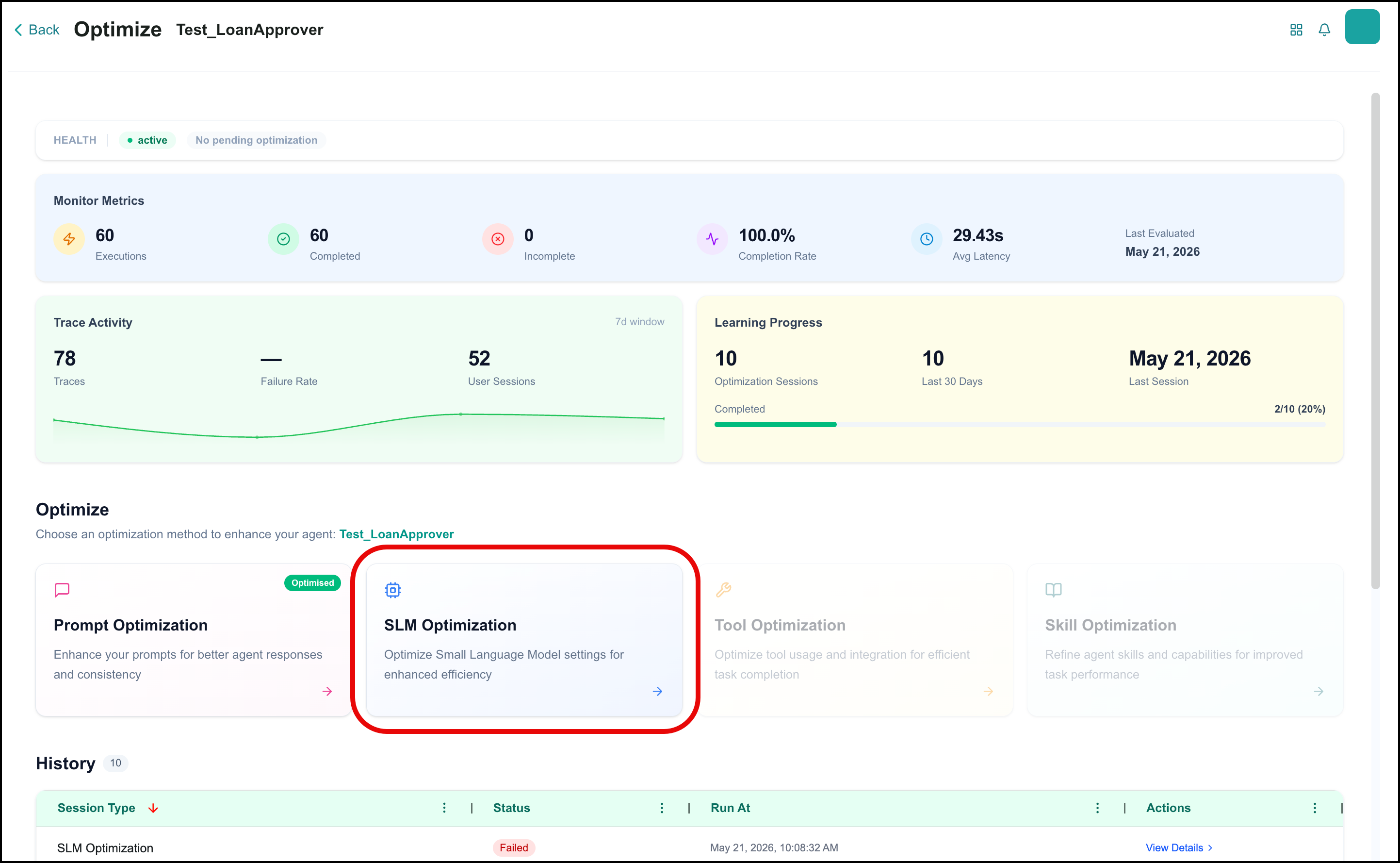
For more information, refer to Optimizing Agents in the User Guide.
Enhancements
Data Discovery Agent
Business AI Cloud upgraded the Data Discovery Agent to a LangGraph-based agentic framework, consistent with the Data Analyst Agent. The search and agent chat experience was redesigned to align with the interaction patterns used across all Data Agents, and a set of targeted improvements was applied to sharpen accuracy, responsiveness, and reliability across real-world data discovery scenarios.
Key Capabilities:
Runs on the LangGraph-based agentic framework, delivering a consistent, production-grade execution architecture across all Data Agents.
The search interface and conversational chat experience align with other Data Agents.
The Data Discovery Agent is available within Business AI Cloud's Data Layer. For more information, refer to Data Discovery Agent in the User Guide.
Data Engineering Agent
Business AI Cloud now enhances the Data Engineering Agent with a human-in-the-loop pipeline creation step, persistent session context, and a set of editor improvements that give teams greater control, visibility, and confidence when building and managing SQL pipelines.
Key Capabilities:
On the first run for a given Knowledge Cluster, the agent surfaces candidate source and target tables for your review and confirmation before proceeding to column mapping and SQL generation.
Session context is stored alongside the pipeline definition and restored each time the pipeline is reopened, allowing you to resume exactly where you left off.
The agent generates a read-only visual view of the pipeline SQL, displaying node-level join logic so you can understand the pipeline structure at a glance without reading raw SQL.
A version dropdown in the pipeline editor lets you navigate and restore prior pipeline definitions, making it easier to track changes and roll back when needed.
The SQL Editor now supports undo and redo operations within an active session, reducing the risk of accidental edits during manual query work.
Schedule pipeline execution on a recurring basis directly from the platform. Once a schedule is configured, the platform automatically executes the pipeline at the defined intervals.
The Data Engineering Agent is available within Business AI Cloud's Data Layer. For more information, refer to Data Engineering Agent in the User Guide.
Data Analyst Agent
Business AI Cloud now upgrades the Data Analyst Agent to a LangGraph-based multi-intent agentic framework, delivering smarter query handling, persistent session management, and a richer set of inline controls that give you greater transparency and control over how SQL is generated, reviewed, and reused.
Key Capabilities:
Sessions are backed by persistent storage and are scoped to the user and the Knowledge Cluster. The latest session is automatically restored when you return, preserving context across interactions without manual setup.
Run SQL is disabled by default. The agent generates SQL and surfaces it for your review before execution.
The chat interface now exposes View SQL and Edit SQL controls, allowing you to inspect and modify generated queries directly within the conversation without switching to a separate editor.
A relevancy score is surfaced alongside each response, giving you immediate visibility into how well the generated SQL aligns with their query intent.
You can save queries directly from the chat interface and promote them to Golden SQL within a Knowledge Base.
The Data Analyst Agent is available within Business AI Cloud's Data Layer. For more information, refer to Data Analyst Agent in the User Guide.
Data Orchestrator Agent
Business AI Cloud enhanced the Data Orchestrator Agent to schedule dataflow execution on a recurring basis. Once a schedule is configured, the platform automatically executes the dataflow at the defined intervals, keeping data pipelines running consistently without requiring manual intervention.
Key Capabilities:
Configure a recurring schedule for any dataflow directly from the platform.
The platform automatically executes the dataflow at the defined intervals, reducing manual effort and ensuring that data remains current and available for downstream workflows.
The Data Orchestrator Agent is available within Business AI Cloud's Data Layer. For more information, refer to Data Orchestrator Agent in the User Guide.
Context Chunks (RAG Evaluation)
Business AI Cloud now displays the context chunks retrieved for each answer during a RAG evaluation experiment. For each evaluated question, you can view the specific chunks the system retrieved and compare them with the ground truth, giving teams direct visibility into both retrieval and response quality.
Key Capabilities:
Surfaces the context chunks used to generate each answer within an evaluation experiment.
Enables comparison of retrieved chunks against ground truth, making retrieval gaps and mismatches immediately visible.
The Context Chunks for RAG Evaluation are available within the Evaluation in Business AI Cloud's Knowledge Layer. For more information, refer to Viewing the Accuracy in the User Guide.
Credit Actuals Drill Down
Business AI Cloud now captures credit consumption at the individual data and agent level, giving teams granular visibility into how credits are used across their agent deployments. This enhancement makes it easier to track usage, identify high-consumption agents, and manage costs with greater precision.
Key Capabilities:
Records actual credit consumption at the individual data and agent level, moving beyond aggregate platform-level reporting.
Enables teams to identify which agents consume the most credits, supporting more informed optimization and cost management decisions.
The Credit Actuals is available in the Admin section of Business AI Cloud. For more information, refer to Credit Actuals in the User Guide.
Auto-Generated Agent Description and Icon
Agents created through the Copilot Agent Builder now automatically generate a user-facing description and an SVG icon based on the agent's configuration. This eliminates the need to manually write descriptions or design icons during agent creation.
Key Capabilities:
Automatic description generation based on the agent's goal and configuration.
Automatic SVG icon generation, validated and saved as part of the agent spec.
The auto-generated description and icon apply to agents created via the Copilot Agent Builder in Business AI Cloud's Agent Layer.
Chat Input Improvements
Business AI Cloud has improved the chat input across the Copilot conversational builder and agent chat UI. The input field now supports multi-line entry and auto-resizes as you type, making it easier to provide structured, multi-part answers in a single message.
Key Capabilities:
Shift+Enter inserts a new line; Enter submits the message.
Auto-expanding input field accommodates longer, multi-line responses.
Applies to the Copilot Agent Builder and skill builder.