1.0.8 Release Note_May 01, 2026
Release Date: May 01, 2026
The Business AI Cloud 1.0.8 Release will introduce the following new or enhanced features.
Important
This document provides high-level information on the Business AI Cloud's latest release features and enhancements. For detailed procedures, configuration steps, and comprehensive guidance, please refer to the Business AI Cloud User Guide.
Release Highlights
New Features
Knowledge Cluster - Groups one or more Knowledge Bases, structured, unstructured, or both, into a single selectable unit for the Data Agents.
Data Engineering Agent - Automates end-to-end SQL pipeline creation, management, and execution using agentic or manual flows; describes requirements in plain English, and the system generates, runs, and monitors pipelines with pushdown support for Snowflake and Databricks.
Optimized Workflow - A new ingestion workflow type that converts PDFs into structured JSON during ingestion, with extraction tailored to the document type (Invoice, Contract, ID Document, and more).
Model Security Scan - Automatically scans SLMs for security vulnerabilities and generates comprehensive reports, giving you immediate visibility into model risk without manual review.
TAG (Table Augmented Generation) Fine-Tuning - Support for relational data sources is now live in Fine-Tuning Studio.
Enhancements
Connectors Support - Adds Milvus, Azure Databricks, and AWS Databricks as supported destination connection types, enabling your pipelines to deliver output directly to your destination environment.
NoSQL Data Support - Extends source connection capabilities to include MongoDB, allowing teams to bring NoSQL data into ingestion pipelines alongside structured and unstructured sources.
Data Ingestion Node – Automatically records entities and metadata extracted from your content into the Data Catalog.
Data Visualization - Improves how structured metadata is displayed, making data catalogs and Knowledge Base content easier to read and navigate.
RCA for Negative Drift Score - When a fine-tuned LoRA model's drift score turns negative, it performs Root Cause Analysis (RCA) to identify the root cause of the regression.
Agent Evaluation for Agentic Workflows - Run Agent Evaluation on the agentic workflows created in Business AI Cloud. Extends comprehensive agent evaluation capabilities to multi-agent workflows, enabling end-to-end performance validation and optimization across complex agent orchestrations before production deployment.
Simulated Scenarios for Agent Evaluation - Generate simulated task scenarios to evaluate agents and multi-agent workflows. Produces synthetic input-response datasets for evaluation, enabling teams to test agent behavior across realistic usage patterns without manual ground-truth curation.
Cookies Management - Allows you to view and manage cookie preferences directly from the Profile Management section.
New Features
Knowledge Cluster
Business AI Cloud introduces Knowledge Cluster, a user-led logical grouping construct that lets you combine one or more Knowledge Bases into a single, selectable unit. Knowledge Cluster supports cross-KB querying using pre-mapped entity relationships to retrieve and correlate results from both structured and unstructured sources, eliminating the need to manually select multiple Knowledge Bases each time.
Key Capabilities:
Simplified knowledge management, reducing repeated configuration across workflows.
Flexible grouping that reflects how your organization actually organizes information.
Faster agent configuration by selecting one cluster instead of multiple individual KBs.
Improved consistency across agents and workflows sharing the same knowledge sources.
The Knowledge Cluster is available within Business AI Cloud's Data Layer.
To access, go to the Home page > Data > Data Agents > Data Discovery Agent > Knowledge Cluster.
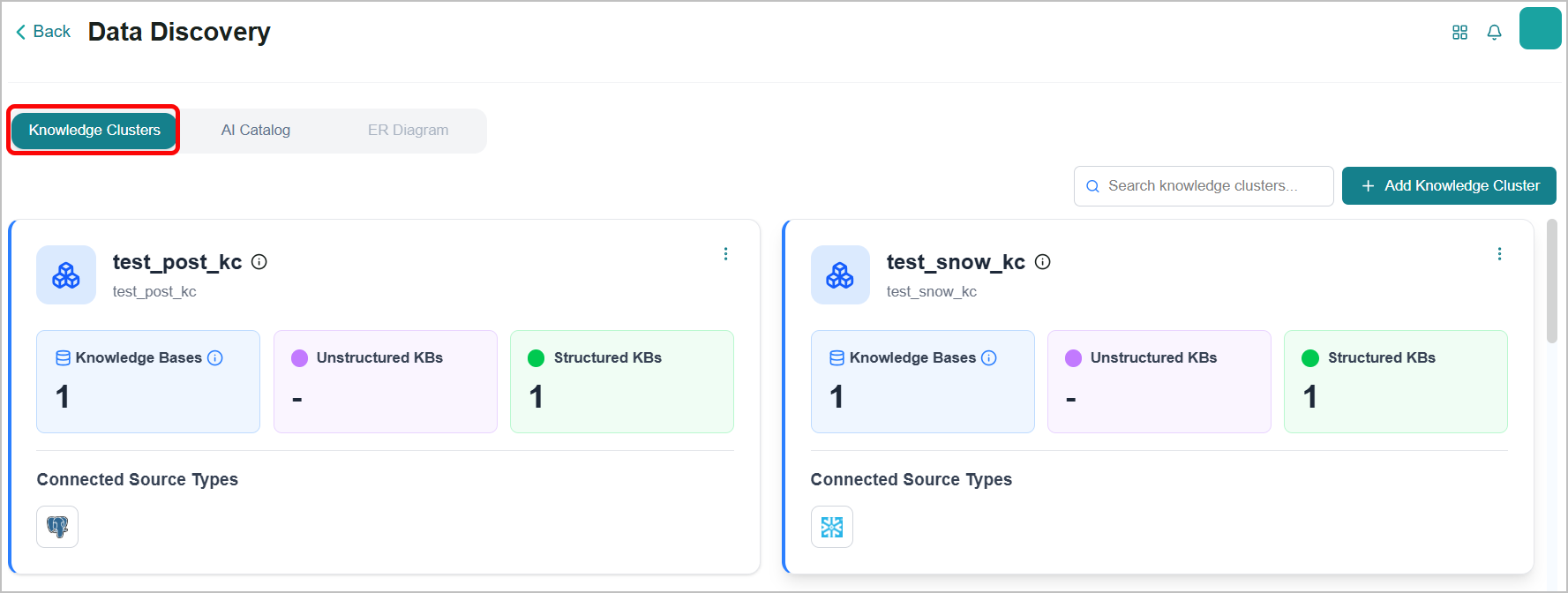
To know more, refer to Knowledge Clusters in the User Guide.
Data Engineering Agent
Business AI Cloud introduces an agent-assisted experience for creating SQL pipelines. You provide the agent with natural-language instructions for creating a pipeline, and it generates the SQL and builds the pipeline automatically, end to end. To write and manage your own queries, a manual SQL pipeline creation path is also available.
Key Capabilities:
Faster time-to-insight by automating pipeline setup and execution.
Reduced dependency on engineering resources for data preparation tasks.
Accessible data interaction enabling non-technical users to extract value from data independently.
Consistent pipeline management across multiple data sources from a single interface.
The Data Engineering Agent is available within Business AI Cloud's Data Layer.
To access, go to the Home page > Data > Data Agents > Data Engineering Agent .
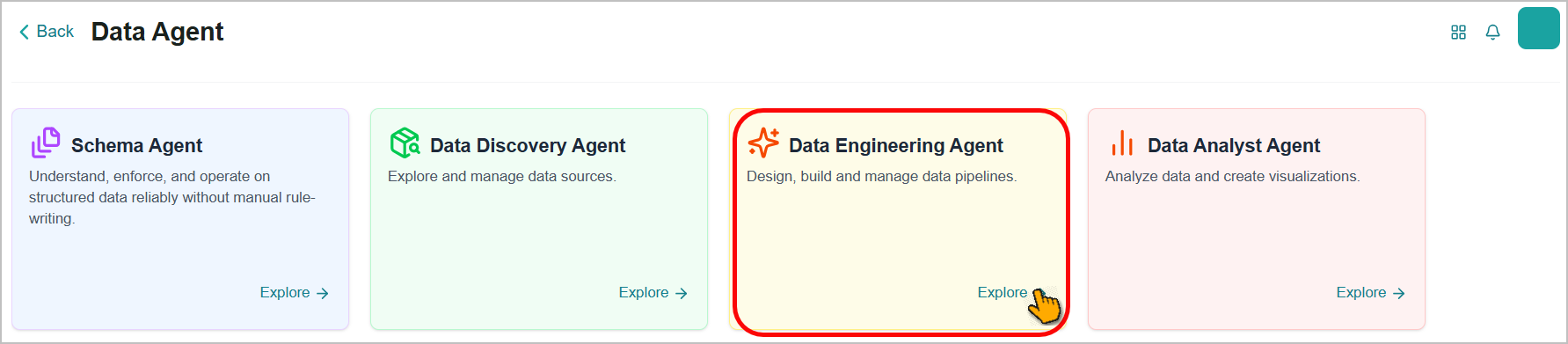
To know more, refer to Data Engineering Agent in the User Guide.
Optimized Workflow
BAIC introduces an optimized data ingestion workflow that converts PDF documents into structured JSON based on the selected document schema (Invoice, Bank Statement, Contract, Health Insurance Card, ID Document, and more), making document content easier to query and process downstream.
Key Capabilities:
PDF-to-JSON conversion: Source PDFs are automatically converted to structured JSON within the ingestion pipeline.
Schema-aware extraction: Extraction and preprocessing are tailored to the selected document schema, so an invoice is processed differently from a contract.
The Optimized Workflow is available within Business AI Cloud's Data Layer.
To access, go to the Home page > Data > Data Ingestion > New Workflow > Optimized.
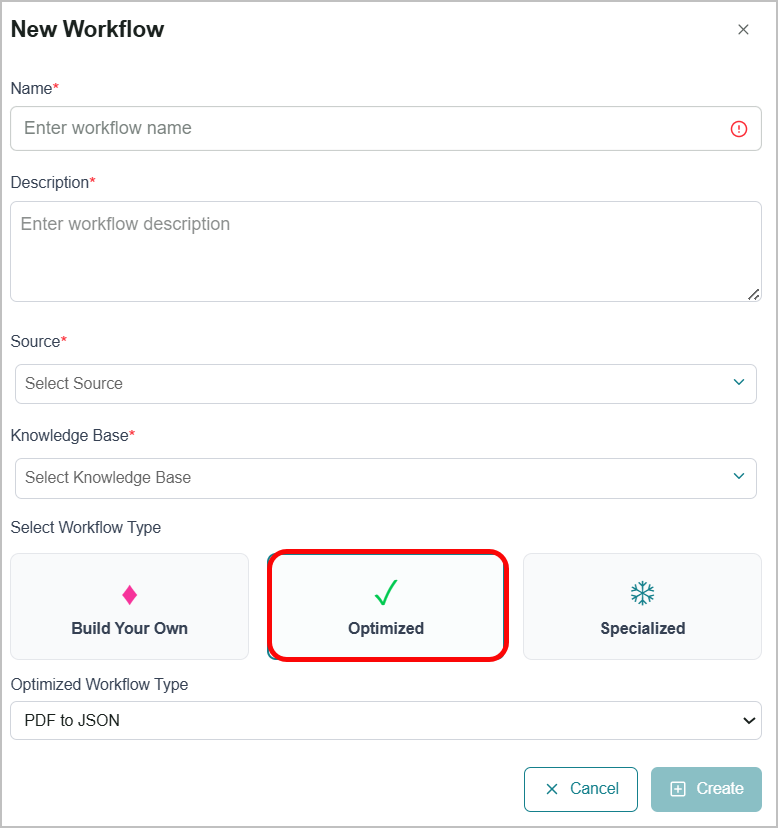 |
To know more, refer to Data Ingestion in the User Guide.
Model Security Scan
Business AI Cloud now provides Model Security Scan, an automated security evaluation capability. It scans your deployed SLM for security vulnerabilities, integrity issues, compliance violations, adversarial risks, and generates comprehensive reports documenting the findings, providing your teams with a clear, actionable view of model-level security risks.
Key Capabilities:
Every base SLM is automatically scanned. No manual setup, configuration, or triggering required.
Security scan status and overall score appear on each model card, making model safety visible at a glance before fine-tuning.
In-depth reports surface category-level scores, the highest- and lowest-scoring areas, and all tested security categories.
Reports are viewable in a new browser tab or exportable as a PDF for offline review, compliance records, and audit trails.
Scan status and scores also appear on the Model Comparison page, so safety factors into side-by-side model evaluation.
The Model Security Scan is available within Business AI Cloud's Model Layer.
To access, go to the Home page > Model > LLM/SLM Management.
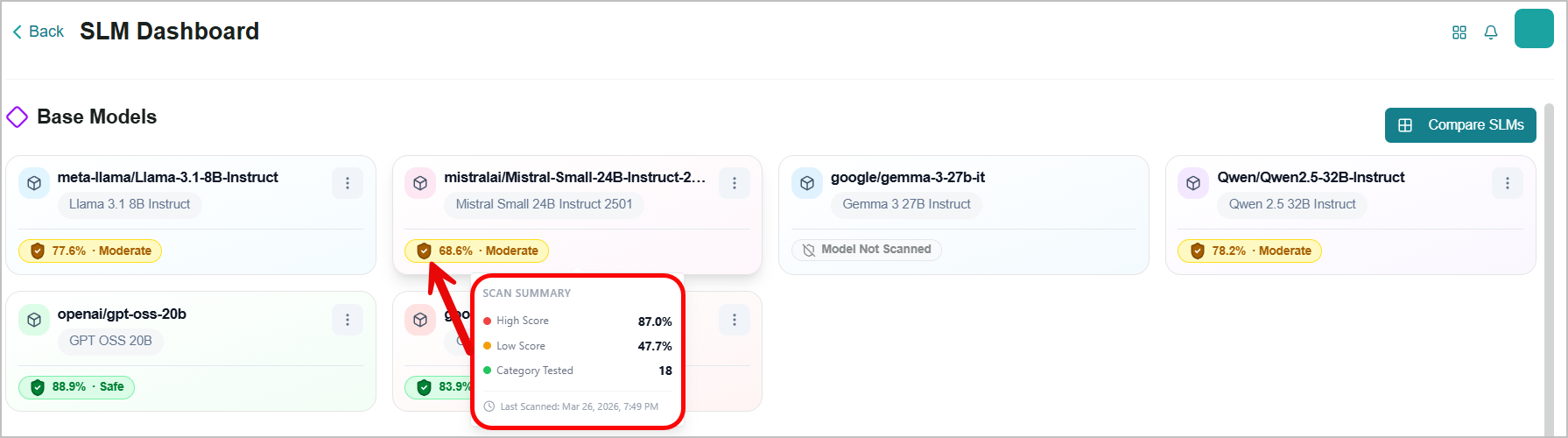
To know more, refer to LLM/SLM Management in the User Guide.
TAG Fine-Tuning
Business AI Cloud now supports SLM fine-tuning for relational databases using the TAG (Table-Augmented Generation) framework. Fine-tune SLMs to generate more accurate SQL and natural language-to-query translations against your Relational DB knowledge bases, improving query accuracy, reducing hallucination, and grounding the model in your actual schema and query patterns.
Key Capabilities:
Auto-generated training data from query logs - Learn from real user behavior by mining historical queries when available.
Synthetic Query Generation - Produce diverse training queries to cover edge cases and unseen schema paths
Inline evaluation per Relational DB - Review fine-tuning results and performance for each knowledge base without leaving the studio.
TAG fine-tuning is now available in the Fine Tuning Studio in Business AI Cloud's Knowledge Layer. For more information, refer to Fine Tuning Studio in the User Guide.
Enhancements
Connectors Support
Business AI Cloud adds new destination connectors, expanding the platforms you can route data to and from. Vector data can now be sent directly to Milvus, structured data can be sent to Databricks on Azure or AWS, and Google Cloud Storage is now supported as a source for global entity extraction.
Key Capabilities:
Milvus as a vector destination: Route vector data to Milvus for RAG evaluation and SLM fine-tuning workflows.
Databricks on Azure and AWS as connectors: Send data directly to Databricks-hosted environments on either cloud, eliminating manual movement between platforms.
Google Cloud Storage(GCS) as a Global Entity Extraction source: Run global entity extraction directly on files stored in GCS buckets, alongside existing source connectors.
The new connections are available within the Manage Connector in Business AI Cloud's Data Layer. For more information, refer to Creating a Destination Connector in the User Guide.
Agent Evaluation for Agentic Workflows
Business AI Cloud now supports Agent Evaluation for Agentic Workflows.
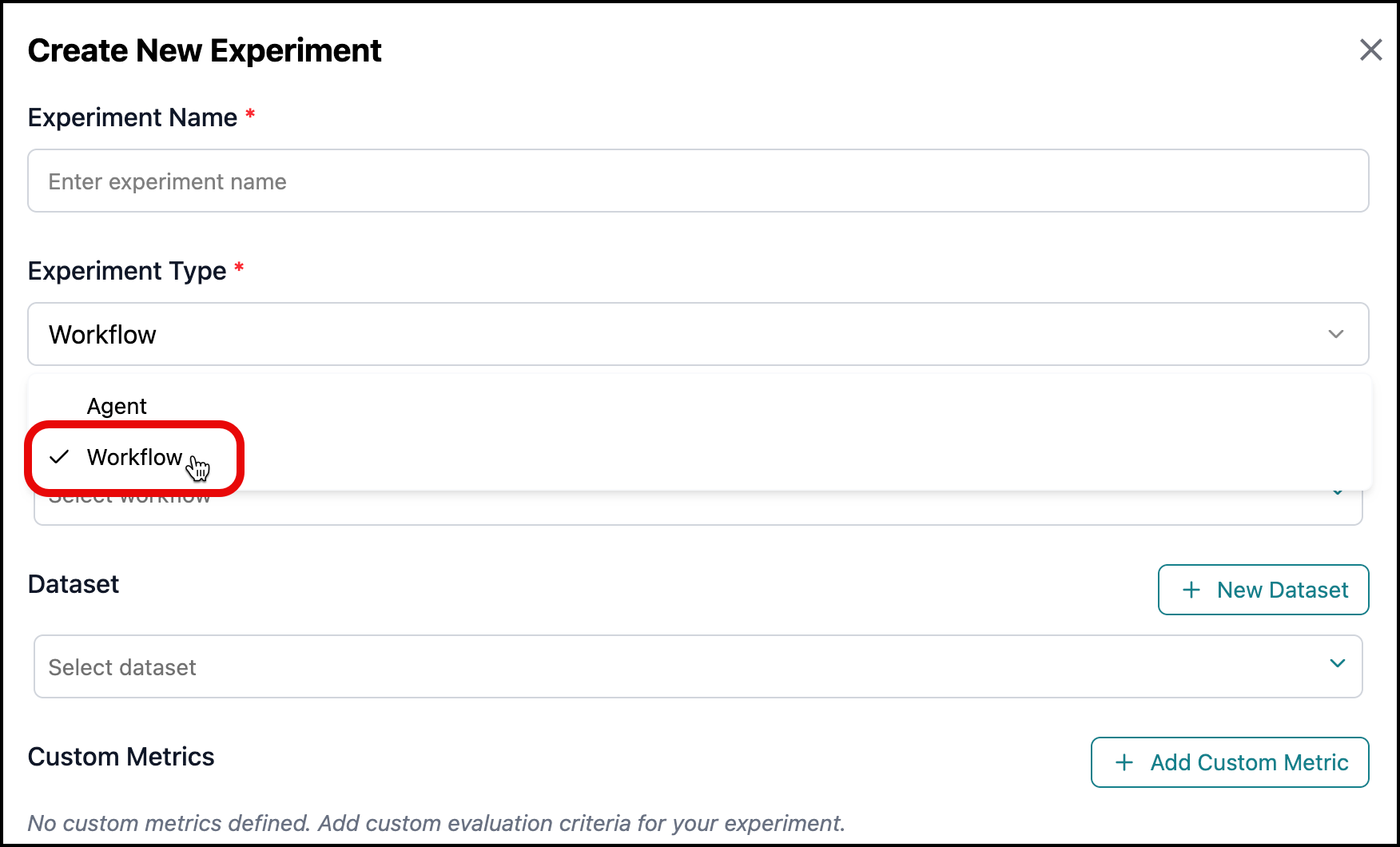 |
Agent Evaluation for Agentic Workflows is available in Agent SDK within Business AI Cloud's Agent Layer. For more information, refer to Agent Evaluation in the User Guide.
NoSQL Data Support
Business AI Cloud now extends its source connection capabilities to support MongoDB as a new NoSQL data source. Teams working with document stores, key-value databases, and other NoSQL formats can bring this data directly into the platform alongside existing structured and unstructured sources.
Note
MongoDB is available as a Beta feature.
Key Capabilities:
Adds MongoDB as a supported NoSQL data source, enabling direct ingestion of document store data into the platform without prior transformation.
Ingested NoSQL data is available for use in agent workflows, knowledge bases, and retrieval pipelines, consistent with other supported source types.
The new connections are available within the Manage Connector in Business AI Cloud's Data Layer. For more information, refer to Creating a Source Connector in the User Guide.
Data Ingestion Node
Business AI Cloud now introduces the Data Catalog Write node, a new workflow node that automatically records entities and metadata extracted from your source content into the Data Catalog. In addition, existing pipeline nodes are updated with improved configuration options, giving teams greater precision and control over how each step in the ingestion workflow behaves.
Key Capabilities:
Automatically captures entities and metadata extracted from your source content and records them directly into the Data Catalog, making discovered data immediately available for search and reuse across the platform.
Enhanced configuration options on existing workflow nodes give teams more precise control over how each pipeline step processes, transforms, and routes data.
The new and enhanced workflow nodes are available in the Data Ingestion section of Business AI Cloud's Data Layer. For more information, refer to in the User Guide.
Data Visualization
Business AI Cloud has enhanced the experience of visualizing structured metadata. The updated interface makes it easier to understand and navigate metadata structures, reducing the time needed to explore and interpret data definitions within the platform.
Key Capabilities:
Faster comprehension of metadata structures, reducing time spent on manual exploration.
Improved navigation across complex data definitions without losing context.
The data visualization is available within the Data Ingestion and Data Agents in Business AI Cloud's Data Layer. For more information, refer to Viewing Metadata in the User Guide.
RCA for Negative Drift Score
Business AI Cloud now provides automated Root Cause Analysis (RCA) for negative drift scores, giving you immediate visibility into what's driving performance degradation in LoRA model versions. When a drift score dips below the baseline thresholds, the platform surfaces actionable diagnostic insights, so teams can investigate and remediate issues faster, without manual analysis.
Key Capabilities:
Question-level regression analysis: view exactly which queries the new model got wrong that the baseline got right.
Zero-effort diagnostics: no manual log-digging, no separate eval runs. Drift detection and root cause analysis arrive together.
Identifies whether the regression stems from a Retrieval change or a Generation issue, enabling faster, more targeted remediation.
The RCA for Negative Drift Score is available within the Fine Tuning Studio in Business AI Cloud's Knowledge Layer. For more information, refer to Viewing Root Cause Analysis in the User Guide.
Simulated User Conversations for Agent Evaluation
Business AI Cloud can now generate and utilize simulated user conversations for agent evaluation based on parameters you provide. Simulated user conversations can be created in datasets used in experiments.
Key Capabilities:
Choose either simulated user conversations or sample prompts when creating a dataset for Agent Evaluation.
Provide parameters for the conversation: Number of Conversational Turns, Task (required), Stop Criteria, and Persona. You can also upload batches of conversation parameters.
Simulated User Conversations for Agent Evaluation is available within the Agent SDK in Business AI Cloud's Agent Layer. For more information, refer to Agent Evaluation in the User Guide.
Cookies Management
Business AI Cloud now provides a dedicated Cookies Management section within Profile Management. Users can view and update their cookie preferences directly from their profile, giving them greater control over platform data settings.
Key Capabilities:
Centralized access to cookie preferences without navigating separate settings menus.
Greater user control and visibility over platform data management settings.
The cookie settings are available within the Profile Management in Business AI Cloud. For more information, refer to Profile Management in the User Guide.
Constraints and Limitations
The following constraints and limitations exist for this release:
Item | Description |
|---|---|
NoSQL Data Source | As a Beta release, it may have limitations in certain configurations. Full functionality is planned for an upcoming release. |