1.0.7 Release Note_Apr 9, 2026
Release Date: April 09, 2026
The Business AI Cloud 1.0.7 Release will introduce the following new or enhanced features.
Important
This document provides high-level information on the Business AI Cloud's latest release features and enhancements. For detailed procedures, configuration steps, and comprehensive guidance, please refer to the Business AI Cloud User Guide.
Release Highlights
New Features
Data Discovery Agent - Automatically discovers, profiles, and catalogs structured enterprise content, making it queryable through plain-English search.
Data Analyst Agent - Ask complex analytical questions in plain English without SQL or database expertise, as the platform AI agent bridges the gap between business questions and technical data systems.
Auto Pairing Best SLM - Automatically evaluates available SLMs and recommends the best-fit SLM to pair with your knowledge base.
Export Custom Application - Export AI agent output applications directly to GitHub or copy them to your local environment for broader integration and development.
Conversational Agent Builder - Build, evaluate, and iteratively optimize AI agents directly through a conversational chat interface that automatically configures integrations, generates test cases, runs evaluations, and applies intelligent optimizations.
Agent Skills - Agents can now be assigned reusable instruction packages from a built-in catalog or as custom imports, enabling flexible, shareable behavior across agents.
Enhancements
RCA for Negative Drift Score - When a fine-tuned LoRA model's drift score turns negative, it performs Root Cause Analysis (RCA) to identify the reason for the regression.
Filter Agents by Tools - Filter and identify AI agents by the tools tagged to them for faster navigation and management.
Edit and Remove MCP Integrations - Edit or remove manually created MCP integrations through a streamlined, user-friendly interface.
Agent Details - The AI agent details page has been redesigned with a cleaner interface.
Import Prompt - The import prompt panel across multiple locations has been redesigned with a cleaner interface.
Custom Metrics in Agent Evaluation - Supplement built-in metrics with custom, LLM-judged criteria specific to your agent's expected behavior.
Dataset File Upload for Agent Evaluation - Upload a JSON file to import multiple query-response evaluation samples at once.
Add Knowledge Base(s) at Agent Runtime - Replace or append the Knowledge Base(s) used by an agent during chat.
Downloadable Links in Agent Chat UI Responses - When an Agent Chat response includes a link to a downloadable object, the link is now clickable.
Pause, Resume, and Terminate Workflows - Running agentic workflows can now be paused, resumed, or terminated directly from the Workflow Status History page.
New Features
Data Discovery Agent
Business AI Cloud provides an AI-powered assistant that simplifies the discovery of organizational data through a natural conversation interface. It automatically discovers and profiles structured content across your enterprise, creating an intelligent catalog accessible through plain-English queries. Ask natural-language questions to find relevant datasets. Results are filtered and displayed instantly, and clicking any dataset opens its full details alongside an interactive relationship diagram showing connections to related resources.
Key Capabilities:
Data remains secure in its original location across multiple environments, with no movement or duplication.
Maps relationships across your entire data landscape, enabling semantic search that understands query meaning and context.
Shows what data exists, where it lives, and how it connects, while maintaining data sovereignty and security.
Delivers enterprise-scale data intelligence without compromising data integrity or location.
Note
The Data Discovery Agent allows you to view the source files used to generate answers. It currently supports structured data only for reading and discovery.
The Data Discovery Agent is available within Business AI Cloud's Data Layer.
To access, go to the Home page > Data > Data Agents > Data Discovery Agent.
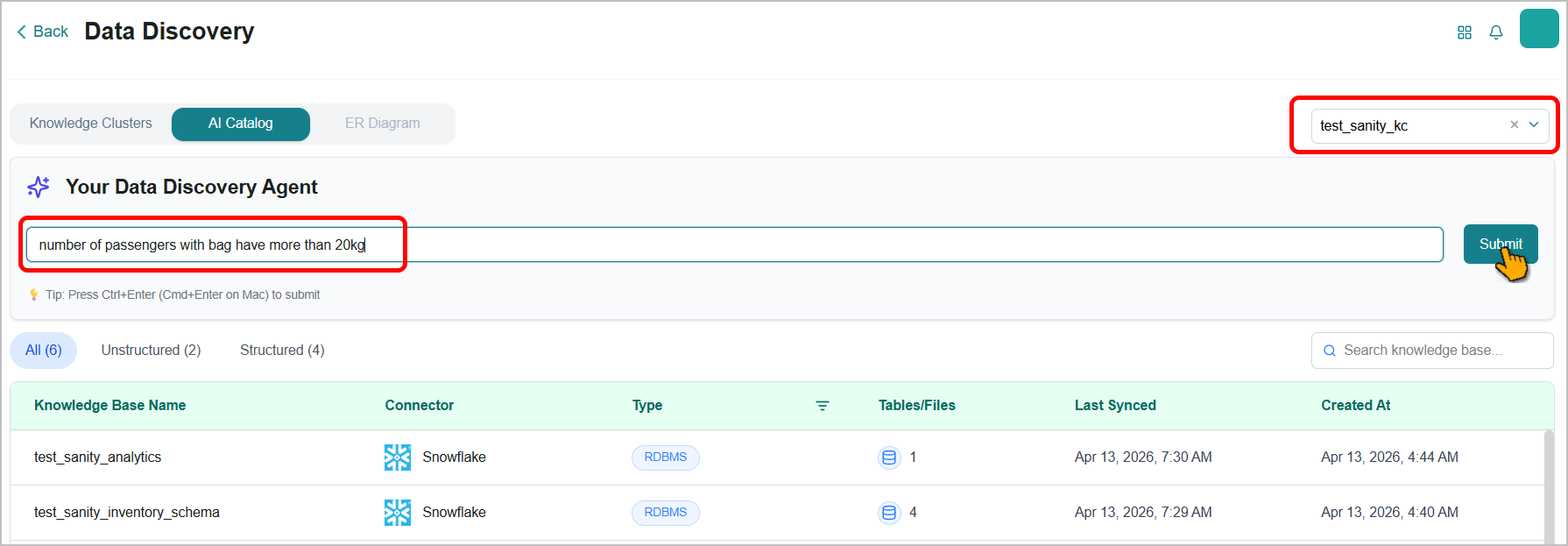
For more information, refer to Data Discovery Agent in the User Guide.
Data Analyst Agent
Business AI Cloud provides an AI-powered agent that democratizes data analysis across your organization. Ask complex analytical questions in plain English without SQL or database expertise. The agent serves as your intelligent data interpreter, bridging the gap between business questions and technical data systems. Leveraging Table Augmented Generation (TAG) processing, it delivers narrative summaries in business terms and interactive visualizations that reveal patterns and trends, transforming vast datasets into actionable intelligence.
Key Capabilities:
Ask complex business questions in plain English and receive accurate, context-aware insights without writing queries or code.
Get immediate answers through both narrative text summaries and interactive visual data representations.
Understands business context rather than just executing queries, enabling deeper and more relevant analysis.
Transforms raw datasets into clear findings that drive faster, better-informed decision-making.
The Data Analyst Agent is available within Business AI Cloud's Data Layer.
To access, go to the Home page > Data > Data Agents > Data Analyst Agent.
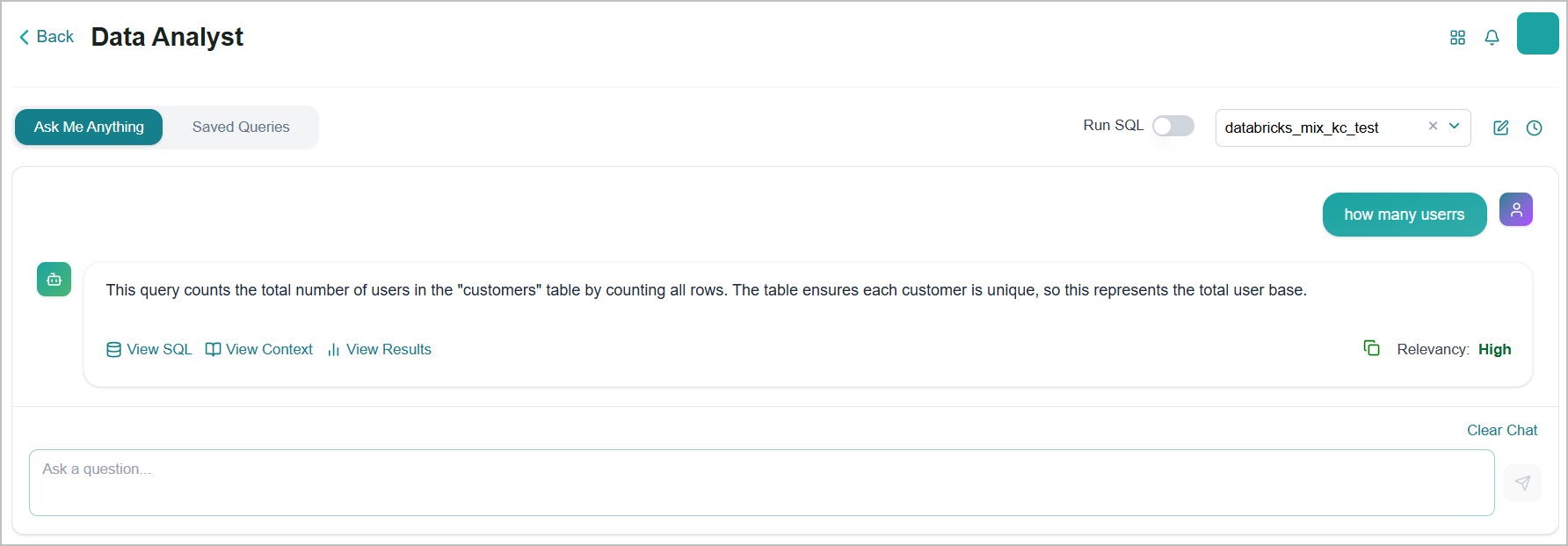
For more information, refer to Data Analyst Agent in the User Guide.
Auto Pairing Best SLM
Business AI Cloud now automatically evaluates available SLMs against your KB's ground truth data and recommends the best-fit SLM to pair with your knowledge base, eliminating manual testing overhead and improving RAG pipeline performance from the start.
Key Capabilities:
SLMs are assessed against your KB's ground truth data to objectively measure accuracy and expected response quality.
Pairing the right SLM to your KB improves retrieval accuracy and response quality across RAG workflows.
The Auto-pairing SLM feature is available within Business AI Cloud's Knowledge Layer.
To access, go to the Home page > Knowledge > SLM for Knowledge Base > Pair SLM > Auto Pairing.
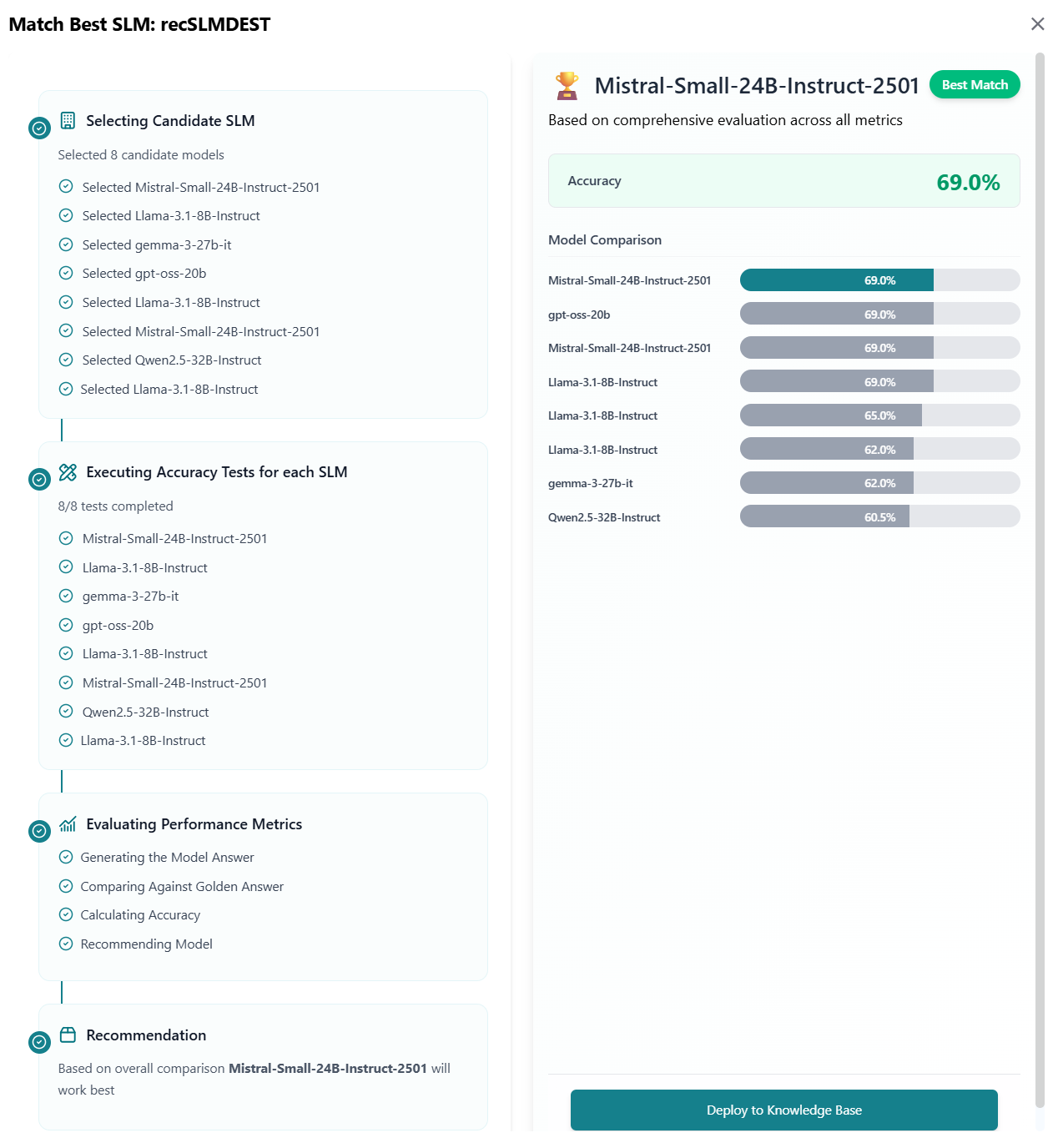
For more information, refer to Pairing an SLM with Knowledge Bases in the User Guide.
Export Custom Application
Business AI Cloud now lets you export applications built with its AI capabilities for deployment and integration in external environments. You can export AI agent applications directly to GitHub or copy them to your local environment, enabling broader integration and development workflows beyond the platform.
Key Capabilities:
Download applications to your local environment for customization, testing, or deployment in external systems.
Push AI agent applications directly to GitHub repositories for version control, collaboration, CI/CD integration, or deployment in external systems.
The Export Custom Application feature is available within Business AI Cloud's Agent Layer.
To access, go to the Home page > Agents > Agent SDK > Create App > Create Custom App.
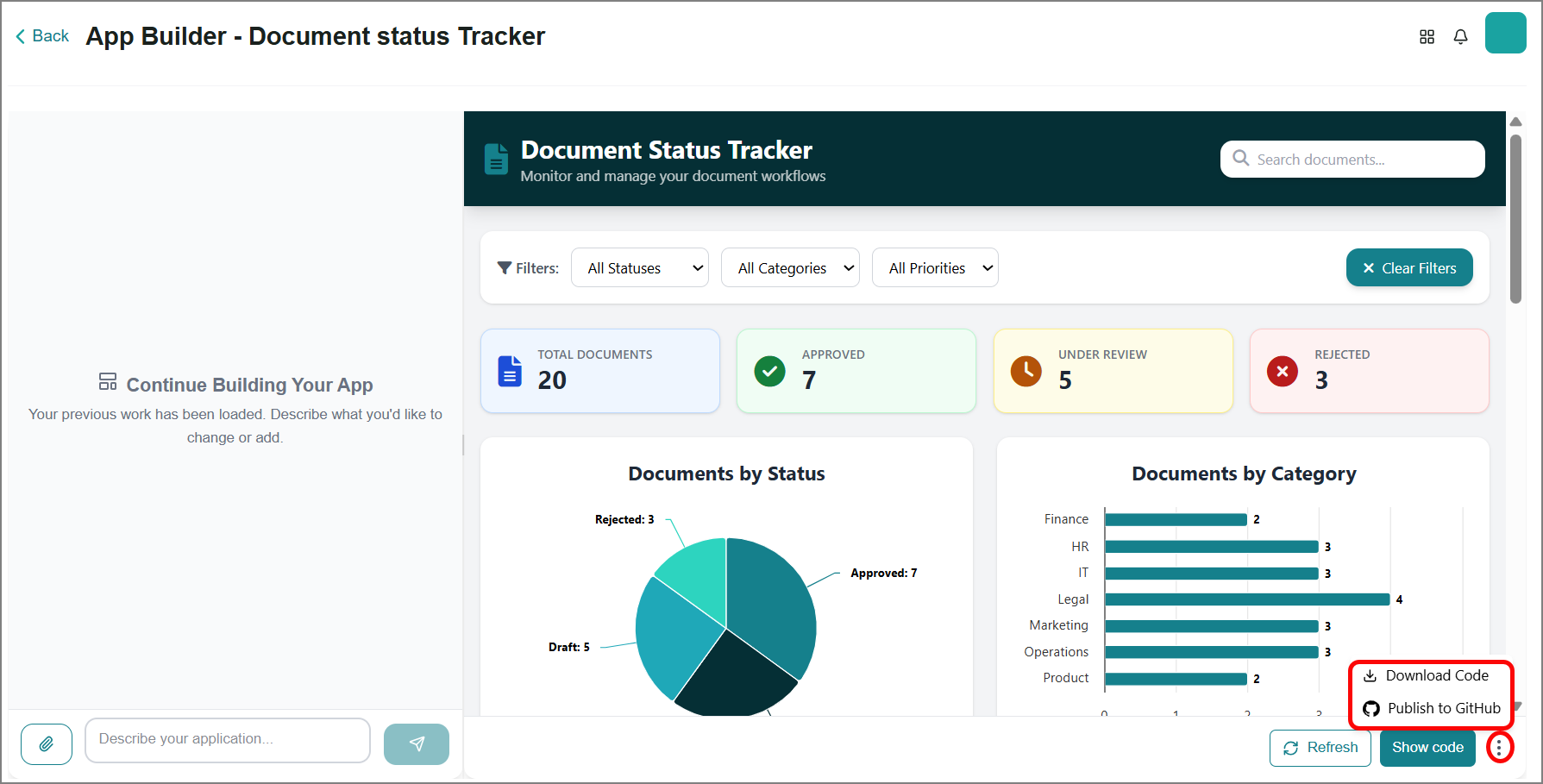
For more information, refer to Exporting an App in the User Guide.
Conversational Agent Builder
The platform now features a completely overhauled Natural Agent Builder. Instead of manually configuring agent parameters, you can now build, test, and optimize agents through an iterative, conversational co-pilot experience. By simply describing your use case in plain English, the builder actively collaborates with you to define the agent's scope, generate real-world test cases, evaluate performance, and apply intelligent optimizations.
Key Capabilities
Conversational Scoping: Actively asks clarifying questions to define the agent's persona, primary use cases, audience, and response style.
Integration Discovery: Automatically detects and suggests necessary tool integrations (e.g., Slack, Microsoft Outlook, Calendar) based on your prompt, alerting you to any missing connections.
Automated Test Generation: Queries connected Knowledge Bases to generate realistic, data-backed test cases (test_cases.md) covering standard queries, edge cases, and out-of-scope handling.
Built-in Evaluation (Evals): Automatically tests the generated agent against the test cases, providing a detailed breakdown of success rates, average response times, strengths, and failure points.
AI-Driven Optimization: Generates targeted hypotheses to fix failing test cases, offering options to automatically apply fixes and refine agent performance.
The Iterative Natural Language Agent Builder feature is available within the platform's Agent Layer. To access, go to the Home page > Agents > Agent SDK > Quick Start > Natural Agent Builder.
Agent Skills
Business AI Cloud now lets you attach Skills to agents, which are reusable instruction packages that define how an agent thinks and responds for a specific task. Skills can be selected from a built-in catalog of predefined options or imported as custom packages, and are shareable across multiple agents. Updating a skill reflects those changes across all agents that use it.
Key Capabilities:
Choose from a catalog of predefined skills or import custom skills via ZIP to tailor agent behavior to your use case.
Skills are modular and reusable, attach the same skill to multiple agents without duplicating configuration.
The Agent Skill feature is available within Business AI Cloud's Agent Layer.
To access, go to the Home page > Agents > Agent SDK > Quick Start > Agent Builder.
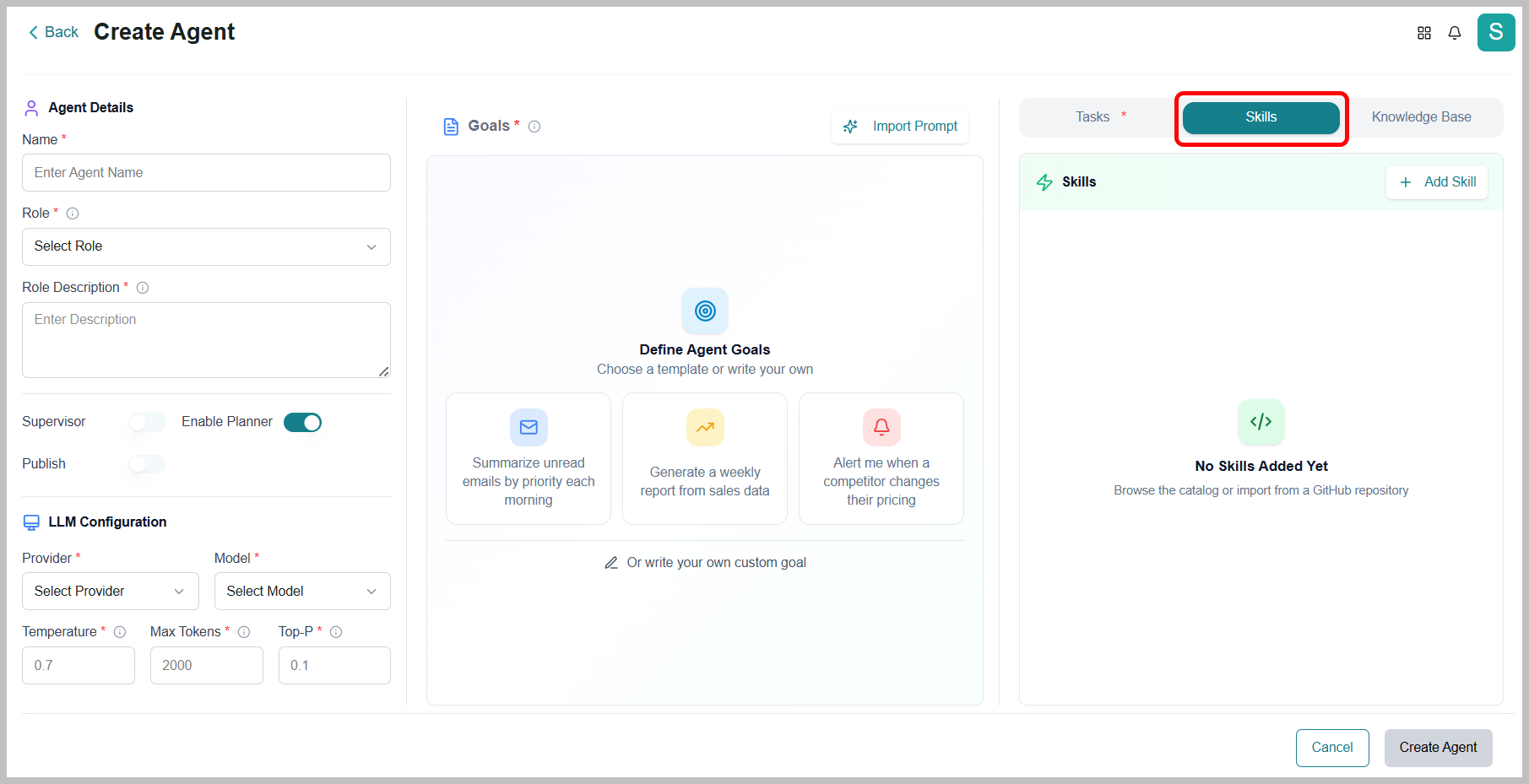
For more information, refer to Creating an Agent in the User Guide.
Enhancements
RCA for Negative Drift Score
Business AI Cloud now provides automated Root Cause Analysis (RCA) for negative drift scores, giving you immediate visibility into what's driving performance degradation in the LoRA model version. When a drift score dips below the baseline thresholds, the platform surfaces actionable diagnostic insights, so teams can investigate and remediate issues faster, without manual analysis.
Key Capabilities:
Compares regressed questions and answers between the baseline and the new model version, highlighting where performance has declined.
Identifies whether the regression stems from a Retrieval change or a Generation issue, enabling faster, more targeted remediation.
The RCA for Negative Drift Score is available within the Fine Tuning Studio in Business AI Cloud's Knowledge Layer. For more information, refer to Viewing Root Cause Analysis in the User Guide.
Filter Agents by Tools
Business AI Cloud now lets you filter and identify AI agents by the tools tagged to them for faster navigation and management. This makes it easier to locate the right agent for a specific task across large agent libraries.
Key Capabilities:
Narrow down your agent list by selecting specific tools to instantly surface agents configured for those capabilities.
Quickly identify the right agent for a task without manually browsing through your entire agent library.
The Tool-based Agent Filter is available within the Agent SDK in Business AI Cloud's Agent Layer and Interacting with AI Agents. For more information, refer to Filtering Agents in the User Guide.
Edit and Remove MCP Integrations
Business AI Cloud now lets you edit or remove manually created MCP integrations through a streamlined, user-friendly interface. This gives you greater control over your integration configurations without requiring technical intervention.
Key Capabilities:
Update existing MCP integration configurations directly from the interface to reflect changes in your environment.
Manage MCP integrations through an intuitive interface designed for fast, error-free configuration updates.
Delete manually created MCP integrations that are no longer needed to keep your integration library clean and up to date.
The MCP Integration feature is available within the Agent Action Library in Business AI Cloud's Agent Layer. For more information, refer to Creating an MCP Integration in the User Guide.
Agent Details
Business AI Cloud now provides a redesigned AI agent details page with a cleaner interface. The updated layout makes it easier to review, manage, and act on agent configurations at a glance.
Key Capabilities:
Access all agent details through a cleaner, more intuitive interface that reduces visual complexity and improves readability.
Locate key agent information and configuration options more quickly with a streamlined page structure.
The Agent Details feature is available within the Agent SDK in Business AI Cloud's Agent Layer. For more information, refer to Creating an Agent in the User Guide.
Import Prompt
Business AI Cloud now provides a redesigned Import Prompt panel with a cleaner interface across multiple platform locations. The updated design ensures a consistent, intuitive experience across all access points to the Import Prompt panel.
Key Capabilities:
Access the Import Prompt functionality through a cleaner, more intuitive interface that reduces visual complexity and improves readability.
Enjoy a unified Import Prompt design across all platform locations for a seamless and predictable workflow.
The Import Prompt feature is available within Business AI Cloud's Knowledge Layer, Model Layer, and Agent Layer. For more information, refer to Creating an Agent in the User Guide.
Custom Metrics in Agent Evaluation
Business AI Cloud now supports custom, LLM-judged metrics in agent evaluation experiments, supplementing built-in metrics (task success, latency, cost, etc.) with criteria specific to your agent's expected behavior. Custom metrics are defined using a natural language prompt and scored by an LLM-as-a-Judge, enabling domain- or use-case-specific evaluation without modifying core experiment setup. After an experiment runs, results are available under the Custom Metrics tab on the Analytics page.
Key Capabilities
Define custom evaluation criteria using a natural language prompt, scored automatically by LLM-as-a-Judge.
Supplement out-of-the-box metrics with domain- or product-specific judgments tailored to your agent's use case.
Review custom metric results alongside built-in metrics on the Analytics page.
Agent Evaluation is accessible via Agent SDK, which resides in the Business AI Cloud's Agent Layer. For more information, refer to Agent Evaluation in the User Guide.
Dataset File Upload for Agent Evaluation
Business AI Cloud now supports bulk-importing evaluation samples via JSON file upload, replacing the need to enter query-response pairs one at a time. Individual samples can still be added or edited manually, and uploading a file replaces all existing samples in the dataset.
Key Capabilities
Upload a JSON file to import multiple query-response evaluation samples at once.
Continue adding or editing individual samples manually when needed.
Agent Evaluation is accessible via Agent SDK, which resides in the Business AI Cloud's Agent Layer. For more information, refer to Agent Evaluation in the User Guide.
Add Knowledge Base(s) at Agent Runtime
Business AI Cloud now provides a way to define the information available to an agent by replacing or appending to the Knowledge Base(s) used during chat.
Key Capabilities
Provide up-to-date knowledge to an agent, regardless of when it was created.
Control the context an agent has at run time without changing the agent itself.
For more information, refer to Interacting with AI Agents in the User Guide.
Pause, Resume, or Terminate Instances in Agentic Workflow
The Workflow Status History page now supports pause/resume and termination of workflow instances.
Key Capabilities
Added Suspend, Resume, and Terminate buttons for workflow instances.
The "Running" tab was renamed to "Ongoing" and now also shows suspended instances.
The "Completed" tab now also shows terminated instances.
A new tab called Incident Detail has been added, alongside the Timeline View, Detailed View, and Manage Variables tabs. Incident Detail is displayed when an instance is suspended due to an external task failure.
Constraints and Limitations
The following constraints and limitations exist for this release:
Item | Description |
|---|---|
Data Agent | The Data Agent feature supports only structured data. |
Auto Pairing | Ground truth data is mandatory for comparing models and identifying the best SLM. |
Agent Skill | A maximum of four skills can be enabled per agent. |
Audit Logs | This is part of the admin capability, and only your organization's admin can view this feature. |