1.0.5 Release Note_Feb 19, 2026
Release Date: February 19, 2026
The Business AI Cloud 1.0.5 Release will introduce the following new or enhanced features.
Important
This document provides high-level information on the Business AI Cloud's latest release features and enhancements. For detailed procedures, configuration steps, and comprehensive guidance, please refer to the Business AI Cloud User Guide.
Release Highlights
New Features
Tool Sequence for Agents - Chain multiple tools in a predefined order for reliable, repeatable execution by agents.
Agent Workflow Execution Logs - Track the last 5 runs of each workflow step and decision point, with detailed execution history for streamlined troubleshooting.
Agent Evaluation - Validate and optimize AI agent performance through testing against curated scenarios.
Audit Logs - Track all user and system actions with comprehensive records for compliance and security.
Credit Actuals - Monitor AI platform costs with granular usage metering and attribution.
Enhancements
SLM Re-pairing with Knowledge Base - Switch between SLMs while preserving KB configurations.
Download Fine-tuned Data - Export complete datasets used to train your fine-tuned models.
Fine-tuned SLM for Agents - Deploy custom fine-tuned SLMs for your agent.
New Features
Sequence-tool for Agents
Business AI Cloud now lets you create sequences of tools for agents to execute. A sequence is a composed tool that chains multiple existing tools into a defined workflow. This capability is especially powerful when combined with coding agents for complex, multi-step automation tasks and enforcing a specific order of operations.
Note
Agents can use these tools independently or combined with other tools, as required.
Key Capabilities:
Chain together data retrieval, processing, and output generation in reliable, predefined sequences.
Coordinate multiple API calls, file operations, and computational tasks within a single agent execution.
Create reproducible automation patterns that maintain consistency across runs.
It's part of the Business AI Cloud's Agent Layer.
To access, go to the Home page > Agents > Agent Action Library > Get Started > Sequence.
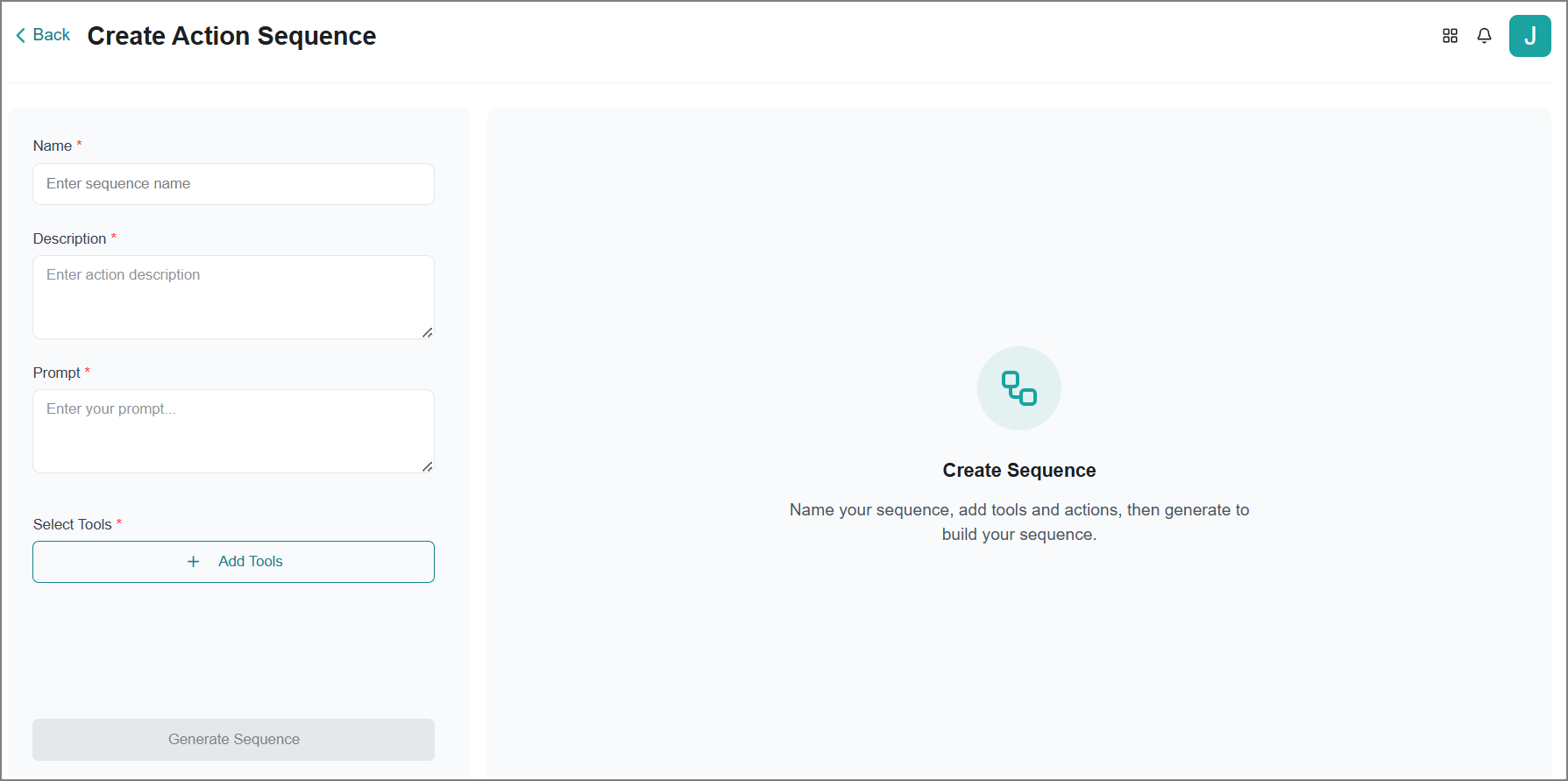
To know more, refer to Configuring a Sequence of Tools in the User Guide.
Agent Workflow Execution History
Business AI Cloud provides complete visibility into your agentic workflow, working through comprehensive analytics. Detailed logs show how your workflows process requests and generate results, enabling data-driven optimization decisions.
Key Capabilities:
View end-to-end execution traces showing each step of your workflow's decision-making process.
Analyze performance metrics to identify bottlenecks and optimization opportunities.
Track agent behavior patterns across multiple runs to understand consistency and reliability.
Troubleshoot issues faster with granular visibility into intermediate outputs and reasoning steps.
It's part of the Business AI Cloud's Agent Layer.
To access, go to the Home page > Agents > Agentic Workflow > View Run History.
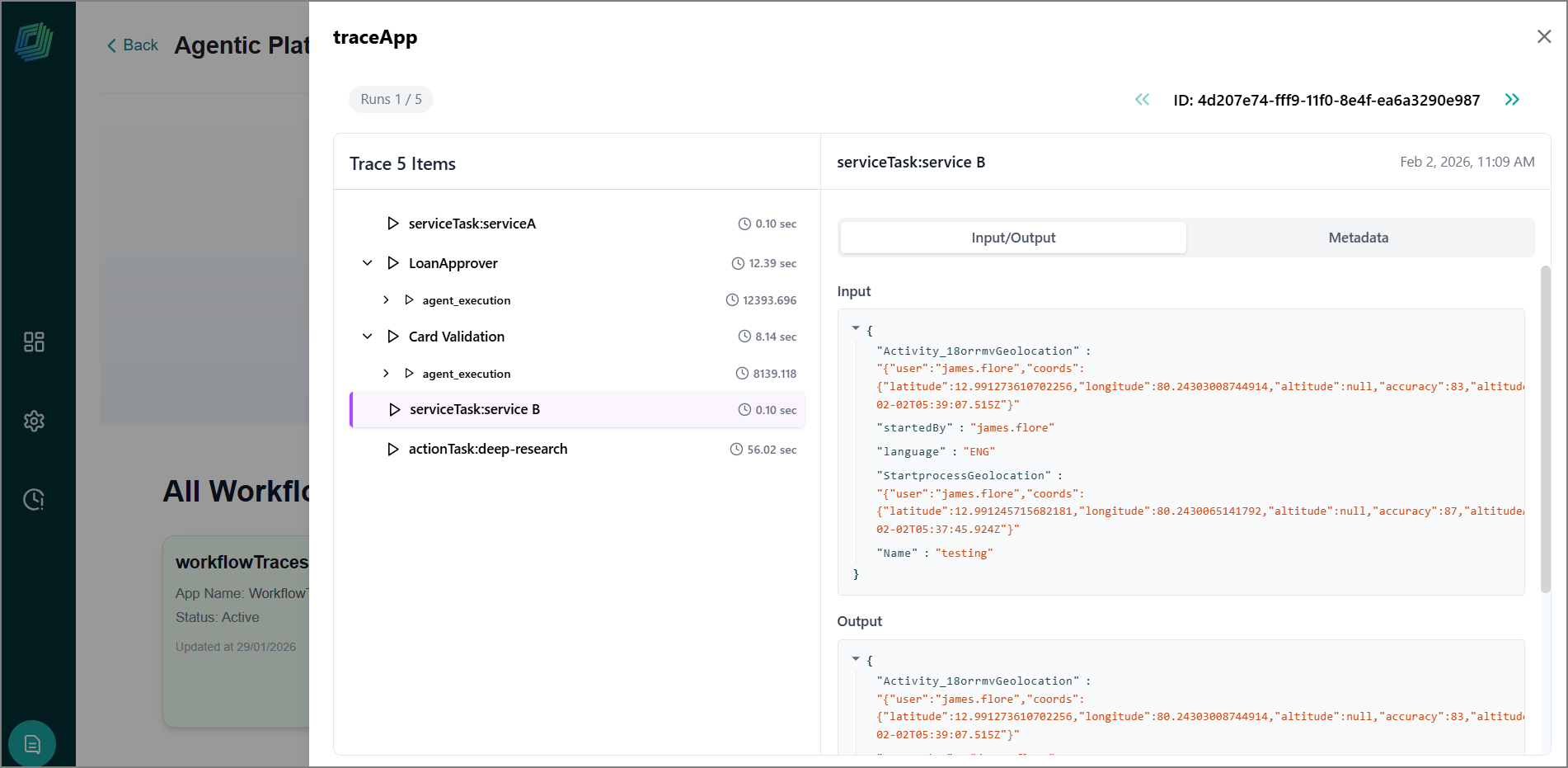
To know more, refer to Viewing the Workflow Execution History in the User Guide.
Agent Evaluation
Business AI Cloud provides a comprehensive framework for assessing and optimizing AI agent performance across your organization. It helps you validate whether your AI agents are working correctly before deploying them to users or making changes to production agents. By running your agent against curated test scenarios, you can measure real outcomes, such as task completion rates, output quality, tool usage correctness, and performance.
Key Capabilities:
Make confident deployment decisions. When you're ready to ship a new agent or update an existing one, you need clear answers: Does this agent reliably complete the tasks it's designed for? Are the outputs accurate and usable? Does it stay within acceptable cost and latency limits? Agent Evaluation gives you objective metrics to answer these questions, helping you decide whether to:
Ship now - The agent meets your requirements, and performance is trending positively.
Iterate and re-evaluate - The agent needs optimization before deployment.
Roll back - Performance has regressed compared to a previous version.
Prevent regressions and catch issues early. Changes to prompts, knowledge bases, tools, or underlying models can impact agent behavior in unexpected ways. Regular evaluation catches these problems before they reach users, protecting you from degraded customer experiences, increased costs, or compliance violations.
It's part of the Business AI Cloud's Agent Layer.
To access, go to the Home page > Agents > Agent SDK > Agent Evaluation.
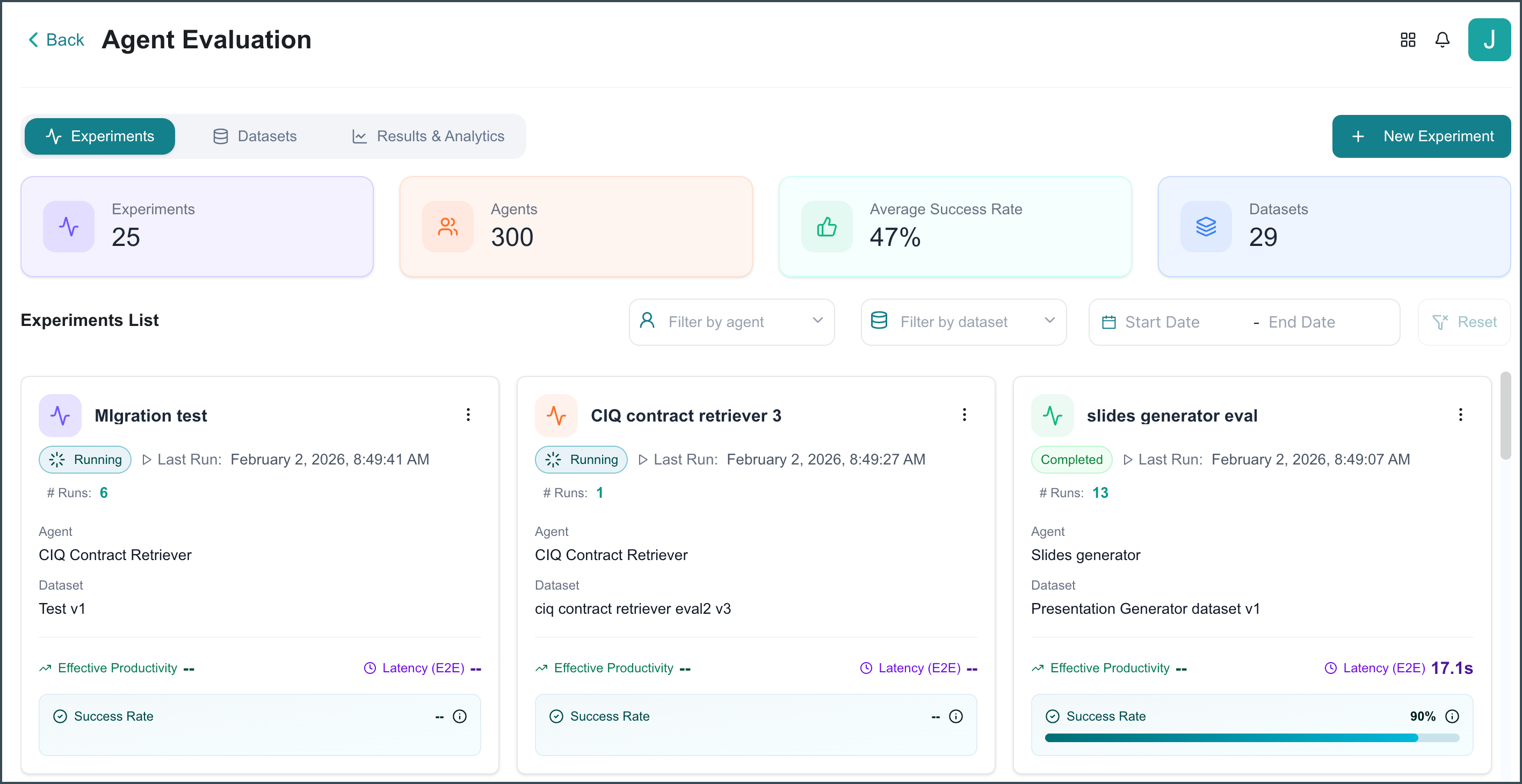
To know more, refer to Agent Evaluation in the User Guide.
Audit Logs
Business AI Cloud provides comprehensive audit logging that automatically tracks and preserves all user and system actions across your platform. This enterprise-grade compliance tool captures complete activity records, including user identity, timestamps, API calls, AI prompts and responses, and model IDs.
Key Capabilities:
Capture all user actions, system events, and AI interactions with complete forensic detail.
Capture every AI prompt, response, and model used for full decision traceability.
Maintain immutable 180-day records that meet regulatory and legal requirements.
Provide on-demand audit data downloads, automated reporting, and system integrations.
It's part of the Business AI Cloud's Admin Capability.
To access, go to the Home page > Admin > Audit Logs tab.
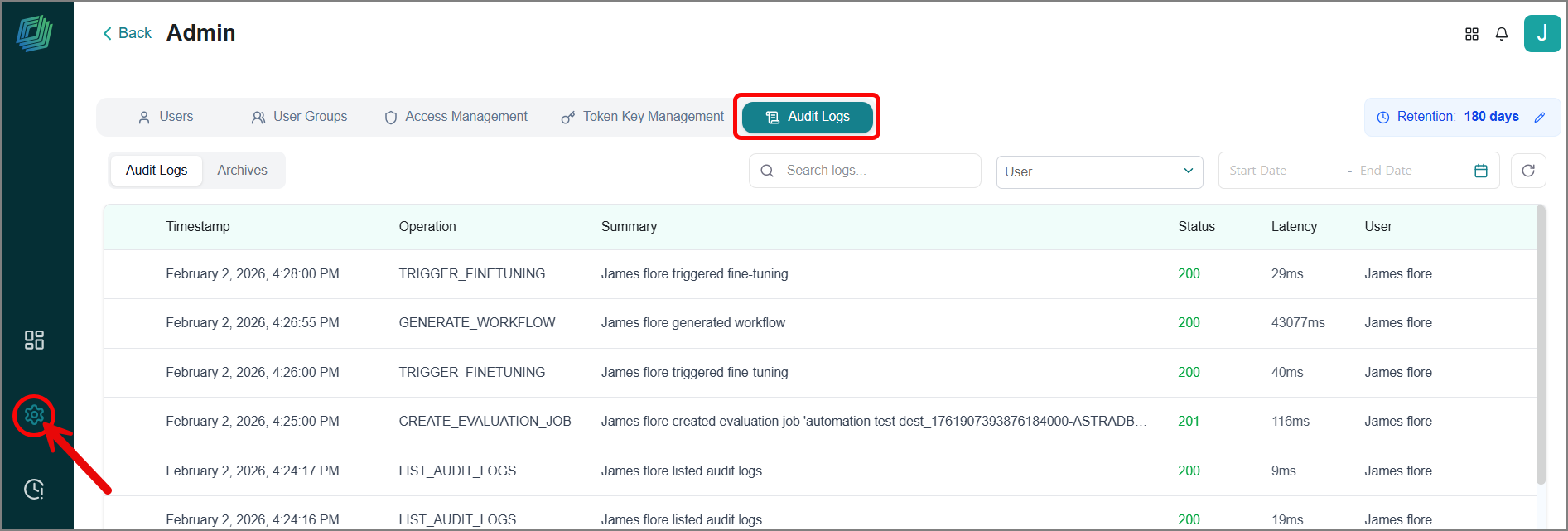
To know more, refer to Audit Logs in the User Guide.
Credit Actuals
Business AI Cloud introduces Credit Actuals, a comprehensive metering and cost-attribution system that provides complete transparency into your AI platform usage. This enterprise-grade capability tracks resource consumption across all Business AI Cloud four layers in real time and converts it into standardized credits, giving you clear visibility into how your AI investments are being used.
Key Capabilities:
Access detailed analytics showing credit allocation, consumption trends, layer-wise breakdowns, and forecasted usage to stay ahead of budget requirements.
Convert diverse metrics like tokens, data scanned, embeddings generated, and agent executions into a single, standardized credit system for simplified cost management.
Track credit consumption by feature, agents, and layer to understand exactly where resources are being utilized and optimize accordingly.
View credit consumption broken down by each component, from data connector usage and RAG pipeline operations to model inference calls and agent workflows.
It's part of the Business AI Cloud's Admin Capability.
To access, go to the Home page > Admin > Credit Actuals tab.
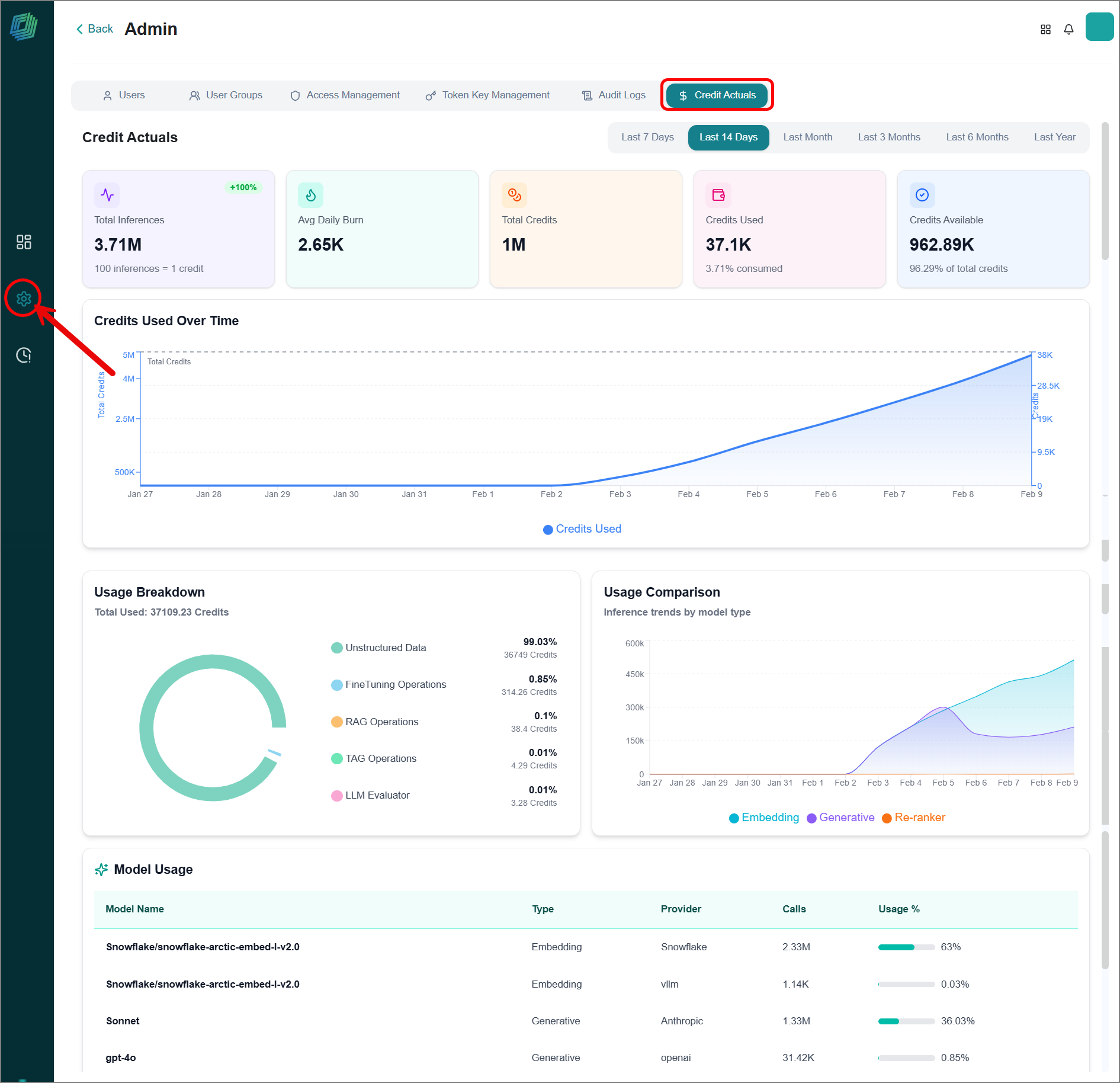
To know more, refer to Credit Actuals in the User Guide.
Enhancements
SLM Re-pairing with Knowledge Base
Business AI Cloud now allows you to swap the Small Language Model (SLM) paired with your knowledge base. This gives you the flexibility to switch between different SLMs while maintaining your existing knowledge base infrastructure, ensuring you can always leverage the most suitable model for your specific use case.
Key Capabilities
Easily change which SLM is connected to your knowledge base through a simple re-pair configuration.
Test multiple SLM options against the same knowledge base to identify which delivers the best results for your requirements.
Verify that new SLM pairings meet your quality and accuracy standards before full deployment.
It's part of the Business AI Cloud's Knowledge Layer. To know more, refer to SLM for Knowledge Base in the User Guide.
Download Fine-tuned Data
Business AI Cloud now lets you download a fine-tuned dataset, giving you complete ownership and portability of your customized training data. This capability enables you to export the specialized data you've used to train models on your organization's information.
Key Capabilities:
Download your fine-tuned datasets in standard formats, such as JSON, ready for use on other platforms or in other environments.
Incorporate your exported training data into custom applications, pipelines, or third-party AI platforms beyond Business AI Cloud.
Maintain full data sovereignty by storing a fine-tuned dataset within your organization's secure systems.
It's part of the Business AI Cloud's Knowledge Layer. To know more, refer to Viewing the Fine-Tuning Performance in the User Guide.
Fine-tuned SLM for Agents
Business AI Cloud now allows you to tag fine-tuned SLMs to your agents, streamlining how you deploy and manage customized language models across your automation process. This capability enables you to directly associate your specialized, domain-trained models with specific agents, ensuring each automated process leverages the most relevant and optimized SLM for its tasks.
Key Capabilities:
Apply the same fine-tuned model across multiple agents or assign different specialized models to different workflows based on specific needs.
Quickly swap or update fine-tuned model tags as you refine your models, enabling continuous improvement without workflow disruption.
Match agents with the most appropriate fine-tuned SLMs for their specific domains, tasks, or data requirements.
It's part of the Business AI Cloud's Agent Layer. To know more, refer to Creating an Agent in the User Guide.
Constraints and Limitations
The following constraints and limitations exist for this release:
Item | Description |
|---|---|
Audit Logs | This is part of the admin capability, and only your organization's admin can view this feature. |
Credit Actuals | This is part of the admin capability, and only your organization's platform admin can view this feature. |
Sequence-tool for Agents | Avoid duplicate tool tagging—when agents use a sequence tool set, don't also tag each tool individually. |