1.0.15 Release Note_October 05, 2026
Release Date: October 05, 2026
The Business AI Cloud 1.0.15 release introduces the following new or enhanced features.
Important
This document provides high-level information on the latest release features and enhancements for the Business AI Cloud. For detailed procedures, configuration steps, and comprehensive guidance, please refer to the Business AI Cloud User Guide.
Release Highlights
New Features
Knowledge Resources - Centralizes reference files and generated mappings, enabling the Data Discovery Agent to produce more accurate Source-to-Target Mappings (STTM) and data models.
SLM Configuration - Customizes SLM configuration during KB pairing and experimentation to improve Q&A generation.
BAIC Copilot Configuration - Controls which elements of the Copilot task-execution interface are visible, with preset or custom visibility profiles and session management.
Agentic Workflow - Introduces a new workflow type (Agentic Workflows) built from connected nodes, supporting both deterministic and agent-driven execution, with Copilot generation and step-through debugging.
Roles and Permissions - Defines roles and configures granular permissions for what each role or group can view and edit across modules.
Enhancements
Several UI elements were refined on the following pages to provide a cleaner, more consistent experience.
Data Ingestion
Data Prep
Knowledge Cluster
Agent Creation
Data Engineering Agent
SQL Query Validation - Validates pipeline query syntax through an explanation check before execution, catching errors early.
Validation Audit - Captures validation templates and pipeline validation activity in the audit section for full traceability.
Custom App Builder - Adds the ability to build dashboards for Knowledge Bases and Knowledge Clusters within the Custom App Builder.
Agent Guardrails - Introduces automated safety checks that scan every agent interaction for prompt-injection attempts and sensitive information (PII/secrets), with results visible in Agent Chat and Agent Evaluation.
User Activation/Deactivation - Allows admins to manually activate and deactivate users.
Credit Actuals - Extends credit tracking to Process Intelligence, capturing credits consumed across its key activities, including LLM inference calls.
SCIM Integration - Connects Business AI Cloud to your identity provider (IdP), automatically syncing users and group memberships without manual updates.
New Features
Knowledge Resources
Business AI Cloud provides Knowledge Resources within Knowledge Clusters, a dedicated space for managing the source material and generated artifacts behind data mapping and modeling work. You can upload reference files, such as glossaries, business rules, or sample mappings, to guide the Data Discovery Agent in generating STTM and data models. Consolidating reference material, mappings, and models in one place removes the need to track scattered files across separate tools, and it gives teams a clear record of how each mapping or model was produced.
Key Capabilities:
Uploads reference files, such as glossaries, business rules, and sample mappings, to guide agent-driven mapping and modeling.
Guides the Data Discovery Agent with generated STTM and data models.
Centralizes source material, generated mappings, and models in a single location.
Tracks version history, showing how each mapping or model was produced.
The Knowledge Resources feature is available within Knowledge Clusters in Business AI Cloud's Data Layer.
To access, go to the Home page > Data > Data Agents > Data Discovery Agent > Knowledge Cluster > Knowledge Resources.
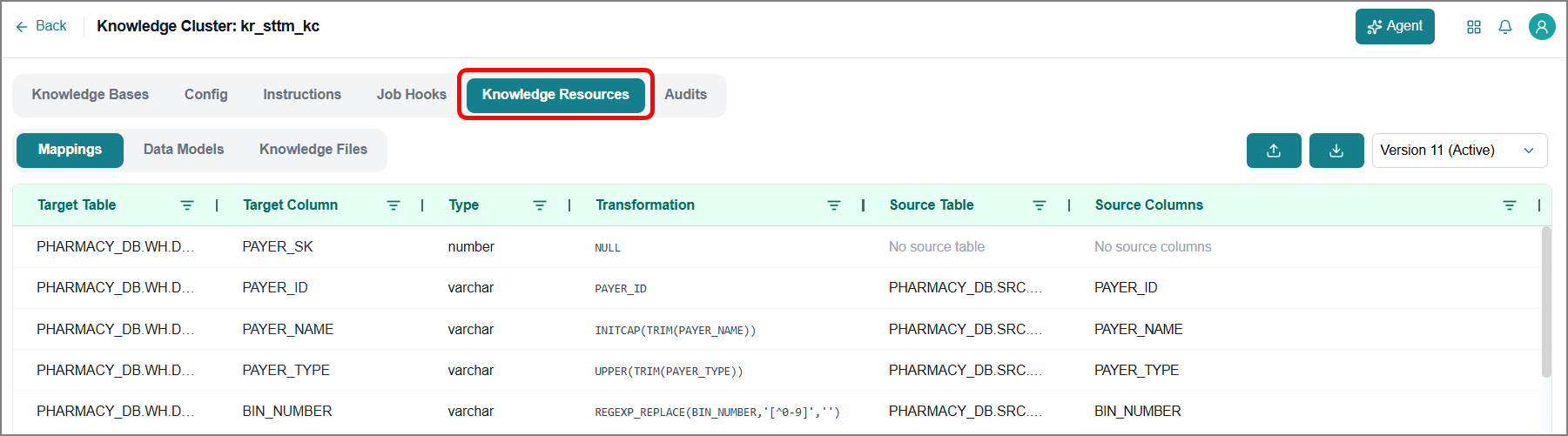
For more information, refer to Knowledge Resources Tab in the User Guide.
SLM Configuration
Business AI Cloud allows SLM configuration to be customized both when pairing an SLM with a Knowledge Base and when experimenting with a KB. This gives you direct control over the model settings that drive Q&A generation, rather than relying on the default configuration alone, so the SLM's behavior can be tuned to the specific content and query patterns of each Knowledge Base.
Key Capabilities:
Customizes SLM configuration during the KB pairing step.
Customizes SLM configuration during KB experimentation.
Improves Q&A generation quality by tailoring model settings to the specific Knowledge Base.
SLM Configuration is available within SLM for Knowledge Base in Business AI Cloud's Knowledge Layer.
To access, go to the Home page > Knowledge > SLM for Knowledge Base > Pair SLM.
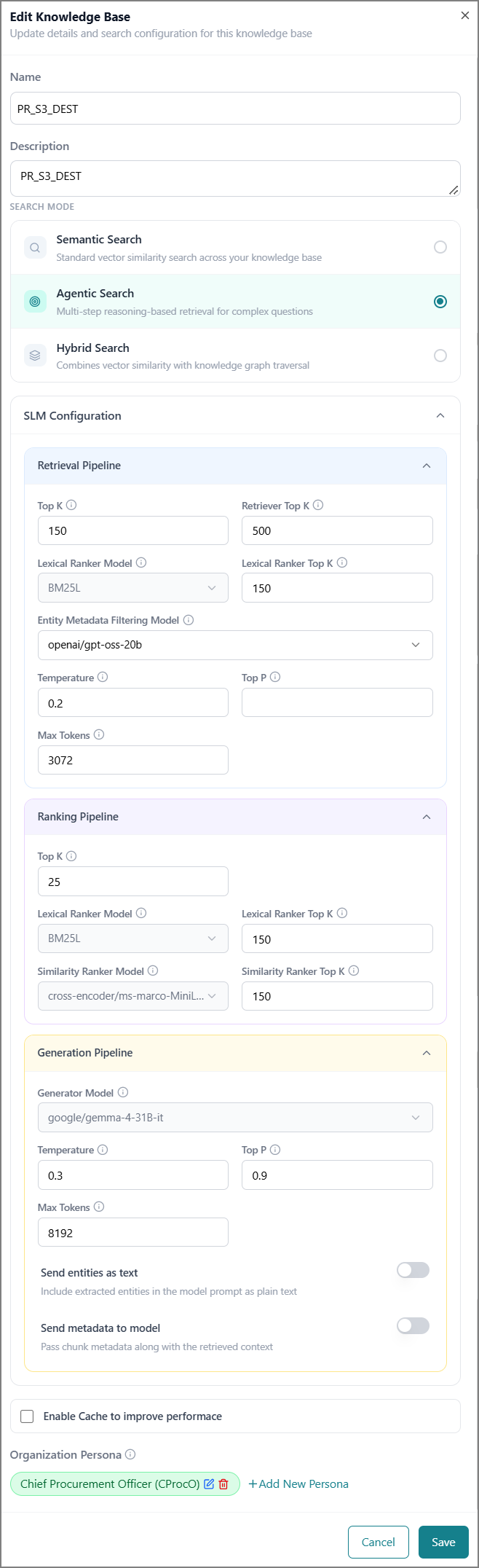 |
For more information, refer to Modifying a Knowledge Base in the User Guide.
BAIC Copilot Configuration
Business AI Cloud provides a BAIC Copilot Settings panel that provisions which elements of the Copilot task-execution interface are visible to viewers. Administrators choose a preset visibility profile or customize individual surfaces, such as reasoning steps, tool calls, and the task plan, tailoring the level of detail shown to different audiences. This lets you view a simplified view of Copilot activity while admins retain access to full execution detail, and it extends to managing Copilot sessions directly from the same panel.
Key Capabilities:
Chooses a preset visibility profile or customizes individual interface surfaces.
Controls visibility of reasoning steps, tool calls, and the task plan independently.
Shows viewers a simplified view while preserving full execution detail for admins.
BAIC Copilot Configuration is available within the BAIC Copilot panel in Business AI Cloud.
To access, go to the Home page > Agent SDK > BAIC Copilot > Settings.
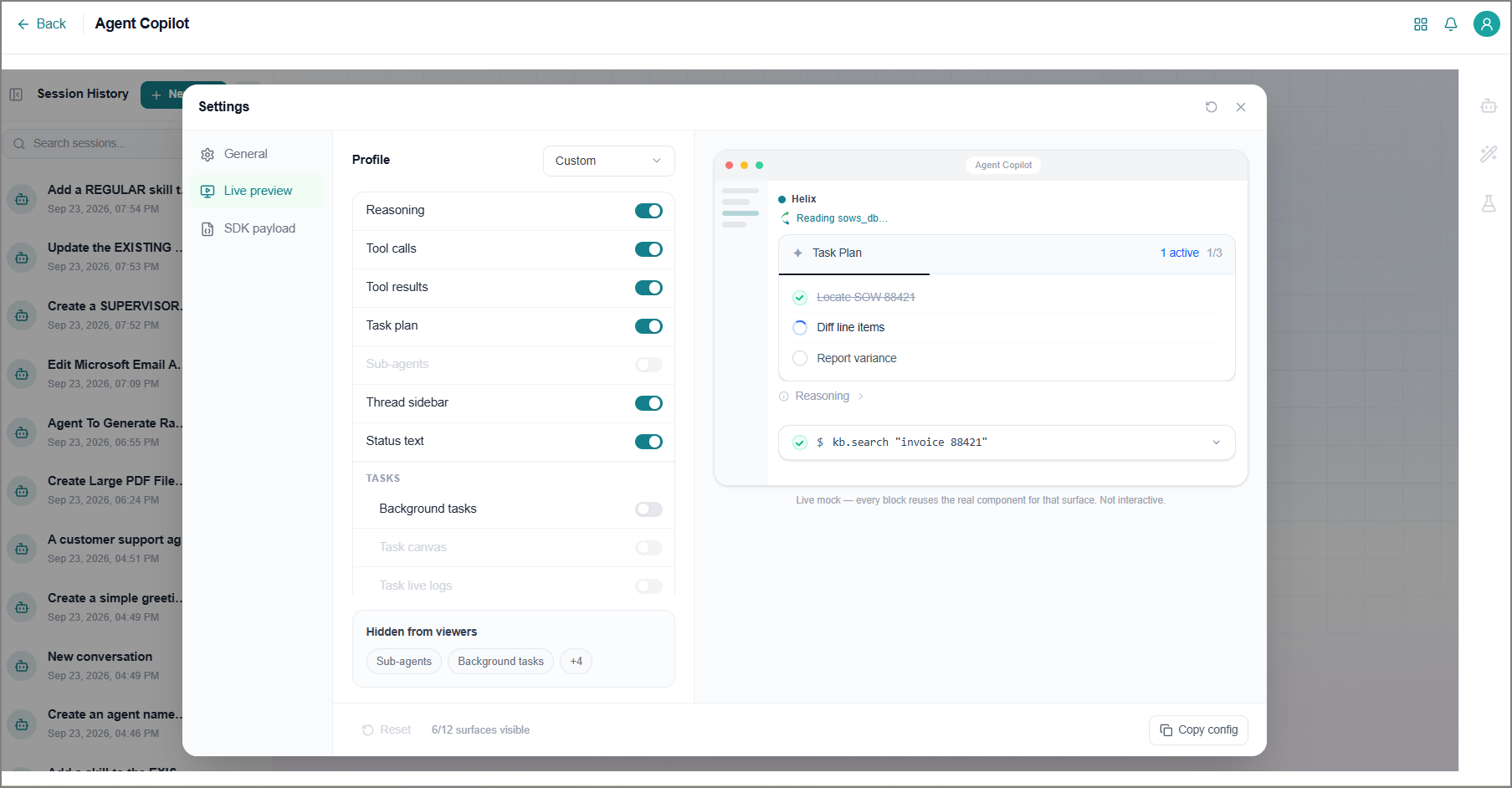
For more information, refer to BAIC Copilot Settings in the User Guide.
Agentic Workflow
Business AI Cloud supports Agentic workflow, a new workflow type available alongside BPMN Workflows. Agentic workflows are built from connected nodes that perform actions, run logic, call agents, or interact with external systems, executed in the order you define. The underlying workflow engine supports both deterministic execution, where you control exactly which steps run and in what order, and non-deterministic execution, where a primary agent can decide at runtime whether to handle a task itself or delegate it to sub-agents.
Workflows can be built manually using the Canvas Builder's node library or generated directly from a natural-language description with Copilot, which can also modify existing flows and explain what they do. Each workflow includes a built-in Debugger Panel for inspecting execution traces, variables, and logs, as well as pause points and step-through debugging to test behavior before publishing. Published workflows are versioned, and published Agentic workflows with a Manual Trigger can be invoked programmatically via the API.
Key Capabilities:
Build workflows as connected nodes spanning five categories: Trigger, Logic, AI, Agents, and Action Library.
Choose between deterministic execution, where you control the exact sequence of steps, and non-deterministic execution, where agents dynamically decide whether to handle or delegate a task.
Generate or modify flows from natural language descriptions using Copilot.
Start flows from five trigger types: Manual, Webhook, Schedule, Chat, Email trigger, and Kafka.
Pause, step through, and inspect variables during a debug run before publishing.
Publish named, versioned snapshots of a flow, with the ability to view or promote any previous version.
Agentic Workflow is available within Business AI Cloud's Agents layer.
To access, go to the Home page > Agents > Agentic Workflow.
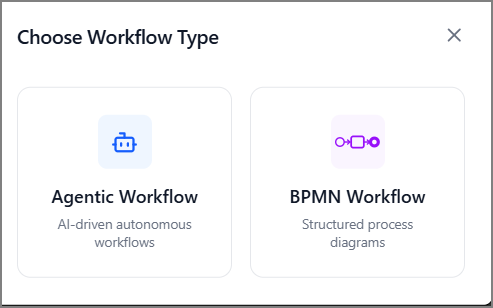 |
For more information, refer to Agentic Workflow in the User Guide.
Roles and Permissions
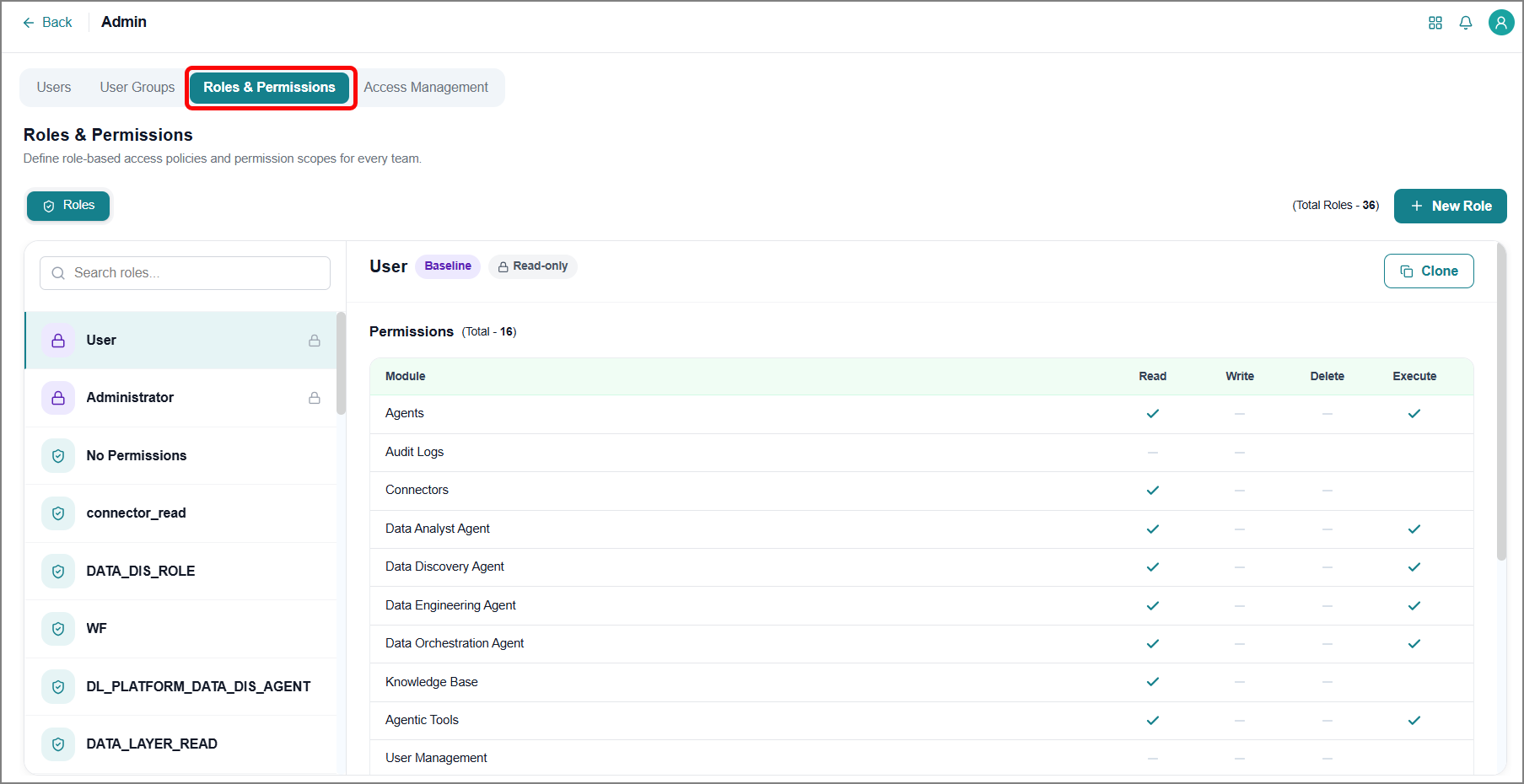
Business AI Cloud supports Roles and Permissions within the Admin section, giving organizations control over what each role can view and edit across the platform. Administrators define roles and configure permission sets at the module level, determining which modules and actions are visible to users or user groups assigned to each role. This replaces broad, one-size-fits-all access with role-based control, letting organizations align platform access with actual job responsibilities and reduce the risk of unauthorized changes.
Key Capabilities:
Creates roles manually and assigns permission sets to each one.
Configures permissions at the module level, controlling visibility and actions independently per module.
View existing permission sets for any role to confirm current access before making changes.
Roles and Permissions are available within Business AI Cloud's Admin section.
To access, go to the Home page > Admin > User Management > Roles and Permissions.
For more information, refer to Roles & Permissions in the User Guide.
Enhancement
SQL Query Validation
Business AI Cloud adds query validation to the Data Engineering Agent's SQL Editor, allowing a pipeline query to be checked before it runs. The validation performs an explanation check on the query's syntax without executing it, surfacing structural issues up front rather than after a pipeline fails mid-run. This gives you a fast, low-risk way to confirm a query is well-formed before committing to a full execution, reducing wasted runs and easing troubleshooting during pipeline development.
Key Capabilities:
Runs an explain check on the query's syntax without executing the query.
Surfaces syntax issue before a pipeline runs to reduce failed executions.
Available directly within the SQL Editor, requiring no separate validation tool.
SQL Query Validation is available within the Data Engineering Agent in Business AI Cloud's Data Layer. For more information, refer to Adding SQL Queries in the User Guide.
Validation Audit
Business AI Cloud extends audit logging to capture activity from Validation Templates and Pipeline Validation within the Data Engineering Agent. Every validation template action and pipeline validation run is recorded alongside other platform activity, giving you a complete, centralized record of validation work without needing to check the Data Engineering Agent separately.
Key Capabilities:
Records validation template creation and updates in the audit log.
Captures pipeline validation runs and their results for compliance and traceability.
Validation Template Audit is available within the Data Engineering Agent in Business AI Cloud's Data Layer. For more information, refer to Managing Validation Templates in the User Guide.
Custom App Builder
Business AI Cloud extends Custom App Builder to support dashboard creation for Knowledge Bases and Knowledge Clusters. Teams can now build dashboards directly within Custom App Builder to surface KB and KC data, rather than relying on separate reporting tools.
Key Capabilities:
Builds dashboards for individual Knowledge Bases within Custom App Builder.
Builds dashboards for Knowledge Clusters within Custom App Builder.
Custom App Builder is available within the Agent SDK in Business AI Cloud's Agent Layer. For more information, refer to Creating a Custom App in the User Guide.
Agent Guardrails
Business AI Cloud automatically checks every agent interaction for unsafe or sensitive content. Two checks run in the background for each interaction: one on the user's prompt before it reaches the agent, and one on the agent's response before it reaches the user. Guardrails currently detect prompt-injection attempts and PII/secrets, such as credit card numbers, API keys, passwords, and email addresses. Results are flagged and logged for review; no content is currently blocked, modified, or redacted.
Key Capabilities:
Enables Guardrails once and runs automatically on every agent call.
Detects prompt-injection attempts, in which a user tries to manipulate the agent into ignoring its instructions.
Detects PII/secrets in conversation text, including credit card numbers, API keys, passwords, phone numbers, and email addresses.
Flags results per user, supporting later audit and compliance review.
Guardrails enablement is available within the Agent Creation page in Business AI Cloud's Agent Layer. For more information, refer to Creating an Agent in the User Guide.
Results are available in these places:
Agent Copilot - A shield icon appears next to any message where a check was triggered.
Agent Evaluation - The Guardrails tab shows results per sample during an experiment.
SCIM Integration
Business AI Cloud supports System for Cross-Domain Identity Management (SCIM), connecting the platform to your identity provider (IdP) so users and group memberships stay in sync automatically. Once connected, creating a user or user group in the IdP and pushing it to SCIM creates the same user or user group on the platform, removing the need for manual updates on either side.
Key Capabilities:
Syncs users and user groups automatically between your IdP and the platform, eliminating manual provisioning.
Assigns a default role automatically to new users provisioned through SCIM, ensuring baseline access even without group membership.
Provisions user groups on demand as they're pushed from the IdP.
The SCIM Configuration is available within Business AI Cloud's Admin section. For more information, refer to SCIM Configuration in the User Guide.
Constraints and Limitations
The following constraints and limitations exist for this release:
Item | Description |
|---|---|
Roles and Permissions | Roles and permissions can be assigned to a user group. Only user groups created by SCIM are supported for this release. |
User Group Default Permissions | By default, user groups have no permissions. Roles and permissions must be manually assigned to each group as needed. |