2025.11 Conversation Insights Agent
Release Date: 10 December 2025
The Conversation Insights Agent 2025.11 Release introduces the following features.
New Features
Conversation Insights Agent Integration with Real-time Guidance Agent
The Conversation Insights Agent can now be seamlessly integrated with the Real-time Guidance Agent, eliminating previous integration challenges that required custom scripts and manual configuration.
With the unified architecture, conversations processed in the Real-Time Guidance Agent are displayed in Conversation Insights Agents for further analytics, eliminating the need to manually upload them. The result is reduced operational complexity, lower infrastructure costs, and a more cohesive experience for teams using multiple Customer Service AI products.
Benefits:
Customers no longer need separate tenant configurations to maintain data consistency.
Common features share consistent UI components throughout the platform.
Delivers significant operational benefits: Speech recognition now runs once per conversation instead of multiple times across products, reducing both processing costs and system load.
Conversations are stored in a single location, eliminating duplicate storage overhead.
Customers using both the Real-time Guidance Agent and Conversation Insights Agent can now map Dispositions configured in the Real-time Guidance Agent to the Conversation Insights Agent for post-call analysis. Customers using only the Conversation Insights Agent can create and configure Dispositions independently within Conversation Insights Agent.
To learn more about creating and configuring Dispositions, click here.
Enhancements
Keyword Search in Transcripts across Conversations
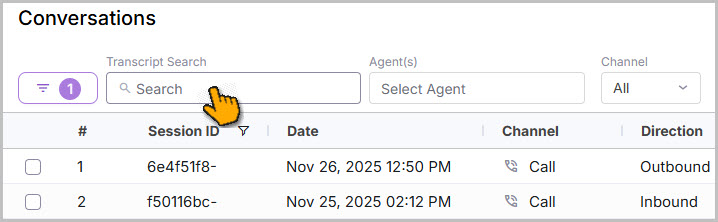
Users can now filter the conversations based on transcript keywords. Entering a keyword in the Transcript search box on the Conversation listings page displays all conversations containing that keyword. When the user opens the conversation details from the search results, the system automatically highlights the searched keyword inside the transcript section and also shows the number of occurrences. This enhancement makes it easier to navigate lengthy conversations and locate relevant information more quickly. To learn more about Keyword Search in Transcripts, click here.
Note
The search result retrieves Conversations up to one month.
Auxiliary Metadata Filter in All Filters in Analytics
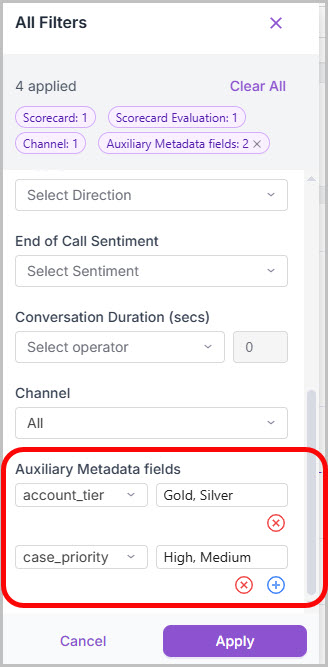
A new enhancement has been introduced in All Filters, allowing users to filter by Auxiliary Metadata fields in the Team Performance dashboard, the Topic Discover dashboard, the My Performance dashboard, and the Conversations listings page. You can filter by up to 15 fields and add multiple values, separated by a comma for each field.
In the Conversation listings page, you can add the Auxiliary Metadata field as a column by selecting the same in the Column reorder. Also, the Call Duration is included as a column. To learn more about the Auxiliary Metadata Filter, refer to the Team Performance dashboard, Topic Discovery dashboard, My Performance dashboard, and Conversation listings page.
Note
Reach out to your Uniphore Support Representative to include the set of Auxiliary Metadata fields for the filter.
Auxiliary Metadata Filter in Analytics
 |
Increased Limit for Auxiliary Metadata Filters in Custom Analytics
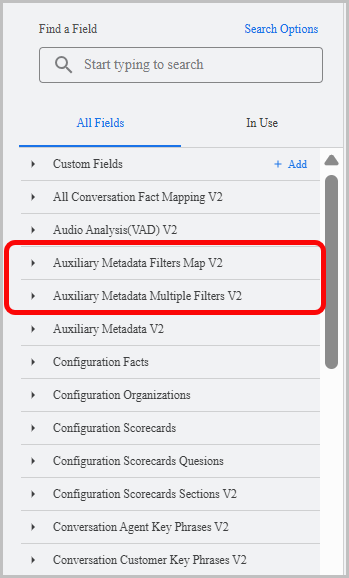
In Custom Analytics, the number of Auxiliary Metadata parameters available in the filter has been increased to 15. You can apply the filter through the Auxiliary Metadata Filters Map V2 and Auxiliary Metadata Multiple Filters V2 fields.
Auxiliary Metadata Filter in Custom Analytics
Note
Auxiliary Metadata Filter in Custom Analytics is currently available in the Production environment.
Enhanced Bulk Export
Bulk Export has been enhanced to meet enterprise-level requirements, now supporting the inclusion of full transcripts and unlimited scalability. The enhancement eliminates in-memory bottlenecks and pod failures when exporting thousands of records. The export capacity has now been significantly scaled up, allowing organizations to reliably export JSON with transcript data for each Conversation.
To learn about the updated Bulk Export APIs, click here.
Constraints and Limitations
Item | Description | Workaround |
|---|---|---|
1 | For some conversations, a one-second difference in call duration is displayed on the Conversation listings page and the Conversation details, due to millisecond rounding. | NA |
Bug Fixes
There are no defects specific to this Release.