Disposition
Disposition refers to the categorization of calls based on predefined criteria. It involves assigning a specific outcome or status to a call, which helps organize and analyze the Conversation data. This categorization can be done automatically using LLMs, which can classify calls into multiple levels based on the transcription of the conversation.
The Call Disposition is a robust and flexible feature that leverages the LLM-based service to automatically categorize calls based on their purpose, outcome, and/or specific customer requirements. The LLM-based service uses a zero-shot learning methodology to adapt to new customer-specific disposition hierarchies without prior training. Uniphore's Administration Platform offers a single, browser-based application for configuring, maintaining, and testing various versions of Call Disposition Hierarchies.
In the Administration Platform, a Business User can define a four-level Call Disposition Hierarchy based on the customer's requirements. The Business User is usually a Uniphore Super Admin, Partner Admin, Account Admin, or Business Analyst. Each user has different levels of access and permissions based on their assigned role. For more information about role-level access and permissions, click here.
Disposition Hierarchy
A disposition hierarchy organizes conversation outcomes into multiple levels for structured classification and reporting. The structured Call Disposition Hierarchy defined in the Platform can be utilized for live calls and post-call analytics. To learn more about Disposition Hierarchy, click here.
Call Disposition Page
The Disposition page provides a comprehensive overview of all Disposition Configurations established for the account, enabling Business Users to create new configurations, modify existing ones, or delete configurations. To learn more about the Disposition page, click here.
Create a New Disposition
From the Create a New Disposition page, you can configure the new Disposition hierarchy. You can download the Configuration template, populate it with your data, and upload it. You can also edit the Disposition details here. To learn more about Create New Disposition, click here.
Real-Time Guidance Agent Integration with Conversation Insights Agent
Real-Time Guidance Agent can be integrated with Conversation Insights Agent using Dispositions. The live calls from Real-Time Guidance Agent are automatically sent to Conversation Insights Agent for post-call analysis. To integrate, follow the below given steps:
Create Dispositions in Administration Platform
The Dispositions should be mapped to the Experiences in X-Console.
In the Organization Hierarchy page, the Organization should be added to the Experience.
Assign Disposition
You can assign a disposition to an organization to automatically categorize customer calls up to four levels, utilizing the LLM-based service. The dispositions created for a specific tenant can be assigned only to the organization available for that tenant.
Navigate to Measurements > Dispositions > Assignments.
From the available Dispositions, select a Disposition and click Assign.
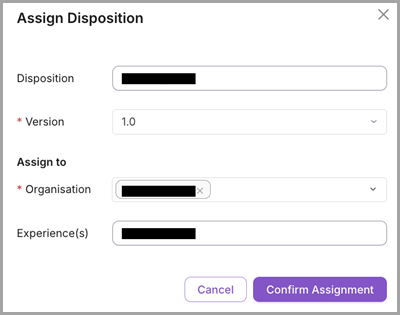
In the Assign Disposition dialog, select the Version and Organization to which you wish to assign the Disposition.
You can assign more than one Organization to a Disposition.
You can select any one version of the Disposition at a time and assign it to the Organization.
Click Confirm Assignment. A Notification message appears, stating either that the mapping is complete or that the mapping could not be completed.
If assigned successfully, in the Disposition, you will see the assigned Organization(s).
Click
 on the top right corner of the Disposition box. Click Clear Mapping to unassign the mapping between the Organization and the Disposition. This will remove assigned Organisation(s) for the Disposition.
The Disposition Flow will be displayed in the Conversations details page.
Note
Experience(s) field is not applicable to Dispositions created in Conversation Insights Agent.