My Performance Dashboard
The My Performance dashboard helps agents monitor their performance. Based on the insights, the agents can learn about their strengths and areas for improvement.
To View My Performance Dashboard:
Navigate to Analytics > Performance > My Performance.
Date (Required): Select the date range to filter the data according to the time frame. The default filter is Last 15 days.
Organization (Optional): Select Organization to filter data based on the Organization and its hierarchy.
Scorecard (Required): Filter by Scorecard. By default, the scorecards are arranged alphabetically, and the first Scorecard is selected. This filter is also available in All Filters.
Direction (Optional): Filter by Call direction - Inbound/Outbound. This filter is also available in All Filters.
Scorecard Evaluation (Required): Filter by the scoring method used for the Scorecard: Auto or Manual. This filter is also available in All Filters.
Click the All Filters icon
 to view the selected filters and the number of applied filters. For example, when two filters are applied, 2 is displayed.
Note
Any filter applied outside of All Filters is automatically reflected within it, and changes made in All Filters are reflected in the respective filter.
Facts (Optional): Filter by Fact. Boolean facts and List Facts that are mapped to the selected Scorecard and Evaluation are displayed. When a Boolean Fact is selected, you can set the value to True or False. When a List Fact is selected, you can select one of the available values. The List Facts does not show the predictive values in the dropdown.
Note
You cannot use List Fact filtering with System Facts.
Scorecard (Required): Filter by Scorecard. By default, the scorecards are arranged alphabetically, and the first Scorecard is selected. This filter is also available outside All Filters.
Scorecard Evaluation (Required): Filter by the scoring method used for the Scorecard: Auto or Manual. This filter is also available outside All Filters.
Note
The auto-scoring method is used by default to measure each Scorecard. Therefore, when the Auto filter is selected, all conversation results for the selected Scorecard are displayed.
When the Manual filter is selected, Scorecards that are manually scored and processed on conversations are taken into consideration. Therefore, the dashboard shows significantly scaled-down data.
Evaluation Score (Optional): Filter by Evaluation Score for the selected Scorecard and Evaluation. You can select the operator and enter the Score. To filter by Auto Fail, select the Auto Fail only option. When Auto Fail is selected, Score cannot be applied.
Direction (Optional): Filter by Call direction - Inbound/Outbound. This filter is also available outside All Filters.
End of Call Sentiment (Optional): Filter by End of Call Sentiment. The available options are Positive, Negative, and Neutral. The data is displayed in the dashboard based on the selected option.
Conversation Duration (Optional): Filter by the duration of the Conversation. Select the operator and enter the time in seconds.
Channel (Optional): Filter by Channel: All, Voice, Chat.
Auxiliary Metadata fields (Optional): Filter by Auxiliary Metadata fields of the conversation. Up to 20 auxiliary metadata fields are listed in the dropdown, of which any 15 fields can be used as filter. Select an Auxiliary Metadata field from the dropdown and add one or more values, separated by a semicolon. Click the plus icon to add a field and the X icon to delete a field.
Note
Any filter applied outside of All Filters is automatically reflected within it, and changes made in All Filters is also reflected in the respective filters.
Reach out to your Uniphore Support Representative to include the set of Auxiliary Metadata fields for the filter.
To view the conversation details, click the Conversations button at the top right corner of the page.
My Performance Dashboard Insights
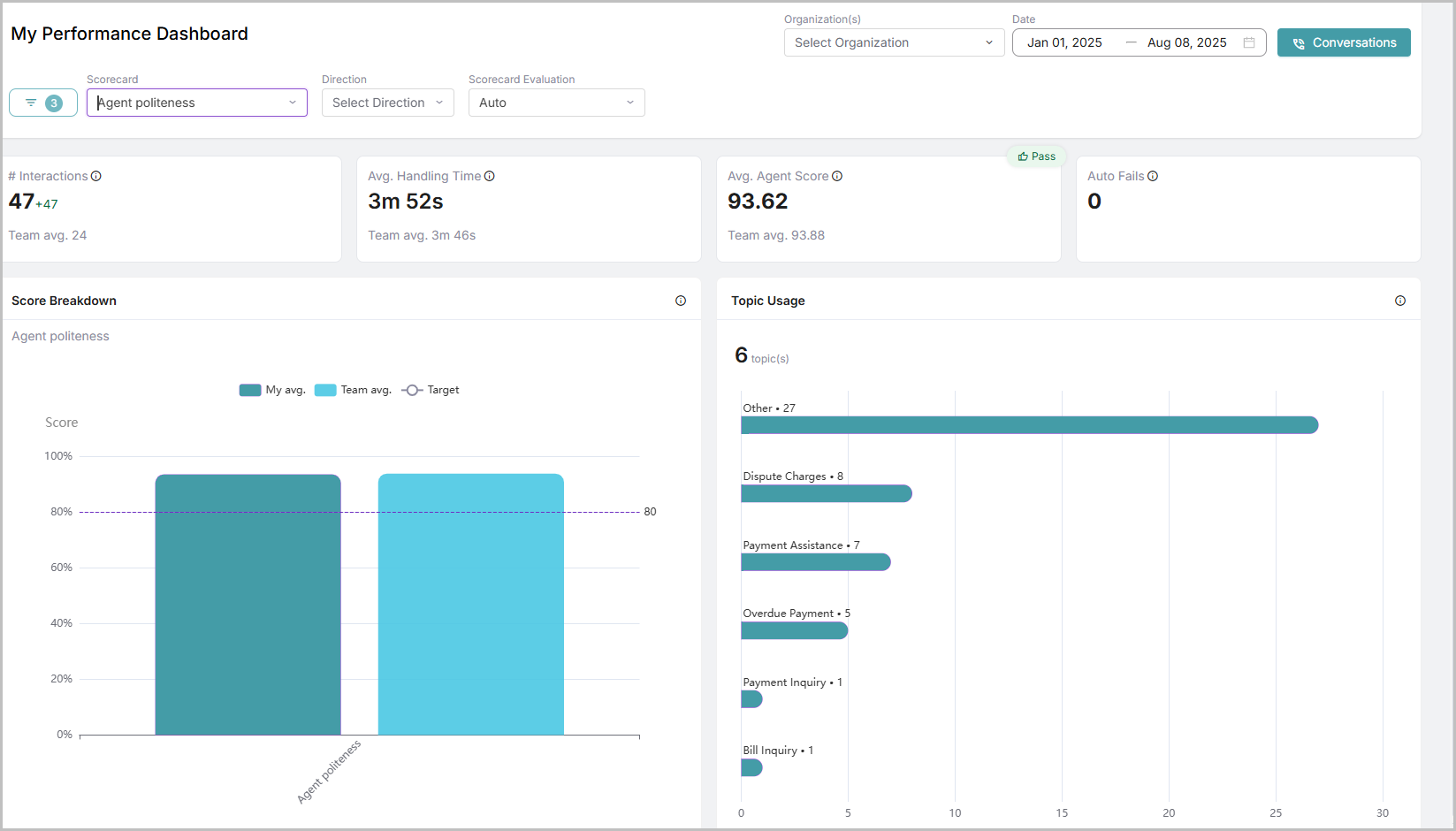
The Delta Value is the difference between the values of the current and previous date ranges. The current date range is based on the dates selected in the Date filter. For example, if the user selects November 1-5, the previous date range will be October 27-31 (the same number of days before the selected period).
In the My Performance dashboard, the metrics Interactions, Average Handle Time, Average Agent Performance, and Auto Fails display the actual data for the selected date range in bold, whereas the Delta value is displayed in smaller text.
Color Coding:
When an agent performs better than the previous date range, the Delta value appears in Green with a positive sign (+).
If the performance is worse than the previous date range, the Delta value appears in Red with a negative sign (-).
Note
When one or more elements (bars or slices) of one or more charts (bar graph or pie chart) are selected, the Interactions, Average Handle Time, and Average Agent Performance will be changed accordingly.
For example, when you select Soft Skills in the Score Breakdown chart, the values of Interactions, Average Handle Time, and Average Agent Performance will be based on that selection.
Name | Description |
|---|---|
Interactions | Total number of conversations handled by the agent. |
Avg. Handle Time | The average time spent by the agent on conversations. |
Avg. Agent Performance | The average score gained by the agent for their performance. Based on the Pass Criteria mentioned in the Create Scorecard page, the Pass or Fail status is displayed. Pass: If the average agent score for the selected Scorecard is equal to or above the Pass Criteria, then the Green color thumbs-up icon is displayed. Fail: If the average agent score for the selected Scorecard is less than the Pass Criteria, then the Red color thumbs-down icon is displayed. |
Auto Fails | Total number of auto-failed conversations for the selected scorecard. If the score meets or exceeds the pass criteria, the Green color thumbs-up icon is displayed. If the score is below the pass criteria, then the Red color thumbs-down icon is displayed. For more information on Auto Fail, refer to Create Question. |
Topics Count | Count of the topics used in conversations that were handled by the agent. |
Score Breakdown | My avg: The average of the agent's score for the selected scorecard. Team avg: The average of the team's score for the selected scorecard. Target: The actual pass criteria of the scorecard. |
Topic Usage | Top 10 topics used in conversations. |