Admin Configuration
Important
Only users with Administrator privileges can access these configurations.
Admin Configuration serves as the central control panel for managing your Business AI Cloud platform environment. This feature enables administrators to oversee user access, configure security tokens, monitor platform activities, and track resource consumption.
To access, go to the Home page > Admin.
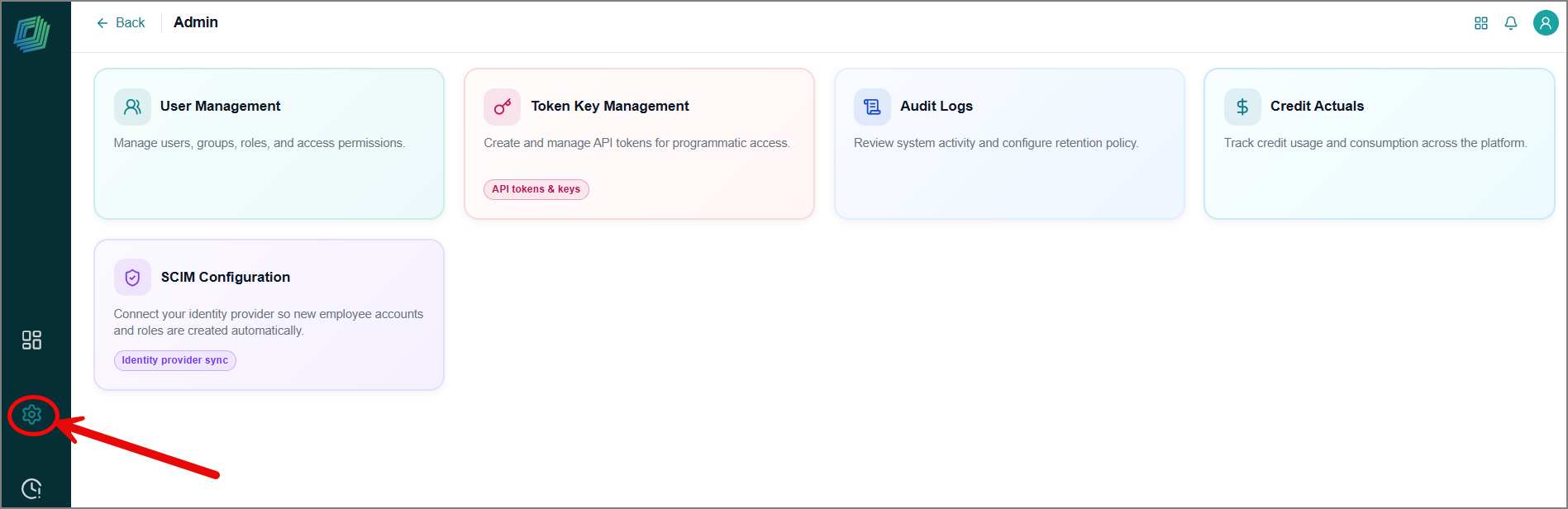
The Admin page opens with the following management cards:
User Management - You can control users and manage their access to the platform.
Users tab- Create, view, and modify users in your account.
User Groups tab - Create and manage user groups.
Roles & Permissions tab - Define roles, grant and restrict access to platform modules for users.
Access Management tab - Grant and control permissions for user groups.
Token Key Management - View and modify API authentication keys.
Audit Logs - Track complete activity history across your AI environment.
Credit Actuals - Monitor application usage based on inference counts.
SCIM Configuration - Sync users and groups automatically from your identity provider (IDP).