2025.06 U-Assist
Release Date: 10 July 2025
The U-Assist 2025.06 Release introduces the following features.
New Features
GenAI Summary Builder for U-Assist on the X-Platform
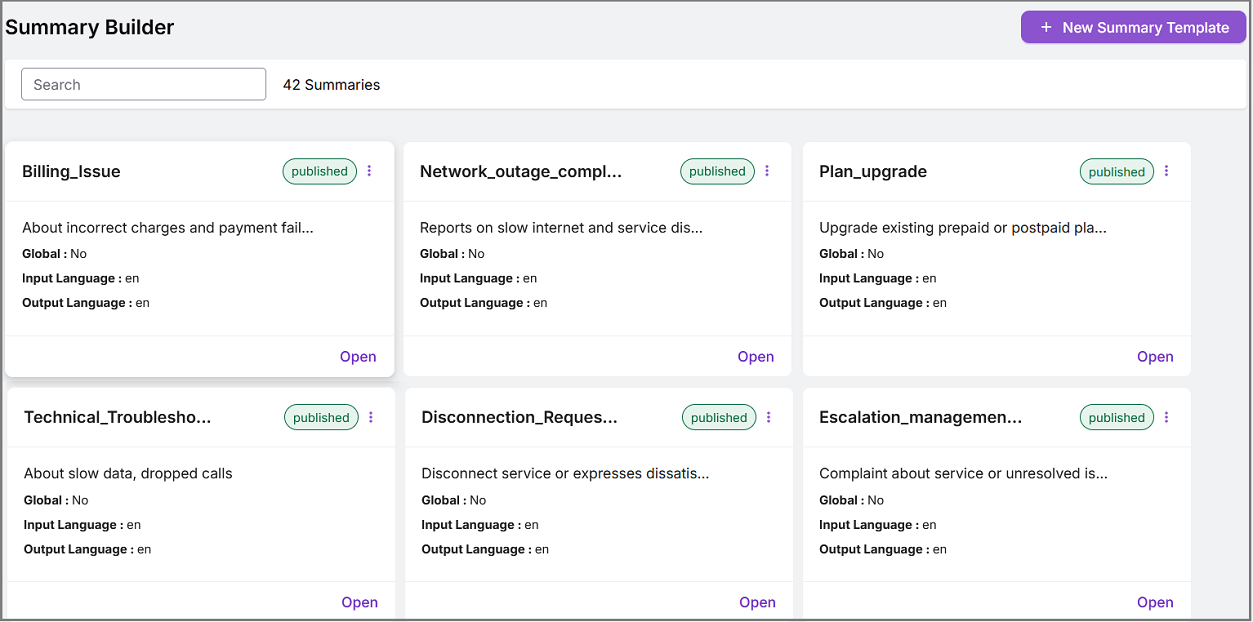
AI-powered Summary Template Creation
U-Assist now leverages AI-powered Call Summary Templates created in the X-Platform to generate personalized, automated, and industry-specific Summaries for customer service calls. An Account Admin on the X-Platform can design, test, and deploy these Templates with a list of fields (for example, Customer Issue, Resolution, Next Steps), AI Instructions (custom prompts), language preferences, and the selected LLM Model, ensuring that each AI-generated Summary aligns with specific business needs, terminology, and workflows.
For more information about GenAI Summary Builder in the X-Platform, click here.
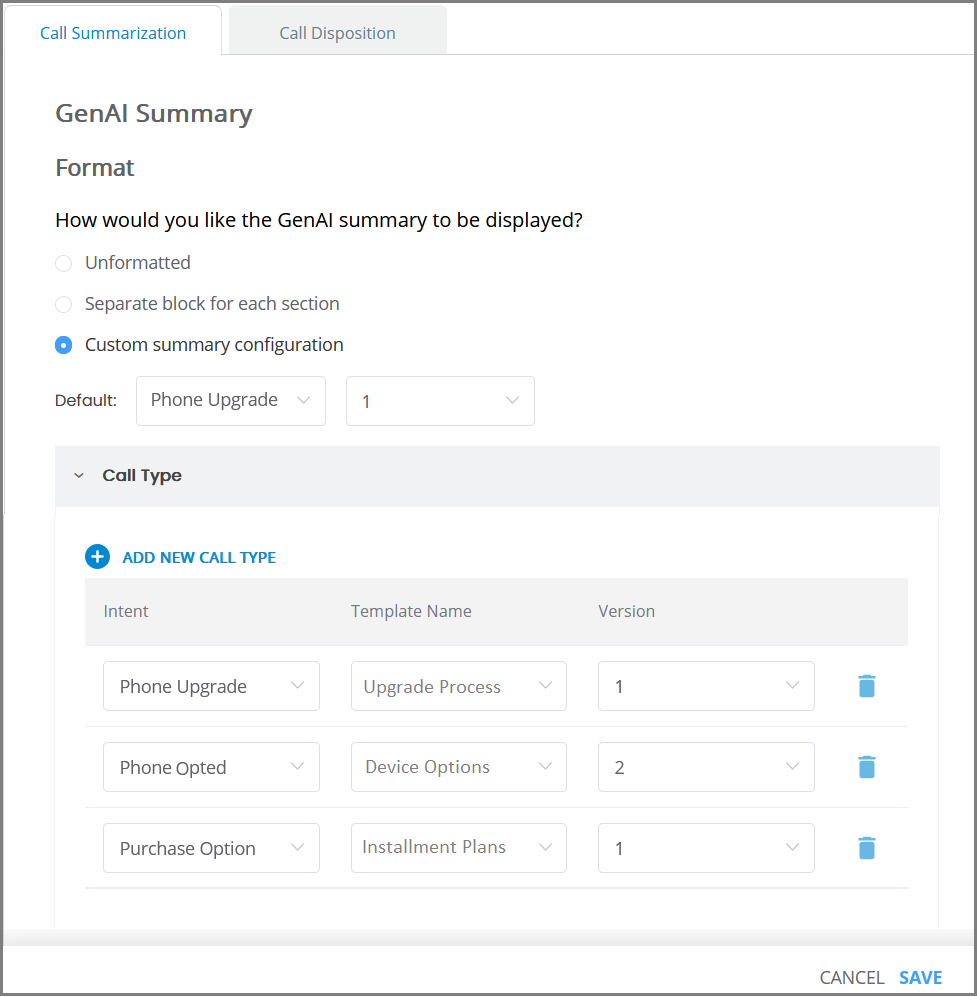
Assign a Summary Template to an Experience
In U-Assist, an Account Admin or Business Analyst can map a specific version of a Summary Template from the X-Platform to an Experience using the GenAI Call Summary Configuration page. This mapped template becomes the default and is automatically applied to a call at runtime. They can also assign specific versions of Summary Templates to Intents, allowing the system to dynamically apply the relevant template each time a new Intent is detected as the call progresses.
For more information on assigning a Summary Template to an Experience, click here.
A Flow Designer or Developer can optionally use the Summary Builder API to change the Summary Template while a call is still active, based on logic that has been defined in the Flow during the design phase. For example, the Flow design can call this API to switch to a different Summary Template whenever a specific Alert notification is received during the call.
For more information on using the Summary Builder API, click here.
Note
To use an AI-powered Call Summary Template from the X-Platform for your account, please contact your Uniphore Support representative.
View AI-Powered Call Summary in Run Time
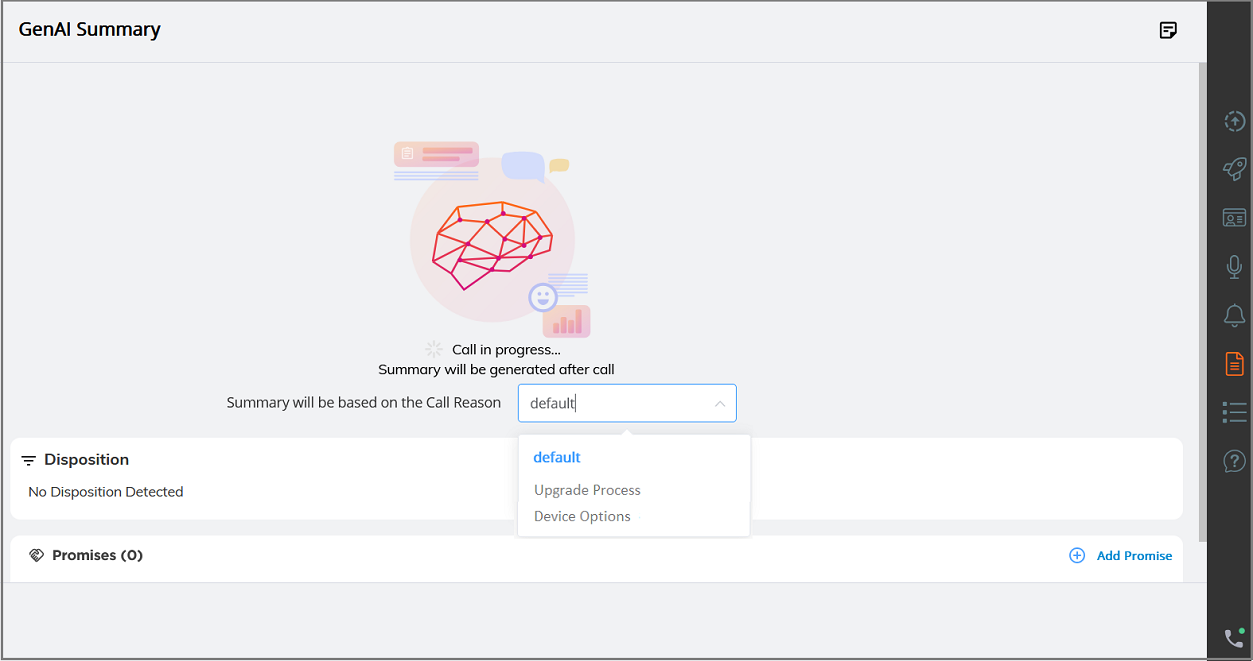
In real time, an Agent can view the AI-powered Call Summary at the end of each call, using the Summary Template assigned to the most recently detected Intent, improving accuracy, consistency, and operational efficiency.
For more information on viewing an AI-powered Call Summary, click here.
When 'Call Type Summary' is enabled in the Client Settings tab of the AI Agent Assist application, the Agent can view the Call Reason dropdown, which dynamically updates each time an Intent is detected. The Agent can also manually modify the auto-detected Intent during an ongoing call.
For more information on Call Type Summary Settings in the Client Settings, click here.
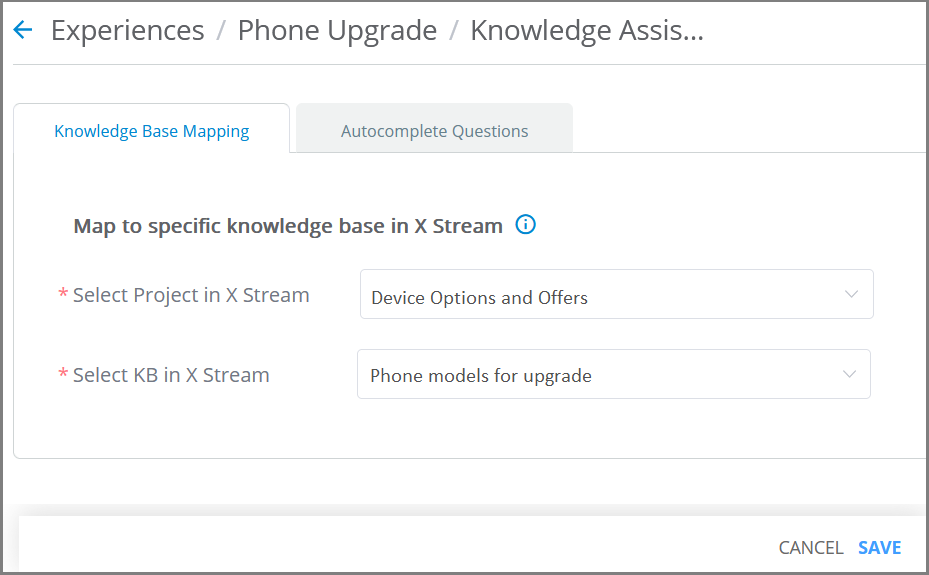
Mapping an Experience to a Specific Knowledge Base in X-Stream
With this release, an Account Admin and Business Analyst can assign each Experience within a specific tenant account to a unique project and its associated set of Knowledge Base documents in X-Stream, which Agents use to answer questions during a call.
For more information on mapping Experience to the Knowledge Base, click here.
In real time, LLM-based responses to questions asked by Agents in the Questions and Answers panel are accurately generated from the assigned Knowledge Base, improving accuracy and reducing latency.
Note
To use a Knowledge Base from X-Stream for your account, please contact your Uniphore Support representative.
For more information on viewing Knowledge Assist in real time, click here.
Enhancements
Manager Application: Download a Conversation Transcript
When a conversation ends, a Manager is now able to download its transcript from the Live Agent In-Call panel of the Manager Application. The transcript will be stored locally.
For complete details about downloading transcripts, click here.
AI Agent Assist and Manager Applications: Change the Display Language Via Browser URL
With this release, you can update the language of the UI components that are displayed in the AI Agent Assist or Manager Applications in real time by appending a language assignment switch to the URL in the browser tab.
For example: &language=es-ES
An appended language switch will override the Browser Locale language setting.
Note
You may need to Refresh the browser page after appending a language switch in order to display the updated UI language.
The language switch must contain the standard ISO language code for the desired language. Currently, the following languages supported by the Application are available for display:
|
|
For complete details about changing the display language in the AI Agent Assist Application, click here.
For complete details about changing the display language in the Manager Application, click here.
Constraints and Limitations
The following constraints and limitations exist for this release:
Item | Description | Workaround |
|---|---|---|
1 | X-Console only provides read-only access to existing SAML configurations. It is not possible to create or edit a SAML configuration. | In order to create or edit a SAML configuration, contact your Uniphore Support representative. |
2 | Currently, the Manager Dashboard only supports live monitoring for up to 200 Agents simultaneously per Manager. | When using the Manager Dashboard for live monitoring of call sessions in your account, do not map more than 200 Agents to a Manager. Contact Uniphore Support for additional information and options. |
3 | A user is unable to upload and test an audio file or text file in the AI Agent Assist Application. | A user must log in to the U-Assist ACW platform at least once in order to successfully upload and test audio files in the AI Agent Assist Application. |
4 | When using the Auto-Submit option with the GenAI Summary, if the Trigger is set to 'End of Current Call', the X-Platform Conversation Summary variable for the current call returns an empty value. | Contact Uniphore Support for additional information and options. |
5 | When creating an Alert for Agents, you can currently map it to a Service Flow; however, the selected Flow will be executed only at the end of the call. | Execution of a Service Flow that is mapped to an Alert will be possible only in a future release. |
Defect Fixes
There are no defect fixes specific to this release.