2025.03 U-Assist
Release Date: 08 April 2025
The U-Assist 2025.03 Release introduces the following features.
New Features
Business Information (BI) Dashboard for GenAI Call Summaries
With this release, U-Assist adds a dedicated Business Information (BI) Dashboard that provides real-time status information for U-Assist generative AI-based Call Summaries, drawn from the available runtime data.
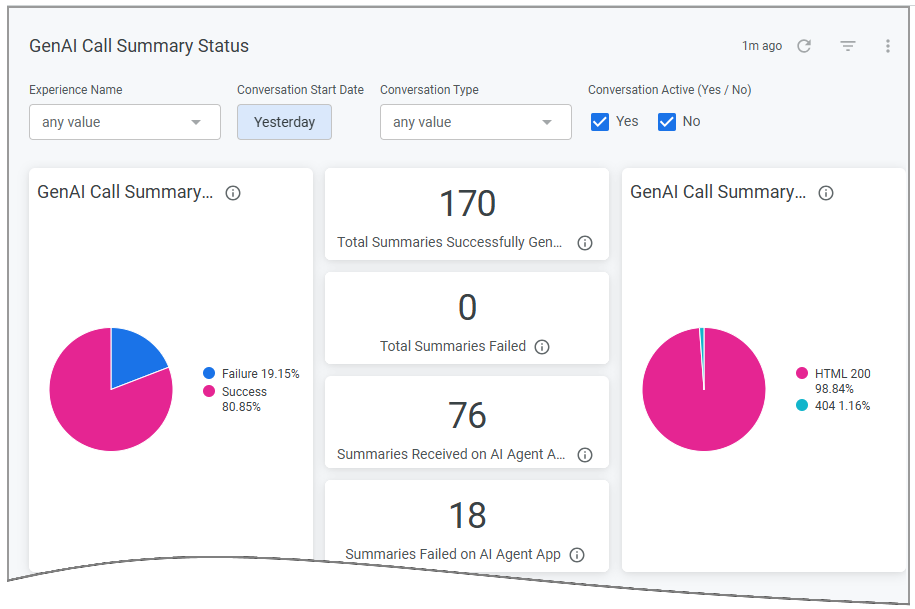 |
BI Dashboards present intuitive views of the metrics that answer key questions about conversations in your contact center, helping your organization to develop service solutions that better reflect the ongoing and evolving needs of your customers.
Our dashboards use Looker, a leading business intelligence software platform that specializes in the preparation, presentation and analysis of enterprise-scale data.
BI Dashboards are accessed directly from the X-Console.
For complete details about Business Information Dashboards in U-Assist, click here.
Enhancements
Customizing Layout and Menu Display Options for AI Agent Assist Application
In the AI Agent Assist Client Settings, a Business Analyst can now customize the Toolbar component to be shown as the Default Opening Panel to an Agent at the beginning of a call, as well as Upper and Left Panels to be displayed in the left column when an alternative Multi-Column layout is enabled. This enables the Business Analyst to customize the AI Agent Assist Application view for an account.
In the Multi-Column Layout, the selected Upper and Lower Left Panels are displayed side-by-side with the right column panels in the AI Agent Assist Application.
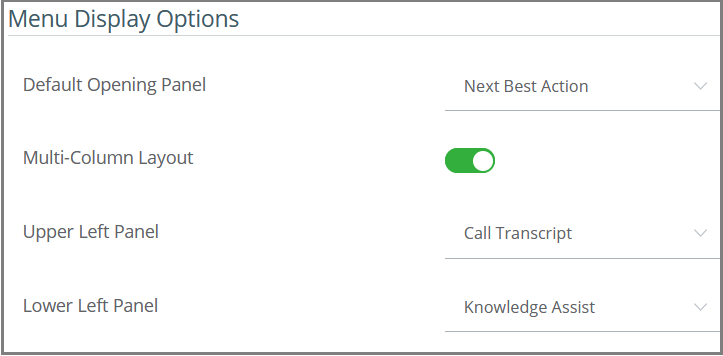
For more details on setting up Menu Display Options, click here.
For more details on viewing Multi-Column Layout in AI Agent Assist, click here.
Adding Agent-Selectable Knowledge Assist Questions for Each Experience
A U-Assist Experience can now store a large collection of selectable questions that will be quickly available for viewing as the Agent types in the AI Agent Assist Application's Knowledge Assist panel. Selecting from 'ready-made' general questions reduces the need for an Agent to manually enter questions, saving time and improving question accuracy.
To display questions that potentially match their current query, the Agent enters relevant characters or words in the Search field:
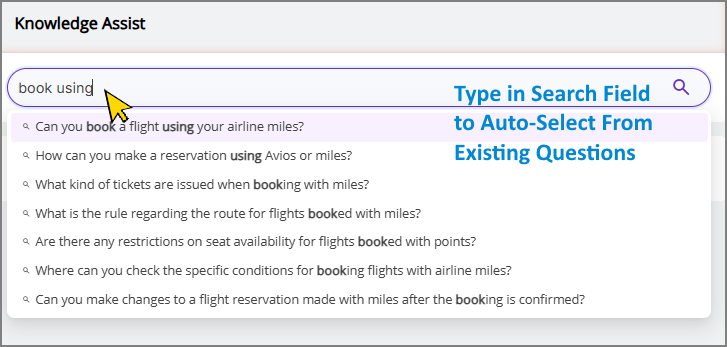 |
Up to 10 related questions will be displayed in the panel. When an Agent selects a question in the list, an LLM-based answer wlll be generated by X-Stream KaaS and displayed to the Agent. If a specific question was asked recently, it will be retrieved instantly without the need to generate a new answer.
The Analyst can pre-define up to 300 relevant questions to be associated with a specific Experience.
For more details on searching for pre-defined general questions during a call, click here.
For more details on adding pre-defined general questions to an Experience, click here.
U-Assist Users Are Now Managed Directly On X-Platform
Starting with this release, U-Assist product users are created and managed directly on the X-Platform from the Users & Accounts menu.
User management functionality is no longer accessible in the X-Console or U-Assist ACW Admin applications.
For complete details about new X-Platform User Administration functionality, click here.
Selecting a Method for Testing Transcripts (Voice or Chat)
With this release, an Account Administrator or Business User acting as an Agent can upload and test Transcripts via Voice or Chat in the AI Agent Assist Application. This allows you to test multiple transcripts concurrently via Chat, demonstrating the AI Agent Assist Application in accordance with client requirements without the need to configure any Telephony System integrations.
The Business User is usually a Flow Admin, Account Admin, Business Analyst, or Quality Analyst.
By default, the transcript is tested with a Voice, ensuring system consistency for both Voice and Chat conversation.
Important
When the chat support is enabled, you can select a method ('As Voice Conversation' or 'As Chat Conversation') for testing Transcripts. The AI Agent Assist application displays a Conversation Side Panel to list all currently uploaded transcripts, allowing you to instantly switch between any uploaded transcripts with a click. All in-call and after-call capabilities and data are maintained and accessible for each conversation.
Note
To enable the chat support for your account, contact your Uniphore Support representative.
For complete details about new testing transcripts, click here.
Identifying Short Calls in the GenAI-Based Call Summary
With this release, our advanced generative AI-based Call Summary enables U-Assist to identify short calls before sending them to the LLM service, based on settings configured by an Analyst on the GenAI Summary Configuration page. This greatly improves the Agent's experience and reduces Average Handle Time (AHT). When a call is determined to be short by identifying call duration or speaker turns, the Agent receives a customized notification message.
On the GenAI Summary Configuration page, an Analyst can configure custom notification message, short call duration, and speaker turns.
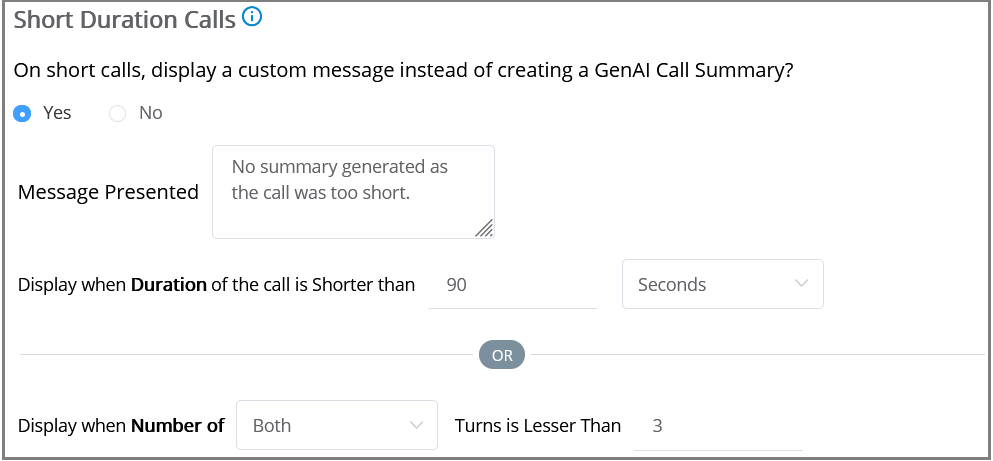
For complete details about configuring Short Calls, click here.
Set a Different Target Language for the GenAI Summary
At runtime, the GenAI Call Summary output can now be produced in a target language that is different from the default language configured for an Experience.
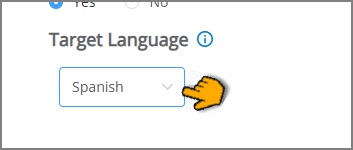
Setting a different target language will cause the Call Summary to be generated and submitted in the selected language for its call session output, regardless of which language is used in real time by the Agent and end user.
Note
In the current release, target language support includes English, Italian, French, and Spanish.
For more details on setting the GenAI Summary target language, click here.
Constraints and Limitations
The following constraints and limitations exist for this release:
Item | Description | Workaround |
|---|---|---|
1 | Currently, the Manager Dashboard only supports live monitoring for up to 30 Agents simultaneously per Manager. | When using the Manager Dashboard for live monitoring of call sessions in your account, do not map more than 30 Agents to a Manager. Contact Uniphore Support for additional information and options. |
2 | When using the Auto-Submit option with the GenAI Summary, if the Trigger is set to 'End of Current Call', the X-Platform Conversation Summary variable for the current call returns an empty value. | Contact Uniphore Support for additional information and options. |
3 | When creating an Alert for Agents, you can currently map it to a Service Flow; however, the selected Flow will be executed only at the end of the call. | Execution of a Service Flow that is mapped to an Alert will be possible only in a future release. |
Defect Fixes
There are no defect fixes specific to this release.