2026.01 Conversation Insights Agent
Release Date: 09 February 2026
Release Date:
The Conversation Insights Agent 2026.01 Release introduces the following features.
New Features
Conversation Insights Agent Integration with Self-Service Agent
Conversations received from Self-Service Agent can now be processed through the Conversation Insights Agent seamlessly. To enable this capability, ensure that both Self-Service Agent and Conversation Insights Agent are deployed. Conversations from the Self-Service Agent are sent as transcripts to the Conversation Insights Agent. These transcripts are analyzed, and the results are displayed in the Team Performance and Topic Discovery dashboards and in Custom Analytics.
Enhancements
Map Composite Fact to Scorecard
The Composite Facts can now be mapped to a Question in a Scorecard. Using the Scorecards, the Conversations are evaluated, and the results are displayed in the Team Performance and My Performance dashboards. Composite Fact mapping to a Scorecard eliminates the need to evaluate Conversations multiple times with each Scorecard. In the Conversation details, you can view the Composite Fact information, including the details of each individual Fact that makes up the Composite Fact.
Introducing Supervisor Filter in Dashboards and Conversations
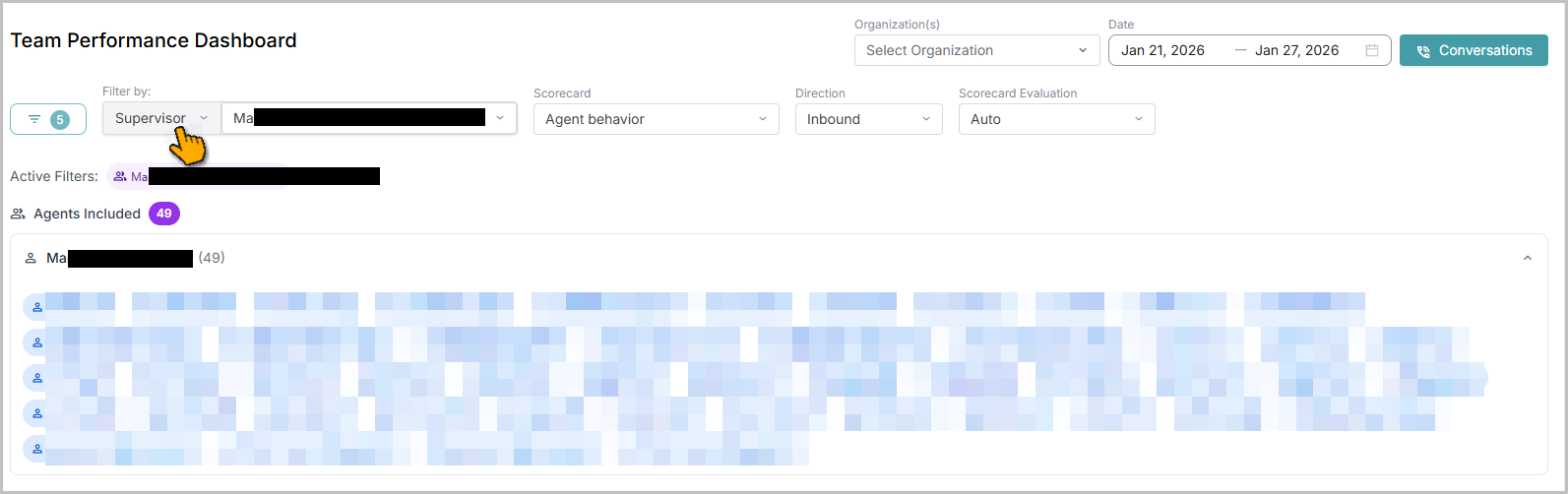
The supervisor filter is introduced in the Team Performance dashboard, the Topic Discovery dashboards, and the Conversations Listings page. When you select the Supervisor option from the dropdown, the list of Supervisors is populated. Selecting a specific supervisor displays the dashboard data and conversations of the Agents mapped to that Supervisor. The results also show the total number of mapped Agents and their names. When the Supervisor filter is applied, All Filters displays the Supervisor option. Conversely, applying the Agent filter displays the Agent option in the All Filters section.
Note
Only Administrators can view and access the Supervisor filter option.
For more information, refer to the Team Performance dashboard, the Topic Discovery dashboard, and Conversations Listings.
Custom Analytics Enhancements
Users can now create Custom dashboards with Composite Facts data. The Conversation Facts V2 field supports Composite Facts.
Question-level comments added during Manual QM can now be displayed in Custom dashboards by selecting Conversation Scorecards Questions V2 > QM Question Level Comment in Custom Analytics. Analyzing these comments enables more effective coaching for Agents.
Sending Timestamp Metadata to LLM for Time-Based Insights
Conversation Insights Agent now sends timestamp metadata along with the conversation transcript to the LLM during fact-checking. This improves the ability of fact queries to extract time-based insights. The accuracy of the insights is driven by how clearly and precisely users define context-aware queries in Facts.
For example, a query can be defined to calculate the percentage of total call duration spent on the introduction, where the introduction is explicitly identified as the segment in which the agent greets the customer and asks for their issue.
Constraints and Limitations
Item | Description | Workaround |
|---|---|---|
1 | On the Conversation Listings page, the Status field is not available in Column Reorder. | NA |
2 | On the Conversation details page, the Summary Overview displays the call elements with no value, as Self-Service Agent sends Voice Conversations as transcripts. | NA |
Bug Fixes
There are no defects specific to this Release.