2024.12
Release Date: 20 January 2025
The U-Assist 2024.12 Release introduces the following features.
New Features
There are no new features added in this release.
Enhancements
Streamlined Method for Defining Call Summary Templates
With this Release, all functionality for defining and maintaining Call Summary templates has been unified and moved to the X-Console Experiences page. In earlier X-Console versions, the Header Summary template, Intent Summary template and Call Disposition selector were accessed from the AI Model page.
No functional changes were made for defining the Call Summary templates -- only their location has been changed in order to make their access easier and streamline their use when working with Experiences.
Note
If you do not see the Call Summary templates on the Experiences page, your account is likely using a legacy U-Assist version. Contact your Uniphore Support representative for more information.
For more details on the new, simplified method for defining the Call Summary template, click here.
'Opt-In/Opt-Out' Toggle for GenAI Summary Sections
With this Release, it is possible to choose whether a section block will be displayed in the GenAI Call Summary. An ‘opt-in/opt-out’ toggle is now provided for each block when configuring a formatted GenAI Summary.
Note
Contact your Account Admin or Uniphore Support representative to enable this enhancement to the GenAI Summary.
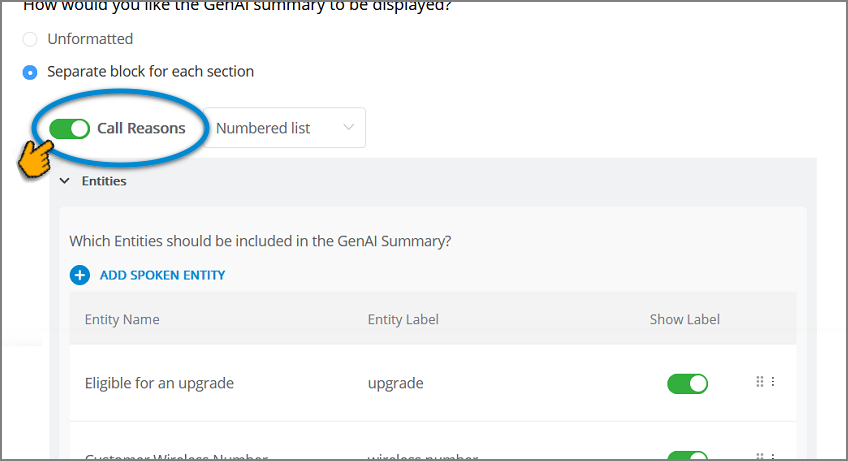 |
For more details on toggling Summary sections on and off, click here.
Improved Trending Topics Statistics in Manager Application
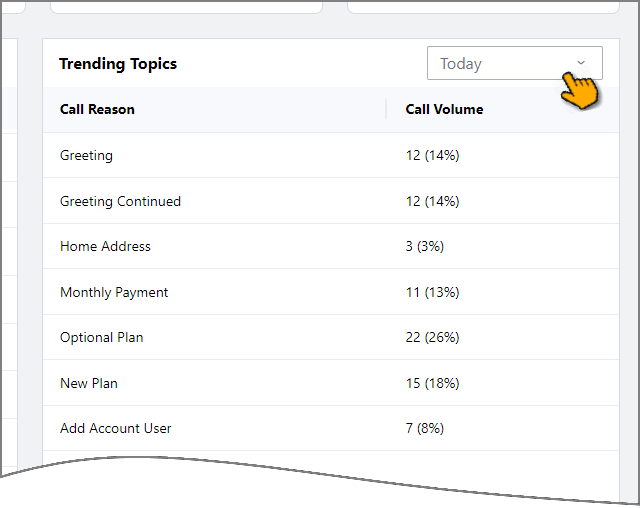
The U-Assist Manager Dashboard now provides improved accuracy and consistency when calculating statistics used for Trending Topics.
Note
Currently, the Manager Dashboard must be enabled for your account before use. For more details, contact your Uniphore Support representative.
For more details on Manager Dashboard components, click here.
Redaction Configuration Improvements
With this Release, the Redaction service is decoupled from the ASR processor, allowing it to perform redaction actions independently.
Earlier, text masking was performed in the ASR Processor based on the information provided by Redaction service and data configured in the Redaction configuration file. This method caused issues while viewing transcripts in real time. Now, the Redaction service can perform text masking independently based on the PCI, PII data, using the account-specific sensitive information configured in the Redaction configuration file.
For more details about Redaction Configuration, click here.
Constraints and Limitations
The following constraints and limitations exist for this release:
Item | Description | Workaround |
|---|---|---|
1 | A user is unable to upload and test an audio file or text file in the AI Agent Assist Application. | A user must log in to the U-Assist ACW platform at least once in order to successfully upload and test audio files in the AI Agent Assist Application. |
2 | When using the Auto-Submit option with the GenAI Summary, if the Trigger is set to 'End of Current Call', the X-Platform Conversation Summary variable for the current call returns an empty value. | Contact Uniphore Support for additional information and options. |
3 | When creating an Alert for Agents, you can currently map it to a Service Flow; however, the selected Flow will be executed only at the end of the call. | Execution of a Service Flow that is mapped to an Alert will be possible only in a future release. |
Defect Fixes
There are no defect fixes specific to this release.