Create an Agent
Customer Service AI is categorized into AI Agent, Telephony, and Guidance. Each category serves a different purpose in customer service operations.
An AI Agent is an LLM-powered intelligent agent configured to perform specific tasks autonomously using AI models, instructions, knowledge, skills, and tools. It can understand user requests, make decisions, and execute actions to achieve its assigned goals.
A Telephony Agent is an AI agent designed to interact with customers through voice calls. It handles inbound or outbound calls, understands caller requests, responds conversationally, and performs configured actions to resolve customer queries.
A Guidance Agent is an AI agent that assists human customer service agents during live customer interactions by analyzing conversations in real time and providing relevant guidance, suggested responses, and contextual information to help resolve customer queries effectively.
AI Agent
In Customer Service AI, the AI Agent is the LLM-powered intelligence layer that drives conversation logic for telephony and guidance agents. An AI Agent thinks, reasons, follows SOPs, uses tools, and determines what happens on a call.
Each AI Agent is configured with the following components:
SOP: Defines the agent's operational playbook, including its responsibilities, business rules, escalation logic, and compliance requirements.
Tools: Provides executable functions that the agent can invoke during a conversation, such as transferring or ending calls, retrieving CRM records, creating support tickets, and processing payments.
Knowledge Bases: Contains documents and information that the agent can search to retrieve relevant answers during a conversation.
Guardrails: Defines rules that control the inputs the agent can receive and the outputs it can generate, ensuring interactions remain safe, compliant, and within defined boundaries.
Versions: Maintains a version history of the agent. Each time the agent is saved, a new version is created, allowing teams to track changes, restore a previous version, and audit the agent's evolution over time.
Lifecycle of the AI Agent
Once created, the AI Agent moves through a managed lifecycle.
Stage | Purpose |
|---|---|
Configure | Define the prompt, tools, knowledge, and guardrails for the AI agent. |
Simulate | Perform quick manual tests using different personas. |
Evaluate | Run batch tests using user-simulator scenarios and measure performance using defined metrics. |
Fine-tune | Train a new model variant using call traces to improve the agent's performance. |
Optimize | Connect the AI agent to a voice agent and prepare it for deployment to live telephony. |
To Create an AI Agent:
An AI Agent can be created using SOP Document, Process Discovery, and Prompt.
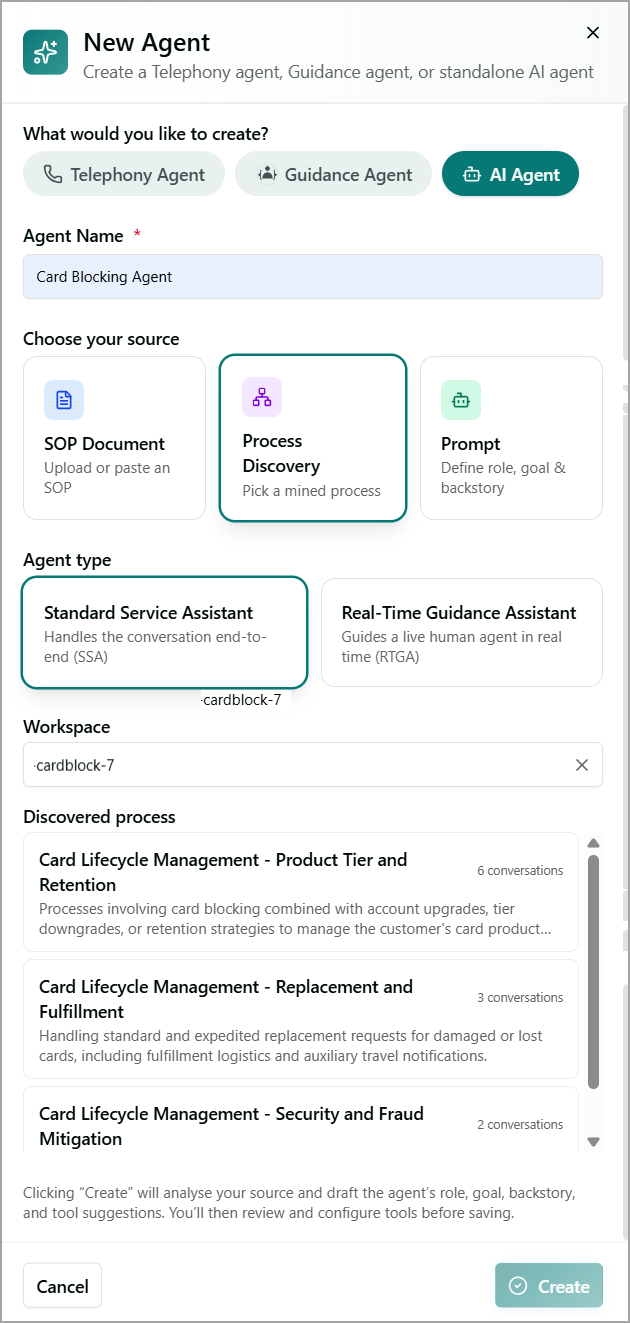
Enter the Agent Name. Give your AI Agent a unique, identifiable name.
Using Choosing a Source, select how the agent should be created. There are three options:
SOP Document: Upload a Standard Operating Procedure file (.txt, .pdf, or .docx) or paste its contents directly as text. The agent will use this document as its knowledge base.
Process Discovery: Build the agent from previously mined conversation processes. Select a Workspace from the dropdown. The system lists the processes already discovered for that Workspace. Choose the one most relevant to your use case. The real call transcripts are analyzed, processes are discovered, and agents are auto-generated with pre-populated SOPs.
Prompt: Build the agent by pasting instructions directly. Manually define the agent's behavior using text prompts. This option also lets you enable the Intent Orchestrator Agent, which allows your agent to coordinate tasks across multiple sub-agents. When using Prompt as the source, you'll also need to define the agent's identity using the following fields:
Role: Specify what role this agent plays (e.g., Support Specialist, Data Analyst).
Goal: State the agent's primary objective. What it is ultimately trying to accomplish.
Backstory: Provide context about the agent's background, expertise, experience, and communication style to shape how it thinks and responds.
Enable the Intent Orchestrator Agent to define the AI agent as a Supervisor Agent. Once defined, multiple sub-agents can be mapped under the Supervisor Agent. For example, if the Credit Card is configured as the Supervisor AI agent, you can create specialized sub-agents such as Check Balance, Block Card, Card Stolen, and Rewards, each designed to handle a specific customer request.
Note
Applicable only when the Prompt option is selected under Choosing a Source.
Select the Agent Type. This field is applicable to SOP Document and Process Discovery. The agent types are:
Standard Service Assistant (SSA): Handles customer conversations end-to-end, interacting directly with customers to address their queries and complete tasks.
Real-Time Guidance Assistant (RTGA): Provides real-time guidance and recommendations to human agents during live customer conversations.
Click Create to launch your AI Agent.
For an AI agent created using an SOP Document and Process Discovery, the agent's goal and backstory are automatically generated based on the content of the uploaded SOP document or the processes discovered through Process Discovery.
After the AI Agent is created, you can configure its tools, knowledge, and skills. For more information, click here.
Telephony Agent
A Telephony Agent is the voice-channel deployment of an AI Agent that enables it to interact with customers over phone calls, manage call flows, transfer or terminate calls, and deliver automated customer support.
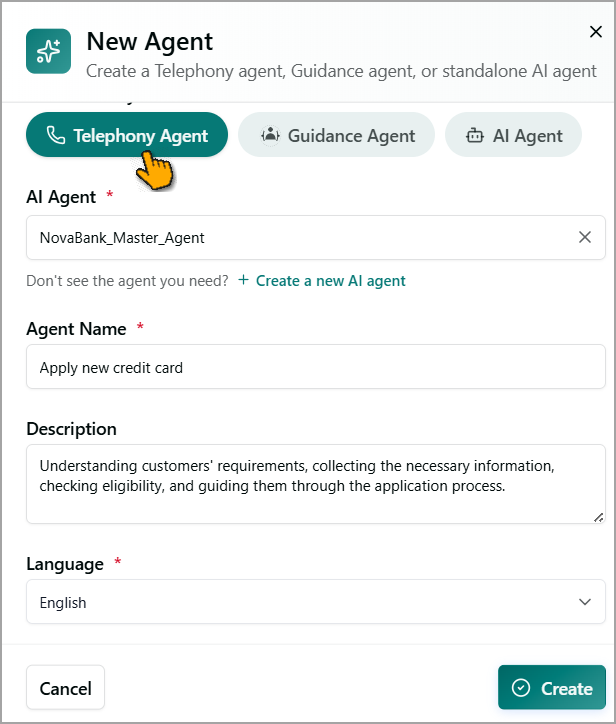
To Create a Telephony Agent:
Select the AI Agent from the dropdown. AI Agents with Published status are only displayed. In case you don't see the agent, click + Create a new AI agent, create, configure, and publish the agent.
Enter the Agent Name for the Telephony Agent.
Add the Description of the agent.
Select the Language from the dropdown. Currently supports English only.
Click Create.
The Configure Required Tools dialog appears. The dialog shows the missing tool that is required for voice call handling. You can modify the Description as needed. Click Update. The tools include Call Transfer, Call Terminate, and Adaptive Voice Settings.
After creating the Telephony Agent, you can configure the agent, customize Customer Experience settings, map phone numbers for call routing, and configure speech settings. The system tools Call Transfer and Call Terminate are added by default. For more information, click here.
Guidance Agent
A Guidance Agent provides real-time assistance to human agents during customer interactions. It uses an In-call Agent to deliver relevant guidance based on the ongoing conversation.
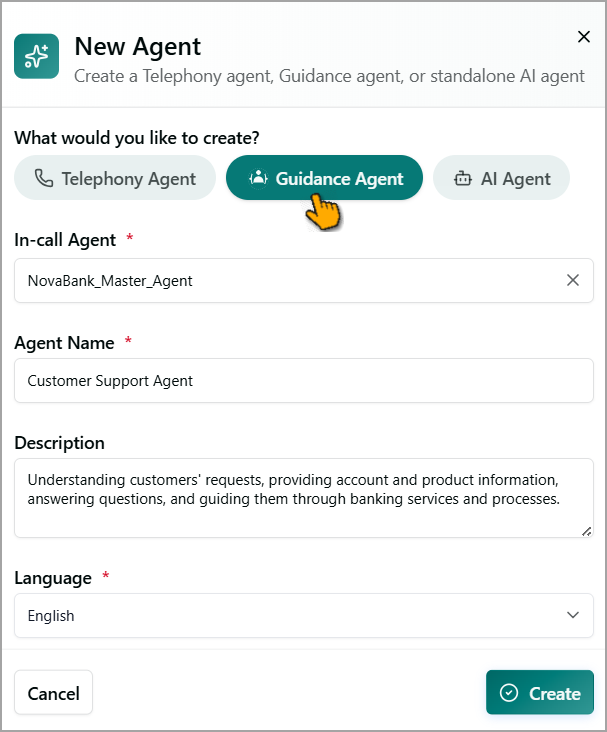
To Create a Guidance Agent:
Select an In-call Agent from the existing AI Agent list. The selected AI Agent runs continuously throughout the customer interaction.
Enter the Agent Name.
Enter a brief Description about the Agent.
Select the Language from the dropdown. Currently supports English only.
Click Create.
After creating a Guidance Agent, you can configure its properties, capabilities, tools, knowledge, and supporting AI agents. For more information, click here.