2026.04 Conversation Insights Agent
Release Date: 14 May 2026
The Conversation Insights Agent 2026.04 Release introduces the following features.
New Features
Introducing Applicability Condition in Scorecards
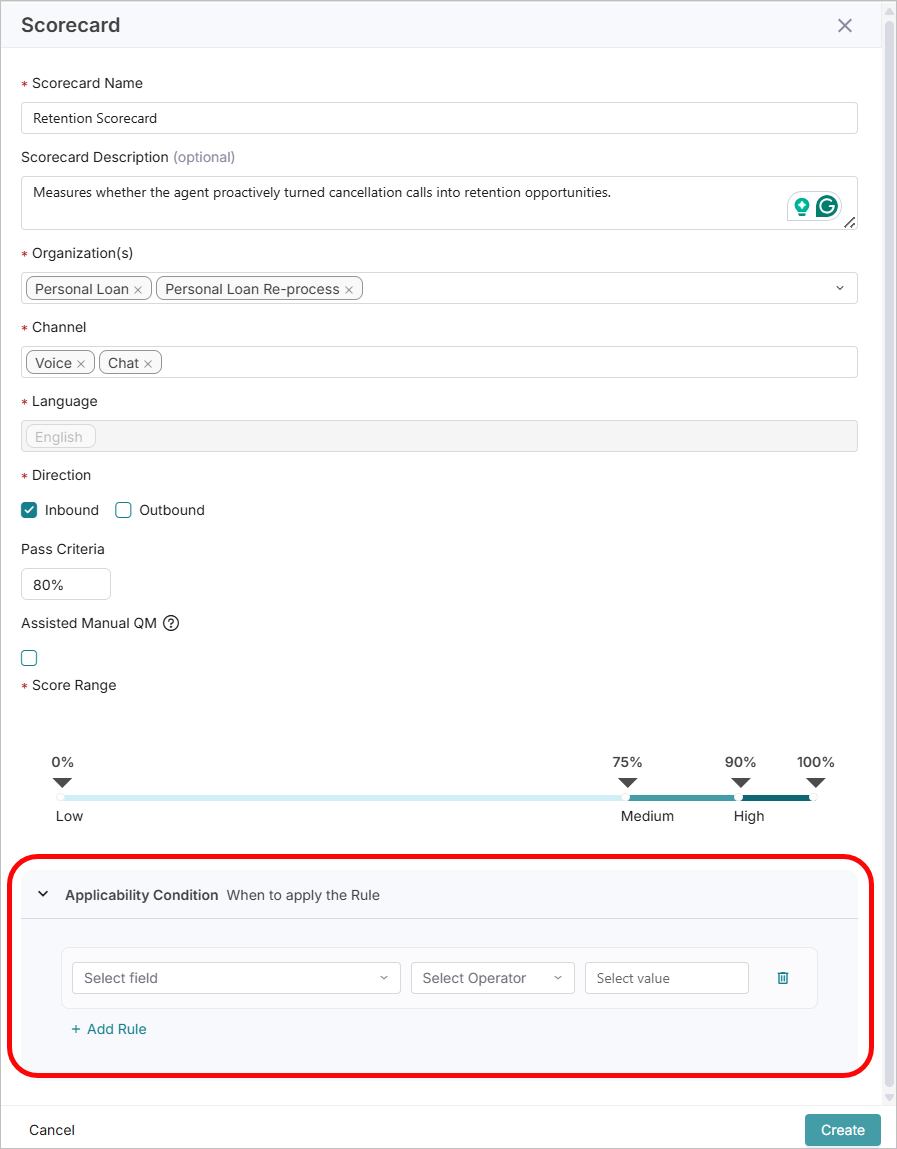
Scorecards now support Applicability Conditions, ensuring only relevant Scorecards are evaluated for a conversation. This eliminates unnecessary processing of Scorecards on all Conversations. The Applicability Conditions are available as a new section on the Scorecard Configuration page. The Condition can be based on Facts (Boolean), Metadata, and Attributes (Call Duration).
Admins can add up to 5 applicability conditions (Rules) per scorecard. These are evaluated before scoring begins, and the scorecard is only applied if the conditions are met. If no condition is met, the Scorecard is skipped during evaluation.
Conditions can be evaluated as:
Match All: All conditions are met
Match Any: At least one condition is met.
Note
All mandatory fields in the Create Scorecard page should be entered to add the Applicability Conditions.
For more information, refer to Create Scorecard.
Enhancements
Supervisor Filter now available for Analysts, Quality Analysts, and Managers
The Supervisor filter is now available to Analyst, Quality Analyst, and Manager (Supervisor) roles. Analysts and Quality Analysts can filter by one or more Supervisors to display Conversations for Agents mapped to the selected Supervisor(s). Managers can view all Conversations across the tenant, regardless of their Agent mappings.
Note
As part of this enhancement, Managers (Supervisors) can view the Conversations of all Agents, regardless of the Manager they are assigned to.
Composite Facts now includes List Facts
Users can now add List Facts to a Composite Fact, in addition to Boolean Facts. Users can add individual List Fact values as rules within a Group or sub-group, configuring each rule with a Fact Name, Operator (Equals / Not Equals), and the corresponding List Value from the dropdown. Users can now add up to 10 rules per Composite Fact. Match conditions can be set to ALL, where all conditions must be met, or ANY, where at least one condition must be met. The configured criteria can be viewed under Conversations>Facts.
For more information, refer to Complex Facts.
Introducing Transcripts Search in Custom Analytics
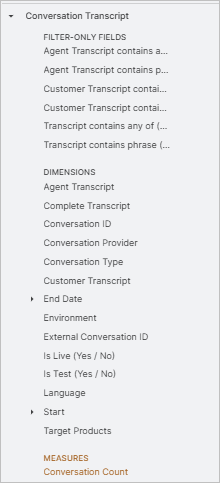
In Custom Analytics, a new view, Conversation Transcript, is introduced, allowing users to search and filter conversations by keyword or phrase directly within transcripts. Searches can be performed against the Complete, Agent, or Customer Transcript. Up to 10 keywords can be searched, separated by a space, comma, or pipe (|). Up to 3 phrases can be searched, separated by a space, comma, or pipe (|).
Conversation Disposition data in Custom Analytics
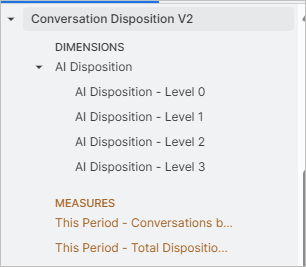
In Custom Analytics, a new view, Conversation Disposition V2, is introduced to expose the Conversation Disposition data. Analysts, Supervisors, and Agents can view how conversations are classified by AI and by agents.
French Localization Enhancements
As part of French localization enhancements, Fact results are now displayed in French. It enables users to send a fact query in French and receive responses in French, regardless of the language of the transcript being analyzed.
Constraints and Limitations
The following constraints and limitations exist for this release:
Item | Description | Workaround |
|---|---|---|
1 | When a call is reprocessed, the Flow Manager intermittently fails with a Conversation Not Found error from the Conversation Service, even though the conversation data exists. The reprocessing job becomes stuck in the IN_PROGRESS state and does not recover automatically. | NA |
Bug Fixes
There are no defects specific to this Release.