2025.02 U-Assist
Release Date: 11 March 2025
The U-Assist 2025.02 Release introduces the following features.
New Features
Introducing Business Information (BI) Dashboards
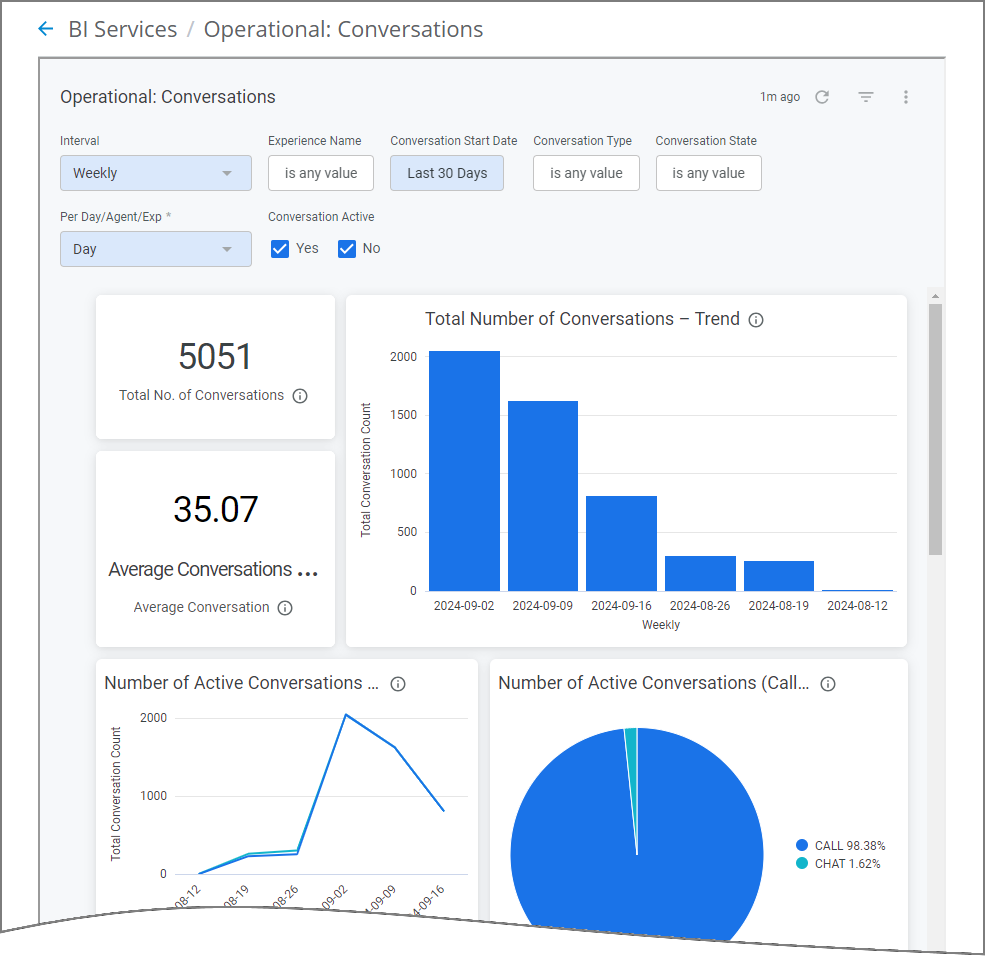
U-Assist now provides Business Information (BI) Dashboards for your account, drawn from all available runtime data. BI Dashboards present intuitive views of the metrics that answer key questions about chats and conversations in your contact center, helping your organization to develop service solutions that better reflect the ongoing and evolving needs of your customers.
 |
Our dashboards use Looker, a leading business intelligence software platform that specializes in the preparation, presentation and analysis of enterprise-scale data.
Uniphore provides four in-depth Dashboards 'out of-the-box', enabling you to immediately benefit from call center analytics without need for any additional setup activities:
Conversation AI - Summarizes the efficiency of AI models deployed in the account.
Conversation Experience - Overall experience summary for Agents and Enterprise Users.
Operational: Agents - Operational summary and performance efficiency for Agents.
Operational: Conversations - Operational overview and performance aspects for Conversations.
BI Dashboards are accessed directly from the X-Console.
For complete details about Business Information Dashboards in U-Assist, click here.
Enhancements
Automatic Filtering for Manager Application Dashboard
With this release, the Manager Application Dashboard will reflect only the data from conversations where Agents are using the AI Agent Assist application. This automatic filtering mechanism ensures that a contact center Manager will always access the most up-to-date and accurate information about their Agents' activities, at all times.
For more details on using the Manager Application Dashboard, click here.
Test Audio and Text Files Using the AI Agent Assist Application
A Business User acting as an Agent can now upload and test audio and text files directly in the AI Agent Assist Application to observe the performance of various AI sub-components (i.e., Intents, Flows, Promises, etc.) when running or testing Experiences. This capability is available only when running in DEV and TEST environments. It helps the Business User to demonstrate the AI Agent Assist Application in accordance with client requirements without the need to configure any Telephony System integrations.
The Business User is usually a Flow Admin, Account Admin, Business Analyst, or Quality Analyst.
Note
The Upload and Test feature is not available in the AI Agent Assist Application when running in the PROD environment.
For more details on testing audio and text files in AI Agent Assist Application, click here.
Constraints and Limitations
The following constraints and limitations exist for this release:
Item | Description | Workaround |
|---|---|---|
1 | When using the Auto-Submit option with the GenAI Summary, if the Trigger is set to 'End of Current Call', the X-Platform Conversation Summary variable for the current call returns an empty value. | Contact Uniphore Support for additional information and options. |
2 | When creating an Alert for Agents, you can currently map it to a Service Flow; however, the selected Flow will be executed only at the end of the call. | Execution of a Service Flow that is mapped to an Alert will be possible only in a future release. |
Defect Fixes
There are no defect fixes specific to this release.