2025.1
Release Date: 28 June 2024
The U-Assist 2025.1 Release introduces the following new or enhanced features.
New Features
Introducing Fault Tolerance (HA) and Zero Time Deploys
With this release, U-Assist introduces two powerful new features to our platform services and application services: Fault Tolerance (HA) and Zero Time Deploys. It is essential to design services with Fault Tolerance and Zero Time Deploys for building robust, reliable, and scalable systems that can adapt to changing conditions and provide a seamless user experience to our customers. In addition to improved reliability and availability from fault tolerant services, zero-time deployments allow for service updates without causing downtime for users, which is crucial for maintaining a seamless user experience and ensuring that the service is available 24/7.
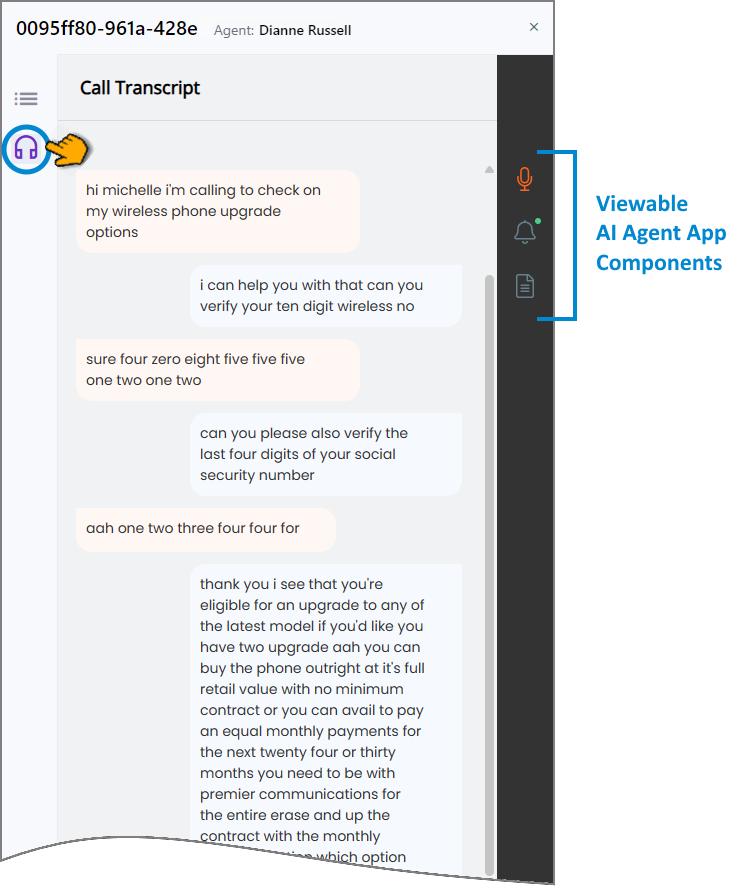
Monitor Live Agent Conversations in the Manager Application
A Supervisor can now access a real-time summary of the conversation, transcripts and Alerts as well as monitor any live Agent conversation listed in the Live Conversations panel of the Manager Application. For complete details, click here.
 |
Note
The Manager Application must be enabled for your account to make this feature available. For more details, contact your Uniphore Support representative
Enhancements
Automatic Submission of AI Agent Call Summaries
Both the template-based Call Summary and the GenAI Summary now optionally provide Auto-Submit functionality. Automatic submission can be performed with or without enabling an Agent to view and edit the Summary, based on the trigger type that is selected. The choices for automatic or manual Summary submission are maintained on the Client Settings page for the associated AI Agent Assist Application.
Only one of the Summary types (i.e., template-based Call Summary or GenAI Summary ) can be used by the AI Agent Application at any time.
For complete details, click here.
Agent Authorization for Microsoft Teams Access
U-Assist can now be integrated with Microsoft Teams to allow an Agent to authenticate using their Microsoft Account through Single Sign-On (SSO) and receive conversation data from Microsoft Teams calls.
For more information on authorizing Agent access to Microsoft Teams calls data, click here.
Alert Trigger Attributes
New attributes were add to the Duration trigger to enable specification of the time increment as well as a value comparator. For complete details, click here.
Configure Experience Training Timeout Period
The Experience training timeout period can now be configured during deployment. The default value is set to 120 seconds.
Important
If you want to change the training timeout to train a large amount of data, please contact your Uniphore support representative for assistance.
Constraints and Limitations
The following constraints and limitations exist for this release:
Item | Description | Workaround |
|---|---|---|
1 | A user is unable to upload and test an audio file or text file in the AI Agent Assist Application. | A user must log in to the U-Assist ACW platform at least once in order to successfully upload and test audio files in the AI Agent Assist Application. |
2 | When using the Auto-Submit option with the GenAI Summary, if the Trigger is set to 'End of Current Call', the X-Platform Conversation Summary variable for the current call returns an empty value. | Contact Uniphore Support for additional information and options. |
Defect Fixes
There are no defect fixes specific to this release.