2025.07 U-Discover
Release Date: 11 August 2025
Rebranding 2025: 'U-Discover' is Now 'Conversation Insights Agent'
Our name change to Conversation Insights Agent reflects Uniphore's ongoing focus on enabling contact centers to quickly extract meaningful insights from customer conversations using natural language queries. Although the name is new, you'll recognize all of the powerful capabilities you have come to rely on. Conversation Insights Agent is a part of the newly inaugurated Uniphore Business AI Cloud.
Note
During our transition to the new product name, please be aware that you may still see the 'U-Discover' name in some of the screens and dialogs that you use. In most cases, the name 'Conversational Insights Agent' is completely interchangeable.
The U-Discover 2025.07 Release introduces the following new or enhanced features.
New Features
Introducing Spanish Localization Support
In this release, we introduce Spanish language support as part of our localization efforts. Currently, this feature is applicable to Chrome and Firefox users. To enable this feature, ensure Spanish is added as the preferred language and available at the top of the language list in Chrome and as an alternative language in Firefox. This enhancement enables users to experience key parts of the application in Spanish, improving accessibility for Spanish-speaking users.
For more details on localization, click here.
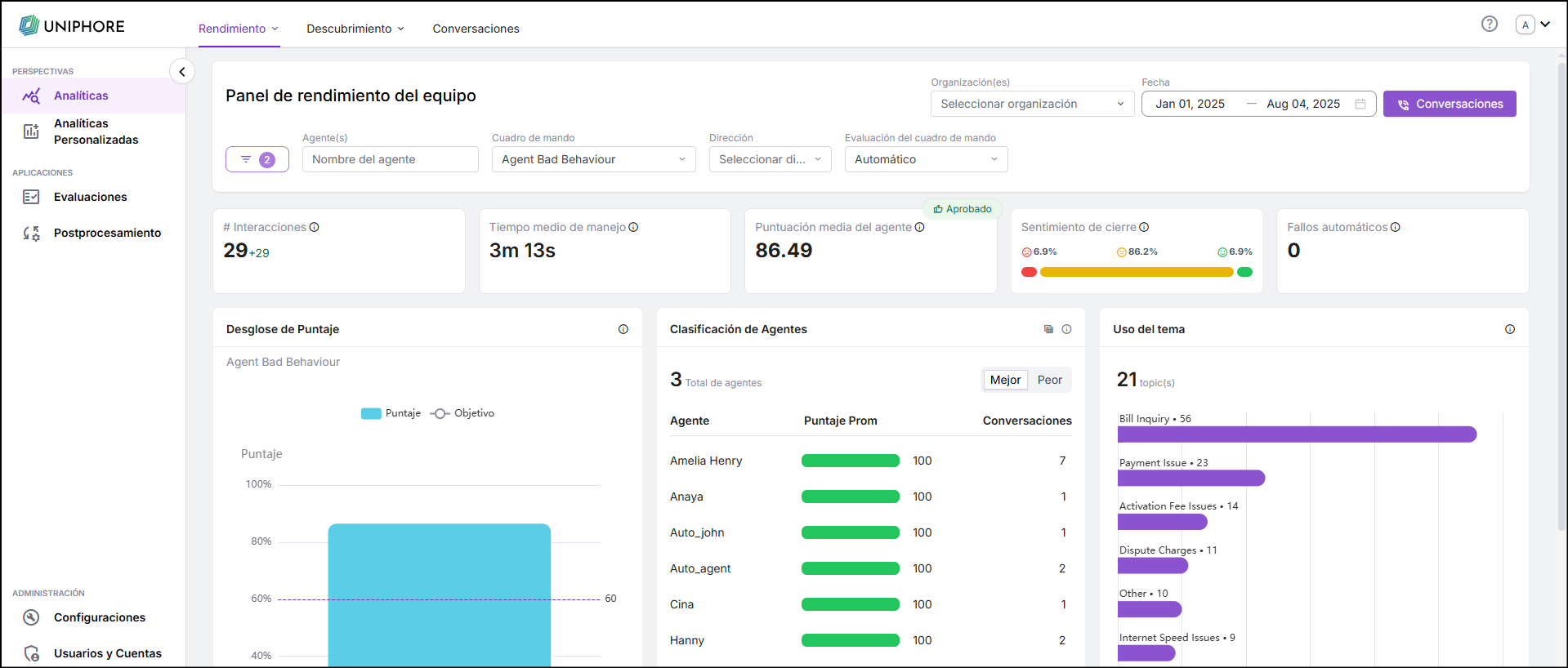
Managers Can View Only Their Assigned Agents
The User Hierarchy enhancement ensures that Managers can view only the details of agents assigned to them. The Team Performance, Topic Discovery dashboards, and Custom dashboards dynamically display the conversation details and other relevant data of the agents for the logged-in Manager. Each manager can be assigned up to 50 direct agents.
Note
To enable this feature, reach out to the Uniphore support team.
Enhancements
Filter Enhancements Across All Dashboards and Screens
The existing filter has been replaced with an All Filters capability. All Filters displays the complete list of filters available on the dashboard or screen. Any filter applied outside of All Filters will be reflected within it, and vice versa. All Filters shows the number of filters applied in the dashboard or screen. All filters are displayed in the Team Performance dashboard, Topic Discover dashboard, My Performance dashboard, Conversations, and Evaluations screens.
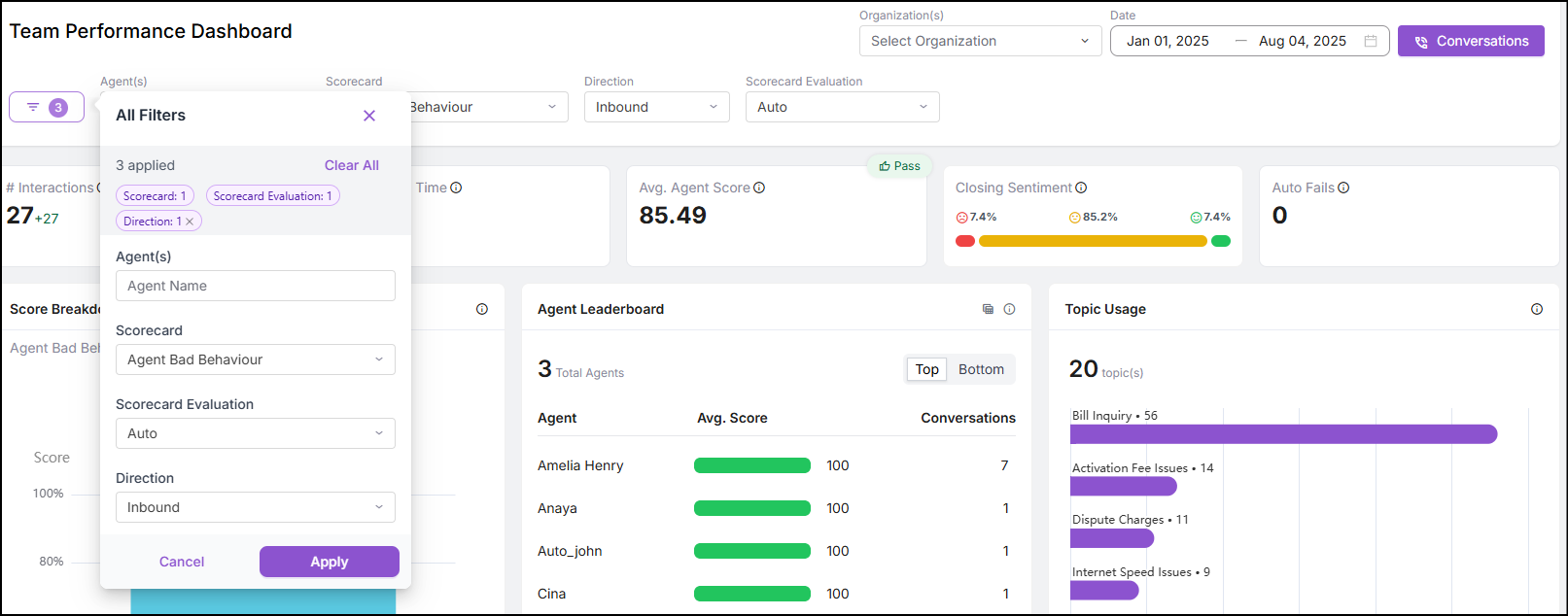
For more details on Filter Enhancements, click here.
Team Performance Dashboard Enhancements
The Leaders and Laggers widget in the Team Performance Dashboard has been enhanced and renamed to Agent Leaderboard. This updated widget allows you to view top-performing and under-performing agents, along with key details such as the Total number of agents, Agent name, Average score, and the Number of scored conversations. Up to 10 agents are displayed by default. You can access the full list of agents using the expanded view. Additionally, clicking on an agent's name applies a filter to the dashboard, displaying data specific to that agent.
The color of the average score bar is based on configurable thresholds. The default configuration is Green for scores above 80, Blue for between 50 and 80, and Red for less than 50.
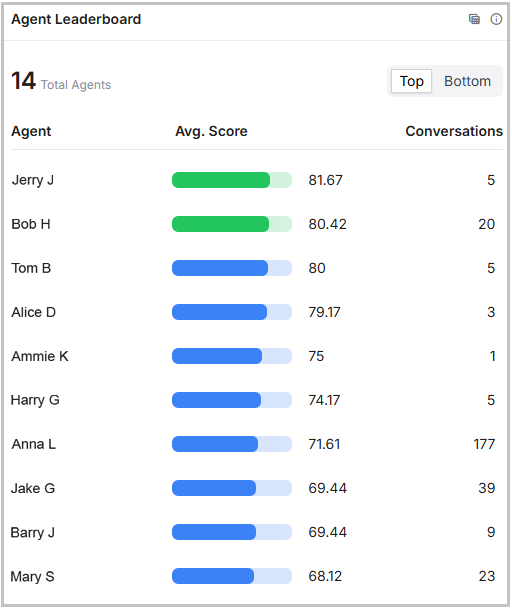
For more details on Agent Leaderboard, click here.
Optimized VAD Calculation to Improve Accuracy and Performance
In this release, VAD calculation accuracy and performance have been improved. As a result, it delivers consistent throughput regardless of call duration.
Constraints and Limitations
The following constraints and limitations exist for this Release:
Item | Description | Workaround |
|---|---|---|
1 | Currently, when an agent is deleted, their call details are no longer visible to the Manager, even though other users can still access them. Ideally, the Manager should also have access to the agent’s historical data after deletion. | NA |
2 | Currently, call recordings up to 2 hours in duration can be processed. Attempting to process recordings that exceed this limit may result in an error. | To process call recordings longer than 2 hours, please contact the Uniphore support team. |
Bug Fixes
There are no defects specific to this Release.