Working with Pre-Call Intelligence
Real-Time Guidance Agent offers an advanced AI-based Pre-Call Intelligence capability that delivers relevant historical and contextual customer insights at the start of a customer interaction, as well as AI-generated handoff summaries when an agent receives a transferred call. By analyzing information from sources such as previous customer conversations and related journey history, it presents structured, actionable insights in real time. This enables agents to quickly understand the customer's context, continue ongoing interactions without requiring customers to repeat information, and deliver more personalized, informed, and efficient support.
Pre-Call Intelligence helps agents handle customer interactions more effectively by providing the following benefits:
Improves Agent productivity and confidence by providing relevant customer context at the beginning of the conversation.
Improves customer satisfaction by enabling personalized, context-aware conversations based on previous interactions and customer journey history.
Supports consistent handling of repeat callers by providing visibility into historical conversations, ongoing issues, and previous resolutions.
Provides seamless agent handoffs by supplying AI-generated summaries that include the transfer reason, completed actions, collected information, and any unresolved or pending tasks.
Enhances the effectiveness of AI-powered assistive capabilities by leveraging historical interactions to improve intent recognition, conversation summaries, and Knowledge-as-a-Service (KaaS) responses over time.
Note
Please contact your Uniphore Product Management Team representative for Real-Time Guidance Agent to schedule a demo of this feature.
What Pre-Call Intelligence Provides
At the start of a call, Pre-Call Intelligence enables Real-Time Guidance Agent to generate and display the following insights:
Conversation History - Displays contextual insights from the customer’s past conversations associated with the corresponding Customer Identifier (CID) at the start of a new interaction, along with the date the conversation occurred and its duration.
If the call is part of an existing journey (i.e., the same customer contacts support again), the Agent can view the Journey Summary, which includes the core issue discussed in previous conversations, call reason, call outcome, and critical context (such as deadlines, promises, or escalations) based on the journey so far.
If the call starts a new journey, the Journey Summary will not be available.
Handoff Context - Displays an AI-generated handoff summary when a call is transferred from another agent. The summary provides structured context from the preceding call leg, including the reason for the transfer, actions completed during the previous interaction, information already collected, and any unresolved issues or pending tasks. This enables the receiving agent to seamlessly continue the conversation and provide efficient, personalized support without asking the customer to repeat information.
Configuring Pre-Call Intelligence: Conversation History
An Account Admin or Analyst can configure Pre-Call Intelligence: Conversation History at the Experience level. This feature generates conversation-driven insights from completed conversations, which are displayed to an Agent at the start of a new conversation.
The generated insights include a Journey Summary, which helps Agents understand:
The customer's previous reasons for contacting support.
Actions performed during earlier interactions.
Outcomes of previous conversations.
Important customer context and ongoing requests.
Before mapping the Summary Template to an Experience, ensure that the LLM instructions are specifically designed to perform the following activities:
Generate contextual insights from the previous conversation summary.
Generate call outcome results from the current conversation, referencing previously generated summaries where applicable.
Identify outstanding or unresolved issues from previously generated summaries.
Insight Generation (After a Call Ends )
Once a conversation is completed, structured insights are generated from the conversation using the Summary Template, which is assigned to an Experience during Pre-Call Intelligence configuration.
The insights are securely stored and associated with the Customer Identifier (CID).
Insight Display (At the Start of a New Call)
When a new conversation begins, previously generated insights are retrieved using the CID and automatically displayed to an Agent.
From the Real-Time Guidance Agent menu section, select Experiences. The Experiences page will be displayed.
Locate and click the name of the Experience for which you want to configure the pre-call intelligence conversation history. The activity cards for that Experience will be displayed.
Click Pre-Call Intelligence. The Pre-Call Intelligence page for the current Experience will be displayed.
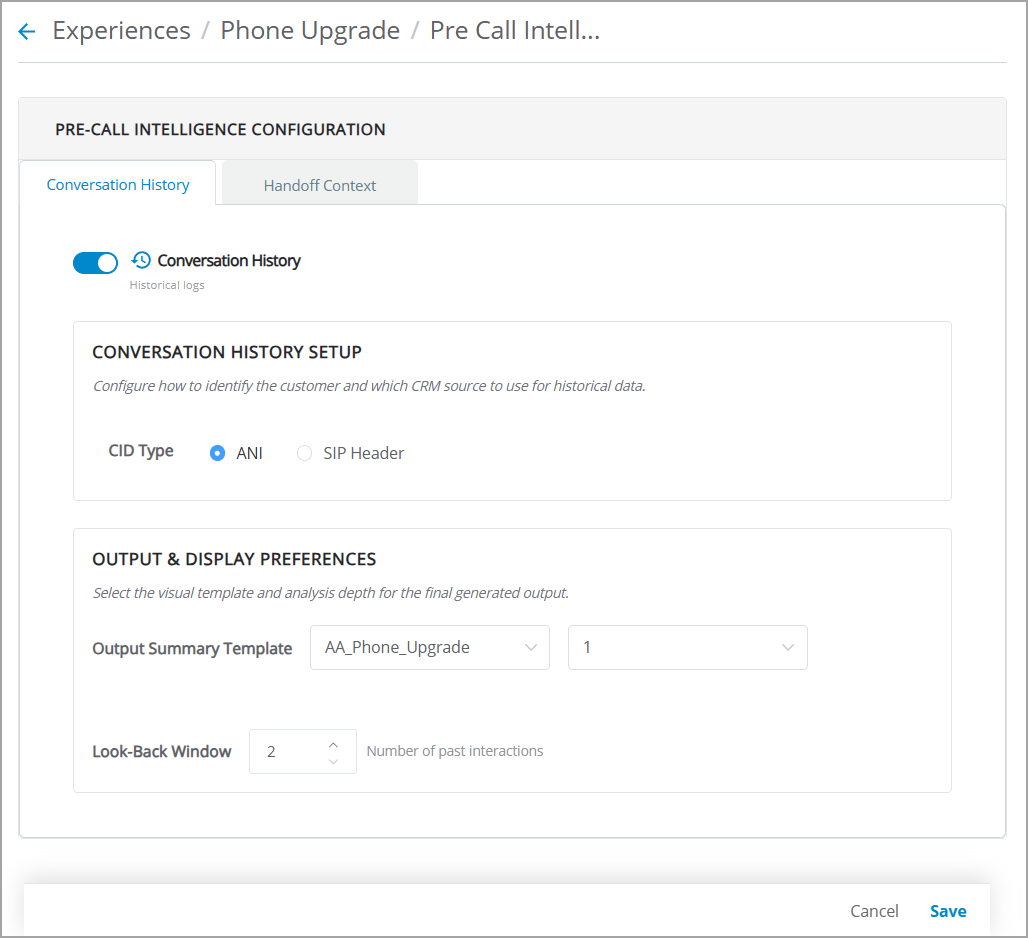
Select the Conversation History checkbox to enable this feature for this Experience. This option is disabled by default. Once enabled, Agents can view the journey summary of previous conversations at the beginning of a call.
In the Conversation History Setup section, select one of the following options as the CID source:
ANI (Automatic Number Identification) - Uses the caller’s registered phone number as the Customer Identifier. The phone number uniquely identifies the customer in your database.
Note
For ANI-based customer identification, tenants require callers to use their registered mobile number during the IVR flow.
SIP Header - Uses a specific SIP header value as the Customer Identifier. Select this option when your telephony environment passes customer identification information in a SIP header during call setup. Enter the corresponding SIP Header Key to specify which header contains the customer identifier.
After the customer is identified using the selected CID source, the system automatically retrieves the customer's conversation history at the start of the call and presents it to the agent as part of Pre-Call Intelligence.
In the Output & Display Preferences section, select the Default Summary Template and its corresponding Version from the dropdown lists. The list displays all available Summary Templates for the selected account.
The selected template will be automatically applied at the start of every call.
In the Look Back Window field, select the maximum number of past conversations (N) for which insights are displayed. The selected number of past conversations is analyzed when generating conversation history insights.
You can define a minimum of 2 past conversations and a maximum of 10 past conversations in the Look Back Window field.
Note
Only valid completed conversations are considered when generating insights. Short calls are excluded from the conversation history list.
Configuring Pre-Call Intelligence: Handoff Context
The Pre-Call Intelligence Handoff Context feature helps Agents quickly understand the context of transferred calls before engaging with customers. When a call is transferred from another Agent, Real-Time Guidance Agent displays a structured hand-off summary of what occurred in the preceding call leg. This feature reduces the need for customers to repeat information and helps Agents continue conversations seamlessly.
When an Agent receives a transferred call, the Handoff Context banner appears automatically in the Customer Information panel in the AI Agent Assist Application. The Handoff Context banner includes:
Call reason - Indicates the reason why the customer originally contacted the company.
Actions taken - Lists the actions completed during the previous call leg. This information is available for agent-to-agent transfers.
Unresolved items - Highlights open issues or pending tasks that were not resolved before the transfer.
For more details, refer to Viewing Agent Handoff Summary in the AI Agent application.
Reduces customer repetition during transfers
Helps Agents understand previous actions immediately
Improves transfer efficiency
Minimizes average handle time
Provides better continuity between transferred calls
An Account Administrator or Business analyst can configure how handoff summaries are generated and displayed to Agents during transferred calls at the Experience level.
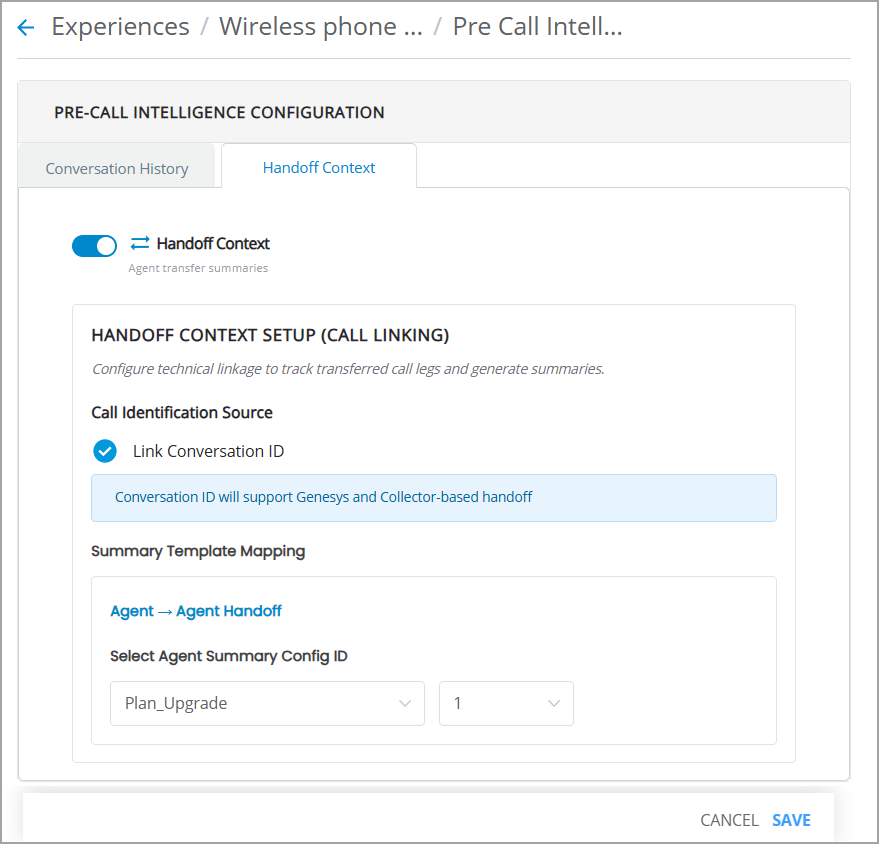
Configure Handoff Context
Feature Enablement
Select the checkbox Handoff Context to enable this feature for this Experience. This option is disabled by default. Once enabled, Agents can view the context of transferred calls when another Agent transfers a call.
Note
Only the ‘Handoff Context’ Pre-Call capability is supported in the current release.
Handoff Context Setup (Call Linking)
Configure the metadata key, which acts as the primary identifier (i.e., Link Conversation ID) used to detect transferred calls and associate related call legs within the same customer interaction journey.
Note
If the metadata key is configured incorrectly, transfer calls cannot be identified, and handoff summaries cannot be generated.
Link Conversation ID - It is a provider-supplied external conversation identifier that references the immediately preceding call leg. It enables one-to-one linkage between adjacent transferred calls. This method is typically used during agent-to-agent transfers through SIP headers such as:
Previous_Session_Id.
Summary Template Mapping
Assign a specific version of the Summary Template created in the Administration Platform to the selected Experience to generate a handoff summary from the preceding leg's conversation transcript.
Basic Workflow for Handoff Context & Summary
The typical workflow describes how the handoff summary is generated from the preceding leg’s conversation transcript and displayed to an Agent when the call is transferred.
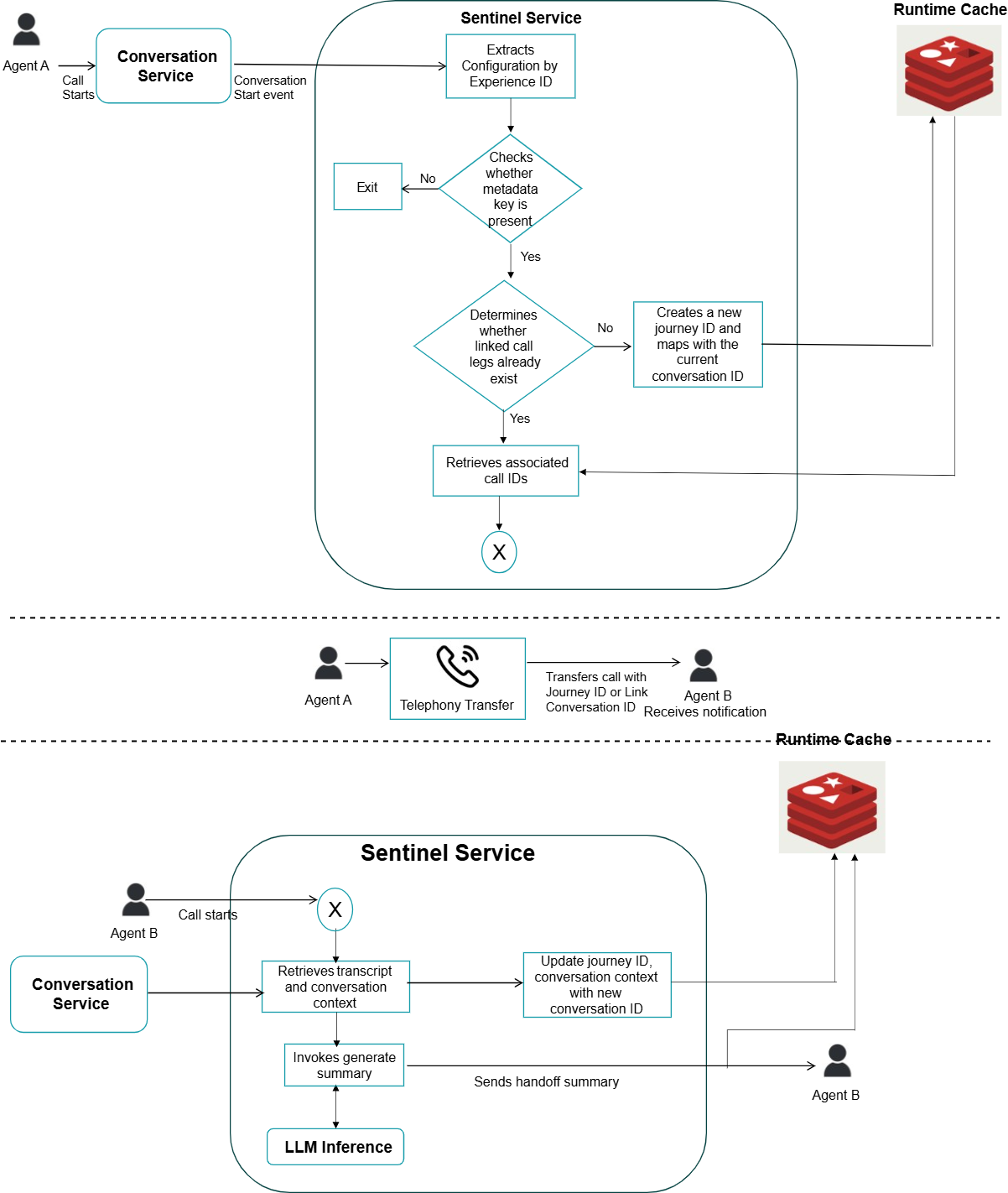
Agent A’s Call Starts
A conversation start event is triggered from the Conversation Service and sent to the Sentinel Service.
The Sentinel Service retrieves the handoff configuration associated with the Experience ID.
The system validates whether the required metadata key is present:
If the metadata key is not available, the handoff summary workflow is ignored.
If the metadata key is available, the workflow continues.
Retrieve Associated Call IDs
The system determines whether linked call legs already exist for the current conversation:
If linked calls exist, the Sentinel Service retrieves the associated call IDs from the runtime cache.
If no linked calls are found (i.e., first call leg), the system:
Creates a new journey ID.
Maps the journey ID to the current conversation ID.
Stores the mapping in the runtime cache.
Agent A transfers the call to Agent B
Agent A transfers the call to Agent B through the telephony transfer flow, along with metadata such as the Link Conversation ID.
Agent B receives a notification when the transferred call is received.
Retrieve transcript and conversation context
When the transferred call starts, the Sentinel Service follows the process described in step 2 above.
The Sentinel Service retrieves the previous call leg IDs from the runtime cache and uses them to retrieve the associated transcript and conversation context from the Conversation Service.
The Sentinel Service invokes the LLM inference service with the template ID, gathered transcript, and context to generate the handoff summary.
The runtime cache is updated with the latest Conversation ID, generated handoff summary, and transcripts.
Display the handoff summary to Agent B
The Sentienl Service displays the generated handoff summary and associated transcripts from previous conversation legs to Agent B’s application.
Agent B can view the handoff context and the generated summary within the application interface before continuing the customer interaction.
For more information on viewing the handoff summary in real time, refer to Viewing Agent Handoff Summary.