Working with Agent Steps
Agent Steps are a collection of resolution or troubleshooting steps (i.e., typically Agent responses and actions) taken by an Agent during the conversation to resolve a customer's issues. Agent Steps can be displayed as part of the Call Summary in the AI Agent Assist Application.
Instead of recognizing potential Agent Steps using string and rule type entities (a time-consuming task that was required in past versions) , the Business Analyst can optionally configure Agent Steps as Intents in an Experience. These Steps can be identified during runtime using an Intent Detection Model. For each Intent, a set of training phrases is added. The trained Intent Model uses semantic matching to detect similar utterances in the conversation, which are subsequently shown as the configured Agent Step.
The Business Analyst is typically a Flow Administrator or an Account Administrator.
For example, if an insurance company wants to verify that their Agent explained everything about 'autopay benefits' to a caller, the Analyst might create an Agent Step Intent called "Agent explained Autopay benefits" and add the following Intent phrases: "Let me explain how autopay works," "I will tell you the benefits of autopay," and so on.
Enabling Agent Steps in the Call Summary
In order to view Agent Steps taken during a call in real time, the Business Analyst must enable it in the Call Summary options for the associated AI Agent Assist client application. For details about configuring the AI Agent Assist Application settings, click here.
During the call, an Agent can view the Agent Steps (i.e., Agent Step Intent names) in the live Call Summary, one by one, whenever they occur in the conversation based on the configured training phrases. In addition, Agent Steps can be formatted according to what is defined on the AI Agent Assist Application Client Settings page. Formatting options currently include: Bulleted List, Numbered List or Check List.
Note
The Agent Steps are displayed in a bulleted format by default.
For details on viewing Agent Steps in AI Agent Application, click here.
Defining Agent Steps
A Business Analyst can add each Agent Step to be extracted from the conversation as an Intent to an Experience based on the customer/client requirements and also define a set of training phrases.
As an example, consider the following example conversation between customer and agent:
Customer: Hi My name is Michael
Agent: Hi Michael, How can I help you?
Customer: I want to check my wireless phone upgrade options
Agent: Can you verify your ten digit wireless number
Customer: 4085551212
Agent: can you also verify the last 4 digits of your social security number
Customer: aah aah one two three four
Agent: thank you. i see that you're eligible for an upgrade to any of the latest models you'd like and you have two upgrade options. You can buy the phone out right at its full retail value with no minimum contract or you can avail to pay equal monthly payments for the next 24 or 30 months. Which option would you like to choose?
Customer: I will go with contract for 24 months. I have one query though, is it available for equal monthly payment option for 24 months
Agent: Yes, it is available for equal monthly payment for a duration of 24 months. lemme go ahead and start the upgrade process. which phone would you like to upgrade tooCustomer: I'll go in for the two hundred and fifty six gigabyte iphone twelve
Agent: Great thanks. For 24 months, the equal monthly payment option is thirty one dollars sixty seven cents which will be added to your monthly bill. I'll go ahead and process the order. would you like to add any accessories.
Customer: Hmmm no thanks
Agent: order has been processed
Let us consider you wish to display the following Agent Steps in the Summary on the AI Agent Application:
Agent verified wireless number
Agent verified customer’s SSN
Agent explained phone upgrade options
Order was processed
For each Agent Step, a sample set of training phrases is provided below.
Expected Agent Steps | Sample Training Phrases |
|---|---|
Agent verified wireless number |
|
Agent verified customer’s SSN |
|
Agent explained phone upgrade options |
|
Order was processed | Let me process the order |
Follow the below step to define an Agent Step Intent:
Create a new Intent, as detailed here.
From the Intent Type dropdown list, select Agent Steps.
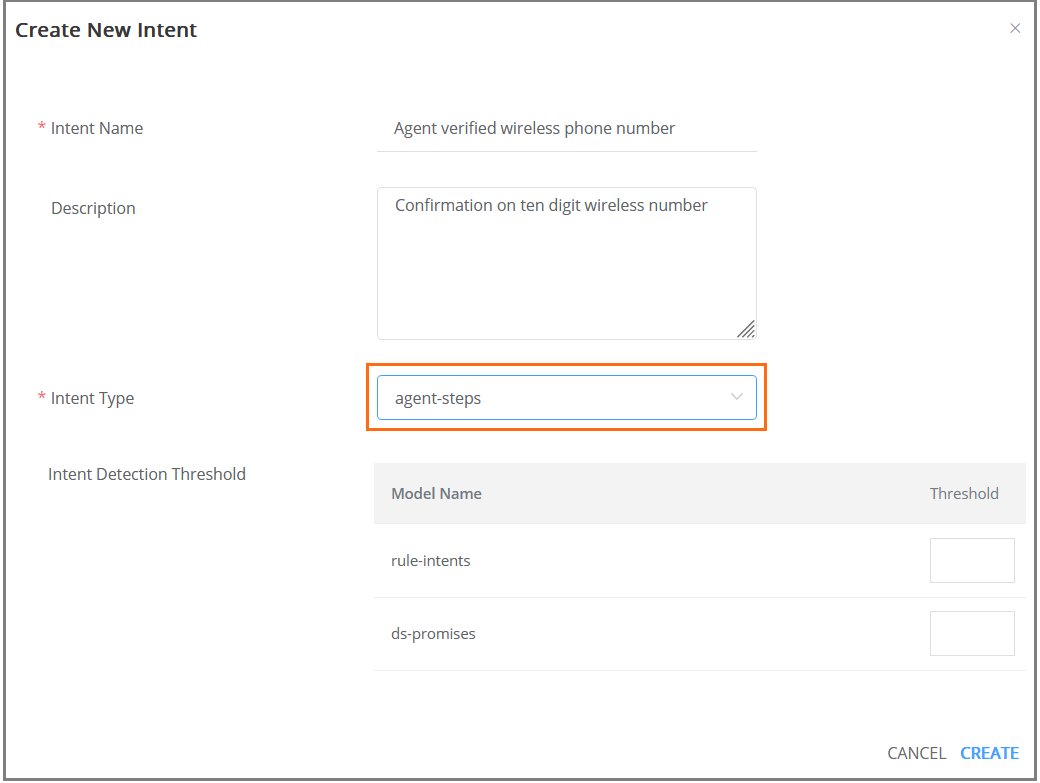
At the lower right corner of the popup, click Create. The new Agent Step Intent will be saved. To cancel your activity at anytime without saving, click Cancel.
Tip
You can update the field values for the saved Intent from the Details panel found on the Intent Training page.
After you create an Intent, you need to also add positive and (optionally) negative phrases for the Intent that will help the NLU server to identify it during a conversation.
Adding Agent Steps Intent Phrases
A Business Analyst can add Intent phrases against each Agent Step, as well as provide negative examples of Intent phrases, to train the Uniphore NLU server to identify the Intent during a conversation.
Agent Step Intent Phrases are similar to Phrases supplied to other Intent types, along with the process used to add them.
Note
Although the feature is called "Agent Steps", you can also configure utterances expected for customer channel, by selecting the appropriate channel while adding training phrases.
For more details on adding Phrases to an Intent, click here.
Note
After adding the Intent phrases, training of Experience is required to make all newly added Intent pharses to the Uniphore NLU server.