Turn-Level Configuration
The Turn-Level Configuration page lets you configure Adaptive Call Settings to adjust a voice agent’s speaking style based on the caller’s emotional state and conversational context. By analyzing caller transcripts at each turn, an independent LLM analyzer applies operator-defined detection rules to dynamically adjust the agent’s emotion, speaking speed, and volume during a call.
Configure Turn-Level Adaptation
From the left navigation pane, go to Setup > Turn-Level Configuration.
Enable the Turn-level adaptation toggle to activate turn-level adaptation. When this feature is enabled, an analyzer reads each caller's turn and adjusts the agent’s reply according to the rules configured below.
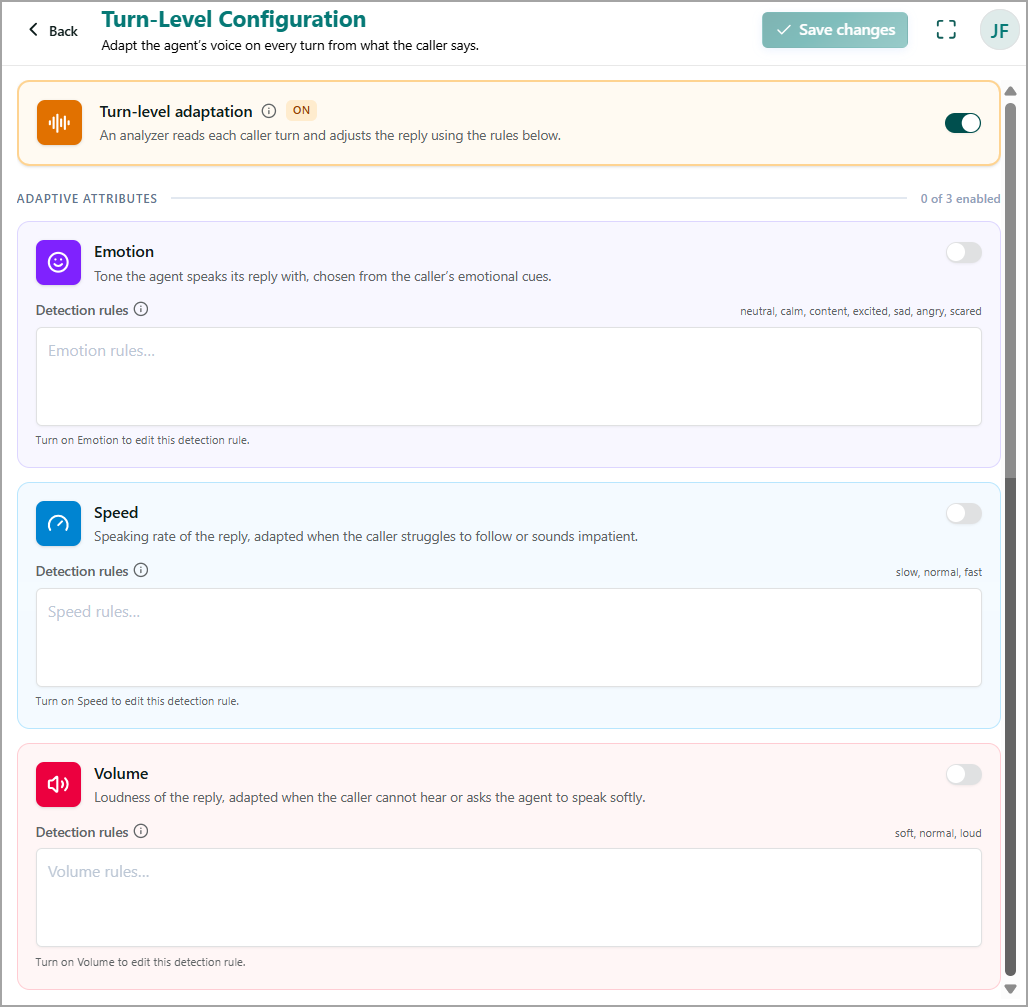
Under Adaptive Attributes, enable the attributes you want the agent to adapt during each conversation turn. Three attributes are available: Emotion, Speed, and Volume.
The counter at the top of the section (for example, 1 of 3 enabled) indicates how many attributes are currently active. Enable each attribute individually to configure its detection rules.
Emotion - Adjusts the tone of the agent’s reply based on the caller’s emotional cues. Enable the Emotion toggle to configure the detection rules that guide the agent’s tone during a call.
Under Detection rules, enter one rule per line using the format:
If <caller cue>, use emotion=<value>
Use one of the supported emotion values displayed in the configuration:
neutral - Uses a neutral, balanced tone.
calm - Uses a calm, reassuring tone.
content - Uses a positive, satisfied tone.
excited - Uses an enthusiastic, energetic tone.
sad - Uses a sympathetic, gentle tone.
angry - Uses a composed, empathetic tone.
scared - Uses a reassuring, supportive tone.
Speed - Controls how quickly the agent speaks during a call. Enable the Speed toggle to configure detection rules that adjust speaking pace based on caller cues, such as requests to repeat information or signs of impatience.
Under Detection rules, enter one rule per line using the format:
If <caller cue>, use speed=<value>
Use one of the supported values displayed in the configuration:
slow - Speaks at a slower pace.
normal – Speaks at the default pace.
fast – Speaks at a faster pace.
Volume - Controls how loud or soft the agent sounds during a call. Enable the Volume toggle to configure detection rules that adjust the speaking volume based on caller cues, such as difficulty hearing the agent or requests to speak more softly.
Under Detection rules, enter one rule per line using the following format:
If <caller cue>, use volume=<value>
Use one of the supported values displayed in the configuration:
soft – Speaks at a softer volume.
normal – Speaks at the default volume.
loud – Speaks at a louder volume.