Specify Variables Sent to the Conversation Service
Session Variables and their values are critical components of the Conversation Service, which stores, reports, and continuously analyzes key information during and after a conversation to improve outcomes and produce valuable insights.
Conversation Service performance for an account can potentially degrade when too many Variables are being reported at runtime, or when the content of Variable values is large (e.g., image data or massive collections). To help remedy performance issues, Variable reporting to the Conversation Service can be explicitly constrained according to the following parameters:
Variable ID | When this capability is activated for an account by Uniphore Support, by default, up to 50 Variables can be specified for reporting to the Conversation Service, according to their unique name IDs. Specification Method: API |
Variable Type | When this capability is activated for an account by Uniphore Support, by default, the following Session Variable Types will not be reported to the Conversation Service:
To report any of the above Variable Types to the Conversation Service, they must be explicitly specified for an account. Note that reporting for any other Variable Types may also be customized, as determined by account needs. Specification Method: Feature Flag |
Important
The capabilities detailed here must be activated by an Account Admin. For more information, please contact your Uniphore Support representative. There is no impact on Conversation Service reporting when an associated capability has not been activated.
Get Variables Currently Reported
This method returns a list of the Variable IDs that are currently reported to the Conversation Service for the specified account.
URL Syntax and Example
http(s)://[url-of-host-cluster]/interact/report/variables
https://xconsole.us.cloud.dcmtelco.com/interact/report/variables
Specific URI Fields
None
HTTP Method
GET
HTTP Headers
Content-Type: application/json
Tenant-Id: <account>
Application-Key: <public API service application Key>
Authorization: <bearer token>
Environment-Name: <environment-name>
HTTP Body
None
Sample Response
{
  1137c831d402-44eb907640649336-0a5e,
  a5357755d54d-4b459e9e7fb0dd28-646c,
  56g9c83d6q09-7k4l2b9m8p3s1g5h-56e2,
  c6g3l2z8r7s1-f8b4h3n7p1q2m5k9-8j26
}
Specify Variable IDs for Reporting
This method specifies one or more Variables that will be reported to the Conversation Service for the specified account, using the unique ID of each Variable.
Note
By default, a total of 50 Session Variables can be specified for reporting.
To find the unique ID of a relevant Variable to use in the specification, do the following:
Sign in to X-Console for your account.
Open the Development Tools panels of your browser (for example, by pressing F12 in Chrome).
From the Resources menu, select Session Variables. The Session Variables page is displayed.
Click the Network tab and from the list of Names in the left column, click variable.
Click the Preview tab from the right column, then open the variables array that is displayed. This array contains the unique IDs for all configured Session Variables in the account, ordered by Variable Name:
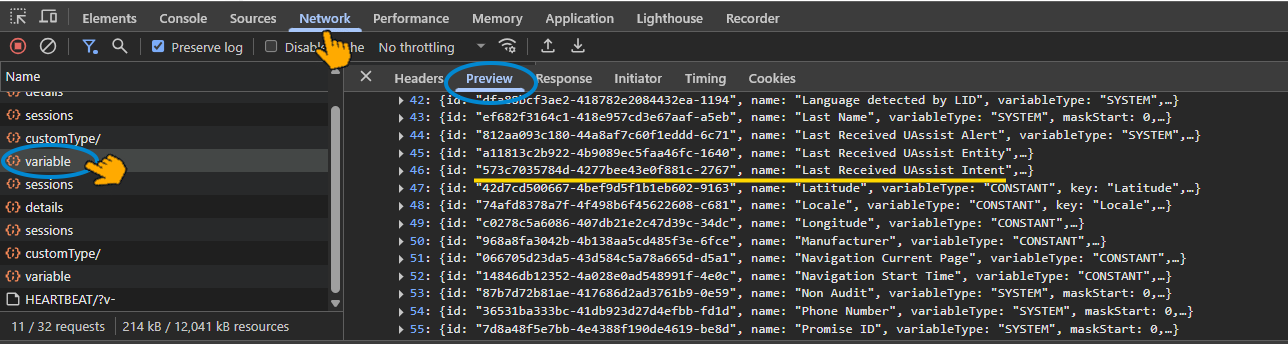
Browse the array to locate the name of the specific Variable you want to report to the Conversation Service and copy its ID value. This is the unique ID for the Variable to your specification list.
URL Syntax and Example
http(s)://[url-of-host-cluster]/interact/report/variables
https://xconsole.us.cloud.dcmtelco.com/interact/report/variables
Specific URI Fields
None
HTTP Method
POST
HTTP Headers
Content-Type: application/json
Tenant-Id: <account>
Application-Key: <public API service application Key>
Authorization: <bearer token>
Environment-Name: <environment-name>
HTTP Body
A JSON-formatted list of one or more Variable IDs to be reported to the Conversation Service.
{
  1137c831d402-44eb907640649336-0a5e,
  a5357755d54d-4b459e9e7fb0dd28-646c,
  56g9c83d6q09-7k4l2b9m8p3s1g5h-56e2,
  c6g3l2z8r7s1-f8b4h3n7p1q2m5k9-8j26
}
Sample Response
A JSON-formatted list of Variable IDs that have been specified successfully.
{
  1137c831d402-44eb907640649336-0a5e,
  a5357755d54d-4b459e9e7fb0dd28-646c,
  56g9c83d6q09-7k4l2b9m8p3s1g5h-56e2,
  c6g3l2z8r7s1-f8b4h3n7p1q2m5k9-8j26
}
Expected Responses
Response Scenario | Status Code/Header | Example Message |
|---|---|---|
Success | 200 | |
Invalid body parameter(s) | 400 | missing or invalid parameter <parameter> |
Invalid security headers | 401 "Unauthenticated-Reason" Header | { "code":"0x7000000", "message": "Request is unauthorized, missing or wrong credentials", "moreInfoUrl":"http://support.uniphore.com", } |
Application does not exist | 404 | application <campaign id> was not found |
General error (internal error from the relevant Server) | 500 | exception |
Delete Variable IDs from Reporting
This method removes one or more specified Variables from the list reported to the Conversation Service for the specified account, using the unique ID of each Variable.
URL Syntax and Example
http(s)://[url-of-host-cluster]/interact/report/variables
https://xconsole.us.cloud.dcmtelco.com/interact/report/variables
Specific URI Fields
None
HTTP Method
DELETE
HTTP Headers
Content-Type: application/json
Tenant-Id: <account>
Application-Key: <public API service application Key>
Authorization: <bearer token>
Environment-Name: <environment-name>
HTTP Body
A JSON-formatted list of one or more Variables to remove from the list of Variables currently reported to the Conversation Service for the specified account, specified by unique ID.
{
  1137c831d402-44eb907640649336-0a5e,
  a5357755d54d-4b459e9e7fb0dd28-646c
}
Sample Response
A JSON-formatted list of Variable IDs that have been removed successfully.
{
  1137c831d402-44eb907640649336-0a5e,
  a5357755d54d-4b459e9e7fb0dd28-646c
}
Specify Reporting by Variable Type
The specification of Variables for reporting to the Conversation Service according to their Variable Type is enabled via an account feature flag configured by an Account Admin.
When this capability is activated for an account by Uniphore Support, by default, the following Session Variable Types will not be reported to the Conversation Service:
Images
Collections
Dynamic Variables
Custom Types
To report any of the above Variable Types to the Conversation Service, they must be explicitly specified for an account. Note that reporting for any other Variable Types may also be customized, as determined by account needs.
The Account Admin will configure the feature flags for relevant Variable Types according to your account's detailed requirements.
When configuring reporting for a Numeric Variable Type, the Variable Entity Type (e.g., Currency) must be specified.
For more information, please contact your Uniphore Support representative to activate and configure this capability.