Retrieve Selected Conversation Details
This method compiles data from all Conversations matching the attribute filters you specify, and enables you to download this compiled data in JSON or CSV formats.
The method supports powerful, multi-tiered group filtering that is controlled using logical AND/OR operators, as detailed below.
The conversation-retriever API enables fetching conversation data directly from the Conversation Service. It can compile and download up to 500K conversation data records per invocation.
To invoke the method, you use three distinct, sequential calls:
start-conversations-export - Initiates the Conversation data compilation according to filters specified in the request body. Upon successful initiation, this call returns a unique session identifier that will be used in subsequent calls. This call may take some time to execute on the server.
export-status - After successful initiation, this call uses the unique session identifier returned by start-conversations-export to report on the progress of Conversation data compilation.
download-conversations - When the export-status call reports that the requested Conversation data compilation has completed, this call uses the unique session identifier to retrieve the compilation as a compressed ZIP file.
Important
The following critical constraints exist when using the conversation-retriever API:
A requested Conversation data compilation ZIP file can be downloaded only once. This constraint supports account security requirements.
The requested Conversation data compilation ZIP file will remain available for downloading for only one hour after compilation is completed. Use the export-status call to monitor compilation progress.
Turns can be fetched via the API only three hours after a session's completion or timeout. The delay period can be shortened by reducing the Session Timeout setting for the associated application. (The default value is 35 minutes.)
Filtering
You can specify filters with the conversation-retriever to locate and retrieve only the Conversation data that is of interest to you. The API uses a powerful filtering mechanism that supports the creation of multiple, hierarchical filter groups, as shown below.
Filters are defined in the Body of the start-conversations-export call. For example:
{
  "tenant_id": "9b450840-de4a-4943-90e3-4e8c085f038a",
  "environment": "Dev",
  "page_size": 500,
  "fields": [
    "CONVERSATION_FIELD_START_TIMESTAMP",
    "CONVERSATION_FIELD_END_TIMESTAMP"
  ],
  "group_filter": {
    "left_filter": {
      "field": "CONVERSATION_FIELD_START_TIMESTAMP",
      "operator": "CONVERSATION_FILTER_OPERATOR_GREATER_THAN_OR_EQUAL",
      "timestamp_value": {
        "seconds": 1704096000,
        "nanos": 0
      }
    },
    "operator": "CONVERSATION_LOGICAL_OPERATOR_AND",
    "right_filter": {
      "field": "CONVERSATION_FIELD_END_TIMESTAMP",
      "operator": "CONVERSATION_FILTER_OPERATOR_LESS_THAN_OR_EQUAL",
      "timestamp_value": {
        "seconds": 1767081600,
        "nanos": 0
      }
    }
  },
  "order_by": [{
    "field": "CONVERSATION_FIELD_CONVERSATION_ID",
    "direction": "CONVERSATION_ORDER_DIRECTION_DESC"
  }]

}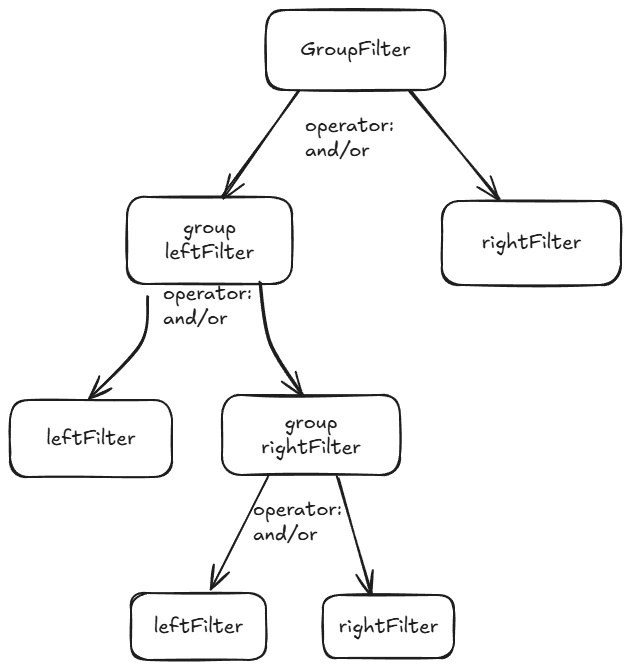
The filtering mechanism is depicted above as a binary tree. You can create a simple single filter (e.g., leftFilter) or build more complex filters by specifying two separate filters (e.g., leftFilter and rightFilter) and applying an AND/OR conditional operator between them. Each filter can itself be the parent of an additional binary subtree, enabling very powerful searches.
Example Filter Details
The Body code example above shows how to compile data between two specified dates, where:
The | "operator": "CONVERSATION_LOGICAL_OPERATOR_AND" |
The | "left_filter": {
"field": "CONVERSATION_FIELD_START_TIMESTAMP",
"operator": "CONVERSATION_FILTER_OPERATOR_GREATER_THAN_OR_EQUAL",
"timestamp_value": {
"seconds": 1704096000,
"nanos": 0
} |
The | "right_filter": {
"field": "CONVERSATION_FIELD_END_TIMESTAMP",
"operator": "CONVERSATION_FILTER_OPERATOR_LESS_THAN_OR_EQUAL",
"timestamp_value": {
"seconds": 1767081600,
"nanos": 0
} |
The | "timestamp_value": {
"seconds": 1767081600,
"nanos": 0
} |
A filter can be applied to the following Conversation Service fields:
|
|
A filter can use any of the following search operators, based on the data type of its Conversation Service field:
|
|
Retrieved Conversation Service data sort order can be specified according to a specified field:
CONVERSATION_ORDER_DIRECTION_ASC(Ascending)CONVERSATION_ORDER_DIRECTION_DESC(Descending)
Additional Filter Examples
Examples of common Conversation data compilation filters are provided below.
Source Telephony ID where:
| "left_filter": {
"field": "CONVERSATION_FIELD_PARTICIPANT_ANI",
"operator": "CONVERSATION_FILTER_OPERATOR_CONTAINS",
"string_value": "8090909099"
} |
Conversation Outcomes where:
| "left_filter": {
"field": "CONVERSATION_FIELD_STATE_STATE",
"operator": "CONVERSATION_FILTER_OPERATOR_CONTAINS",
"string_value": "CONVERSATION_STATE_FINISHED"
} |
VA ID where:
| "left_filter": {
"field": "CONVERSATION_FIELD_PARTICIPANT_ID",
"operator": "CONVERSATION_FILTER_OPERATOR_CONTAINS",
"string_value": "18"
} |
Application ID where:
| "left_filter": {
"field": "CONVERSATION_FIELD_APPLICATION_ID",
"operator": "CONVERSATION_FILTER_OPERATOR_CONTAINS",
"string_value": "576c27f3-444d-4abf-9fa1-61d55e96c590"
} |
1. Initiate the Compilation
This method initiates the Conversation Service data compilation according to filters specified in the request body. Upon successful initiation, this call returns a unique compilation identifier that will be used in subsequent calls.
Depending on the filters specified and the amount of data to compile, the call may take some time to execute on the server. For this reason, the API executes asynchronously. Subsequent methods are used to check its status and download its results.
URL Syntax and Example
http(s)://[url-of-host-cluster]/conversations-retriever/export-conversations/start-conversations-export?environment=[relevant-environment]
https://xconsole.us.cloud.dcmtelco.com/conversations-retriever/export-conversations/start-conversations-export?environment=dev
Specific URI Fields
URI Field | Data Type | Description |
|---|---|---|
environment | string | The name of the specific environment to access for the compilation. |
HTTP Method
POST
HTTP Headers
Content-Type: application/json Application-Key: <public API service application Key> Authorization: <bearer token>
Tip
Get the <bearer token> using the authorization method or directly from your Uniphore Support representative.
HTTP Body
The Body specifies the filter that will be submitted for the compilation. For detailed filter use cases and examples, see the section Filtering, above.
Maximum
page_sizevalue is 500.Optional Values in HTTP Body:
"output_format":"JSON"or"output_format":"CSV"
If not present or specified incorrectly, the output format will automatically default to JSON.
{
"tenant_id": "<tenant-unique-id>",
"environment": "<relevant-environment>",
"page_size": 500,
"output_format":"JSON",
"fields": [
"CONVERSATION_FIELD_START_TIMESTAMP",
"CONVERSATION_FIELD_END_TIMESTAMP"
],
"group_filter": {
"left_filter": {
  "field": "CONVERSATION_FIELD_START_TIMESTAMP",
  "operator": "CONVERSATION_FILTER_OPERATOR_GREATER_THAN_OR_EQUAL",
  "timestamp_value": {
    "seconds": 1704096000,
    "nanos": 0
  }
},
"operator": "CONVERSATION_LOGICAL_OPERATOR_AND",
"right_filter": {
  "field": "CONVERSATION_FIELD_END_TIMESTAMP",
  "operator": "CONVERSATION_FILTER_OPERATOR_LESS_THAN_OR_EQUAL",
  "timestamp_value": {
    "seconds": 1767081600,
    "nanos": 0
  }
}
},
"order_by": [
{
"field": "CONVERSATION_FIELD_CONVERSATION_ID",
"direction": "CONVERSATION_ORDER_DIRECTION_DESC"
}
]
}
Sample Response
{
62g9c83d-6q09-7k4l-2b9m-8p3s1g5h56e2
}On successful execution the method will return the unique compilation ID that has been assigned to the requested operation.
This compilation ID is needed to call subsequent methods that monitor the compilation status and then download the compilation results.
2. Monitor the Compilation Status
This method enables you to monitor the status of a requested Conversation Service data compilation that is already running.
The method requires the unique compilation ID that is returned after successful initiation of a compilation request.
URL Syntax and Example
http(s)://[url-of-host-cluster]/conversations-retriever/export-conversations/export-status/[unique-compilation-ID]?environment=[relevant-environment]
https://xconsole.us.cloud.dcmtelco.com/conversations-retriever/export-conversations/export-status/62g9c83d-6q09-7k4l-2b9m-8p3s1g5h56e2?environment=dev
Specific URI Fields
URI Field | Data Type | Description |
|---|---|---|
unique-compilation-ID | string | Relevant ID returned by the start-conversations-export initiation call. |
environment | string | The name of the specific environment to access for the compilation. |
HTTP Method
GET
HTTP Headers
Content-Type: application/json
Application-Key: <public API service application Key>
Authorization: <bearer token>
HTTP Body
None
Sample Response
"COMPLETED"
On successful execution, the method returns the current status of the requested compilation operation.
Available statuses are:
In Progress - The requested data compilation is still running.
Completed - The requested data compilation finished and can now be downloaded.
Not Found - The requested data compilation does not exist.
When the response status shows Completed, you can download the requested compilation to your local device using the download-conversations API call.
3. Download the Compilation
This method saves the requested Conversation Service data compilation as a ZIP-formatted file to your local device. It's execution will succeed only after the export-status method returns the response Completed.
The method requires the unique compilation ID of a compilation request.
Important
Please also note the following constraints before using this method:
A requested Conversation data compilation ZIP file can be downloaded only once. This constraint supports account security requirements.
The requested Conversation data compilation ZIP file will remain available for downloading for only one hour after compilation is completed. Use the export-status call to monitor compilation progress.
Turns can be fetched via the API only three hours after a session's completion or timeout. The delay period can be shortened by reducing the Session Timeout setting for the associated application. (The default value is 35 minutes.)
When using Postman to execute the API: Be sure to select the Send and Download option to download the requested compilation ZIP file. Clicking Send will dump the ZIP file contents to your device, making them inaccessible for saving. Should you inadvertently use the Send option, you'll need to rerun the compilation to create a new ZIP file that can be downloaded.
URL Syntax and Example
http(s)://[url-of-host-cluster]/conversations-retriever/export-conversations/download-conversations/[unique-compilation-ID]?environment=[relevant-environment]
https://xconsole.us.cloud.dcmtelco.com/conversations-retriever/export-conversations/download-conversations/62g9c83d-6q09-7k4l-2b9m-8p3s1g5h56e2?environment=dev
Specific URI Fields
URI Field | Data Type | Description |
|---|---|---|
unique-compilation-ID | string | Relevant ID returned by the start-conversations-export initiation call. |
environment | string | The name of the specific environment to access for the compilation. |
HTTP Method
GET
HTTP Headers
Content-Type: application/json
Application-Key: <public API service application Key>
Authorization: <bearer token>
HTTP Body
None
Sample Response
On successful execution, the method will download a ZIP file containing the requested compilation to the specified location on the local device.