Specification and Requirements
This topic provides general information related to prerequisites, as well as system capabilities and considerations:
Prerequisites - Customer Specific
This guide doesn’t provide details on general configuration of specific Avaya systems. However, there are a few Avaya configuration requirements needed in order to integrate with the Communication Recording Agent Collector.
In addition to the prerequisites below:
A CTI user must be created. For information on how to create the CTI user see Configuring CTI Users in the Avaya Documentation Center.
For SMS a CM user account with permission to execute list station and display station commands is required.
Note
These steps demonstrate the use of Avaya administration tools and processes, which are subject to change by Avaya. While the configuration steps outlined here will be kept up to date to reflect the correct procedures, some variations may occur.
Using the Multiple Registration MR method, the Collector is configured to register as an additional instance of the target device to be recorded (two instances for stereo). In order to register each device, the following must be set in the Station Configuration on the CM:
The IP Softphone feature needs to be enabled.
For SIP stations the Type of 3PCC Enabled setting needs to be set to Avaya.
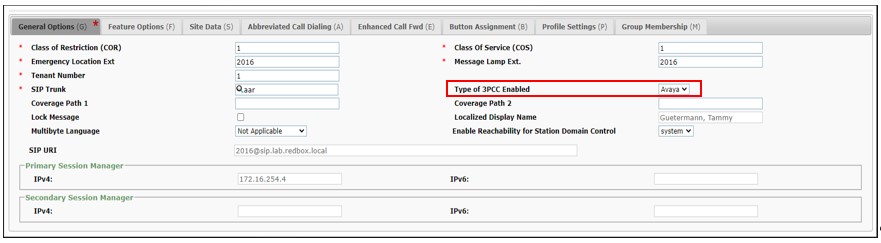
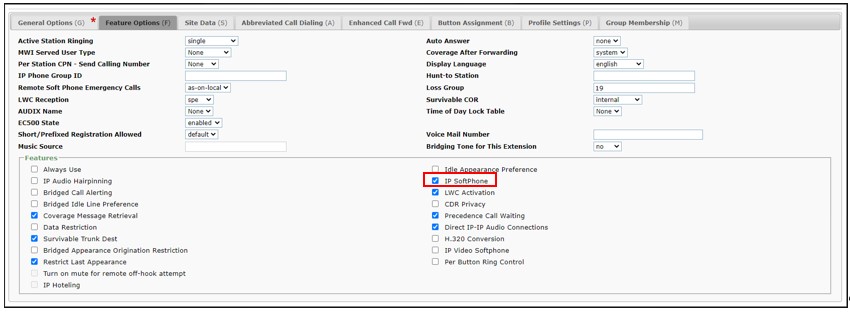
A set of pre-provisioned “recording devices” must be configured (one is required per concurrent recording channel). In order to register each device, the following must be set in the Station Configuration on the CM:
The Set Type must be 9620.
The IP Softphone feature needs to be enabled.
Avaya licenses and versions:
Recording Method | TSAPI Licenses | DMCC Licenses | Station Licenses | Min CM* Version | Min AES Version |
|---|---|---|---|---|---|
Mono MR | 1 Per Recordable Device 1 Per Monitored ACD Split (for Agent information) | 1 Per Recordable Device | N/R | 5.0 | 5.2 |
Mono MR Parallel Recording | 1 Per Recordable Device 1 Per Monitored ACD Split (for Agent information) | 2 Per Recordable Device | N/R | 8.0.1 | 8.0.1 |
Stereo MR | 1 Per Recordable Device 1 Per Monitored ACD Split (for Agent information) | 2 Per Recordable Device | N/R | 8.0.1 | 8.0.1 |
Stereo MR Parallel Recording | 1 Per Recordable Device 1 Per Monitored ACD Split (for Agent information) | 4 Per Recordable Device | N/R | 8.0.1 | 8.0.1 |
Single Step Conferencing | 1 Per Recordable Device 1 Per Concurrent Recording Channel 1 Per Monitored ACD Split (for Agent information) | 1 Per Concurrent Recording Channel | 1 Per Recordable Device | 3.0* | 5.2 |
* CM versions earlier than 5.0 may require additional licenses.
Avaya TSAPI monitor licenses can be shared, so if a device is already using a TSAPI monitor the Collector will share this connection. A full TSAPI monitor connection is required for any devices that are not currently monitored and need to be recorded.
Older versions of the CM and AES provide limited support for active recording and are not supported by Communication Recording Agent.
To record encrypted calls, Avaya AES 7.0 or above is needed.
To receive agent information (AGENT ID and AGENT NAME), Avaya AES 6.1 or above is needed.
For automatic Warning Tones Generation, Avaya AES 6.3 or above is needed.
Note
Registration on demand allows a DMCC license to only be used to register a device when it has received a call.
For the Collector to receive agent information (AGENT ID and AGENT NAME) using DMCC, each agent must be added to a Hunt Group (skill) on the Avaya AES using the Avaya Aura System Manager (Elements > Communications Manager > Groups > Hunt Group).
Note
The Collector will require an additional TSAPI license for each Hunt Group monitored.
Once agent information is available, the Agent ID is used to populate the Channel Name field on the Collector, and the Agent Name is used to populate the Agent Name field.
Prerequisites - Uniphore Specific
In general, there are no additional Communication Recording Agent system requirements specific to an Avaya Aura integration.
Tested Configuration
Integration testing of a basic interop between Avaya Aura and Communication Recording Agent (Avaya Aura Active Collector and Communication Recording Agent) has been completed using Avaya H.323 and SIP Phones.
Call Recording Capabilities
The following call metadata will be captured for each recorded call:
Avaya Aura:
Metadata | Description |
|---|---|
Call Start Time | The date and time that the conversation started. |
Call End Time | The date and time that the conversation ended. |
Call Direction | The direction of the call, Inbound/Outbound. |
Station Extension | The extension of the telephony station. |
Station Name | The name of the telephony station. |
Trunk Group Name | The name of the telephony trunk. |
Other Party Name | The name of the other party on the conversation. |
Other Party Number | The number of the other party on the conversation. |
Caller Name | Depending on availability, the name of the person who initially started the call, this will vary depending on the direction of the call. |
Caller Number | The Calling line identity (CLI). |
Called Name | The name of the called party. |
Called Number | The dialed number. |
External Call ID | The Avaya UCID. |
Call Hold Count | The number of times a call has been placed on hold. |
Call End Reason | The reason the call ended, see Call End Reasons below for a full list of potential reasons. |
Releasing Number | The telephony number of the party who ended the call. |
Releasing Name | The name of the party who ended the call. |
Avaya Aura Call Center Elite:
Metadata | Description |
|---|---|
Agent Name | The name of the agent on the conversation. |
Agent ID * | The ID of the agent on the conversation. |
Queue Name | The ACD hunt group name. |
Queue ID | The ACD hunt group extension. |
Collector:
Metadata | Description |
|---|---|
Call Duration | The length of time the conversation lasted, calculated using Call Start Time and Call End Time. |
Administration Platform User Management
Metadata | Description |
|---|---|
Agent Email | The email address of the agent associated with the conversation. |
Agent Last Name | The last name of the agent associated with the conversation. |
Agent Manager | The manager of the agent associated with the conversation. |
The list below describes each of the possible values for the call end reason metadata:
CalledPartyDisconnected- The person who answered the call (the called party), ended the call.CallingPartyDisconnected- The person who started the call (the calling party), ended the call.CallFailed- The call failed to complete due to telephony errors such as invalid dialed numbers, unreachable destinations, or signaling failures.Held- The agent put the call on hold, effectively ending that leg of the call. This typically occurs in scenarios without transfer or consultation.HeldForConference- The agent put the call on hold by initiating conferencing, effectively ending that leg of the call.HeldForConsultation- The agent put the call on hold by initiating a consultation, effectively ending that leg of the call.HeldForTransfer- The agent put the call on hold by initiating a transfer, effectively ending that leg of the call.Conferenced- The call leg ended when a participant was added to create an ad-hoc conference (creating a new call leg).ConferenceEnded- The ad-hoc conference call leg ended when a participant leaves to create a normal two-party call (creating a new call leg).ConferenceSplit- The conference was split into multiple calls, this call end reason is only applicable for telephony platforms that support a conference split function.Transferred- The call leg ended as part of a successful transfer (creating a new call leg).Parked– The call was parked (temporarily placed in a holding queue) effectively ending that leg of the call.SourceFailed- The call leg ended due to failure of the source media stream. For example, this can occur if the DMCC link drops, whether from the client side or the server.Shutdown- The collector was shutdown gracefully. In this scenario, all calls are gracefully ended, and this is the call end reason.Segmented- The call was segmented, ending the call leg intentionally as part of a configured segmentation policy (time-based splitting). Typically, unused or reserved for advanced configurations.DeadCall- The system detected a "dead" call with no media activity and no termination event. This is considered an anomalous state.Unknown- The call ended for any reason unrecognized or not categorized by the above predefined list, indicating an exceptional or unclassified condition.
* Agent ID is only available from AES V6.1 and above – see Agent Information in Prerequisites - Customer Specific.
Avaya | ||
|---|---|---|
Recording | Multiple Registration | Single Step Conferencing |
Supported Media | Voice | Voice |
Max Supported Channels (per Collector) | 3000 | 3000 |
Mono/Stereo Recording | Mono & Stereo | Mono (Mixed) |
Record Internal Calls | Y | Y |
Record Encrypted Calls * | N | N |
Codecs | G711A, G711U, G.722, G729 | G711A, G711U, G.722, G729 |
Single Call Through Hold | Y | Y |
Device Discovery | Automatic with SMS enabled | Automatic with SMS enabled |
Device Enablement * | Configurable | Configurable |
Silence Suppression * | Y | Y |
Discard Call on Silence * | N | N |
Recording Alarms | Y | Y |
Collector | ||
Recommended Resiliency Model | Parallel | N |
Communication Recording Agent | ||
Linked Calls | Y | Y |
Blocklist | Y | Y |
Other Features | ||
Requires CTI Feed to Record | Y | Y |
* To clarify several feature-specific details:
Single Call Through Hold: When a call is put on hold the recording appears as a single recording or is split into multiple calls.
Device Enablement: Indicates if new devices are automatically enabled or disabled for recording.
Silence Suppression: Recording of silence is suppressed. Only supported for the G.711 Codec. Not supported for SRTP.
Note
Features highlighted Y above are supported by Communication Recording Agent. Certain features may not be supported by the telephony platform. For example, a trunk gateway is unlikely to send internal calls to the Collector.
Networking Considerations
Sufficient network bandwidth between the Collector and the Avaya Media Server (AMS) is required to support the necessary concurrent call recordings. This can be calculated using the following formula:
bandwidth = bitrate x channels
Where bitrate is the codec bitrate and channels is the number of concurrent channels to be recorded (times one for mono, or two for stereo).
Due to the small size and high frequency of RTP packets, it’s not possible to utilise the full potential bandwidth before the network becomes a bottleneck and packet loss ensues.
A dedicated network adapter should be used for media traffic.
A network adapter should be added for each 100 Mbps of required network bandwidth.
Note
This assumes a 1000 BASE-T network.
Firewall Port Considerations
The following ports will need to be opened on any firewalls between the Collector(s) and the AES:
Port | Protocol | Purpose |
|---|---|---|
4721 | TCP | Open for the DMCC connection from the Collector to the AES. (standard connection). |
4722 | TCP | Open for the DMCC connection from the Collector to the AES. (secure connection). |
25000-65535 | UDP | RTP and RTCP communication between Avaya Media Server and Collector. Even ports are used for RTP. Corresponding RTCP messages will be sent via the next higher odd numbered port. |
443 | TCP | HTTPS communication between the Collector and the AES (if using SMS). |
Note
The ports described above are specifically for this integration. Other ports are required for generic Collector functionality.
Known Limitations
When recording using Single Step Conferencing the Collector is a participant in the call. Avaya Aura CM supports up to six participants in a single call, which is effectively reduced by one for each recording device.
For Multi-Registration stereo recording, Avaya has a limit on the maximum number of concurrent calls that can be recorded. A standalone stereo Collector can record up to 4000 concurrent calls. A resilient pair of stereo Collectors can record up to 2000 concurrent calls. If recording limits are reached, additional calls exceeding these limits may not be recorded and will likely have one or both audio channels missing. If calls aren’t recorded or have audio missing, check with your telephony administrator that your telephony platform hasn’t reached the parallel recording limits.
When a 3rd agent is added to an internal conference call, the connection will fail resulting in the denial event 1736 - Max conference callers. DMCC stations are used for recording and are seen as devices on the call, CM supports a maximum of 6 devices per call. When a 3rd agent is added to the conference, the number of devices exceeds 6 and the conference is denied.