Process Creation
Define what matters, then let Orby learn and map the rest.
Processes can be defined for Orby to learn in 2 ways:
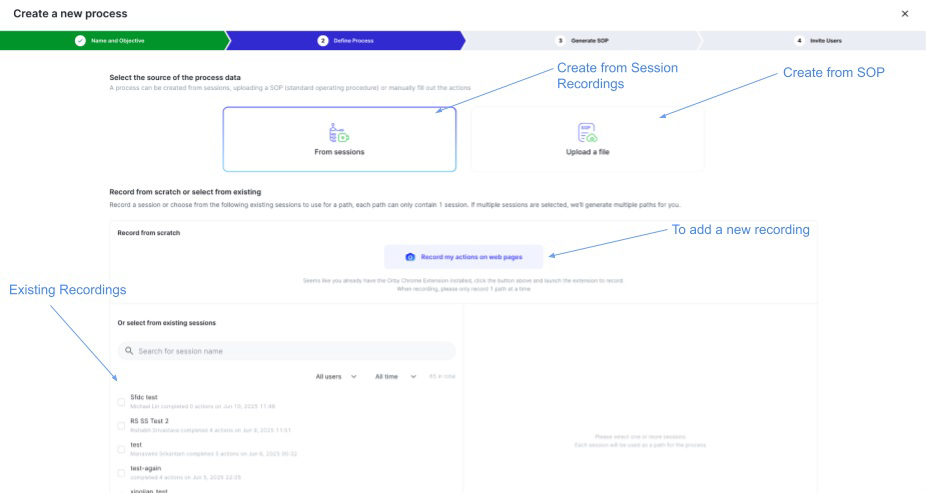 Screen recordings captured with Orby’s Chrome extension. One recording is specified for each path that the users want to observe (happy path, exception paths, etc.). This is a “clean” recording showing the process in its entirety.
Manual uploads of SOPs, which are textual descriptions of the process for Orby to learn from
Users define the paths they want tracked (e.g., happy path, escalation path), and Orby automatically generates:
Meaningful process variants from user behavior, Visualized steps for each variant.
Users can:
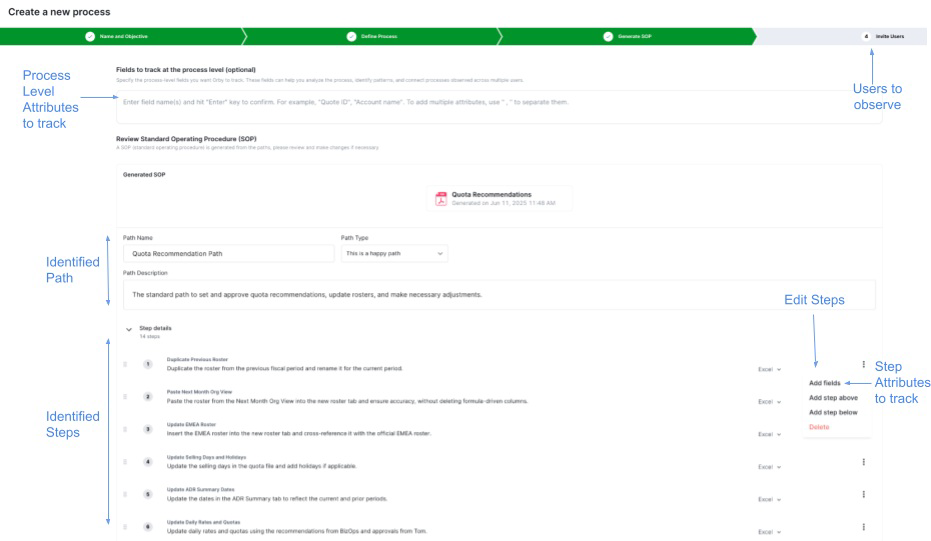
Refine step granularity (merge/split/edit steps)
Specify business attributes (e.g., invoice amount, ticket type) to extract from the screen. These can be specified both for the overall process as well as for individual steps within the process.
Filter observation to specific websites or platforms (by default, Orby observes all browser activity within the selected window)
Specify which users can be observed - these users can install the extension and begin observation. Other users will not be observed.
 |