Policy Manager
As the name suggests, the Policy Manager manages the system policies. Policies are designed to help with regulatory, data retention, and management requirements. The Communication Recording Agent policies include Recording Control, Storage, Transcription, Export, Access, and Locks policies. You can use policies to control conversation recording, define data storage locations, automatically export conversations to specified destinations, grant access to specific users and groups, and lock conversations to prevent deletion. For detailed information on each type of policy and how to manage them, see Manage Communication Recording AgentPolicies.
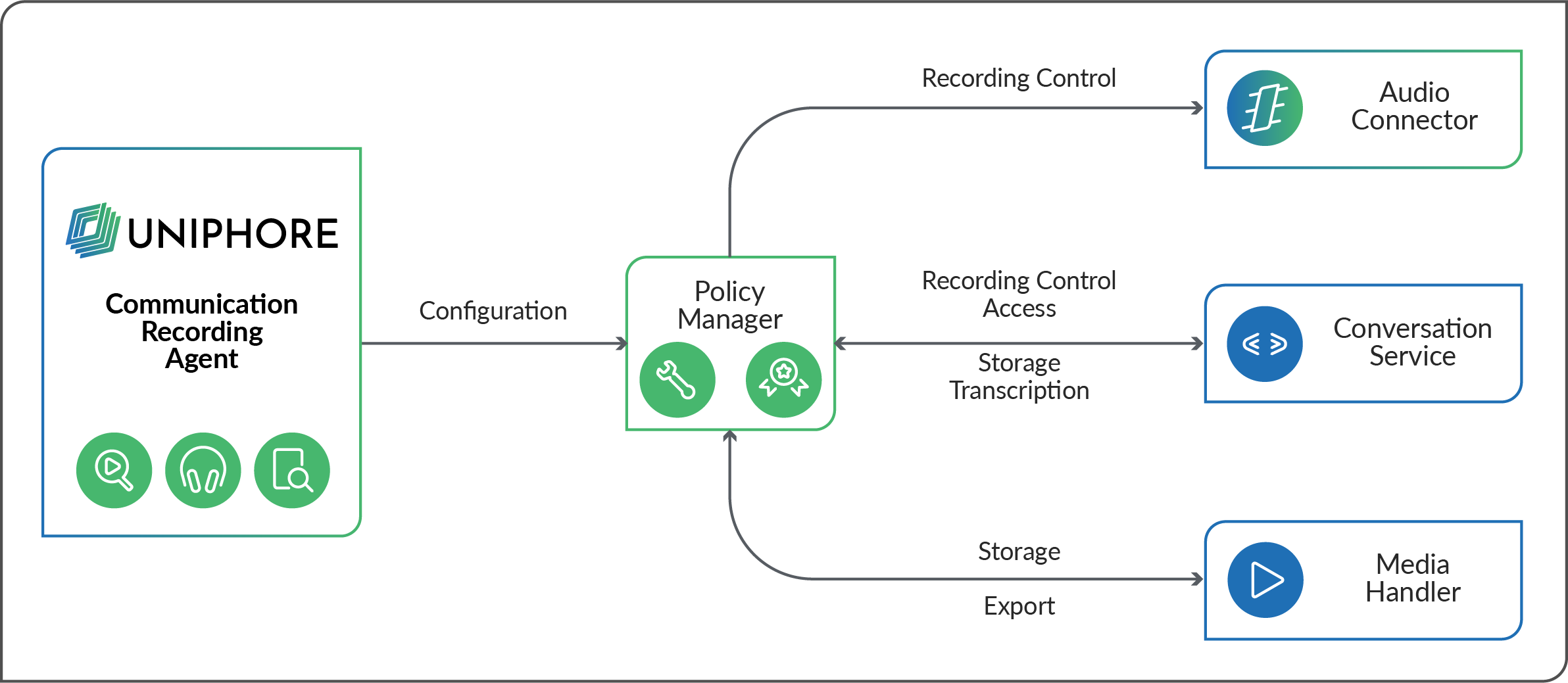
The system components that make the Communication Recording Agent system use policies to determine aspects of their function. The following describes how each component works with the Policy Manager to deliver the various features that Communication Recording Agent provides:
Audio Connector – Works with the Policy Manager to determine if a call should be recorded.
The Audio Connector receives a list of policies that match the conversation's metadata and checks if a Blocklist policy is applicable. If the conversation matches a Blocklist policy, then the call is not recorded. The Conversation Service also checks with the Policy Manager, and if a conversation shouldn't be recorded, it labels the Conversation as not recorded due to a Blocklist policy.
Conversation Service – Works with the Policy Manager to label conversations as recorded/not recorded (Blocklist policies, as mentioned above), provide filtered search results for users (Access policies), delete or move call metadata (Purge/Archive policies), provide call transcriptions (Transcription Policies), and tag calls to indicate which policies have been applied to the call (Allowlist, Purge, Move, Archive, transcription post call, Export, Lock policies).
Using Blocklist policies, the Conversation Service determines if it should provide the Audio Connector with a Conversation ID for an incoming call or if it should label the call as not recorded.
Using Access policies, the Conversation Service provides a filtered set of search results matching a user's access privileges. When a user searches for a conversation in the UI they can search across the metadata stored in the Conversation Service. The Conversation Service checks with the Policy Manager to confirm which conversations the user is allowed to access, and then provides filtered results to the user that match the user's initial search within their access privileges. Access privileges are determined using a combination of Roles and Access Control policies.
As the Conversation Service handles conversation metadata, when conversations match an Archive policy, the Conversation Service provides the metadata to the Policy Manager. The conversation is sent to archive storage, and the Conversation Service removes the conversation's metadata (excluding call ID, start/end dates). Similarly, when a conversation matches a Purge policy, the metadata is removed from conversations that match the filter in the policy (again, excluding the call ID, start/end dates).
When a conversation matches a Transcription policy (post-call), the Conversation Service provides the transcription (transcribed by the ASR) to the Policy Manager, which then sends it to the transcription server.
When conversations are processed for Allowlist, Storage, Transcription, or Export policies, the Conversation Service tags the conversation with the relevant policy tag.
Media Handler – Works with the Policy Manager to process Storage and Realtime Export policies.
When a conversation matches a Storage policy, the Media Handler and Policy Manager processes the related conversations according to the policy, and then the Media Handler removes the audio from the relevant Storage Location.
For Realtime Export policies, when an incoming call matches a Realtime Export policy, the Media Handler provides the real-time media stream to the endpoint specified in the policy.
Note
The above summarizes how the Policy Manager is used to configure various parts of your Communication Recording Agent system. The Policy Manager has additional features that are used by other applications.