Screen Recording - Ekisa
The Communication Recording Agent screen recording capability is provided by Ekisa 5.0. Screen-recorded calls are processed, searched, replayed, exported, and transcribed in the same way as any other call. Conversation audio and metadata are captured and processed as normal.
The Screen Recording feature enables the recording of agent desktop activity for quality assurance, training, and compliance. Supervisors can analyse these recordings to identify inefficiencies and implement corrective actions.
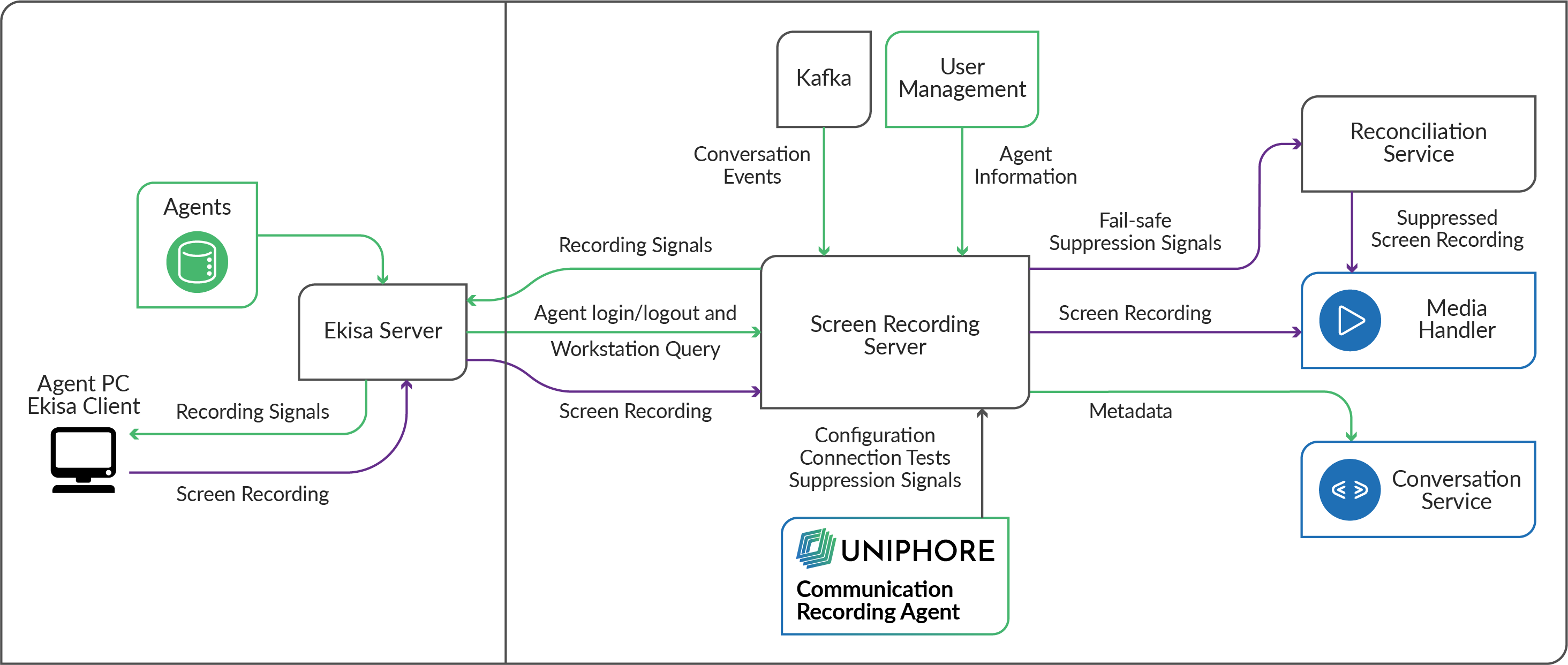
Screen Recording Service is built within X-Platform, which proxies screen recording requests. Screen recording is controlled by conversation events provided by Kafka to the Screen Recording Server:
When a conversation starts, the Screen Recording Server receives the conversation start event and requests agent metadata (including Ekisa Workstation metadata) from Administration Platform user management. Using this metadata, the Screen Recording Server signals Ekisa to record the screen of the agent/workstation in the conversation.
When the conversation ends, the Screen Recording Server receives the conversation end event and signals Ekisa to stop recording. When the screen recording has stopped, the captured screen recording is sent from Ekisa to the Media Handler, where it's forwarded to storage. The metadata for the conversation regarding the screen recording is updated in the Conversation Service.
Important
Screen recording must be enabled for a customer account to capture agent screens during conversations.
Suppression
During conversation capture, if the agent requires the capture to be paused, they can request suppression and avoid the capture of sensitive data. When an agent requests that the call capture be suppressed, Communication Recording Agent sends the request to the Screen Recording Server, where it's forwarded to Ekisa. Ekisa suppresses the screen recording session for the workstation that the agent is using. Once the agent has completed the work that should not be captured, they can send a stop suppression request. Communication Recording Agent sends the request to the Screen Recording Server, where it's forwarded to Ekisa to resume screen recording.
In the unlikely event that an issue arises during suppression, the Reconciliation Service is used to ensure that no sensitive data is retained. Any unsuccessful suppression requests in the above process are forwarded to the Reconciliation Service. After capture is completed, the captured screen recording is sent to the Reconciliation Service, where the suppression is processed post-call.