Managing Domain SLMs
The Domain SLMs page allows you to monitor and manage domain-specific Small Language Models (SLMs) that are continuously fine-tuned using production conversation data. Domain SLMs improve response quality for specific business domains by adapting base models using customer interactions.
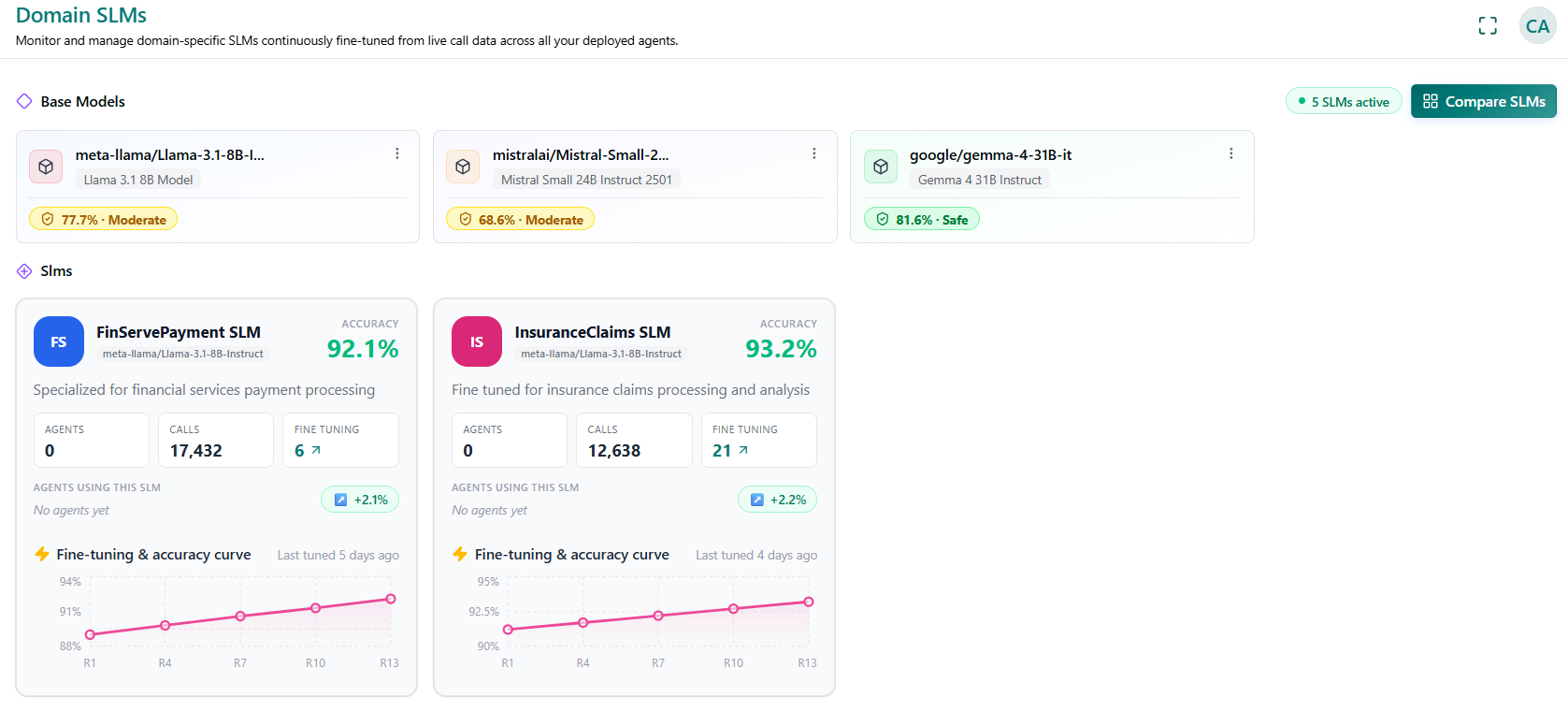
In this page, you can view the available base models, deployed domain SLMs, their performance, usage statistics, and fine-tuning progress.
Base Model
The Base Models section displays the foundation models that serve as the starting point for creating specialized SLMs. For each base model, the following information is displayed:
Model Name - The name of the foundation model.
Model Version – The version or variant of the base model.
Safety Score – Displays the model's safety evaluation score along with its corresponding rating (for example, Safe or Moderate).
Model Security Scan Report
Model Security Scan helps you verify that your AI models are safe, compliant, and operating as intended, before they go live and throughout their deployment. Using industry-standard security tooling, it automatically scans models for security vulnerabilities and summarizes results as an average security score, giving you a clear view of your model's security posture and whether it meets acceptable thresholds.
For more details on examining the model and viewing the scan report, refer Model Security Scan Report in Business AI Cloud.
Domain SLMs
The SLMs section displays all available domain-specific models fine-tuned for specific business use cases.
Each SLM card includes the following information.
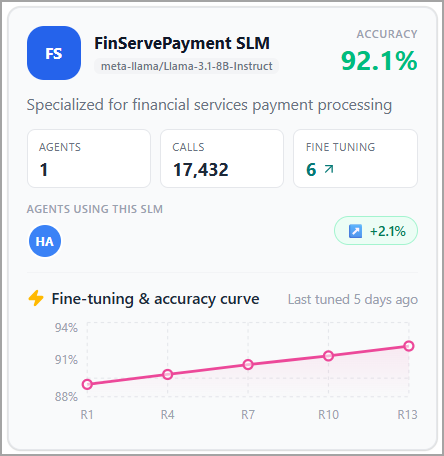
SLM Name | Displays the name of the domain-specific SLM. |
Base Model | Displays the foundation model used to create the SLM. |
Description | Provides a brief description of the business domain or use case supported by the SLM. |
Accuracy | Displays the current accuracy achieved by the SLM after fine-tuning. |
Agents | Displays the number of AI agents currently using the SLM. |
Calls | Displays the total number of customer conversations processed by the SLM. |
Fine-tuning | Displays the total number of fine-tuning iterations completed for the SLM. |
Agents Using This SLM | Lists the AI agents currently configured to use the selected SLM. If no agents are assigned, No agents yet is displayed. |
Accuracy Improvement | Displays the overall accuracy improvement achieved through fine-tuning compared to the initial model. |
Fine-tuning & Accuracy Curve | Displays the trend of model accuracy across multiple fine-tuning iterations, allowing you to monitor how the SLM improves over time. |
Last Tuned | Displays when the SLM was most recently fine-tuned. |