Domain Language
Domain Language lets you define domain-specific terms and their pronunciations to improve how voice agents recognize and pronounce specialized words, names, acronyms, and other terms. Terms are configured separately for each language and apply to all voice agents that use that language.
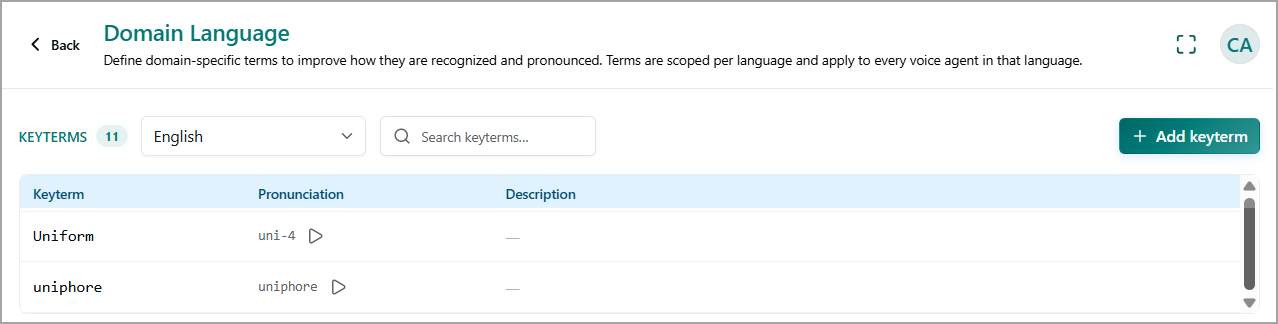
The page includes the following options:
Language - Select the language for which you want to manage domain-specific terms. Terms are scoped to the selected language.
Search keyterms - Search for a specific key term in the selected language.
Add keyterm - Add a new domain-specific term and define its pronunciation and description.
Keyterms – Displays the total number of key terms configured for the selected language.
Keyterm list - Displays the following information:
Keyterm – The domain-specific word, name, acronym, or phrase that you want the voice agent to recognize correctly.
Pronunciation – Defines how the key term is pronounced by the voice agent. Click the Play icon to listen to the configured pronunciation.
Description – Provides additional information about the key term, such as its meaning or context.
Add a Keyterm
From the Domain Language page, click Add Keyterm.
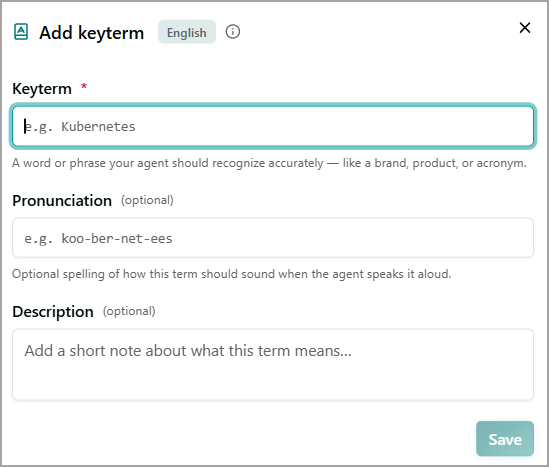
Enter the domain-specific Keyterm.
Specify its Pronunciation.
Enter a Description, if required.
Save the keyterm. The configured term becomes available to voice agents using the selected language.
Edit a Keyterm
Hover over the row for the keyterm that you want to edit.
Click Edit
 and update the required keyterm details and then save your changes.
Delete a Keyterm
Hover over the row for the keyterm that you want to delete.
Click Delete
 and update the required keyterm details and then save your changes.