Creating Datasets
In the platform, a dataset refers to data that has been extracted, enriched, and chunked based on a specific configuration. It is a key component of a Project.
Go to the top menu and click .
Click on the desired project.
The Projects detail page remains empty if the dataset was not configured during project creation.
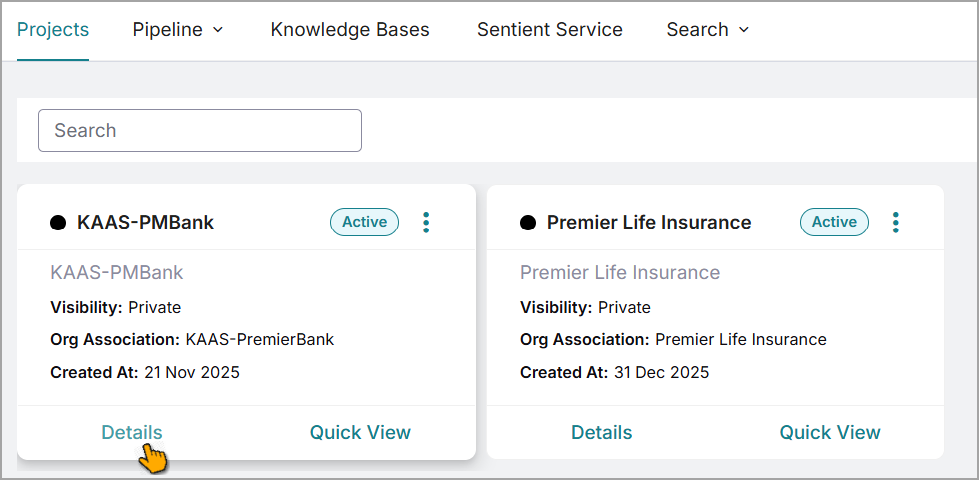
Tip
Alternatively, use Quick View feature to view project details page.
Click .
The Add New Dataset window opens.
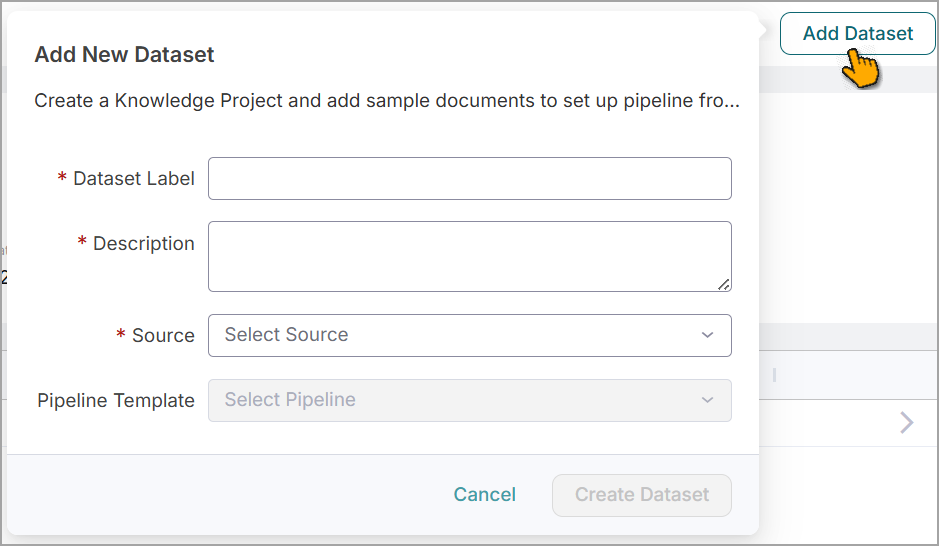
Enter a name for the Dataset Label.
Enter the Description for the dataset.
Select a Source from the dropdown list for this dataset.
The list displays the pipelines configured on the Data Integration page.
Select a default Pipeline Template from the dropdown list to process the data ingested from the source.
The available templates may vary based on the selected source. To create a new pipeline template, refer to Creating Pipeline Template.
Click .
The new dataset is created for the project and displays on the project detail page.
Tip
If required, follow the steps in the Creating Pipeline Template section to build a custom template, and proceed to create a new dataset within the same project.