Control Playback
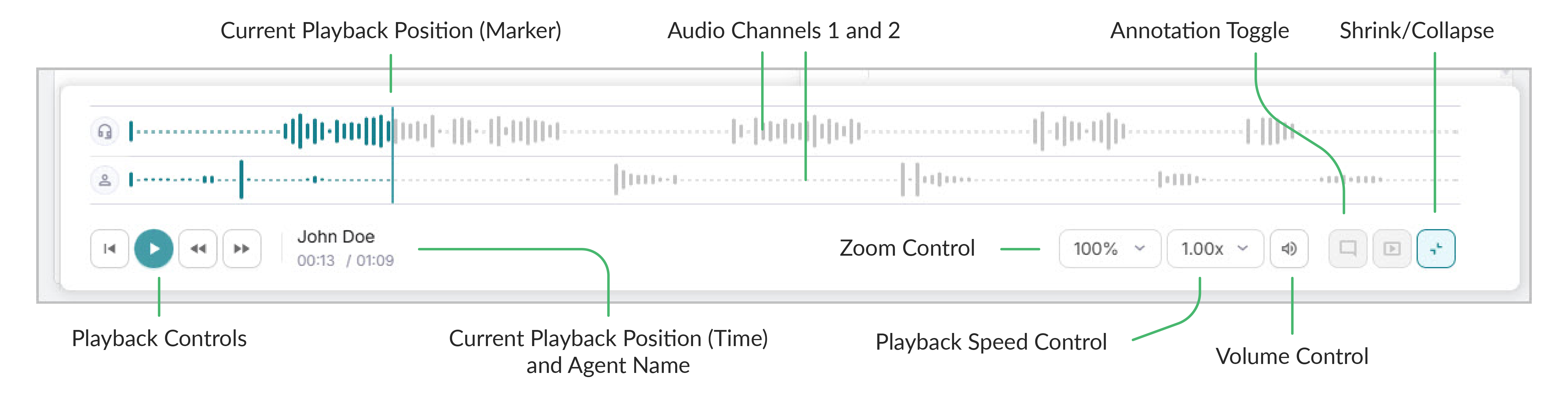
The Media Player is displayed when you highlight a call. Just like any other media player, use Play/Pause, Forward, Back, and Playback Speed options to control playback. You can also use the following features for finer control:
Feature | Description |
|---|---|
Audio Waveform | Call audio is represented in the main waveform panel. Use this to quickly see points in the conversation, such as speech, silence, or dial tones. |
Jump | Click anywhere in the audio waveform to jump to that point in the call. |
Restart | Click Replay in the Playback Controls to restart playback. |
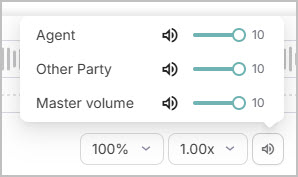
Volume | Use the volume sliders and mute for finer audio control. Set the audio volume for each audio channel and use the Master volume control. |
Zoom | Use the Zoom options to zoom in on the audio; this is particularly useful for longer calls. |
 |