Clone Agent
The Clone Agent feature lets you create an independent copy of an existing agent within the same tenant. The cloned agent retains the source agent's configuration, allowing you to reuse an existing setup instead of configuring a new agent from scratch.
You can clone supported agent types, including AI Agents, Telephony Agents, Guidance Agents, Chat Agents, and other agent types supported by Customer Service AI.
Cloning is useful when you want to:
Create an agent variant for a different use case.
Experiment with configuration changes without affecting the original agent.
Reuse an existing agent setup to reduce configuration effort and maintain consistency.
Clone an Agent
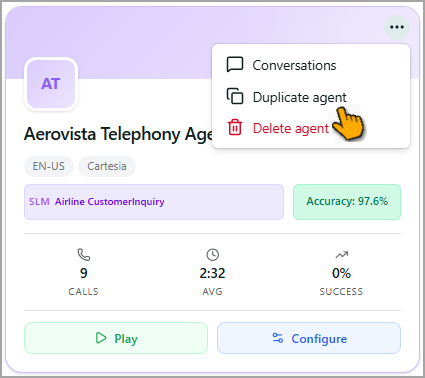
In Agent Studio, locate the agent you want to clone.
Click More options (
 ) and select Duplicate agent. The Duplicate agent pop-up appears.
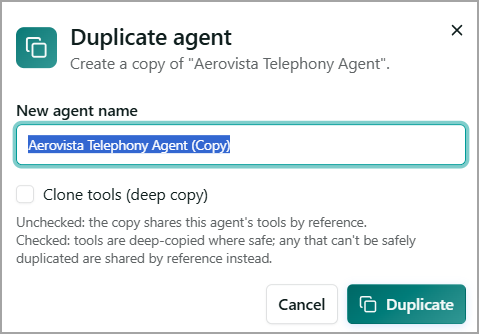
In the New agent name field, the original agent name appears with (Copy) appended by default. Edit the name if required.
Select or clear the Clone tool (deep copy) checkbox to choose the cloning method:
Deep Clone - Select the checkbox to copy the complete agent configuration, including agent settings, prompts, flows, tool integrations, Knowledge Bases, models, and other configured settings.
Standard Clone - Clear the checkbox to copy the agent configuration without tool integrations. All other configurations are retained as they are.
If the source agent is used in a flow, the associated flow is also cloned.
If the source Telephony Agent is associated with a chat widget, the chat widget is also cloned.
When cloning a Guidance Agent, its Capability Routing configuration is not copied, regardless of whether you select or clear the Clone tool (deep copy) checkbox.
Click Duplicate to create the cloned agent. The system assigns a new, unique Agent ID to the cloned agent.
To cancel the cloning process, click Cancel.