About Flows
The Flows feature enables you to design and manage multi-agent workflows that define how customer interactions progress through different AI agents. A flow represents a sequence of connected agents, escalation rules, and handoff sequences that work together to resolve customer requests efficiently.
Flows help organizations orchestrate voice agents, guidance agents, and external agents into a unified customer journey, ensuring that conversations are routed to the appropriate agent based on the customer's needs and the defined business logic.
Prerequisites
At least one agent must be configured in the Agents module before building a new flow. The configured agents can then be added to the journey workflow.
The intended call routing logic, including agent handoffs, escalation paths, and workflow sequence, is clearly defined before building the flow.
Accessing Flows
From the left navigation menu, click Flows. A list of all configured customer journey workflows is displayed as a card containing summary information about the workflow.
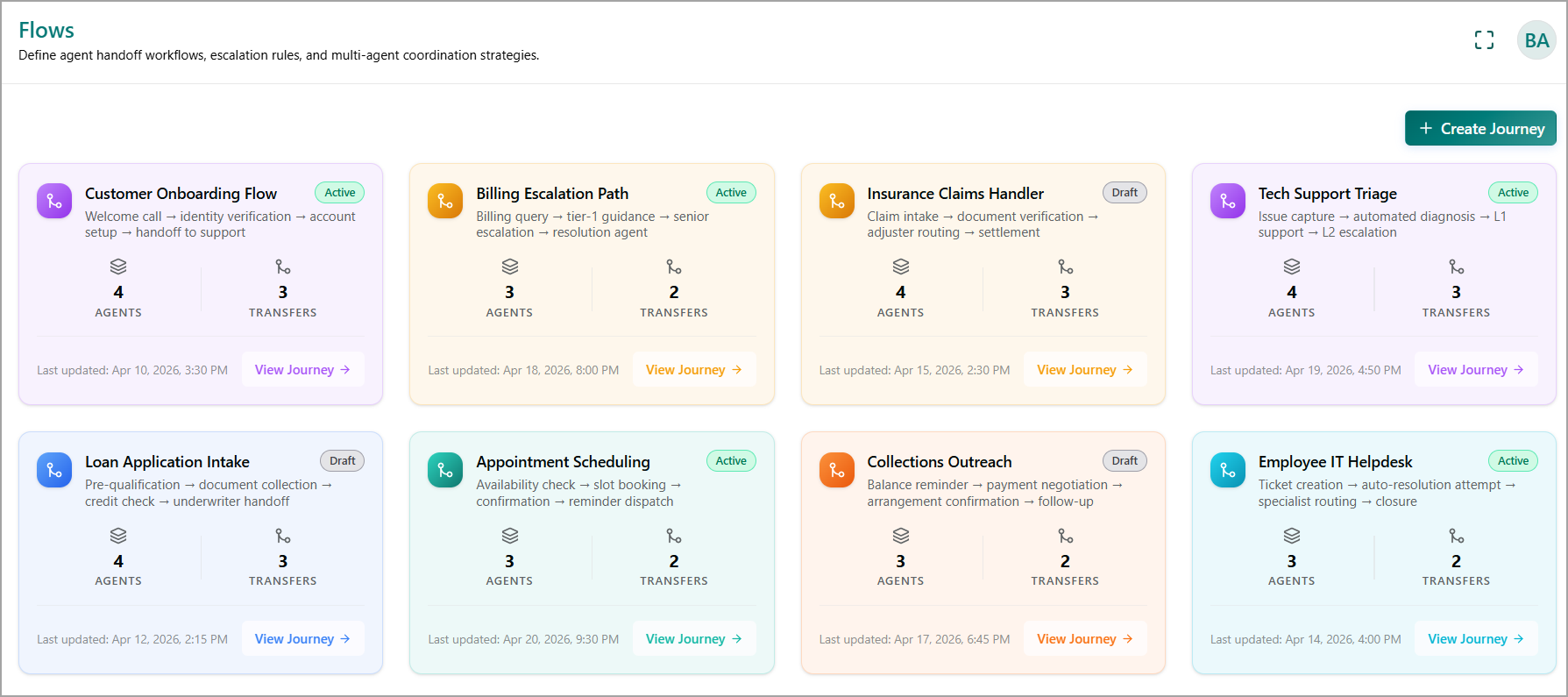
Each flow card includes the following information:
Flow Name - Displays the title of the flow (e.g., Customer Onboarding Flow, Billing Escalation Path).
Description - Provides a brief summary of the workflow and the sequence of activities.
Flow Status - Indicates whether the flow is Active or Draft.
Active - The flow is available for use in production.
Draft - The flow is currently being created, configured, or modified and is not yet available for production use.
Agents - Displays the total number of agents configured within the flow.
Transfers - Displays the number of handoffs or transitions between connected agents.
Last Updated - Shows the date and time when the flow was last modified.
View Flow - Opens the selected workflow in the visual flow designer. For more details, refer to Viewing Flow Configuration Details.