What is a Scorecard?
A Scorecard is a tool for evaluating a team and an agent's performance based on key performance indicators. Scorecards are used for quality assurance, performance evaluation and management, training and development, and customer experience improvement. Scorecards help agents by providing a clear picture of their performance. The Scorecard contains Sections, Sub sections, and Questions within them.
Note
At least one scorecard is required to populate the Agent Performance and Team Performance dashboards.
Let us take the example of the Agent Performance Scorecard. The contact centre might want to evaluate an agent’s performance on every call, based on the following parameters:
Whether they performed the right call opening procedures
Whether they responded appropriately to customer feedback
Whether they asked the right probing questions
Whether they exhibited certain soft skills
Whether they closed the call properly.
Each of the above can represent a section in a Scorecard and can be further broken down into specific questions, as given below.
Call opening |
|
Feedback |
|
Sales |
|
Soft skills |
|
Close |
|
The above table represents a scorecard, with each question provided a weightage. The agent is scored depending on the answer to each question. Similarly, you can create separate Scorecards to monitor whether the agent adhered to specific compliance requirements during calls, such as reading certain disclosures, authenticating the customer, and so on.
Most of the questions mentioned above can be resolved using the Conversation Insights Agent Facts capability. Only Boolean Facts can be associated with a scorecard, and Composite Facts can also be mapped since they are made up of Boolean Facts.
A Scorecard can be organized into sections and further subsections. Questions can be created within subsections or as floating elements within a section. Each Scorecard consists of the following details:
Name
Description
Organization
Language
Channel
Version
Status
Note
A Scorecard is by default in Draft Status and has to be changed to Approved Status before it can be processed against Conversations.
By default, all Scorecards are scored automatically.
Scorecard Process
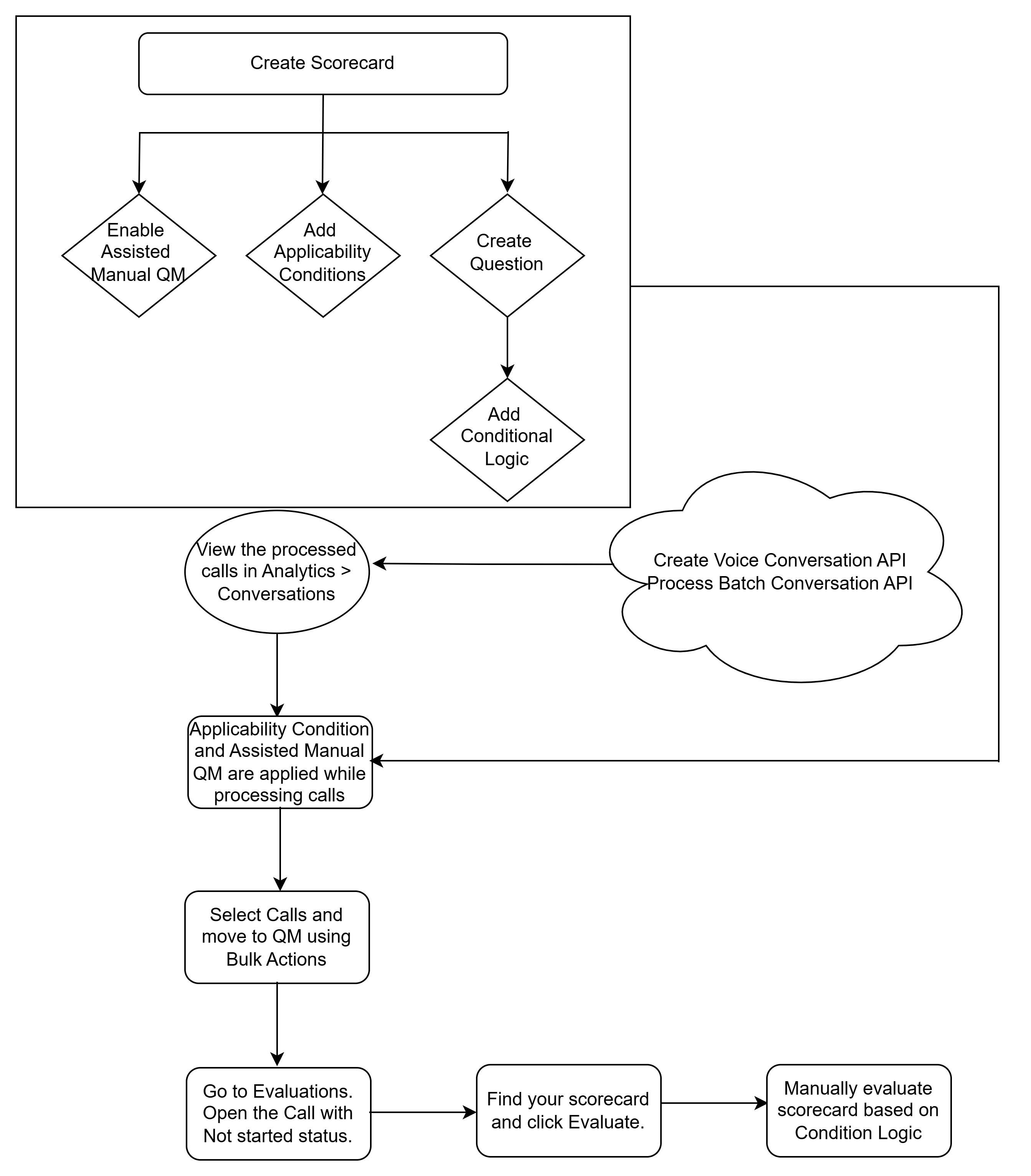
The scorecard process is an end-to-end Quality Management (QM) workflow that enables teams to evaluate customer calls systematically using configurable scorecards. The process ensures that the right calls are evaluated by the appropriate scorecard, combining auto and manual evaluation to deliver consistent quality assessments.
Create the Scorecard
When creating a scorecard, you can:
Enable Assisted Manual QM
Add Applicability Conditions
Create Question > Add Conditional Logic
Ingest Calls
Voice calls are uploaded into the system and processed via the following API methods. During ingestion, Applicability Conditions and Assisted Manual QM are automatically applied while calls are being processed. Calls that meet the Applicability Conditions are only processed, and calls that do not meet the Applicability Conditions are excluded from processing.
Create Voice Conversation API
Process Batch Conversation API
Select Calls for QM
The processed calls can be viewed in Analytics > Conversations. From there, Quality Analysts select calls and move them to QM using Bulk Actions.
Evaluate
Go to Evaluations and open a call with the status Not Started. Find your scorecard and click Evaluate. You can manually evaluate the scorecard using the Conditional Logic. The manual evaluation is applicable only if Assisted Manual QM is enabled during scorecard creation.