Setting the UI Language for an Application
Note
Only languages that are currently supported by the Application will be displayed at runtime. When assigning the desired language, you must use its standard ISO code.
In the X-Console, you can control the language displayed in the UI for a specific Application at runtime in any of the following ways:
Using the Locale setting in the Details panel of the Account Information page:
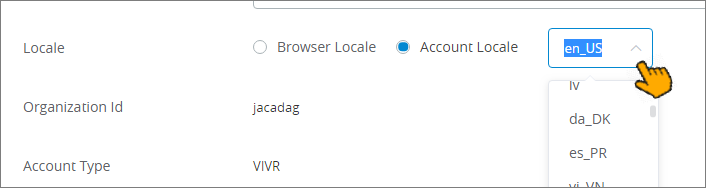
This method impacts the entire Account and can be changed only by a user with the Account Admin Role.
For more information, click here.
Using the URL Parameters field in the Share feature for the relevant Application. To designate the desired display language for the Application, add the
&language=parameter together with its standard ISO language code, as in the example below: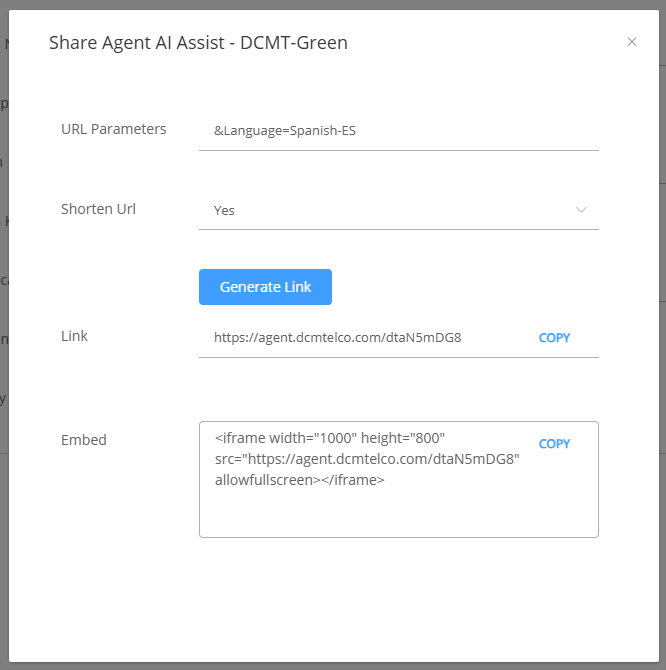
This method impacts the selected Application whenever it is executed.
For more information, click here.
Appending a language assignment switch to the URL in the current browser tab of the running application. For example, after appending:
&language=es, the application will update its UI components to display their equivalents in the Spanish language.This method impacts only the current browser instance of the running Application.
For more information, click here.