Sentient Agent Design Environment
The Sentient Agent Design Environment enables businesses to configure and manage AI-driven Knowledge Configuration Templates for Proactive Q&A. It provides a centralized interface to create and maintain Configuration Templates, manage the associated Q&A cache, test templates using call transcript datasets, and deploy configurations tailored to specific projects, client workflows, and intents.
The environment allows Business Users to customize Proactive Q&A behavior using Large Language Models (LLMs). Users can define key parameters for each template, including assigned knowledge bases, language preferences, cache configuration, and similarity models.
A Business User is typically an Account Admin or Business Analyst who is responsible for creating, managing, and publishing multiple versions of Configuration Templates.
This flexibility enables organizations to configure and optimize the Proactive Knowledge Service during onboarding or enhancement cycles, ensuring that Agents receive accurate and contextually relevant guidance aligned with project requirements, client workflows, and user intents.
Earlier versions of the Proactive Knowledge-as-a-Service (PKaaS) capability were released in limited availability with certain operational limitations, such as the absence of a dedicated configuration interface, limited observability, and no structured feedback mechanism.
The Sentient Agent Design Environment now provides a more robust and scalable design approach for broader adoption across multiple clients, with key enhancements including:
A full user interface for configuration, eliminating the need for backend YAML-based setup.
Template-based configuration with API exposure for integration with external systems, such as Real-Time Guidance Agent.
An adaptive feedback loop, allowing Agents to provide feedback using thumbs up or thumbs down to continuously improve suggestion quality.
Multi-tenant support enables the service to support multiple clients within the same platform.
The Sentient Agent Design Environment can be used by many functions across an organization:
Business Analyst (BA) / Solution Designer - Create and manage Configuration Templates, manage the Q&A cache, run tests, and review feedback.
Key Concepts
Configuration Template - The central setup object that contains LLM settings, cache configuration, knowledge base linkage, language settings, and similarity threshold settings. Each template is assigned a unique Template ID, which is mapped to an Experience in Real-Time Guidance Agent.
LLM Model - The LLM is the underlying AI engine that interprets the call transcript and generates the relevant Q&A based on the template configuration and LLM instructions. The platform supports a selection of LLMs optimized for different needs:
Performance-optimized: Fast and cost-effective for high-volume use
Quality-optimized: High accuracy for complex or sensitive conversations
Multilingual support: Capable of processing transcripts in various languages
An Account Admin or Business Analyst can select the appropriate model at the template level to balance cost, latency, and accuracy.
LLM Instructions - LLM Instructions are the guidance and rules provided to the LLM to control how it generates proactive questions and answers. These instructions help the AI understand the expected behavior, response style, business context, and workflow requirements for a specific Configuration Template. For more information, refer to Guidelines for Adding LLM Instructions in Create a New Configuration Template.
Language Settings - Defines the primary language used for processing user queries.
Similarity Model - Computes the semantic similarity between user queries and questions stored in the Q&A cache or knowledge base.
Cache Bank - A collection of Q&A pairs associated with a template. The Proactive Knowledge Service checks the cache first before calling KaaS.
KaaS Fallback - If no cache match is found, the Proactive Knowledge Service can fall back to querying the Knowledge Base for an answer (optional, configurable per template).
About the Sentient Agent Design Environment
The Sentient Agent Design Environment home page provides high-level details of all Knowledge Configuration Templates defined for the current Account, and enables an Account Admin or Business analyst to create new Configuration Templates, edit existing Template details, or delete Templates as needed:
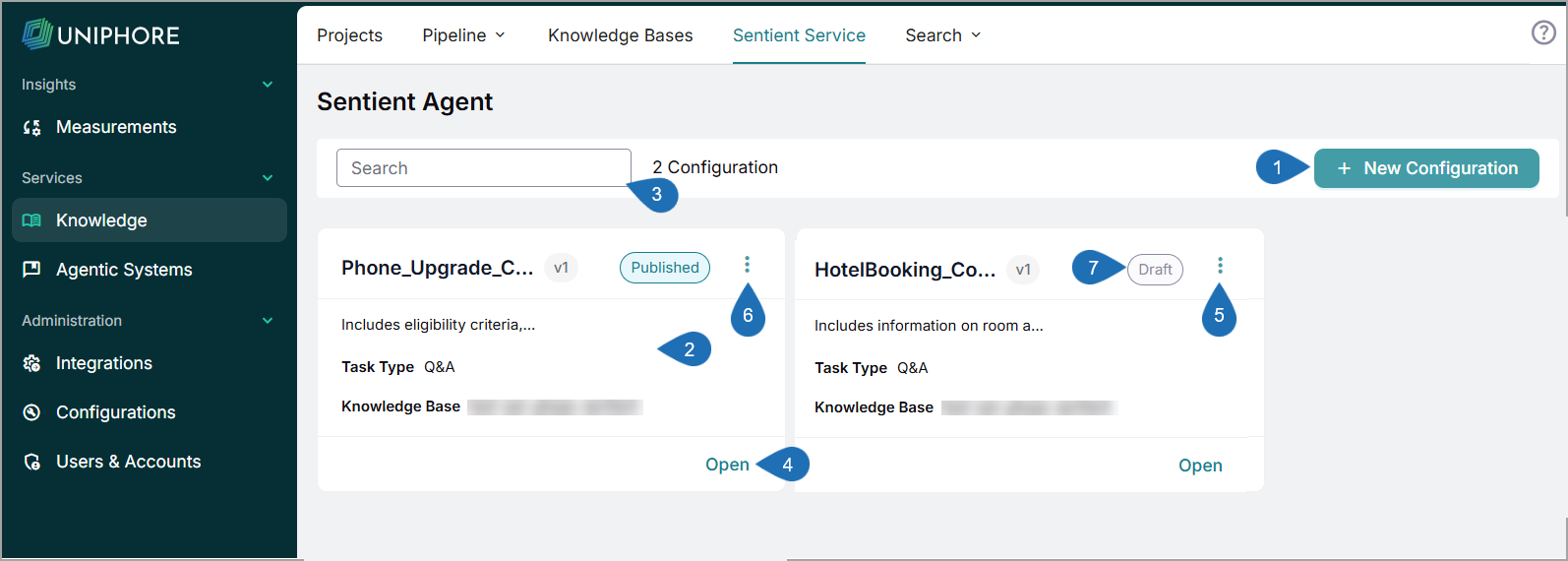
Item | Feature | Description |
|---|---|---|
1 | New Configuration | Enables creation of a new Configuration Template for the current account. |
2 | Knowledge Cards | Displays all Configuration Templates that are defined for the current account. For each Configuration Template, the card provides high-level details, including:
|
3 | Search Box | Enables searching the list for any Template that matches the details you provide. |
4 | Open Knowledge | Click Open and select the desired Version to view and update the Knowledge details. |
5 | Clone | Click Ellipsis ( NoteOnly Configuration Templates in the Published state can be cloned. |
6 | Delete | Click Ellipsis ( NoteOnly Configuration Templates in the Published state can be deleted. |
7 | Status | The current status of the Configuration Template:
|
