Seller EQ
1. Team Statistics
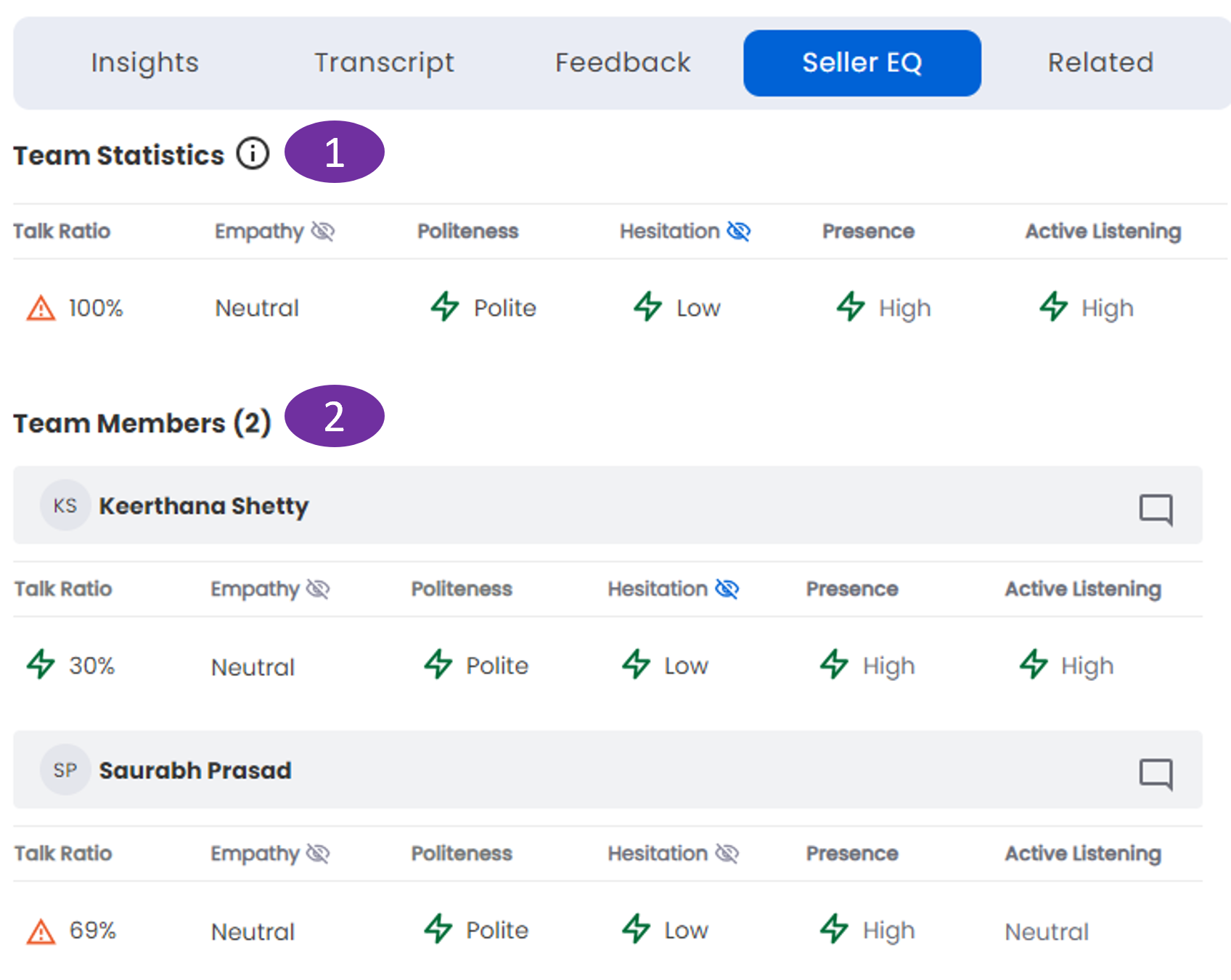
The overall team statistics with respect to the speech parameters that follow are shown here:
Talk Ratio:
Talk ratio of team reps to customer in percentage. A red triangle with an exclamation mark inside indicates an unacceptable level.
Empathy:

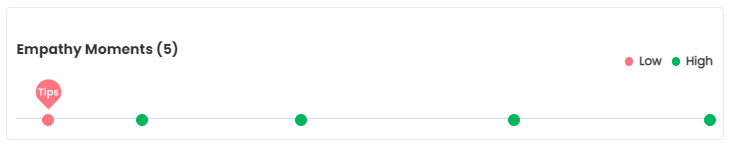
Shows team reps’ empathy toward the customer. It can be Positive, Neutral or Negative which are shown as colored emojis. Click on the eye icon to view the Empathy Moments. The Empathy Moments are shown as colored dots on a linear track. Hover above the dots to view the time of the moment of empathy in the meeting. Click on the colored dots to view the meeting from that moment.
High Empathy Moments - Green dots.
Low Empathy Moments - Red dots. These have a red balloon above with the text "Tips". When you click on it the balloon turns blue and the tip is shown below. The tip gives the details of
What was said:
It shows what was spoken by the seller during the meeting.
Suggestions:
The "Sales Interaction Agent" bot suggests what the seller could have spoken to produce a positive empathy or avoid a negative empathy. The bot produces these suggestions based on a Natural Language Processing (NLP) model. This model is fine-tuned iteratively to produce a greater number of relevant and accurate suggestions.
Play button:
Click on the play button to view the meeting from that moment. By the side of play button, the time of What was said is shown.
Politeness: Shows team reps’ politeness toward the customer as Low, Medium, High or Challenging.
Hesitation: The team rep's hesitation level during the meeting as Low or High. The Moments of Hesitation are shown as blue dots on a linear track. Hover above the blue dot to view the time of this moment of low or high hesitation in the meeting.
Presence: The gestures or the body language demonstrated by the participants which shows the presence in the meeting. The body postures such as yawning, hand position, looking away from the camera, moving out of place, etc. indicate poor presence. The lack of these behaviors indicates a high presence.
Active Listening: The active listening constitutes a keen listening of the meeting conversation by the participants. Computer vision helps track this. If you respond and engage with what's being said, it shows you are actively listening.
2. Team Members
The individual team members statistics with respect to the speech parameters that follow are shown here:
Talk Ratio: Talk ratio of rep to customer in percentage. A red triangle with an exclamation mark inside indicates an unacceptable level.
Empathy:
Shows team reps’ empathy toward the customer. It can be Positive, Neutral or Negative which are shown as colored emojis. Click on the eye icon to view the Empathy Moments. The Empathy Moments are shown as colored dots on a linear track. Hover above the dots to view the time of the moment of empathy in the meeting. Click on the colored dots to view the meeting from that moment.
High Empathy Moments - Green dots.
Low Empathy Moments - Red dots. These have a red balloon above with the text "Tips". When you click on it the balloon turns blue and the tip is shown below. The tip gives the details of
What was said:
It shows what was spoken by the seller during the meeting.
Suggestions:
The "Sales Interaction Agent" bot suggests what the seller could have spoken to produce a positive empathy or avoid a negative empathy. The bot produces these suggestions based on a Natural Language Processing (NLP) model. This model is fine-tuned iteratively to produce a greater number of relevant and accurate suggestions.
Play button:
Click on the play button to view the meeting from that moment. By the side of play button, the time of What was said is shown.
Politeness: Shows the reps’ politeness toward the customer as Low, Medium, High or Challenging. A red triangle with an exclamation mark inside indicates an unacceptable level.
Hesitation: The rep's hesitation level during the meeting as Low or High. The Moments of Hesitation are shown as blue dots on a linear track. Hover above the blue dot to view the time of this moment of low or high hesitation in the meeting.
Presence: The gestures or the body language demonstrated by the participants which shows the presence in the meeting. The body postures such as yawning, hand position, looking away from the camera, moving out of place, etc. indicate poor presence. The lack of these behaviors indicates a high presence.
Active Listening: The active listening constitutes a keen listening of the meeting conversation by the participants. Computer vision helps track this. If you respond and engage with what's being said, it shows you are actively listening.