Meeting Summary
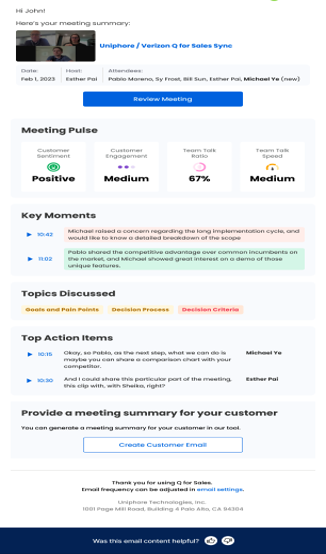
A machine generated meeting summary is generated every time a meeting is completed. The meeting host and all internal attendees (i.e., the participants who are in the same company as the host) receive a meeting level summarization by email. It's a recap of what happened in the meeting. The summary is generated by reading the data from CRM and analyzing and summarizing the emotional factors of the meeting. The emotional factors refer to buyer sentiment and engagement, and the topics discussed.
Meeting Information
The information related to the meeting details as listed below are displayed here:
Meeting Name: Shown besides the meeting icon. You can click the meeting icon or the meeting name to view the meeting replay
Date: The meeting date in MMM DD, YYYY format
Host: The name of the meeting host
Attendees: Lists the names of all the meeting attendees
Click the Review Meeting button to review the meeting summary and do any edits as required.
Meeting Pulse
The information that follows is listed here:
Customer Sentiment: Displayed as colored emojis (Positive-Green, Neutral-Grey, Negative-Red)
Customer Engagement: Displayed as Low, Medium or High
Team Talk Ratio: Displayed as a percentage
Team Talk Speed: Displayed as Low, Medium or High
Key Moments
The top three key moments are displayed here by leveraging Generative AI technology.
Topics Discussed
The various topics related to either sales methodology or industry that were discussed in the meeting are displayed her.
Top Action Items
The follow up actions of the meeting are listed here.
Provide a Meeting Summary for your Customer
You can create and send the meeting summary to your customer by clicking on Create Customer Email button.
The meeting attendees receive a meeting level summarization by email.