Create Tenant
When a customer is onboarded, the Super Admin creates a Tenant and users and deploys the application. Uniphore's Implementation team handles the tenant creation.
To Create a Tenant:
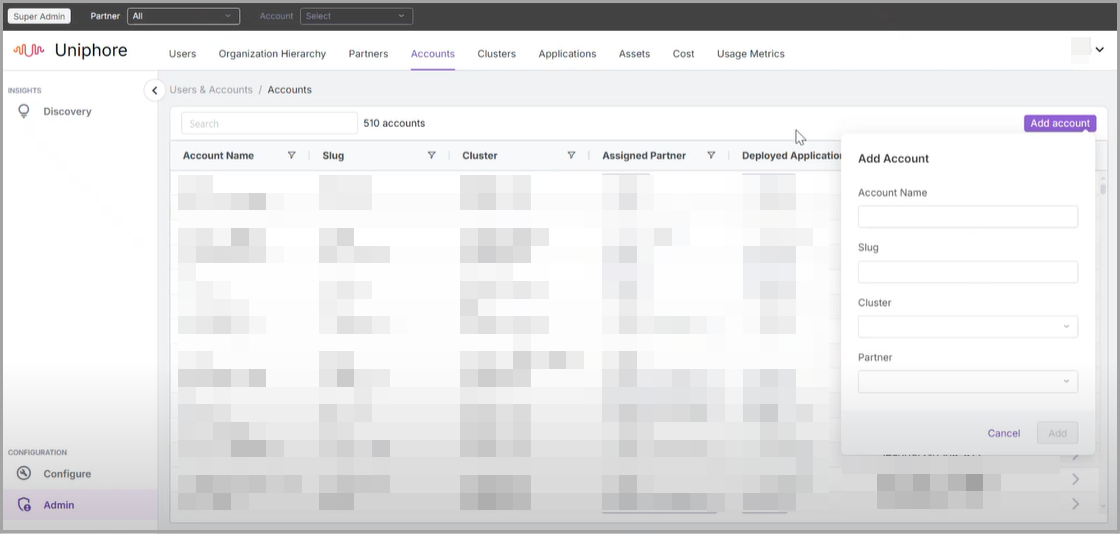
Log in to the Platform using Super Admin credentials.
Go to Admin from the left pane and select the Accounts tab.
Click Add account. In the Add account dialog, enter the following details:
Account Name: The name of the customer
Slug: A unique name that can be used to identify the tenant. Accepts only small case.
Cluster: The region where the tenant will be deployed. A drop-down list displays all locations. Changing the cluster will have an impact on the URL of the application.
Partner: Select Uniphore or Partner as applicable.
Note
Ensure the partner is already available or create a new partner through the Partner tab.
Click Add.
Note
Upon creating the Tenant and Users, the Implementation team shares the URL and login credentials with the users.