All Deals
Besides assisting sales reps in conducting effective meetings, “Sales Interaction Agent” captures and understands contextual events and emotional cues. It helps determine the collective impact that emotional moments have on deals and deal health. Which ones are productive and which ones aren't. As a result, sellers, managers, and revenue ops can understand the “Impact of Insights” across all active sales deals.
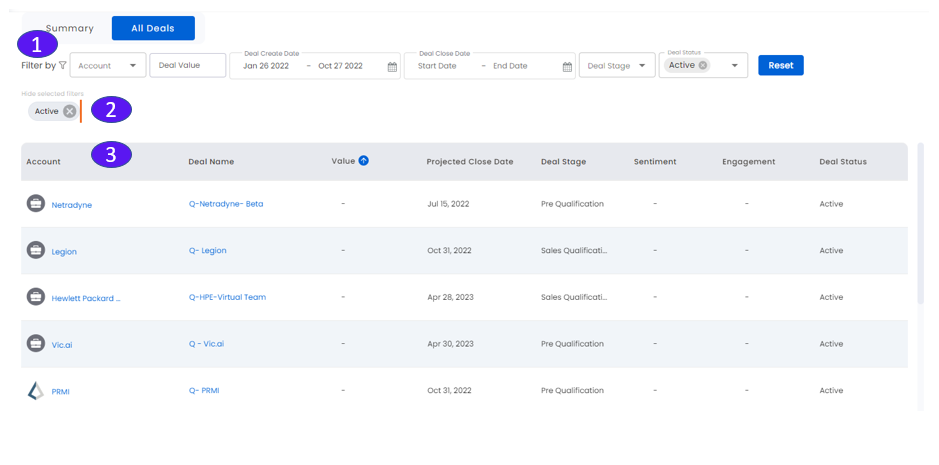
1. Filter Ribbon
Filter by account, deal value, date range, and deal stage and deal status. Click Reset to return to default values.
You can now view the deal status by selecting the required status from the Deal Status drop down menu. Some of the commonly used deal statuses are as follows:
Active
Lost
No Decision
Won
2. View/Hide Selected Filters
Click to view/hide the selected filter(s) for the deal status.
3. Deal List
Summary information with sortable columns for all deals:
Account icon and name: Click to see the Individual Account view
Deal Name
Value
Projected Close Date
Deal Stage
Sentiment (color-coded)
Engagement (color-coded)
Deal Status (Active/Inactive)