About Agent Assistant
Agent Assist provides real-time support to a live agent during customer interactions. It is displayed as a docked side panel in Agent Desktop and works alongside your CRM application, allowing you to continue working with customer records, policies, and other business information without leaving the call.
It displays the live conversation transcript, customer context, AI-generated summaries, and recommended actions in a single interface.
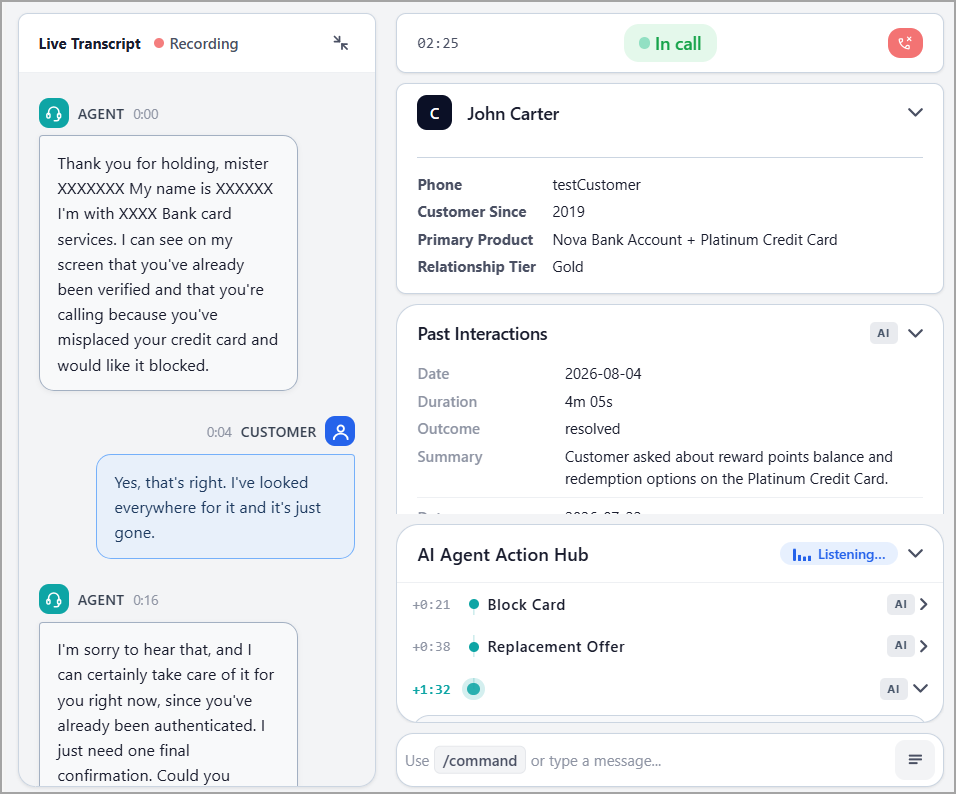
The information and recommendations displayed in Agent Assistant are generated based on the AI agent's goal and backstory defined during agent configuration, as well as the configured Guidance Agent.
The Agent Assistant includes the following sections:
Item | Feature | Description | ||||||||||||||||||||||||||||||
|---|---|---|---|---|---|---|---|---|---|---|---|---|---|---|---|---|---|---|---|---|---|---|---|---|---|---|---|---|---|---|---|---|
1 | Live Transcript | Displays the ongoing conversation between the agent and customer. Recording is displayed next to the Live Transcript heading. | ||||||||||||||||||||||||||||||
2 | Call Status | Displays the current call duration and status. During an active conversation, the status is displayed as In call. Once the call is complete, the status changes to After-call. Click the End Call | ||||||||||||||||||||||||||||||
3 | Customer Information | Displays key identifying and account details about the customer on the call, providing the agent with immediate context without requiring the customer to repeat information already on file. The section can display details such as:
Click the expand/collapse icon to show or hide the customer details. | ||||||||||||||||||||||||||||||
4 | Past Interactions | Displays AI-generated contextual insights from the customer's previous interactions. It helps to understand the customer's relevant history and provide more contextual assistance during the current call. For each interaction, the available information can include:
The information displayed in the Past Interactions section is generated by the AI agents configured in the Pre-call section during Guidance Agent configuration. For more information, refer to Configure a Guidance Agent. | ||||||||||||||||||||||||||||||
5 | AI Agent Action Hub | Provides AI-generated actions based on the ongoing conversation. The Action Hub continuously listens to the conversation and identifies actions that may be relevant to the customer's request. For example, during a call about a misplaced credit card, the Action Hub can display actions such as block card and replacement offer. Each action can include a timestamp indicating when it was identified during the call. The information displayed in the AI Agent Action Hub section is generated by the AI agent configured in the In-call agent during Guidance Agent configuration. For more information, refer to Configure a Guidance Agent. | ||||||||||||||||||||||||||||||
6 | Command Bar | Defines a command that the AI agent can recognize and execute during a call. It specifies the trigger conditions, required information, action to be performed, and the structured result to be returned. The available commands are defined in the AI agent's backstory. The command can include:
| ||||||||||||||||||||||||||||||
7 | Post-Call Summary | Provides an AI-generated summary of the conversation after the call. It includes the following information:
The information displayed in the Post-Call Summary section is generated by the AI agents configured in the Post-call section during Guidance Agent configuration. For more information, refer to Configure a Guidance Agent. |
