5. Installing Interact
This section provides detailed instructions for on-premises installation of Uniphore Interact on one or more nodes.
Interact Installation Workflow
|
|
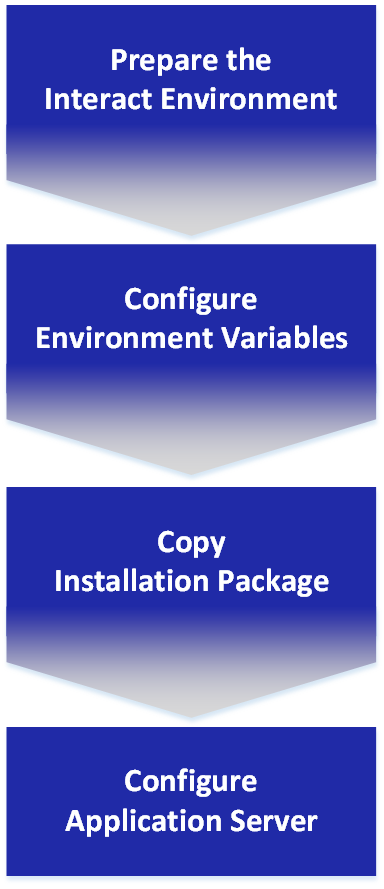
Preparing the Interact Server Environment
Note: Before beginning installation, verify that your target server(s) meet all platform application prerequisites.
Create the following folders on each Interact server node:
Local Folder Name | Service/Platform |
|---|---|
| Interact Root Folder |
| Job Management Folder |
| RDS Folder |
| JMS Messaging Folder |
| Deployment Folder |
| Snapshot API Folder |
| Snapshot Consumer Folder |
| URPC Folder |
| URPC Common Connector Folder |
| U-Assist Folder |
| U-Self Serve Folder |
Configuring Environment Variables
The following environment variables must be configured on each server node for Interact to run properly.
Note: Refer to your operating system documentation for detailed instructions on how to create or change an environment variable.
Environment Variable | Points to Local Folder | Service/Platform |
|---|---|---|
| java | N/A |
|
| Interact Server |
| tomcat | Tomcat |
|
| Job Management |
|
| RDS |
|
| RDS Client |
|
| Messaging |
|
| JBot |
|
| Deployment |
|
| Deployment Consumer |
|
| Snapshot API |
|
| Snapshot Consumer |
|
| Uniphore Remote Procedure Call (RPC) |
|
| Uniphore Remote Procedure Call (RPC) Common Connector |
|
| U-Assist |
|
| U-Self Serve |
Optional Services
If you are installing any optional add-on services (e.g., RPA or BI services), you can choose to add any relevant environment variables also at this time. See complete instructions for all add-on components in the section Optional Add-On Installations.
Copying Installation Files
All files and components necessary for installing and running Uniphore Interact are provided in the distribution package as a .zip file.
The package contains the components for both core services, which are required in order for Interact to run, and optional add-on services, which are installed according to the current customer license.
Core Services (Required)
Unzip the installation package to a temporary, separate folder on your server(s). The following subfolders and their contents are extracted:
bi_homebot_integrations_homecustom_ip_homedeploymentconsumer_homedeployment_homeinteract_homejarsjms_homejob_mgmt_homejws_homerds_homerpa_homesnapshot/snapshot_api_homesnapshot/snapshot_consumer_homeuassist_homeuss_homeu_common_connector_homeupgrade_scriptsurpc_homewebapps
If they exist, delete any Interact-related
.warfiles from thewebappssub-folder in yourtomcatroot folder. Then, copy the contents of thewebappssub-folder from the installation package to that same sub-folder of yourtomcatroot folder.Copy all content from the
interact_homefolder of the installation package to your<INTERACT_HOME>folder.Copy all content from the
jarssub-folder to thelibsub-folder of your<CATALINA_HOME>folder. Any existing files should be overwritten.Copy each of the
.warfiles listed below from the specified sub-folder of the installation package to thewebappssub-folder of yourtomcatroot folder:.war File
Sub-Folder in Installation Package
deployment.wardeployment
deployment-consumer.wardeploymentconsumer
jobMgmt.warjobManagement
messaging.warjms
rds.warrds
snapshot_api.warsnapshot_consumer.warsnapshot
deployment.wardeployment
uassist.waruassist
u_self_serve.waruss
u_common_connector.waru_common_connector
uRPC.warurpc
Add-On Services (Optional)
If desired, copy the content of each add-on package sub-folder to its appropriate sub-folder on the server. See complete instructions for all add-on components in the section Optional Add-On Installations .
Note: Add-on service components can be installed and configured on Interact at any time.
Configuring the Application Server
Set up the Apache Tomcat Application Server with the following steps:
Complete details are provided in each of the following sections.
 Interact Configuration Files Overview [Return to Top ↑]
All required Interact services are configured and customized to the local environment using the properties files listed below.
Note: After updating properties in any of the following configuration files, you need to restart its Interact server instance in order for changes to take effect.
File Name | Description/Notes |
|---|---|
<INTERACT_HOME> \conf folder: | |
| A configuration file for the Hazelcast distributed cache. For more information, click here. |
| A configuration file for Hazelcast that controls how the applications connect to the distributed cache layer. For information about enabling a distributed cache in a clustered environment, click here. |
| Contains general settings for the Interact Server. For more information, click here. |
| Contains settings for external UDP-based log handling tools (e.g., Logstash). |
| Contains scheduling settings for various server jobs. For more information, click here. |
| Contains MongoDB connection settings. For a description of the properties, click here. |
| Contains Interact reporting engine settings when the engine is connected to a MongoDB secondary node. For a description of the properties, click here. |
| Contains settings for use with natural language processing (NLP) activities. |
| Contains client-side settings for raw data service (RDS) activities. For a description of the properties, click here. |
| Contains settings for the Interact Server’s reporting engine. For more information, click here. |
| Contains settings for use with Interact's URL shortener service. For more information, click here. |
| Contains settings for the Interact Server’s Twilio integration engine. |
| Contains settings for the voice proxy tool. |
| A configuration file for the Hazelcast distributed cache that contains voice-proxy information. For information about enabling a distributed cache in a clustered environment, click here. |
| Contain all settings for the Interact Job Management service. For more information, click here. |
| Contains settings for raw data service (RDS) activities. For more information, click here. |
| Contains settings for Interact Resource Deployment service activities. For more information, click here. |
| Contains settings for Messaging service activities. For more information, click here. |
| Contains settings for Interact Snapshot service activities. For more information, click here. |
| Contains settings for Uniphore Common Connector activities. For more information, click here. |
| Contains settings for U-Self Serve service activities. For more information, click here. |
| Contains settings for U-Assist service activities. For more information, click here. |
| Contains settings for uRPC service activities. For more information, click here. |
Note: For details on properties files used for configuring optional, add-on Interact services, click here.
Configure Tomcat Instances [Return to Top ↑]Add the
<INTERACT_HOME>environment variable to each Tomcat instance for loading on startup:For Windows:
In the tomcat root folder, open the file /bin/setenv.bat and add:
Set INTERACT_HOME=[path name here]
For Linux:
In the tomcat root folder, open the file /bin/setenv.sh and add:
export INTERACT_HOME=[path name here]
Change the maximum heap size to an appropriate value, based on your needs. We recommend:
Maximum heap size (Xmx setting) to 2 GB
XX:MaxPermSize according to your needs (e.g., 512 MB)
Ensure that all required services have been copied to each Tomcat instance, as detailed here.
Allocate memory to the perm gen memory by passing the required options to the Java process. We recommend that the minimum memory allocation be 512 MB.
When using OpenJDK 11, pass the following option settings to the Java process:
set JAVA_OPTS="--add-modules java.se --add-exports java.base/jdk.internal.ref=ALL-UNNAMED
 --add-opens java.base/java.lang=ALL-UNNAMED --add-opens java.base/java.nio=ALL-UNNAMED
 --add-opens java.base/sun.nio.ch=ALL-UNNAMED --add-opens java.management/sun.management=ALL-UNNAMED
 --add-opens jdk.management/com.sun.management.internal=ALL-UNNAMED"
Configure MongoDB Connection Settings [Return to Top ↑]The settings that specify the connections between Interact and the MongoDB database are maintained in the following files:
mongo.properties - contains the database connection settings used by Interact applications
mongo-report.properties - contains the database connection settings used by the Interact Reports component
In a clustered environment, verify that the properties set on each cluster node are identical.
Note: After updating any of the following properties, you need to restart the Interact Server in order for changes to take effect.
Property Name | Description/Notes |
|---|---|
| The host running MongoDB. In a replica set, this property should point to each of the nodes in the set. To set multiple replica-set nodes, separate the addresses with commas. For example:
|
| The name of the Uniphore Interact database. This property should always be set to:
|
| The MongoDB username and password. These properties are optional. |
| Sets the authentication method used by the database. The following values are supported by the current MongoDB version:
|
| Relevant for replica sets only. When set to true, the application will perform read operations from the secondary node (when possible). The recommended settings for each properties file are:
|
Configure Interact Server Endpoints [Return to Top ↑]Interact Server endpoints and other general server settings are defined in the jis-app.properties file found in the <INTERACT_HOME> \conf folder.
Initially, all the settings in the file are commented using the # symbol. Using a text editor, open the file, uncomment all required properties, and ensure that the server IP and port values point to the required settings.
Properties that may need to be uncommented and configured are detailed in the following table.
Note: Anytime a change is made to an endpoint or setting in this file, you will need to restart the server(s) in order for the change to take affect.
Property | Description/Notes | Example |
|---|---|---|
| The protocol used for accessing the server. |
|
| The host name or IP used to access the server. This property should be set to the machine name or IP running the server. |
|
| The port used to access the server. This property should be set to the listening port of the server running Uniphore Interact. |
|
| The full URL used by the administration module to connect to the Interact Server. When left empty, the admin module uses the host and port defined in the server.endpoint.host and server.endpoint.port. properties. In a clustered configuration, it is recommended to point the admin module to use localhost to access the local Interact Server, rather than going through the load balancer. |
|
| The full URL used by the administration module to connect to the Interact reporting application. When left empty, the admin module uses the host and port defined in the server.endpoint.host and server.endpoint.port. properties. In a clustered configuration, it is recommended to point the admin module to use localhost to access the local Interact Server, rather than going through the load balancer. |
|
| The username used for accessing the server. This property is necessary for proper performance of the Usage Dashboard and other internal jobs. |
|
| The full URL path to the Uniphore Interact reporting application. |
|
| The full URL path to the Uniphore Interact Admin Console. This property is used to access the Admin Console from the Web Designer. |
|
| The full URL path used by the Admin Console to communicate with the Interact Server (necessary when operations such as sharing links and previewing Flows are required). |
|
| The full URL path used by the Web Designer to communicate with the Interact Server (necessary when operations such as internal authentication and Flow simulation are required). |
|
| Indicates whether version 7.2 licenses are supported. The default setting is true. | |
| The period of time for which account updates are cached by a server. The default setting is zero minutes. | |
| The period of time for which user updates are cached by a server. The default setting is zero minutes. | |
| The period of time for which updates to account settings are cached by a server. The default setting is zero minutes. | |
| The period of time for which application key updates are cached by a server. The default setting is zero minutes. | |
| Indicates whether a thread pool is used when updating the users database with last login times. The default setting is true. | |
| Indicates whether CTI capabilities should be available for the account. The default setting is false. |
Configure the Raw Data Service (RDS) [Return to Top ↑]Raw data service (RDS) settings are maintained in the following files:
rds.properties
Property Name | Description/Notes |
|---|---|
| Set to the endpoint of your Interact server. For example:
|
| Add or uncomment this setting:
|
| Add or uncomment this setting:
|
| Add or uncomment this setting:
|
rds_client.properties
Property Name | Description/Notes |
|---|---|
| Set to your RDS server address. For example:
|
Configure the Job Management Service [Return to Top ↑]Job Management settings are maintained in the following files:
job.mgmt.client.properties
Property Name | Description/Notes |
|---|---|
| Set this to the Job Management server path. For example:
|
job.mgmt.mongo.properties
Property Name | Description/Notes |
|---|---|
| The IP address(es) or hostname(s) and port(s) of the host(s) running MongoDB. For example:
|
| The name of the Job Management database for Mongo. This property should be set to:
|
| The MongoDB username. |
| The MongoDB password. |
| Sets the authentication method used by the database. The following values are supported by MongoDB:
|
| Set this to the Job Management port assigned for MongoDB. For example:
|
job.mgmt.properties
Property Name | Description/Notes |
|---|---|
| If the application runs independently of springboot, or if the application is deployed on Tomcat, set this value to false. |
| Set this to the location of the Quartz Job Management file. For example:
|
Configure the Messaging Service (JMS) [Return to Top ↑]Messaging Service (JMS) settings are maintained in the following file:
messaging.properties
Property Name | Description/Notes |
|---|---|
| Set this to the endpoint of your Interact server. For example:
|
| Add or uncomment this setting:
|
| Add or uncomment this setting:
|
Schedule Interact Server Jobs [Return to Top ↑]Job scheduling settings are maintained in the mgmt-app.properties file. The schedule for each job is configured as a Cron expression.
To change the default schedule for a job, uncomment the relevant line and then change the Cron expression as required. Examples and other resources are provided in the mgmt-app.properties file.
Available job properties are:
Job Name | Description/Notes |
|---|---|
| Identifies new users who have not created a password within seven days of their account creation, and sends them a reminder email. |
| Identifies new users who have not created a password within 14 days of their account creation, and deletes these users from the system. |
| Identifies new users who have not created a password within 11 days of their account creation, and sends a notification to the Primary Contact email of the relevant account. |
| Identifies unfinished Flows in the database, and marks them as abandoned. |
| Aggregates the data in the Navigation database collection. This collection is used when displaying the Interact Usage Dashboard and when generating custom reports. For more information about the Navigation collection, see the section Navigation in the Uniphore Interact Reporting document. |
| Aggregates the data in the FunnelReportsInstances database collection. This collection is used when generating Funnel reports. |
Configure Resource Deployment Service [Return to Top ↑]Deployment server and performance settings are maintained in the
U-Assist Service settings are maintained in the following files:
jis-app.propertiesdeployment.propertiesdeployment-consumer.properties
jis-app.properties
Property Name | Description/Notes |
|---|---|
| Set this to the endpoint of the Deployment server. For example:
|
deployment.properties
Properties that may need to be uncommented and configured are detailed in the following table.
Property Name | Description/Notes |
|---|---|
| Set to the endpoint of your Interact server. For example:
|
| Set to the endpoint used by the Snapshot service. For example:
|
| Configures the default period of time (in seconds) to be allowed for importing or exporting a file containing deployment resources. For example:
sets the time period for 1 hour (i.e., 60 seconds * 60 minutes). |
| Configures the maximum period of time (in seconds) to be allowed for importing or exporting a file containing deployment resources. For example:
sets the time period for 2 weeks (i.e., 60 seconds * 60 minutes * 24 hours * 14 days). |
| Configures a local server processing time limit for completing execution of a REST request. For example:
|
| Configures the initial period of time (in milliseconds) to wait before performing a cleanup of cached deployment resources. For example:
|
| Configures the regular period of time (in milliseconds) to wait before performing a cleanup of cached deployment resources. For example:
|
| Configures the period of time (in minutes) to store a file containing deployment resources. For example:
|
| Configures the period of time (in minutes) to prevent any other activity on an environment which is currently receiving an import file. For example:
|
| Configures the period of time (in minutes) that a saved snapshot will be stored in cache. For example:
|
| Configures the period of time (in minutes) that an export or import request will be stored in cache. For example:
|
| Configures the period of time (in seconds) to wait for the deployment consumer to pull a request from the queue. For example:
|
deployment.consumer.properties
Properties that may need to be uncommented and configured are detailed in the following table.
Property Name | Description/Notes |
|---|---|
| The GridFs tables prefix used by MongoConnectionManager. This must be set to:
|
| Set to the endpoint of your Interact server. For example:
|
| Set to the endpoint used by the Snapshot service. For example:
|
| Configures the default period of time (in seconds) to be allowed for importing or exporting a file containing deployment resources. For example:
sets the time period for 1 hour (i.e., 60 seconds * 60 minutes). |
| Configures the maximum period of time (in seconds) to be allowed for importing or exporting a file containing deployment resources. For example:
sets the time period for 2 weeks (i.e., 60 seconds * 60 minutes * 24 hours * 14 days). |
| Configures a local server processing time limit for completing execution of a REST request. For example:
|
| Configures the initial period of time (in milliseconds) to wait before performing a cleanup of cached deployment resources. For example:
|
| Configures the regular period of time (in milliseconds) to wait before performing a cleanup of cached deployment resources. For example:
|
| Configures the period of time (in minutes) to store a file containing deployment resources. For example:
|
| Configures the period of time (in minutes) to prevent any other activity on an environment which is currently receiving an import file. For example:
|
Configure the Snapshot Service [Return to Top ↑]Snapshot Service settings are maintained in the following files:
jis-app.propertiesdeployment.propertiessnapshotApi.properties
jis-app.properties
Property Name | Description/Notes |
|---|---|
| Set this to the endpoint of your Snapshot API server. For example:
|
deployment.properties
Property Name | Description/Notes |
|---|---|
| Set this to the endpoint of your Snapshot API server. For example:
|
| Controls the period of time (in minutes) to wait before removing cached deployment data when creating a snapshot. For example:
|
snapshotApi.properties
Property Name | Description/Notes |
|---|---|
| Add or uncomment this setting:
|
| Set this to the endpoint of your Interact server. For example:
|
| Configures the period of time (in seconds) to wait for the snapshot consumer to pull a request from the queue. For example:
|
| Configures the period of time (in minutes) to prevent any other activity on an environment which is currently receiving a snapshot file. For example:
|
Configure the U-Assist Service [Return to Top ↑]U-Assist Service settings are maintained in the following files:
jis-app.propertiesuassist.properties
jis-app.properties
Property Name | Description/Notes |
|---|---|
| Set this to the endpoint of your U-Assist server. For example:
|
uassist.properties
Property Name | Description/Notes |
|---|---|
| Set this to the endpoint of your Interact server. For example:
|
| Add or uncomment this setting:
|
Configure the U-Self Serve Service [Return to Top ↑]U-Self Serve Service settings are maintained in the following files:
jis-app.propertiesu_self_serve.properties
jis-app.properties
Property Name | Description/Notes |
|---|---|
| Set this to the endpoint of your U-Self Serve server. For example:
|
u_self_serve.properties
Property Name | Description/Notes |
|---|---|
| Add or uncomment this setting:
|
| Set this to the endpoint of your Interact server. For example:
|
| Configures the sampling time (in milliseconds) to determine if there is a request waiting. For example:
|
| Configures the settings required for Auth0 customer identity access. For example:
|
Configure the U-Self Serve Service [Return to Top ↑]U-Self Serve Service settings are maintained in the following files:
jis-app.propertiesu_self_serve.properties
jis-app.properties
Property Name | Description/Notes |
|---|---|
| Set this to the endpoint of your U-Self Serve server. For example:
|
u_self_serve.properties
Property Name | Description/Notes |
|---|---|
| Set this to the endpoint of your Interact server. For example:
|
| Add or uncomment this setting:
|
| Configures the sampling time (in milliseconds) to determine if there is a request waiting. For example:
|
Configure the uRPC Service [Return to Top ↑]uRPC Service settings are maintained in the following file:
urpc.properties
Property Name | Description/Notes |
|---|---|
| Set this to the endpoint of your Interact server. For example:
|
| Add or uncomment this setting:
|
| Add or uncomment this setting:
|
Configure the U-Common Connector Service [Return to Top ↑]U-Common Connector Service settings are maintained in the following files:
jis-app.properties
Property Name | Description/Notes |
|---|---|
| Set this to the endpoint of your U-Common Connector server. For example:
|
u_common_connector.properties
Property Name | Description/Notes |
|---|---|
| Set this to the endpoint of your Interact server. For example:
|
| Add or uncomment this setting:
|
| Add or uncomment this setting:
|
| Add or uncomment this setting:
|
Configure Hazelcast Cache Settings [Return to Top ↑]Interact uses Hazelcast to provide a distributed cache mechanism for sharing information across multiple nodes. Distributed cache settings are maintained in the following files:
hazelcast.xmlserver.xmlcontext.xml
Note: For complete information about using Hazelcast, go to http://www.hazelcast.org
Ports Usage
Hazelcast is used by two core Interact services modules (interact.war and reports.war), therefore a running Hazelcast node is required for both.
To support this, during startup two separate instances of Hazelcast are started on each server. Each Hazelcast node attempts to use the port defined in the port section specified in the configuration file (e.g., 5701 ). If the port is already reserved by the other running node, it will be auto-incremented (e.g., 5702), for use by the second node.
To ensure a successful startup, the specified ports must be free and must be able to communicate with the cluster servers. (Alternatively, it is possible to configure a multicast address for cross-member communication.)
hazelcast.xml
Verify that the
hazelcast.xmlfile exists (in<INTERACT_HOME>\conf folder on all cluster nodes.Specify all cluster members in the file:
Insert the following parameter under the network node:
<port auto-increment="true">5701</port>
Set the value for the tcp-ip parameter and configure the cluster members:
<tcp-ip enabled="true"> <interface><member1 host></interface> <interface><member2 host></interface> <interface>>member3 host></interface>> ... </tcp-ip><
Turn off symmetric encryption by adding the following parameter under the network node:
<symmetric-encryption enabled="false">
server.xml
Verify that the
server.xmlfile exists in<CATALINA_HOME>\conf folder.Open the file and verify that the following rows appear in the listeners section:
<!-- Starts Hazelcast node based on $JACADA_INTERACT/conf/hazelcast.xml --> <Listener className="com.jacada.is.hazelcast_bootstrap.StartupHandler" />
For more information about server.xml , go to http://tomcat.apache.org.
context.xml
To prevent server startup exceptions that may appear when loading a persistent session, open this file in the <CATALINA_HOME> \conf folder and add/uncomment the following line:
<Manager pathname="" />
After saving the file, empty the \work folder and restart the Tomcat server.
Configure Interact Log Settings [Return to Top ↑]The settings that specify Interact logging activities are maintained in the following files:
jis-app.propertieslogback.xml
In the
jis-app.propertiesfile found in the<INTERACT_HOME>\conf folder on each active cluster node, verify that the following properties are set to their default value ( false):database.logging=false logstash.logging=falseOn each participating cluster server, open the file WEB-INF/classes/
logback.xmland set the log value to the desired level. Note: You must set the log level for each relevant service, on each active cluster node.Restart each active cluster node.
By default, server logs are written to the <INTERACT_HOME> /logs folder. The main module log file is as_rest.log.
For complete information about logback , see http://logback.qos.ch/.
Configure the URL Shortener [Return to Top ↑]Interact provides an internal URL shortening service, which you can use to shorten URLs as required (for example, when sending access links to Flow users).
The settings that specify Interact URL shortening are maintained in the following files, found in the <INTERACT_HOME> \conf folder:
jis-app.propertiesshort-url.properties
In the
jis-app.propertiesfile, change or add the following properties:Property
Description/Notes
urlShortener.server.endpointSpecifies the local environment endpoint to the URL shortener.
urlShortener.defaultServiceSpecifies the name of the URL Shortener service that will be used.
For example:
urlShortener.server.endpoint=http://localhost:8080/UrlShortener urlShortener.defaultService=urlShortenerIn the
short-url.propertiesfile, specify the following:Property
Description/Notes
urlPrefixSpecifies the path to the URL shortener.
tokenLengthSpecifies the number of characters for the random string that is appended to the base URL.
For example:
urlPrefix=http://localhost:8080/UrlShortener/ tokenLength=10
Note: In order for the URL Shortener to function, the Account Admin must activate the relevent URL Shortener checkbox on the General Settings page of the Admin Console.
Configure Interact Reporting [Return to Top ↑]Interact generates reports that enable monitoring of Flow execution. Reports provide aggregated information to help reveal usage patterns for selected Flows during a specified timeframe. Reports are also used to provide data runtime required by other Interact components.
Note: For complete information about data collection and report creation, see the X-Platform Reporting section.
The reporting aggregation schedule and other parameters are configurable.
Interact Reporting settings are maintained in the following files, found in the <INTERACT_HOME> \conf folder:
jis-app.propertiesreport-app.properties
In the
jis-app.propertiesfile, change or add the following properties:Property
Description/Notes
reports.server.urlSpecifies the server URL that will be used by the reporting application. For example:
reports.server.url=https://<host>:<port>/reportswhere: <host> and <port> specify the location of the Reporting application
server.admin.reportsEndpointSpecifies the local environment endpoint for the reporting application. For example:
reports.server.url=https://<host>:<port>/reportswhere: <host> and <port> specify the location of the Reporting application
In the
report-app.propertiesfile, change or add the following properties, as needed:Property
Description/Notes
Default Value
job.run.intervalScheduled duration for performing aggregation in milliseconds.
1800000horizontal.mode.enabledTurns on the Hazelcast distributed cache.
truehorizontal.mode.litememberSettings for the Hazelcast manager.
falsehorizontal.mode.nativeclientfalsehorizontal.mode.run.local.nodetruedatabase.loggingSaves log messages to a separate database.
falselogstash.logging
Sends log messages to the UDP port.
falselogstash.udp.hostIP address of the UDP listener.
—
logstash.udp.portPort of the UDP listener.
—
Restart the server.