U-Self Serve - KaaS Integration
Knowledge as a Service (KaaS) is an innovative solution that integrates advanced conversational AI technologies with cognitive search capabilities to deliver critical knowledge, information, and expertise through a cloud-based solution.
U-Self Serve can respond to an end user's question based on information that is contained in one or more synchronized documents that business users upload to KaaS.
When an end user asks a question, the Bot will generate a relevant answered based on the information available across the uploaded documents and will also personalize the length and nature of the answer depending on whether the session takes place on a voice or chat channel.
Guardrails are enabled to ensure that only factual responses are provided to the end user. Guardrails can also identify specific profane words used by the end user and ignores them while generating the response.
Note
KaaS upgraded capabilities have been introduced to replace the previous KAI solution. Mapping an account's U-Self Serve Bots with KaaS is managed automatically.
Document Upload in KaaS
Document upload will happen through the Uniphore KaaS service UI. Contact Customer Support to provision a KaaS tenant for the current customer account you are working with. After you receive your user credentials upload the documents through KaaS UI.
Only English documents can be uploaded.
PDF, HTML, Text files can be uploaded.
Multiple documents can be uploaded at a time.
Documents can be uploaded manually or Synced directly from an external source such as an S3 bucket so that every time the document is uploaded at source, the updated document contents will be available for U-Self Serve to generate relevant responses.
A unique set of documents can be uploaded for all the VA's in the tenant.
For more detailed documentation on using KaaS for document management, reach out to U-Self Serve team.
How Does KaaS Work?
 |
A specific KaaS tenant needs be provisioned for each U-Self-Serve tenant.
Uniphore Customer Support adds users to the KaaS tenants who then login to the KaaS UI to upload documents. Uniphore Customer Support provisions KaaS tenant for the specific U-Self-Serve tenant.
BOT Designers with the flow admin user role log in to X-Console tenant with their X-Platform SSO login to create the VA, train Intents, create Flows and map Flows to Intents.
BOT Designers with a separate set of credentials log in to the KaaS interface to upload or sync documents.
Business users of KaaS can upload one or more documents or also sync data from a specific data source (such as an Amazon S3 bucket) to their KaaS tenant.
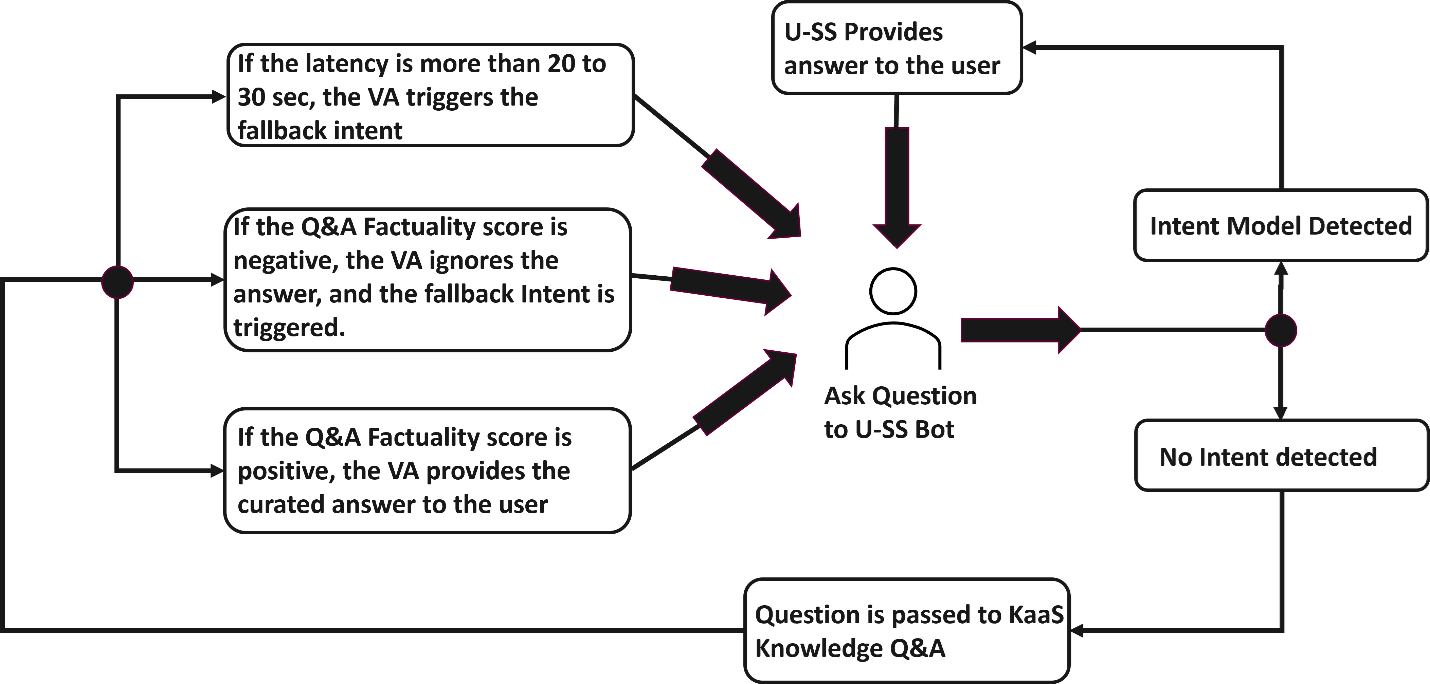
In run time, when an Intent is not identified the U-Self Serve dialog manager invokes KaaS along with the user input to generate an answer based on information contained in one or more uploaded documents.
The U-Self-Serve Dialog manager reviews the "Factuality" score and if found to less than zero, the KaaS response is ignored and the U-Self Serve Fallback flow response is generated.
Note
Factuality score is a measure of how accurate or true the information provided by the system. It assesses whether the responses or knowledge generated are based on verified facts, accurate data, or reliable sources.
The channel of the session as voice or chat is taken into consideration when generating response. For example, voice responses are shorter and will not have numbered or bulleted lists.