API Release Notes
Release Notes: January 15, 2025
Document Processing HITL
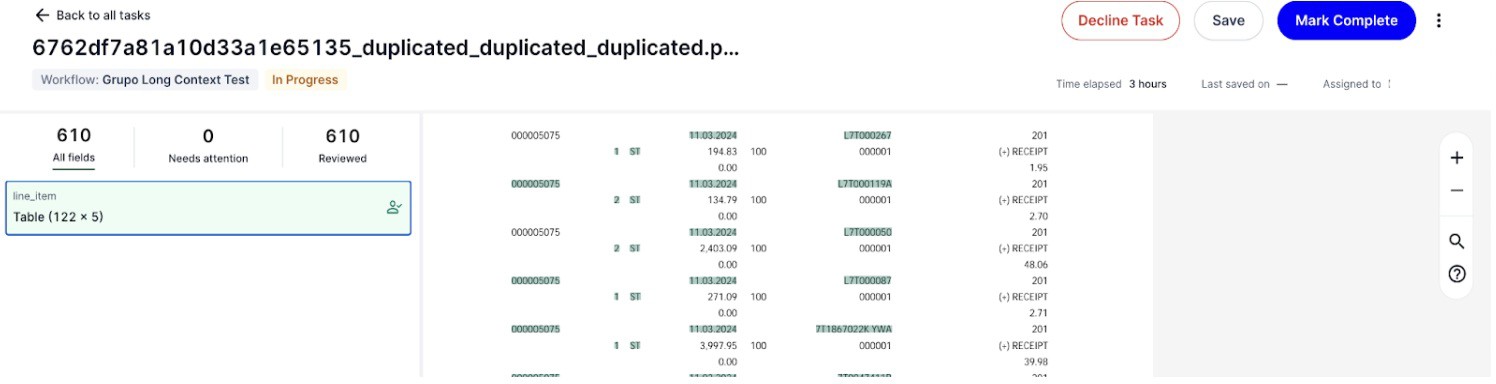
Manual Save Available for API automation tasks
For API automation, users now have the ability to save the tasks within the review and come back to see the task in the same state as earlier. Also once the task is saved , its status changes to “Review in progress”.
 |
In the UI, we have renamed "Normalized Value" to "Final Value" for both simple and table entities and renamed "Value" to "Raw Value" for simple entities
Disabled editing of the "Raw Value" field directly.
 The raw value is expected to match the direct text in the document to facilitate our ML continuous learning abilities. If you prefer to put a customized value (e.g. inferred value), put it in the "Final Value" field.
 Increased the maximum allowed text to 2 lines within table cells. If text still overflows, mouse over to see the full text as tooltips.
  Set optimal initial zoom level for documents to enhance user experience for small documents
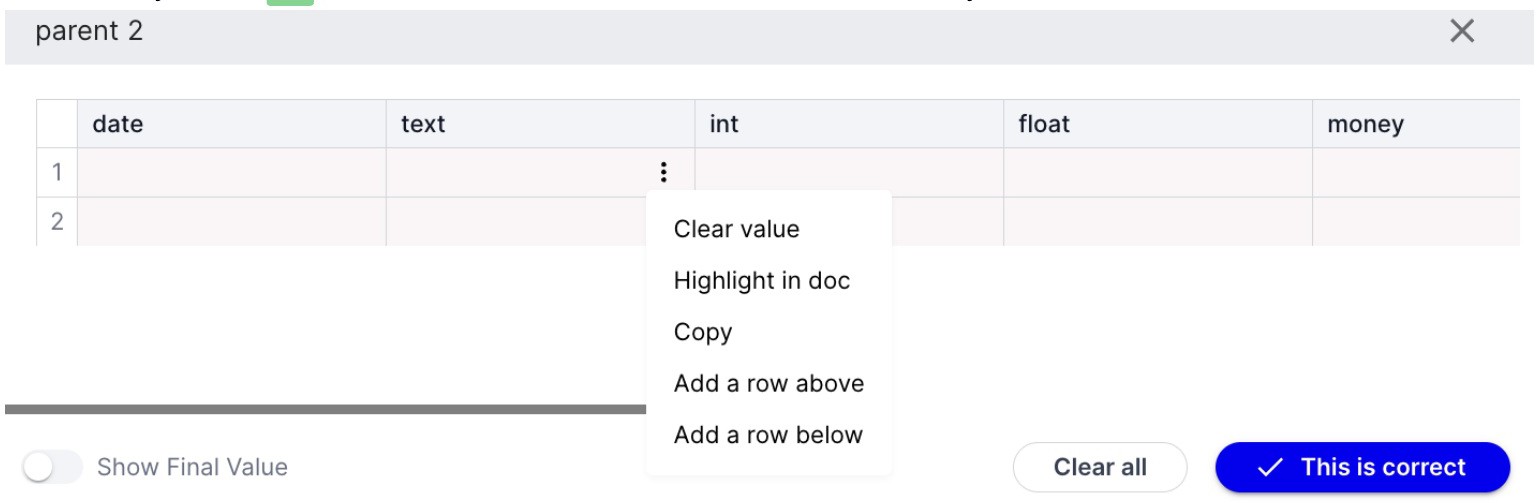
Added ability to add rows above and below on individual table cells for easy access
 |
Incremental Authentication
SAML users can also integrate with Google and Microsoft OAuth if their organization policy allows.
In the beginning a user can do incremental authentication (for Google or Microsoft) with any email, however, once that is done he needs to use the same user email to perform additional authentication.
Gmail and Outlook workflows now display the correct token owner's email in the UI.
To enhance user experience, a loader has been added during incremental authentication. After successful authentication, the desired action is automatically triggered, ensuring a seamless experience.
Release Notes: January 3, 2025
Role-Based Access Control Updates
Organization admins can now access all tasks instead of tasks from workflows that they are workflow admins Export Tasks to CSV
Workflow admins and org admins can now export API automation tasks for their workflows. Simply by click "Export" in Tasks page with preferred filters and click on "Create Export". We will send an email to your inbox once the job is complete:
Click on the download button it will take you to our web portal and start the file download. The CSV file contains information including task name, task id, workflow name, workflow type, status, number of document pages, reviewer name, reviewer email, last modified time, task completion time, field name, parent field name, predicted value, predicted normalized value, pre annotation confidence score, final ground truth value, final normalized value, values matches, normalized value matches.
New Drop-down Actions
JSON results of completed API automation tasks can be downloaded from within each task by task reviewers, workflow admins or org admins if allowed to view tasks. Run workflow action from the workflow action drop-down for orby workflows.
By clicking "Run" against any of the listed workflows, a pop-up will appear, allowing users to upload the required document. Upon successful upload, users will be redirected to the Executions list, where they can view all executions, including the newly added one. This enhancement streamlines task creation and provides a more intuitive user experience.
Dashboard updates
Included UI automation execution and tasks stats along with API automation ones
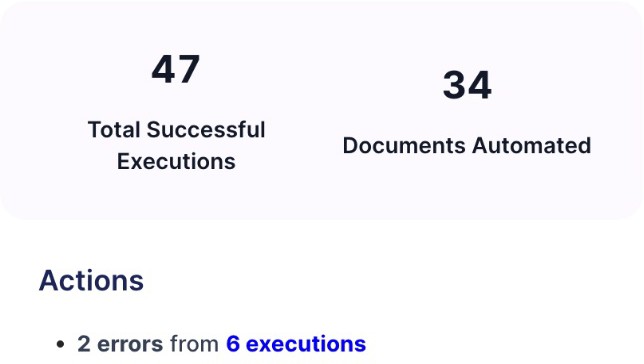 |
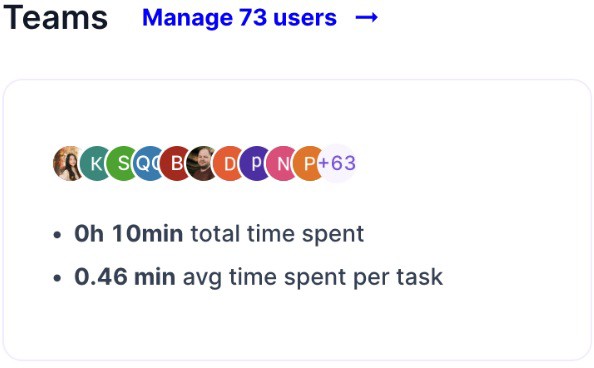
Added a new executions section Added a new teams section
 |
HITL updates
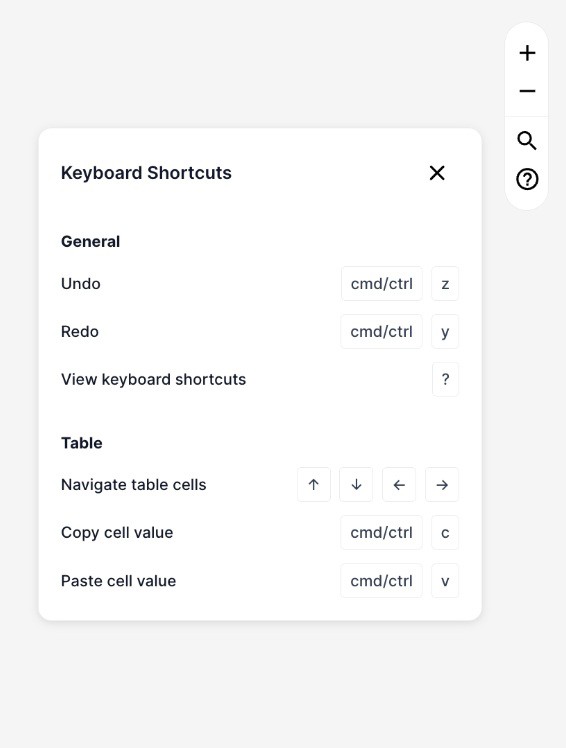 Improved document annotation experience when there are overlapped texts (i.e. watermarks) Visual update of document control toolbar and added keyboard shortcuts popover
Revamped the entity sidebar
Added new collapsed view and automatically collapses for table entities based on browser window size. Introduced a new "All Fields" tab that consolidates all entities
Redesigned the entire entity view with updated colors for highlighting, entity selection, and status-based distinctions (e.g., reviewed, not found, predicted).
Add entity page index in JSON of extraction tasks
Normalization Improvements
All entities in the JSONs of extraction tasks have normalizedValue.text populated in the following methods:
Text type: remove leading and trailing whitespaces, and replace continuous whitespaces with a single whitespace Money type: ISO 4217 text format if normalization succeeds, otherwise same with Text type
Date type: ISO 8601 text format if normalization succeeds, otherwise same with Text type
 Number_Float and Number_Int: convert to text and process as the Text type
December 4, 2024 Release Notes
 Brand reffresh: A new look and logo updated across our platform!
Creatte Executtiion APII s ttattus iimprovementt
Return 207 status when executions fail for a portion of the input files Return 400 status when all executions fail
Return 200 status when all executions succeed
New Templlattes :: Added two new workflow templates "Classification Template" and "Extraction Template" that do not require user configurations on input and output.
 You can use the CreateExecutions() API or "add task" UI to provide the input, and the DownloadExecutionResult() API to download the output. Exttrac ttiion Workffllow schema s iize lliim iitt iincrease:: Increased the simple entities limit from 48 to 85 for extraction workflows, nested entities limit is still 32.
Nov 20, 2024 Release notes
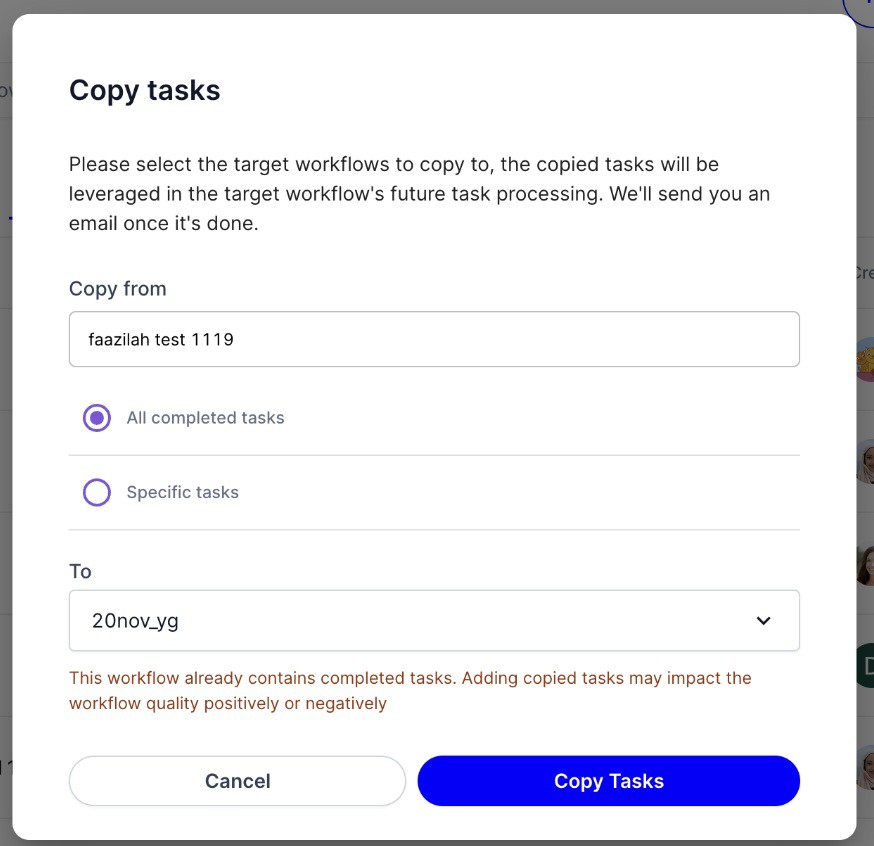 Task copy is now available for destination workflows that already have completed tasks
User filters can now be searched by name in addition to email
Nov 8, 2024 Release notes
Major updates
Single tenant support available to store PII data in separate databases Updated pagination component across pages
Added the “Creator“ filter for API automation worklows Declined tasks will result their executions in “Cancelled” status
SAML configuration now supports multiple domains under the same identity provider. For multiple domains under different identity providers, please create under different organizations
A new security feature (available upon request) to automatically log out users after 30 minutes of inactivity, with the exception when there are unsaved HITL changes. If the webpage is still open, a confirmation popover will appear two minutes before the logout. If no webpage is open and 30 minutes have passed since the last activity, the user will be logged out automatically
 API updates: Source execution ID and following up execution IDs are part of API response and execution result
Oct 25, 2024 Release notes
Major updates
Dashboard improvements: We’ve made updates to offer a more visual and intuitive dashboard experience. The new updates include:  The total number of successful executions over the last 7 days, presented in a bar chart for easy performance tracking.
Additionally, we've enhanced the accuracy section with gauges displaying real-time metrics for all extraction and classification worklows  Access to the field-level accuracy, a new page where admins can look into accuracy for all fields across worklows
Top accurate workflows by accuracy
The task summary section has enabled a link to view all pending tasks
Improved accuracy of "Total hours saved" by factoring in periods of user inactivity while reviewing a task.
Task accuracy is now calculated only for tasks that have undergone human review, either through human approval or modification after completion (including cases where a human edits an auto-completed task). If none of the tasks in a worklow have been reviewed by a human, the worklow's accuracy will not be displayed.
API Automation Worklows:
A new "Accuracy" column has been added to display the prediction accuracy for each worklow.
The "Accuracy" number is clickable: Users will be redirected to a new page that lists the fields and accuracy for this particular worklow
Teams Page
A new "Completed Tasks" column has been added to display the number of completed tasks by each user
Completed Tasks count can be filtered based on newly added time filter which only affects completed task count
New Fields Page: Introducing a new Fields page to list and filter worklow fields along with field-level accuracy, across worklows
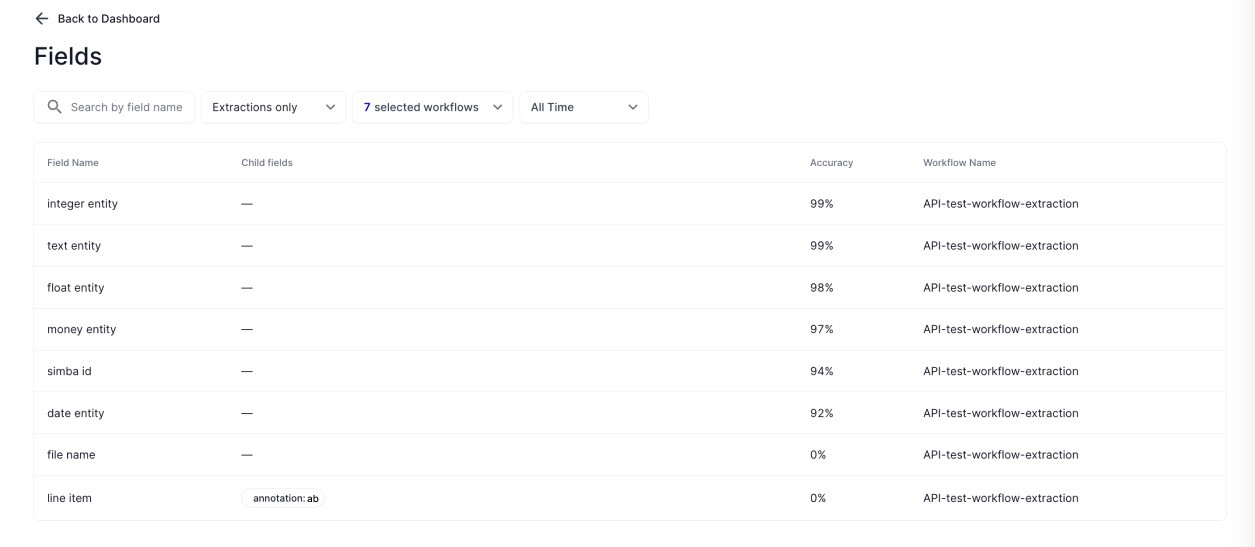 |
The fields page could be accessed either through the dashboard or by clicking on the accuracy column from API Automation worklows We can filter worklow fields based on the following
 Name
Name
 Type (Extraction or Classification) Worklows
Time frame
 Gracefully handled session termination:
Every 24 hours, the user needs to refresh their session by re-logging in due to compliance requirements
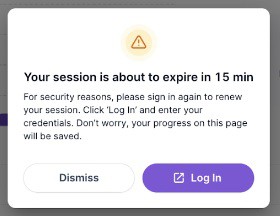
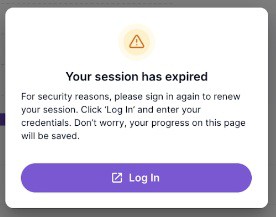
15 minutes before a session expires the user will be prompted to refresh their session by re-logging in a new window without losing their progress.
15 minutes or less before the session expires, a warning modal will show up: | After the session expires, users will be asked to log in again without losing their progress | ||
|---|---|---|---|
|
|
The following Public External APIs are launched for API automations: CreateExecutions(), GetExecution(), ListExecutions(), DownloadExecutionResult() For details, please refer to the API page
 Added support for longer extraction outputs to capture longer entity text or number of entities Made improvements to confidence scores for nested entities
Oct 8, 2024 Release notes
Major updates
The quota banner: To make more accurate predictions, workflows have a max number of pending tasks at the beginning, so that our model can learn from rounds of data for learning purposes. For each workflow, a user can have a max quota of 50 tasks to review. Learn more about quota here.
Tasks
A notification banner will show up and display the number of executions blocked if initial learning is needed, or when quota has been reached “Review tasks” will filter out the list of tasks users should prioritize to review, so that the rest of the tasks can be unblocked
Workflows
 Blocked workflows will have a status indicator "Needs Attention".
 “Review tasks” will filter out the list of tasks users should prioritize to review
Executions
Blocked executions will show up as "Needs Attention"
“Review tasks” will filter out the list of tasks users should prioritize to review
Announcement: Users may see announcements such as latest release notes after signing in Task Review / Annotation editor
Improvement on table annotation
Shift + Click for selecting table cells consecutively
Users can now select a range of cells in a column by selecting a cell, holding the Shift key, and clicking another cell. All the cells between the two selected cells will be highlighted.
Declined Tasks: Included Description along with Problem Type in Declined reason column
Executions
Users can now easily switch between tabs directly via the URL by modifying the tab parameter. This allows users to choose and work on specific tabs without navigating through the UI, enhancing flexibility and convenience.
 Back-end updates
Orby could skip empty nested entities in the JSON output for specific organizations upon request Orby could disable JSON encryption for specific SFTP workflows or organizations upon request
Sep 25, 2024 Release notes
Majjor updates
Enhanced confidence score in Extraction Worklows
Error details in Execution page: when available, detailed error reasons are provided as a tooltip on the Execution page for API Automations.
Sep 18, 2024 Release notes
Majjor updates
Role-based Access control: additional roles are introduced at the organizational level and the workflow level
Organiizattiion llevell access conttroll
Organiizattiion Adm iin : this role replaced the old Adm iin role. It has all permissions except reviewing tasks.
Reviewing tasks require an additional Workffllow Adm iin role
Creattor : Creators can create and share workflows, and grant access to other users to the workflows they created. They can not access workflows created by others unless explicitly invited.
Assigning the creator role when adding users
Once invited to a workflow, Creattors have all the permissions of a Workffllow Adm iin
User:: A user can be given explicit permission at the workflow or task level, and can hold multiple roles across different workflows.
Same as the old User role, this role has no organization level permissions
Users can be granted with workflow-level roles such as Workffllow Adm iin and Reviiewer
Workffllow llevell access conttroll
Workffllow Adm iin : users can be invited to a workflow to become a workflow admin, and have access to view, edit, delete workflows as well as inviting other workflow admins and reviewers; workflow admin can also add, view, delete, review and assign tasks
Add workflow admin during workflow creation
Reviiewer : Reviewers will be invited to review tasks of specific workflows
For tasks added using the “Add Task” button, file sizes of up to 100MB are supported
Annotation editor Human-in-the-loop improvements:
The table popover is now more compact and space couscous
Removed the "Dellette" button for individual rows and replaced it with an action drop-down that has the "Dellette" option in the menu
Removed the "Add Row " button and introduced "IInsertt Above " and "IInsertt Bellow " options in the menu that appears when you press the menu button for a particular row. Now rows can be added anywhere in the table.
`Show Normalliized Vallue` is now a toggle and moved to the bottom of the table
When moving above the headers or to the left of the rows, an action widget will appear at the row and column level, user can drag and drop to arrange the order of the columns and rows
Performance improvements for large table annotation
The extraction and classification workflow setting that includes or excludes feedback from specific users to improve AI models is now based on the last people who modified a task (e.g. last reviewers of the task, or people who edit a completed task) instead of all people.
For users logged in via the Microsoft Single Sign-On, if there is a profile image on the Microsoft account, it will be reflected within the Orby app as well
Aug 28, 2024 Release notes
Majjor updates
For API Automations, significant interaction improvements have been made to the task review editor to improve usability and efficiency:
Simple Entities / Fields
 Updated the text of the "Add llocatiion " button to "Hiighlliight iin doc "
The "Not found " text on the button on the popover has been changed to "Cllear allll"
 When you press "Clear all," the entity popover will remain open, and all highlights and values associated with that field will be cleared
Nested Entities / Tables
‼ The "Add Locatiions " button has been removed from the table popover. For bulk annotation, once users select a column by clicking the table header, they can draw highlight for the whole column directly from the document without having to click “Add Location” first
Now users can resize table columns with ease! Simply hover your cursor between the columns and drag to adjust their width
Removed the Starting Over button from the table popover
The "Not found " text on the button on Table Popover has been changed to "Cllear allll"
When you press "Clear all," the table popover will remain open, and all highlights and values associated with each cell will be cleared. If a field is not found, leave the field and highlight empty and confirm correct
Cell menu updates
The "Not found iin doc " option in the cell menu has been changed to "Cllear vallue"
The “Ediit Detaiills ” option in the cell menu has been removed. Instead we have added a new option “Hiighlliight iin doc ” which allows adding additional highlights for that cell Added support for directly modifying cell values:
Double-click on a cell to start editing
Added new menu option “Ediit Vallue” for cell to support editing
When the cell is highlighted, start typing to override the existing value Press the Enter key to activate the cell and start editing the cell text
When the text editor for a cell is active, press the Enter key to move to the next cell in the same column
Aug 16, 2024 Release notes
Majjor updates
Early access to Integration Platform: We are excited to announce that selected users will now have the opportunity to experience our new integration platform firsthand. This platform combines document processing and UI automation into a unified solution.
The key features include:
 Admin capabilities: Admins can create and manage workflows for both document automation and UI automation within a single platform.
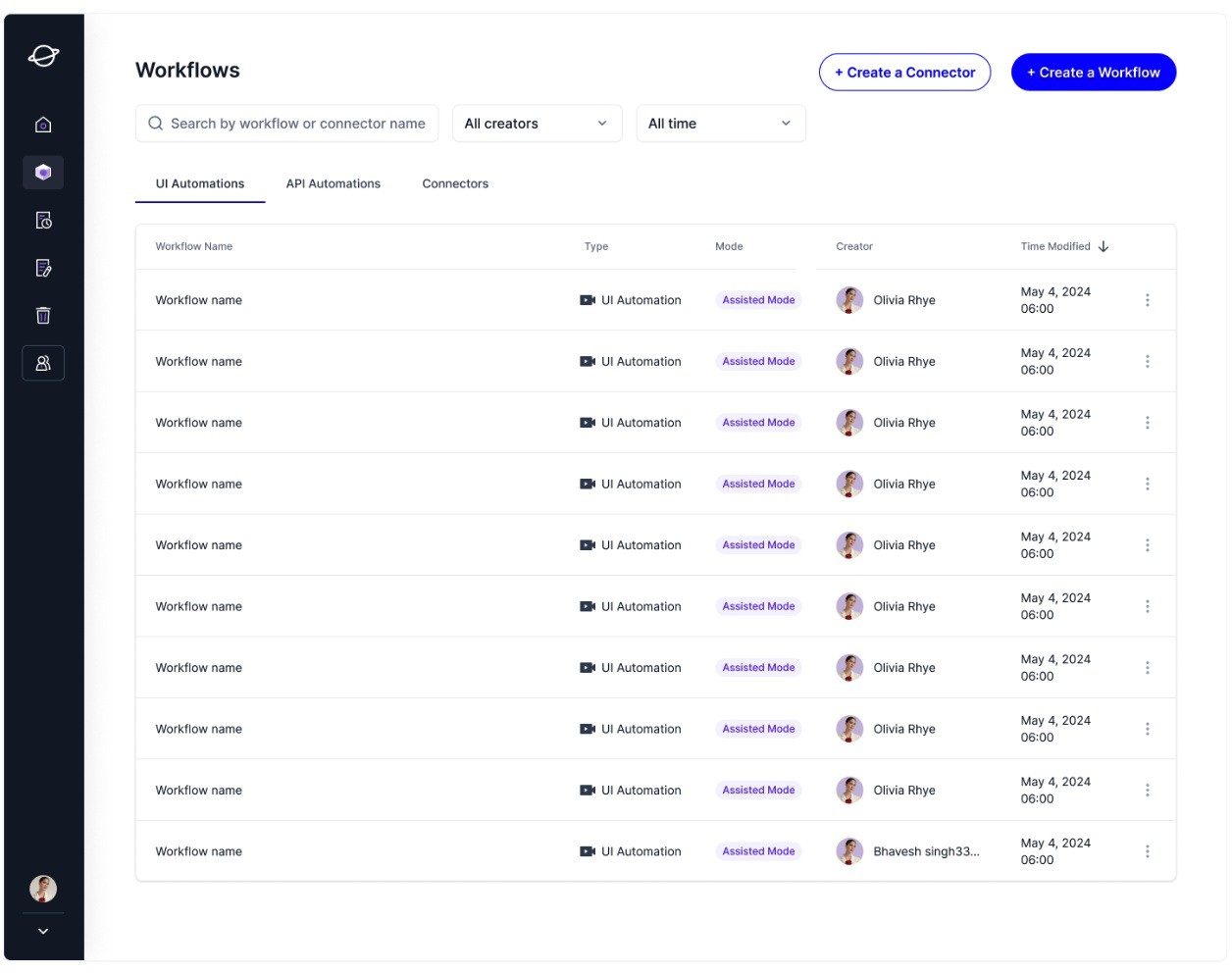 User capabilities: Users can review tasks and executions related to document automation, as well as monitor executions for UI automation. A modern & slick user experience and navigation
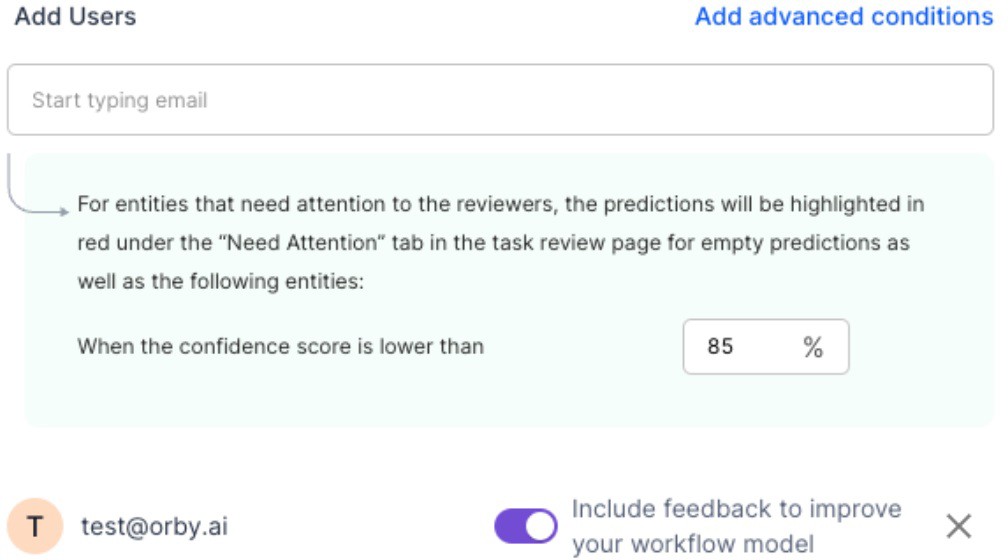
 When adding users to a workflow, admins can now choose to include or exclude feedback from specific users to improve AI models for workflow
 |
Increased schema size limit: 48 simple entities and 32 nested entities
Image file types are supported to trigger the workflows: JPEG, JPG, PNG, TIF, TIFF, BMP, WEBP, GIF in addition to PDF For nested entities (tables), users can now navigate and take additional actions via the keyboard keys:
Undo: ctrl/cmd + Z Redo: ctrl/cmd + Y Copy: ctrl/cmd + C Paste: ctrl/cmd + V
Delete key: clear content in cell
→ ↑ ↓ ← : Use the arrow keys to move between table cells
Aug 2, 2024 Release notes
Major updates
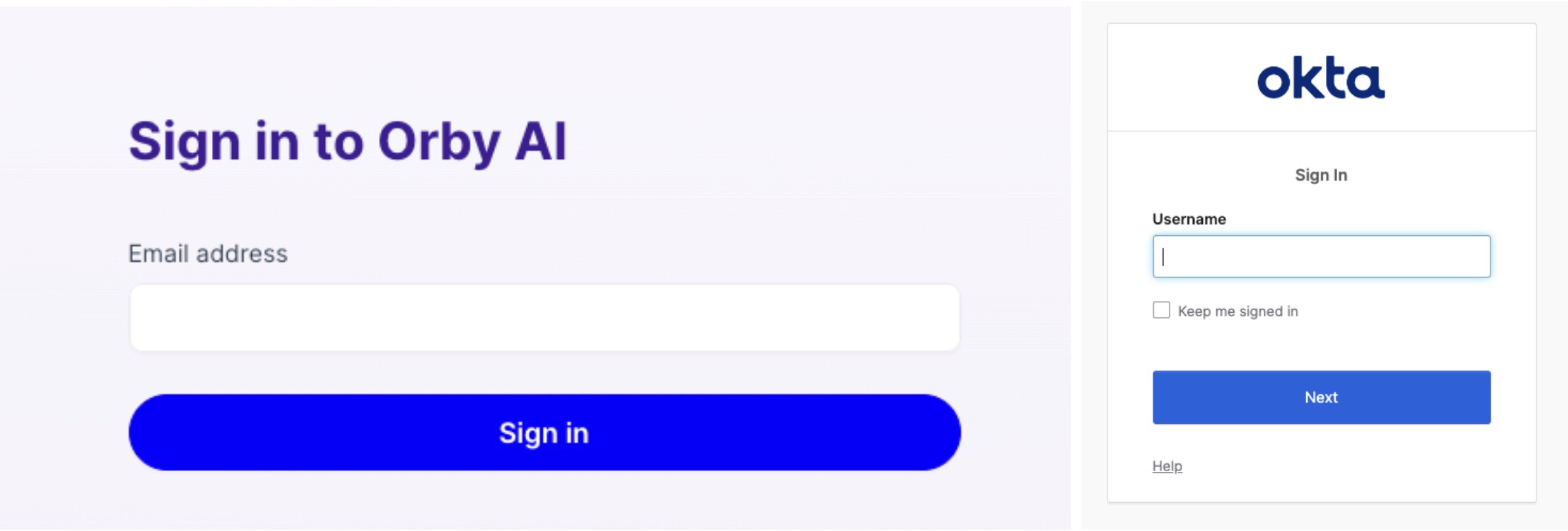
SAML Single Sign-on is now available for admins. Admins can enable OKTA in Settings for the organization to sign in through OKTA SSO in a more secure way.
 |
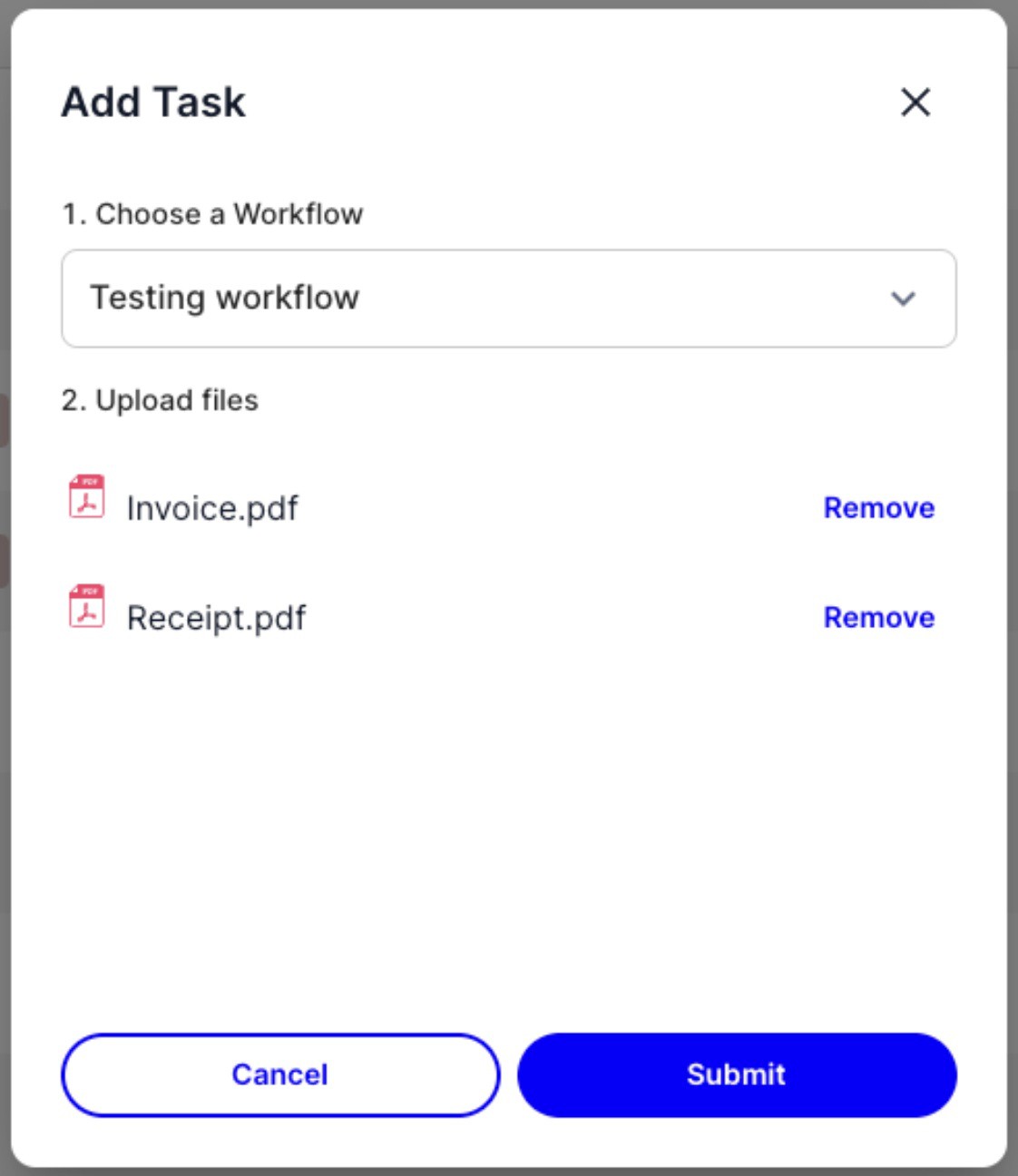
Add Task: users can add multiple files when adding a task
 |
 Admins can retry system-declined tasks. This could be helpful when there are temporary issues in our system. In the annotation editor, the number next to Table (Nested entity) relects the number of rows in this table
Machine-learning improvements for all customer worklows
Jul 11, 2024 Release notes
Majjor updates
Completed tasks are now editable by admins and the last reviewer  Refreshed UX for “Add Task” and a more intuitive user experience Human-in-the-loop
 Users can now click and drag to select locations for all entity types
When bulk-annotating a nested entity children (or columns), now users can select more table rows from the document, Orby will confirm with the user before adding the additional rows to the table popover
Internal code improvements on confidence scores and calibrations
Jun 20, 2024 Release Notes
Summary Major updates
New login page with Microsoft single sign on
New Microsoft Outlook to Excel Extraction Template
Extract entities from Microsoft Outlook to Excel workbook
Processed email messages will be labeled (a.k.a categorized) as "Orby: {workflow name}".
Affected Excel worksheet will contain workflow name, nested entity type name, and task URLs.
Note: Microsoft token expires in 90 days so please log into the Orby web portal at least once every quarter.
New Human-In-The-Loop experience for Nested Entity (Tables)
On the left panel, all nested entities of the same type are consolidated into 1 table entity The left panel is now collapsible
The table popover is responsive and can be resized and dragged to the side Annotate a cell or a column by adding location
Add or delete a row
Arranging order of rows or columns Hide/Show columns
Edit normalized values in bulk or for individual cells
Mark as not found for the whole table or for individual cells Starting over by reverting back to the initial predicted state Mark the whole table as correct
Teams page
Support user email and name search (prefix search) on teams page
Display user profile image and full name when available on the teams page
Tasks
Allow assigned tasks to be unassigned by admins and related users
Other updates
Workflows
 Increase schema size limit to 32 simple entities and 16 nested entities
 Json output entity order improvements: from top to bottom and left to right
  Notes entities are displayed after other entities.
Empty entities are displayed after entities without locations
 For empty entities or entities without locations, they are ordered by schema order in the workflow configuration. Entities are sorted based on their predicted position in the document from top to bottom, and left to right.
For nested entities:
Nested entity children in a group are sorted left to right.
The first sorted child entity will be used to indicate its group's location when comparing with other entities or nested entity groups.
 Gmail processed email label:
Processed emails will be labeled as "Orby: {workflow name}", same as the new Outlook workflows
Tasks
Support batch task deletion
Decryption failure files: will generate a system-declined task with the reason "Decryption failed"
When user uploads files of the wrong format to SFTP, A system-declined task will be created "Add a task" now generate JSON outputs for related workflow
Annotation editor
Warn users when there is unsaved changes
"All predictions" tab in the annotation editor to view predictions across statuses Search: supports text search for 2-letter string now
Date and money normalization now handles more formats and variations Dashboard
Dashboard filter settings can be preserved in the URL
Apr 30, 2024 Release Notes
Summary
 New task processing order that minimizes customers from blocking each other New Orby created subfolder - “OrbyAI_Scheduled”:
Whenever a user drops a file for SFTP or GDrive workflows, it will move to the new “OrbyAI_Scheduled” folder inside the workflow folder, which means Orby gets the file and will process it.
New workflow task assignment option for unassigned tasks
 Admin can choose to leave tasks unassigned during the workflow creation, and select who can view the task instead. Admin can view all unassigned tasks and assign to anyone in the organization
Users can view unassigned tasks they are added to, and assign to themselves  Pending tasks
Admins and users can now filter pending tasks based on reviewers.
Human-in-the-loop improvements:
Entity floating window now has a more intuitive user experience Bounding Box Enhancement
 When an entity is selected: on hovering over the document text, the word recognition outline shows up For workflows that has GSheet as an output
The same sheet can be used for all workflows within an organization
 For simple entities, the name of the tab will be: "simple (workflow-name)", e.g. "simple (testing workflow)"
For nested entities, the name of the tab will be: "<nested entity name>_nested (workflow name)", e.g. "lineitem_nested (testing workflow)" Extraction entity order in the Human-in-the-loop UI
All entities are now ordered from top to bottom and then left to right. Nested entities' positions are determined by its first child. Children within a nested entity are also ordered this way.
Normalization
 Text normalization no longer convert text to lower case
 Money normalization and connectors now handle the following currencies even when they do not have associated numerical values (e.g. "USD" or "$" in value field will trigger the USD currency drop-down in the normalization field)
 All 3-letter currency codes in ISO 4217
Currency symbols and variations for USD, INR, BRL, EUR, CAD, AUD, and GBP Date normalization is now case insensitive
Deleted items restoration
 Enabled restoration for deleted workflows, connectors and tasks within 30 days of the deletion. After 30 days, deleted items will be permanently deleted.
Schema name restrictions
Schema name only allows lowercase letters, numbers, underscores "_", dashes "-", and single space “ “ (multiple spaces will be replaced with single space). “*” is allowed in the beginning for Notes entities (a.k.a annotation entities)
Page urls
 Workflow and connector editing pages' urls now include their unique ids. Task listing pages' urls now include the filter settings
JSON Output enhancements:
Added task url information in the JSON files.
Internal Improvements: Various backend enhancements for better performance and bug fixes.
Apr 1, 2024 Release Notes
ML release: Improvement to REM in error case where parsed numeric values taken from irrelevant string values
Mar 12, 2024 Release Notes
Summary
New Dashboard UI now includes metrics such as: Task completion
Time saved
Accuracy of Orby
Total tasks and status breakdown: Created
Pending
Completed Declined
Error
Admins have access to all organizational data and can filter the dashboard by workflow type, user, and select custom dates  Users can only view data relevant to them
Soft delete for tasks and connectors:
Admins can now delete pending, completed, and declined tasks, as well as connectors individually
Deleted tasks and connectors will be stored in the "deleted items" tab briefly for potential restoration
Restoration feature for deleted resources will be added in the next release, along with soft delete for workflows This feature allows admins to remove tasks that may have impacted model training consistency
Task reassignment based on schema:
Admins can configure tasks and assign to specific users based on their expertise in particular workflow entities Note: Only new tasks will be affected by these configurations; pending tasks remain unchanged
Enhanced JSON output with Workflow name information
Feb 8, 2024 Release Notes
Summary
Task reassignment
Connector option for assigning task to the same users Nested entity smart annotation
For entity extraction workflows: Support new nested entity format in CSV-based schema definition and updated the sample CSV Email notifications to new organization users
Jan 19, 2024 Release Notes
Summary
Launch new nested entity format and UIs in workflow configurations and connector pages Trigger text normalization for extraction entity types under the "Other" category
Normalized value removes extra whitespaces and are all lowercase Allow task name prefix search in task listing pages
Support multi-line text search in task review page when the candidates are continuous in OCR List classification workflow doc type values in connector UI to facilitate connector configuration. A few improvements to address SFTP decryption error
Dec 8, 2023 Release Notes
Summary
Updated restrictions
Increase pending & creating total task limit per workflow user from 5 to 10. Restrict workflow and connector names to 100 characters
Limit classification workflow schema size to 8, including the default class "OrbyAI_Unknown" Document text search improvement
Add keyboard shortcut: ⌘ + f for Mac and Ctrl + F for Windows and Linux
Add result toggle
Enable text search for classification tasks
Task review page "Need attention" entity filter: allow admins to configure entity's need attention confidence score threshold in the "Add user" step of DEFAULT mode workflow Empty predictions will always be listed as "Need attention"
Task listing pages' workflow filter improvement
Add workflow filters to all task listing pages
Retain applied workflows filters through url parameters Workflow filter search is now case insensitive
UI improvements
Update task reviewer info if a task is accepted or declined by an admin
Use a different tag color for copied task in task list pages to differentiate them more clearly with original and modified tasks SFTP file names: Use "_OrbySuffix_" when appending suffixes to original file names
Motivation: to provide clear boundary between original file name and Orby-added suffixes
For example "aaa.pdf.pgp" will be renamed to "aaa.pdf.gpg_OrbySuffix_656f08550060c49f9047864c"
Fixes
OCR errors when pdf pages are of different sizes Extra spaces in predicted entity values
Fix some situations where the predicted text is overwritten by OCR content unexpectedly
Nov 13, 2023 Release Notes
New Features
Launched a new Global Rate Limit:
It allows customers to upload hundreds of documents as a batch to the SFTP workflow folder. Orby will process them gradually until the "5 pending tasks per workflow user" quota is reached or all the documents have been processed
Throughput: a conservative rate limit has been set to prioritize service reliability over high throughput
Based on our testing on a new SFTP classification workflow with 175 mixed length of documents, 15 workflow users and 3 completed tasks, it took 20 minutes to generate the max 75 pending tasks when there is no other workflow processing other tasks
User recommendations
Make the workflows quality and quota ready for large volume of inputs
Quality ready: at least 1 example for each classification document type and each extraction entity type through copied tasks and/or completed tasks, the more the better Quota ready: at least 1 completed task for each classification workflow and 3 completed tasks for each extraction workflow
Gradually increase the batch size
Assuming there are 50 workflow users for the entry classification workflow, there would be at most 250 pending tasks for this workflow. Suggest to set the initial batch size to ~150. If all files are processed successfully, increase the next batch to 250, and more later on.
Launched a native text search box on the task review page
 Access it through the search icon on the top right corner of the page
To be supported in the next release: keyboard shortcut, search result toggle 6% extraction accuracy improvement on average across main contract datasets
More validations for uploaded workflow config YAML files
The background color of reviewed entities and tab on the task review page changes from blue to green  Renamed all workflow templates to new name patterns.
Nov 3, 2023 Release Notes
New Features
Launched a new Task Copy feature
Admins can use this feature to copy completed tasks from one workflow to another workflow that doesn't have any completed task Launched a new SFTP Workflow Config Download and Upload feature
Admins can download configs from one organization, make modifications, and use the modified config to create/update workflows in the same organization or a different organization.
Added a workflow filter in the Pending Tasks page Feature Changes
PDF with 100+ pages will lead to a System Declined task with the error "Oversized file". Blocks extraction workflow creations or updates with >= 32 entity types
Bug Fiixes
Fixed an error which blocked the creation of workflow connectors that have duplicate names with connectors in other organizations. Connector names only need to be unique with an organization.
UI Changes
Reviewing empty predictions in extraction tasks will now trigger an entity review popup window too. Text segments with empty mention texts will be removed now.
Add warning texts in the entity review popup window when:
entity mention text does not match the OCR detected text (e.g. due to manual edits) or when there is a text segment with empty mention text.
When adding a new text segment to an multi-segment entity through the + icon, the new text segment won't fully overlap with the previously focused text segment anymore. Added help messages for normalization types in the workflow configuration UI
Changed the background color or "Reviewed" entity from blue to green.